
పరిచయం
This manual provides detailed instructions for the installation, operation, and maintenance of your AKASO Mirror Dash Cam 2K. Please read this manual thoroughly before using the device to ensure proper function and safety. This device is designed to record driving footage and assist with parking.
ప్యాకేజీ విషయాలు
ప్యాకేజీలో అన్ని అంశాలు ఉన్నాయని నిర్ధారించుకోండి:
- AKASO Mirror Dash Cam 2K (Main Unit)
- Rear Camera with Extension Cable
- కార్ ఛార్జర్
- GPS మాడ్యూల్
- Mounting Straps/Bands
- 32GB మైక్రో SD కార్డ్
- వినియోగదారు మాన్యువల్
- Cable Clips (optional, for cable management)
ఉత్పత్తి ముగిసిందిview
The AKASO Mirror Dash Cam 2K is a comprehensive vehicle recording system designed to enhance driving safety and provide evidence in case of incidents. It features a 12-inch touchscreen display, dual cameras for front and rear recording, advanced night vision, and parking assistance.

చిత్రం: The AKASO Mirror Dash Cam 2K main unit, showcasing its 12-inch display and key features such as Sony sensor, 2K UHD resolution, wide field of view, IPS touchscreen, GPS module, parking monitor, and night vision capabilities.
- ప్రదర్శన: 12-inch IPS Touchscreen for intuitive control and clear viewing.
- ముందు కెమెరా: Records in 1080P with a 170° wide-angle lens.
- వెనుక కెమెరా: Records in 1080P with a 170° wide-angle lens, providing a total 340° viewing కోణం.
- రాత్రి దృష్టి: Equipped with an advanced Sony IMX307 sensor and F1.8 6-glass fixed-focus lens for enhanced low-light performance.
- పార్కింగ్ మానిటర్: Automatically records and saves video if an impact is detected while parked.
- G-సెన్సార్: Detects sudden movements or collisions and locks the current video footagఇ ఓవర్ రైటింగ్ నిరోధించడానికి.
- లూప్ రికార్డింగ్: Continuously records, overwriting the oldest unlocked fileమెమరీ కార్డ్ నిండినప్పుడు s.
- GPS మాడ్యూల్: Records driving route, speed, and location data (requires connection).
- నిల్వ: Supports Micro SD cards up to 128GB (32GB card included).
సెటప్ మరియు ఇన్స్టాలేషన్
Follow these steps to properly install your dash cam system.
1. మైక్రో SD కార్డ్ని చొప్పించండి
Before powering on, insert the provided 32GB Micro SD card (or another compatible card up to 128GB, Class 10 or higher) into the designated slot on the main unit. Ensure the card is inserted correctly until it clicks into place.
2. Mount the Main Unit
మీ వాహనం యొక్క వెనుక భాగానికి మిర్రర్ డాష్ కామ్ను అటాచ్ చేయండి.view mirror using the provided rubber mounting straps. Securely fasten the straps to prevent movement during driving.

చిత్రం: A close-up of the main dash cam unit, highlighting the adjustable front camera lens. The lens can be moved horizontally and rotated to achieve the optimal recording angle.
3. వెనుక కెమెరాను ఇన్స్టాల్ చేయండి
The rear camera can be installed either inside the rear window or externally near the license plate. For external installation, ensure it is mounted securely and the cable is routed safely into the vehicle, avoiding water ingress. Connect the rear camera cable to the main unit.
- Choose a suitable location for the rear camera (e.g., above the license plate or inside the rear window).
- Secure the camera using screws or adhesive tape.
- Route the rear camera cable to the front of the vehicle, concealing it along the headliner and A-pillars.
- ప్రధాన డాష్ కామ్ యూనిట్లోని నియమించబడిన పోర్ట్కు వెనుక కెమెరా కేబుల్ను కనెక్ట్ చేయండి.
- (Optional) If using the reverse assist function, connect the red wire from the rear camera cable to your vehicle's reverse light positive wire.
4. శక్తిని కనెక్ట్ చేయండి
Plug the car charger into your vehicle's cigarette lighter socket and connect the other end to the main unit's power input. Route the power cable neatly to avoid obstructing your view or driving controls.
5. Connect GPS Module (Optional)
If included, connect the GPS module to its dedicated port on the main unit. Mount the GPS module on the dashboard or windshield where it has a clear view సరైన సిగ్నల్ రిసెప్షన్ కోసం ఆకాశం యొక్క ఎత్తు.
ఆపరేటింగ్ సూచనలు
పవర్ ఆన్/ఆఫ్
- The dash cam will automatically power on and begin recording when your vehicle's ignition is turned on (if connected to a switched power source).
- To manually power on/off, press and hold the power button on the side of the unit.
ప్రాథమిక రికార్డింగ్
Once powered on, the dash cam will automatically start loop recording. Video fileలు విభాగాలలో (ఉదా. 1, 3, లేదా 5 నిమిషాలు) మైక్రో SD కార్డ్లో సేవ్ చేయబడతాయి. కార్డ్ నిండినప్పుడు, పాతది అన్లాక్ చేయబడుతుంది. fileలు భర్తీ చేయబడతాయి.

చిత్రం: A graphic representation of loop recording, showing how the dash cam continuously records video in segments, overwriting the oldest files when the storage card is full, ensuring uninterrupted recording.
టచ్స్క్రీన్ ఆపరేషన్
The 12-inch IPS touchscreen allows for easy navigation and control:
- ఎడమ/కుడి స్వైప్ చేయండి: ముందు కెమెరా మధ్య మారండి view, వెనుక కెమెరా view, or split-screen display.
- పైకి/క్రిందికి స్వైప్ చేయండి (కెమెరాలో view): నిలువును సర్దుబాటు చేయండి viewing angle of the selected camera.
- చిహ్నాలను నొక్కండి: Access settings, playback, lock video, or take a photo.
G-సెన్సార్ (అత్యవసర రికార్డింగ్)
The built-in G-Sensor detects sudden impacts or collisions. When triggered, it automatically locks the current video file, preventing it from being overwritten by loop recording. These files are stored in a separate "Event" folder on the SD card.

చిత్రం: An illustration showing a car accident with a prominent padlock icon, indicating the G-Sensor's function to automatically lock and protect video footage ప్రభావం సమయంలో.
పార్కింగ్ మానిటర్
When enabled, the Parking Monitor function uses the G-Sensor to detect impacts while your vehicle is parked. If an impact is detected, the dash cam will automatically power on and record a short video, then power off. This requires a continuous power supply (e.g., hardwire kit, sold separately).
Reverse Assist / Parking Guidelines
When the vehicle is put into reverse (and the rear camera's red wire is connected to the reverse light), the display will automatically switch to the rear camera view with parking guidelines. These guidelines assist in safe parking.
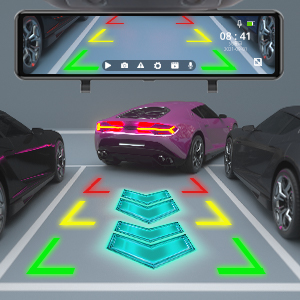
చిత్రం: The dash cam screen displaying the rear camera view with dynamic parking guidelines, assisting the driver in safely maneuvering into a parking space.
GPS కార్యాచరణ
With the GPS module connected, the dash cam will record your vehicle's speed, location, and driving route. This data can be viewed using a dedicated GPS player software on a computer (software typically available for download from the manufacturer's webసైట్).
ప్లేబ్యాక్
Access recorded videos directly on the dash cam's screen by tapping the playback icon. You can browse through front and rear camera footage. Alternatively, remove the Micro SD card and view fileకంప్యూటర్లో లు.
నిర్వహణ
- Cleaning Lenses and Screen: Use a soft, lint-free cloth to gently wipe the camera lenses and the display screen. Avoid abrasive materials or chemical cleaners.
- మైక్రో SD కార్డ్ నిర్వహణ:
- Format the Micro SD card regularly (e.g., once a month) within the dash cam's settings to ensure optimal performance and prevent data corruption.
- Replace the Micro SD card if it shows signs of wear, errors, or reduced performance.
- ఫర్మ్వేర్ నవీకరణలు: Check the AKASO official website periodically for firmware updates. Follow the provided instructions carefully to update the device.
ట్రబుల్షూటింగ్
మీ డాష్ క్యామ్తో మీకు సమస్యలు ఎదురైతే, ఈ క్రింది సాధారణ సమస్యలు మరియు పరిష్కారాలను చూడండి:
- డాష్ కామ్ పవర్ ఆన్ అవ్వదు.
- Ensure the car charger is securely plugged into both the dash cam and the vehicle's cigarette lighter socket.
- Check if the vehicle's cigarette lighter socket is receiving power.
- Try a different car charger or USB cable if available.
- Dash cam stops recording or shows "Card Error".
- Format the Micro SD card within the dash cam's settings.
- Ensure the Micro SD card is Class 10 or higher and supports up to 128GB.
- Replace the Micro SD card if the issue persists, as it may be faulty.
- పేలవమైన వీడియో నాణ్యత లేదా అస్పష్టమైన చిత్రాలు.
- Clean the front and rear camera lenses with a soft cloth.
- Ensure the protective film (if any) has been removed from the lenses.
- Adjust the camera angle to avoid glare from the windshield or dashboard reflections.
- For night vision, ensure the windshield is clean.
- Rear camera not displaying or showing "No Signal".
- Check the connection of the rear camera cable to the main unit.
- వెనుక కెమెరా కేబుల్ దెబ్బతినకుండా చూసుకోండి.
- Verify the rear camera itself is properly installed and connected.
- GPS signal is weak or not acquired.
- Ensure the GPS module is connected and mounted in a location with a clear view of the sky (e.g., dashboard, top of windshield).
- Avoid placing the GPS module under metallic objects or tinted areas that might block the signal.
- Mirror unit shakes or vibrates.
- Ensure the mounting straps are securely tightened around your vehicle's original rearview అద్దం.
- Adjust the position to ensure a snug fit.
స్పెసిఫికేషన్లు
| ఫీచర్ | వివరాలు |
|---|---|
| ఉత్పత్తి కొలతలు | 10.04 x 2.76 x 1.5 అంగుళాలు |
| వస్తువు బరువు | 2.33 పౌండ్లు |
| అంశం మోడల్ సంఖ్య | 13 |
| బ్యాటరీలు | 1 లిథియం అయాన్ బ్యాటరీ (చేర్చబడింది) |
| బ్రాండ్ | AKASO |
| మోడల్ పేరు | AKASO Mirror Dash Cam 2K |
| వాహన సేవా రకం | కారు |
| కనెక్టివిటీ టెక్నాలజీ | USB |
| ప్రత్యేక ఫీచర్ | G-సెన్సార్ |
| వీడియో క్యాప్చర్ రిజల్యూషన్ | 1080p (Front & Rear) |
| మౌంటు రకం | వెనుకview మిర్రర్ మౌంట్ |
| రంగు | నలుపు |
| రంగంలో View | 170 డిగ్రీలు (ముందు & వెనుక) |
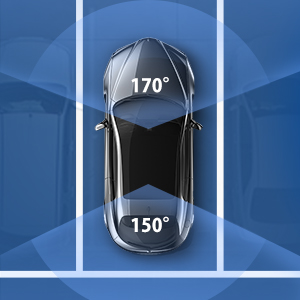
చిత్రం: An overhead diagram of a car illustrating the wide field of view provided by the dash cam system, covering 170 degrees at the front and 150 degrees at the rear for comprehensive coverage.

చిత్రం: A visual representation of the dash cam's ability to operate in various environmental conditions, depicted by a split image showing a snowy landscape with a snowflake and a desert scene with a sun icon.
వారంటీ మరియు మద్దతు
AKASO products come with a standard warranty. For specific warranty terms, technical support, or customer service inquiries, please refer to the warranty card included in your package or visit the official AKASO website. You can also contact AKASO customer support directly for assistance.
Official AKASO Webసైట్: AKASO Store on Amazon
ముఖ్యమైన భద్రతా సమాచారం
- Do not operate the dash cam or access its settings while driving.
- డ్రైవర్ కారుకు అంతరాయం కలిగించని ప్రదేశంలో డాష్ క్యామ్ ఇన్స్టాల్ చేయబడిందని నిర్ధారించుకోండి. view లేదా వాహన భద్రతా లక్షణాలతో జోక్యం చేసుకోవచ్చు.
- Use only the original car charger provided or a certified replacement.
- పరికరాన్ని తీవ్రమైన ఉష్ణోగ్రతలు, ఎక్కువసేపు ప్రత్యక్ష సూర్యకాంతి లేదా తేమకు గురిచేయవద్దు.
- పరికరాన్ని పిల్లలకు దూరంగా ఉంచండి.