1. ఉత్పత్తి ముగిసిందిview
This manual provides comprehensive instructions for the installation, operation, and maintenance of the Samsung SHP-DS705 Digital Door Lock. Please read this manual carefully before using the product to ensure proper function and safety.
ముఖ్య లక్షణాలు:
- స్వయంచాలక మేల్కొలుపు: Equipped with an IR sensor, the lock automatically activates when it detects a user's presence.
- Adjustable Sound Settings: Customize the lock's sound volume to suit your environment, ideal for quiet hours or ensuring entry alerts.
- మెరుగైన భద్రత: Features like randomizer PIN code entry and RF key tag support provide robust protection against unauthorized access. The randomizer PIN helps prevent fingerprint trace analysis.

Figure 1: Samsung SHP-DS705 Digital Door Lock (Main Unit and Keypad)
2. భద్రతా సమాచారం
- Do not attempt to disassemble, repair, or modify the lock yourself. This may void the warranty and cause damage.
- Keep the product away from water and direct sunlight.
- Use only specified batteries. Incorrect battery types may cause malfunction or leakage.
- Avoid exposing the lock to strong impacts or vibrations.
- Ensure the door is properly aligned and closes smoothly before installation to prevent damage to the lock mechanism.
3. ప్యాకేజీ విషయాలు
Please check that all components are present in the package:
- Outdoor Unit (Keypad)
- Indoor Unit (Main Body)
- మోర్టైజ్ లాక్
- స్ట్రైక్ ప్లేట్
- RF కీ Tags (Quantity may vary)
- మౌంటు స్క్రూలు మరియు హార్డ్వేర్
- AA Batteries (Quantity may vary)
- వినియోగదారు మాన్యువల్ (ఈ పత్రం)
4. సంస్థాపన మరియు సెటప్
Professional installation is recommended for optimal performance and security. Ensure the door thickness and backset are compatible with the lock specifications.
సాధారణ ఇన్స్టాలేషన్ దశలు:
- తలుపును సిద్ధం చేయండి: Ensure the door is drilled according to the provided template.
- మోర్టైజ్ లాక్ని ఇన్స్టాల్ చేయండి: Insert the mortise lock into the door edge and secure it with screws.
- Install Outdoor Unit: Mount the outdoor keypad unit, feeding the cable through the door.
- Install Indoor Unit: Connect the cable from the outdoor unit to the indoor unit. Mount the indoor unit and secure it with screws.
- బ్యాటరీలను వ్యవస్థాపించండి: Insert the specified AA batteries into the battery compartment of the indoor unit.
- పరీక్ష కార్యాచరణ: Verify that the lock operates smoothly from both inside and outside.
Initial Setup (PIN Code Registration):
- ఇండోర్ యూనిట్లోని బ్యాటరీ కవర్ను తెరవండి.
- Press the [Registration] button.
- On the outdoor keypad, enter your desired 4-12 digit PIN code, then press the [*] button.
- Press the [Registration] button again to complete.
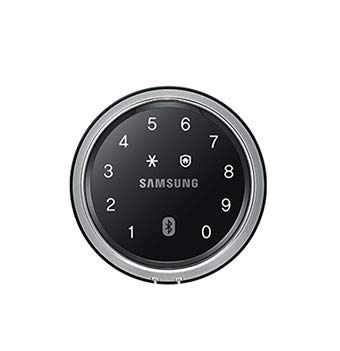
Figure 2: Samsung SHP-DS705 Digital Door Lock Keypad
5. ఆపరేషన్
Unlocking with PIN Code:
- దీన్ని యాక్టివేట్ చేయడానికి కీప్యాడ్ను తాకండి.
- మీ రిజిస్టర్డ్ పిన్ కోడ్ను నమోదు చేయండి.
- Press the [*] button. The door will unlock.
Unlocking with RF Key Tag:
- Place the registered RF key tag on the card reader area of the outdoor unit.
- తలుపు అన్లాక్ అవుతుంది.
తలుపు లాక్ చేయడం:
- ఆటోమేటిక్ లాకింగ్: The lock will automatically engage approximately 3 seconds after the door is closed.
- Manual Locking (Outside): Touch the keypad or press the [*] button after closing the door.
- Manual Locking (Inside): Press the [CLOSE] button on the indoor unit.
ధ్వని సర్దుబాటు:
To adjust the volume of the lock's sounds (e.g., key press, unlock/lock sounds), locate the volume control button or switch on the indoor unit and select your desired level.
Privacy Mode (Indoor Forced Lock):
Activate privacy mode from the indoor unit to prevent unlocking from the outside using PIN codes or key tags. This feature is typically engaged by pressing and holding a specific button on the indoor unit.
6. నిర్వహణ
- బ్యాటరీ భర్తీ: Replace all batteries when the low battery indicator appears. Use new, high-quality AA alkaline batteries. Do not mix old and new batteries.
- శుభ్రపరచడం: Wipe the lock's surface with a soft, dry cloth. Do not use abrasive cleaners, solvents, or water directly on the lock.
- సాధారణ తనిఖీలు: Periodically check that all screws are tight and the lock mechanism operates smoothly.
7. ట్రబుల్షూటింగ్
| సమస్య | సాధ్యమైన కారణం | పరిష్కారం |
|---|---|---|
| లాక్ స్పందించదు. | డెడ్ బ్యాటరీలు. | అన్ని బ్యాటరీలను క్రొత్త వాటితో భర్తీ చేయండి. |
| Cannot unlock with PIN code. | Incorrect PIN entered; Privacy mode activated. | Re-enter correct PIN; Deactivate privacy mode from inside. |
| తలుపు స్వయంచాలకంగా లాక్ చేయబడదు. | Auto-lock function disabled; Door not fully closed. | Check auto-lock settings; Ensure door is properly closed and aligned. |
| Keypad is not lighting up. | బ్యాటరీలు తక్కువగా ఉన్నాయి లేదా చనిపోయినవి. | బ్యాటరీలను భర్తీ చేయండి. |
8. స్పెసిఫికేషన్లు
| ఫీచర్ | వివరాలు |
|---|---|
| బ్రాండ్ | Generic (Compatible with Samsung SHP-DS705) |
| మోడల్ | SHP-DS705 |
| లాక్ రకం | Digital Keyless Lock |
| ప్రత్యేక ఫీచర్ | Easy to install, IR Sensor for auto-wake |
| సిఫార్సు ఉపయోగం | Security for residential or office doors |
| శైలి | ఆధునిక |
| రంగు | నలుపు |
| కంట్రోలర్ రకం | టచ్ కంట్రోల్ |
| నియంత్రణ పద్ధతి | టచ్ |
| వస్తువు బరువు | 454 g (approx. 1 Pound) |
| ప్యాకేజీ కొలతలు | 25 x 20 x 9 సెం.మీ |
| తయారీదారు | JAL |
9. వారంటీ మరియు మద్దతు
For warranty information and technical support, please refer to the documentation provided at the time of purchase or contact your retailer. Keep your purchase receipt as proof of purchase.


