
1. పరిచయం
This manual provides essential information for the safe and efficient operation of your Intex SH4004 40-inch HD Ready LED Smart TV. Please read these instructions carefully before using the product and retain them for future reference. Your Intex SH4004 TV features a 40-inch HD Ready LED display, smart TV capabilities with Android OS, built-in Wi-Fi, and multiple connectivity options.
2. భద్రతా సమాచారం
అగ్ని ప్రమాదం, విద్యుత్ షాక్ మరియు గాయం ప్రమాదాన్ని తగ్గించడానికి ఈ టెలివిజన్ను ఉపయోగిస్తున్నప్పుడు ఎల్లప్పుడూ ప్రాథమిక భద్రతా జాగ్రత్తలను అనుసరించండి.
- శక్తి మూలం: పేర్కొన్న వాల్యూమ్ లోపల టీవీ విద్యుత్ సరఫరాకు కనెక్ట్ చేయబడిందని నిర్ధారించుకోండి.tage పరిధి. పవర్ అవుట్లెట్లను ఓవర్లోడ్ చేయవద్దు.
- వెంటిలేషన్: వెంటిలేషన్ ఓపెనింగ్లను బ్లాక్ చేయవద్దు. వేడెక్కకుండా నిరోధించడానికి సరైన గాలి ప్రవాహం కోసం టీవీ చుట్టూ తగినంత స్థలాన్ని అనుమతించండి.
- నీరు మరియు తేమ: టీవీని వర్షం లేదా తేమకు గురిచేయవద్దు. టీవీపై కుండీల వంటి ద్రవాలతో నిండిన వస్తువులను ఉంచవద్దు.
- శుభ్రపరచడం: శుభ్రపరిచే ముందు టీవీని పవర్ అవుట్లెట్ నుండి అన్ప్లగ్ చేయండి. మృదువైన, పొడి వస్త్రాన్ని ఉపయోగించండి. లిక్విడ్ క్లీనర్లను లేదా ఏరోసోల్ క్లీనర్లను ఉపయోగించవద్దు.
- ప్లేస్మెంట్: టీవీని స్థిరమైన, సమతల ఉపరితలంపై ఉంచండి. ప్రత్యక్ష సూర్యకాంతిలో లేదా ఉష్ణ వనరుల దగ్గర ఉంచకుండా ఉండండి.
- సర్వీసింగ్: ఈ ఉత్పత్తిని మీరే సేవ చేయడానికి ప్రయత్నించవద్దు. అర్హత కలిగిన సేవా సిబ్బందికి అన్ని సర్వీసులను చూడండి.
3. ప్యాకేజీ విషయాలు
ప్యాకేజీలో అన్ని అంశాలు ఉన్నాయని నిర్ధారించుకోండి:
- Intex SH4004 40-inch HD Ready LED Smart TV
- రిమోట్ కంట్రోల్
- టీవీ స్టాండ్ (2 ముక్కలు)
- టీవీ స్టాండ్ కోసం స్క్రూలు
- పవర్ కేబుల్
- వినియోగదారు మాన్యువల్
4. ఉత్పత్తి ముగిసిందిview
4.1 ఫ్రంట్ View
The front of the Intex SH4004 TV features the 40-inch LED display and the Intex brand logo at the bottom center.

మూర్తి 4.1: ముందు view of the Intex SH4004 Smart TV.
4.2 వెనుక View మరియు కనెక్టివిటీ పోర్ట్లు
The rear panel houses various input and output ports for connecting external devices.

చిత్రం 4.2: వెనుక view of the Intex SH4004 Smart TV, highlighting port locations.
అందుబాటులో ఉన్న పోర్ట్లు:
- HDMI పోర్ట్లు (x2): For connecting set-top boxes, Blu-ray players, gaming consoles, and other HDMI-enabled devices.
- USB పోర్ట్ (x1): For connecting USB hard drives, flash drives, and other USB devices for media playback.
- యాంటెన్నా ఇన్పుట్: For connecting an aerial for terrestrial TV channels.
- ఆడియో/వీడియో ఇన్పుట్లు: For connecting older devices using composite cables.
- ఈథర్నెట్ పోర్ట్: వైర్డు ఇంటర్నెట్ కనెక్షన్ కోసం.
4.3 కొలతలు
The physical dimensions of the TV are important for placement and installation.
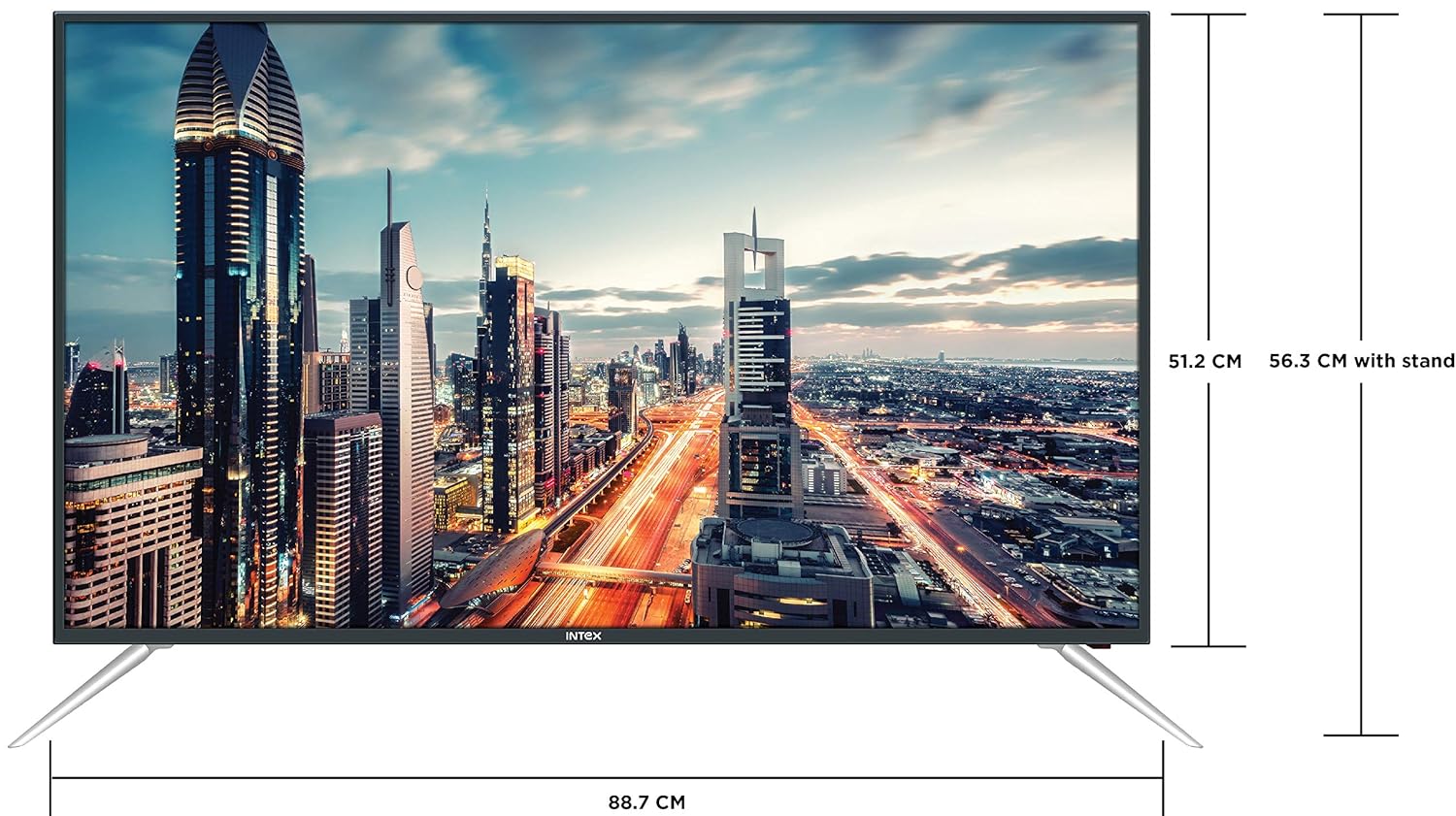
Figure 4.3: Intex SH4004 Smart TV dimensions.
- స్క్రీన్ పరిమాణం: 40 అంగుళాలు (98 సెం.మీ.)
- వెడల్పు: సుమారు 88.7 సెం.మీ
- ఎత్తు (స్టాండ్ లేకుండా): సుమారు 51.2 సెం.మీ
- ఎత్తు (స్టాండ్తో): సుమారు 56.3 సెం.మీ
- ప్యాకేజీ కొలతలు: 102 x 60.5 x 16 సెం.మీ
- వస్తువు బరువు: 10.8 కిలోలు
5. సెటప్
5.1 టీవీ స్టాండ్ అటాచ్ చేయడం
- స్క్రీన్ దెబ్బతినకుండా ఉండటానికి టీవీని ముఖం కిందకి మృదువైన, శుభ్రమైన ఉపరితలంపై జాగ్రత్తగా ఉంచండి.
- Align the stand pieces with the corresponding slots at the bottom of the TV.
- అందించిన స్క్రూలను ఉపయోగించి స్టాండ్ ముక్కలను భద్రపరచండి. అవి గట్టిగా బిగించబడ్డాయని నిర్ధారించుకోండి.
5.2 వాల్ మౌంటు
If you prefer to wall mount your TV, please contact Intex support for professional installation. Refer to the Warranty and Support section for contact details. Ensure you use a compatible VESA wall mount kit (not included) and follow its instructions carefully.
5.3 కనెక్ట్ పవర్
Connect the power cable to the TV's power input and then plug the other end into a wall outlet.
5.4 బాహ్య పరికరాలను కనెక్ట్ చేయడం
- HDMI: Use an HDMI cable to connect devices like set-top boxes, gaming consoles, or Blu-ray players to the HDMI ports on the TV's rear panel.
- USB: Insert USB flash drives or external hard drives into the USB port for media playback.
- యాంటెన్నా: Connect your antenna cable to the ANTENNA IN port for receiving broadcast channels.
5.5 ప్రారంభ సెటప్ విజార్డ్
మొదటిసారి పవర్-ఆన్ చేసినప్పుడు, టీవీ మీకు ప్రారంభ సెటప్ ప్రక్రియ ద్వారా మార్గనిర్దేశం చేస్తుంది:
- భాష ఎంపిక: మీకు ఇష్టమైన భాషను ఎంచుకోండి.
- నెట్వర్క్ సెటప్: Connect to your Wi-Fi network or use a wired Ethernet connection. Enter your Wi-Fi password if prompted.
- ఛానల్ స్కాన్: అందుబాటులో ఉన్న ప్రసార ఛానెల్ల కోసం టీవీ స్కాన్ చేస్తుంది.
- సమయ క్షేత్రం: మీ స్థానిక సమయ మండలిని సెట్ చేయండి.
6. ఆపరేటింగ్ సూచనలు
6.1 రిమోట్ కంట్రోల్ విధులు
The remote control allows you to navigate the TV's features. Common buttons include Power, Volume Up/Down, Channel Up/Down, Input Source, Menu, Navigation (Up/Down/Left/Right), OK, Back, Home, and Smart TV app shortcuts.
6.2 ప్రాథమిక టీవీ విధులు
- పవర్ ఆన్/ఆఫ్: రిమోట్ లేదా టీవీలో పవర్ బటన్ను నొక్కండి.
- వాల్యూమ్ సర్దుబాటు: వాల్యూమ్ అప్/డౌన్ బటన్లను ఉపయోగించండి.
- ఛానెల్ ఎంపిక: Use the Channel Up/Down buttons or enter channel numbers directly.
- ఇన్పుట్ మూలం: Press the Input/Source button to switch between HDMI, USB, AV, and TV inputs.
6.3 స్మార్ట్ టీవీ ఫీచర్లు (ఆండ్రాయిడ్ OS)
Your Intex SH4004 runs on Android OS, providing access to various smart features:
- Wi-Fi కనెక్టివిటీ: ఇంటర్నెట్ యాక్సెస్ కోసం మీ హోమ్ నెట్వర్క్కి కనెక్ట్ అవ్వండి.
- యాప్ స్టోర్: Download and install applications. Supported internet services include Sony, TV Store, YouTube, and Zee5.
- మీడియా ప్లేబ్యాక్: వీడియోలు, సంగీతం ప్లే చేయండి మరియు view కనెక్ట్ చేయబడిన USB పరికరాల నుండి ఫోటోలు.
- Motion Sensor Gaming: The TV supports motion sensor gaming. An in-built tennis game is included for entertainment.
- స్మార్ట్ పవర్ సేవింగ్: Features designed to optimize energy consumption.
- Eye Safe-T Matrix: Display technology aimed at reducing eye strain.
7. నిర్వహణ
7.1 టీవీని శుభ్రపరచడం
- శుభ్రం చేసే ముందు టీవీని ఎల్లప్పుడూ అన్ప్లగ్ చేయండి.
- స్క్రీన్ మరియు క్యాబినెట్ను సున్నితంగా తుడవడానికి మృదువైన, పొడి, మెత్తటి బట్టను ఉపయోగించండి.
- తెరపై మొండి గుర్తుల కోసం, తేలికగా dampen the cloth with water or a specialized screen cleaner (ensure it's suitable for LED screens) and wipe gently. Do not spray liquid directly onto the screen.
- రాపిడి క్లీనర్లు, మైనపులు లేదా ద్రావణాలను ఉపయోగించడం మానుకోండి.
7.2 సాధారణ సంరక్షణ
- టీవీని ప్రత్యక్ష సూర్యకాంతి మరియు వేడి వనరుల నుండి దూరంగా ఉంచండి.
- టీవీ చుట్టూ సరైన వెంటిలేషన్ ఉండేలా చూసుకోండి.
- టీవీని ఎక్కువ కాలం ఉపయోగించకపోతే, దానిని పవర్ అవుట్లెట్ నుండి అన్ప్లగ్ చేయండి.
8. ట్రబుల్షూటింగ్
Before contacting support, try these basic troubleshooting steps for common issues.
| సమస్య | సాధ్యమైన కారణం | పరిష్కారం |
|---|---|---|
| పవర్ లేదు | Power cable disconnected; Power outlet fault. | Check power cable connection; Try a different outlet; Press power button on TV/remote. |
| చిత్రం లేదు, కానీ ధ్వని ఉంది | Incorrect input source selected; External device issue. | Press the 'Input/Source' button to select the correct input; Check external device connections. |
| శబ్దం లేదు, కానీ చిత్రం ఉంది | వాల్యూమ్ మ్యూట్ చేయబడింది లేదా చాలా తక్కువగా ఉంది; బాహ్య ఆడియో సిస్టమ్ సమస్య. | Unmute volume or increase level; Check audio cables to external sound system. |
| Wi-Fi కనెక్షన్ సమస్యలు | Incorrect password; Router too far; Router issue. | Re-enter Wi-Fi password; Move TV closer to router or use Ethernet; Restart router. |
| రిమోట్ కంట్రోల్ పనిచేయడం లేదు | బ్యాటరీలు అయిపోయాయి; రిమోట్ మరియు టీవీ మధ్య అడ్డంకి. | Replace remote batteries; Remove any obstructions; Point remote directly at TV sensor. |
9. స్పెసిఫికేషన్లు
Detailed technical specifications for the Intex SH4004 Smart TV.
| ఫీచర్ | స్పెసిఫికేషన్ |
|---|---|
| బ్రాండ్ | ఇంటెక్స్ |
| మోడల్ పేరు | SH4004 |
| ప్రదర్శన సాంకేతికత | LED |
| స్క్రీన్ పరిమాణం | 40 అంగుళాలు (98 సెం.మీ.) |
| రిజల్యూషన్ | HD సిద్ధంగా (1366 x 768 పిక్సెల్లు) |
| రిఫ్రెష్ రేట్ | 60 Hz |
| Viewing యాంగిల్ | 178 డిగ్రీలు |
| కారక నిష్పత్తి | 16:9 |
| ఆపరేటింగ్ సిస్టమ్ | ఆండ్రాయిడ్ |
| ప్రాసెసర్ | 1.2GHz Quad core Mali 450 |
| RAM | 512MB |
| అంతర్గత మెమరీ | 4GB |
| కనెక్టివిటీ | 2 HDMI ports, 1 USB port, Built-In-Wifi, Ethernet |
| సౌండ్ అవుట్పుట్ | 20 Watts (2 speakers, Stereo) |
| మద్దతు ఉన్న ఇంటర్నెట్ సేవలు | Sony, TV Store, Youtube, Zee5 |
| మౌంటు రకం | వాల్ మౌంట్ / టేబుల్ టాప్ |
| వస్తువు బరువు | 10.8 కిలోలు |
10. వారంటీ మరియు మద్దతు
వారంటీ సమాచారం:
- The product comes with a 1-year manufacturer warranty from the date of purchase.
- An additional 2 years of extended warranty is provided by Intex.
Installation and Support:
For requesting installation, wall mounting, or a product demonstration after delivery, please contact Intex support directly.
Intex Support Contact:
- ఫోన్: 0120-4895555
When contacting support, please provide the product's model name (SH4004) and seller's details as mentioned on your invoice.