
పరిచయం
This manual provides essential information for the proper use and maintenance of your Easytry123 replacement infrared remote control. This remote is designed to be compatible with specific Philips LED HDTV TV models, including 49PUS6501/12, 49PUS6551/12, 49PUS6561/12, 49PUS7101/12, 49PUS7181/12, 49PUT6801/98, and 55PUS6501/12. Please verify your TV model number to ensure compatibility.
Important Note: This is a replacement remote control and may not support all functions of your original TV remote. It is not a universal remote control.
ఉత్పత్తి ముగిసిందిview

చిత్రం 1: ముందు view of the Easytry123 replacement remote control, showing the power button, navigation pad, channel/volume controls, and numeric keypad.
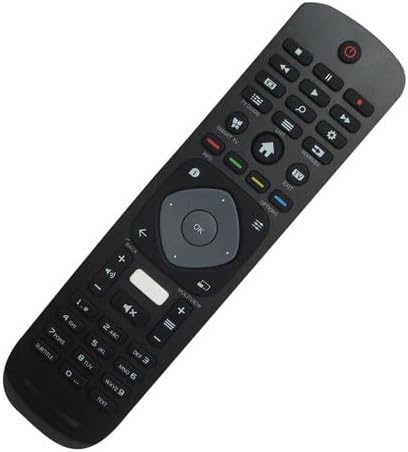
చిత్రం 2: కోణీయ ముందు భాగం view రిమోట్ కంట్రోల్, దాని ఎర్గోనామిక్ డిజైన్ మరియు బటన్ లేఅవుట్ను హైలైట్ చేస్తుంది.

చిత్రం 3: వెనుకకు view రిమోట్ కంట్రోల్ యొక్క, బ్యాటరీ కంపార్ట్మెంట్ కవర్ను చూపుతుంది.
The Easytry123 replacement remote control features a standard button layout for TV operation, including power, channel, volume, navigation, and numeric input. It is designed for comfortable handling and intuitive use.
సెటప్
1. బ్యాటరీ ఇన్స్టాలేషన్
- రిమోట్ కంట్రోల్ వెనుక బ్యాటరీ కంపార్ట్మెంట్ను గుర్తించండి.
- బ్యాటరీ కంపార్ట్మెంట్ కవర్ను తెరవడానికి దాన్ని క్రిందికి లేదా బయటికి జారండి.
- రెండు (2) AAA బ్యాటరీలను చొప్పించండి, పాజిటివ్ (+) మరియు నెగటివ్ (-) టెర్మినల్స్ కంపార్ట్మెంట్ లోపల ఉన్న రేఖాచిత్రాలకు సరిపోలుతున్నాయని నిర్ధారించుకోండి.
- బ్యాటరీ కంపార్ట్మెంట్ కవర్ను సురక్షితంగా మూసివేయండి.
No setup or coding is required for this remote control. Once batteries are installed, it is ready for use with compatible Philips TV models.
ఆపరేటింగ్ సూచనలు
This remote control operates using infrared (IR) technology. Ensure there is a clear line of sight between the remote control and the IR receiver on your television for optimal performance.
- పవర్ బటన్: టీవీని ఆన్ లేదా ఆఫ్ చేయడానికి నొక్కండి.
- సంఖ్యా కీప్యాడ్ (0-9): ఛానెల్ నంబర్లను నేరుగా నమోదు చేయడానికి ఉపయోగించండి.
- ఛానల్ పైకి/క్రిందికి: Press to change channels sequentially.
- వాల్యూమ్ అప్/డౌన్: Press to adjust the sound volume.
- మ్యూట్ బటన్: Press to mute or unmute the TV sound.
- నావిగేషన్ ప్యాడ్ (బాణం బటన్లు & సరే): Use to navigate menus and confirm selections.
- వెనుకకు/నిష్క్రమించు బటన్లు: Used to return to the previous screen or exit menus.
- Smart TV/Home Button: Accesses the TV's smart features or home screen.
Functionality may vary depending on your specific TV model. Some advanced features or specific buttons present on your original remote may not be replicated on this replacement unit.
నిర్వహణ
బ్యాటరీ భర్తీ
రిమోట్ కంట్రోల్ ప్రతిస్పందన మందగించినప్పుడు లేదా పనిచేయడం ఆగిపోయినప్పుడు బ్యాటరీలను మార్చండి. ఎల్లప్పుడూ రెండు బ్యాటరీలను ఒకే సమయంలో కొత్త AAA బ్యాటరీలతో భర్తీ చేయండి. పాత మరియు కొత్త బ్యాటరీలను లేదా వివిధ రకాల బ్యాటరీలను కలపవద్దు.
క్లీనింగ్
రిమోట్ కంట్రోల్ శుభ్రం చేయడానికి, మృదువైన, పొడి వస్త్రాన్ని ఉపయోగించండి. మొండి ధూళి కోసం, కొద్దిగా dampen గుడ్డను నీటితో శుభ్రం చేసుకోండి. కఠినమైన రసాయనాలు, రాపిడి క్లీనర్లు లేదా అధిక తేమను ఉపయోగించకుండా ఉండండి, ఎందుకంటే ఇవి రిమోట్ను దెబ్బతీస్తాయి.
ట్రబుల్షూటింగ్
- రిమోట్ స్పందించడం లేదు:
- బ్యాటరీలు సరైన ధ్రువణతతో సరిగ్గా చొప్పించబడ్డాయో లేదో తనిఖీ చేయండి.
- పాత బ్యాటరీలను కొత్త AAA బ్యాటరీలతో భర్తీ చేయండి.
- రిమోట్ మరియు టీవీ యొక్క IR రిసీవర్ మధ్య ఎటువంటి అడ్డంకులు లేవని నిర్ధారించుకోండి.
- రిమోట్ నేరుగా టీవీ వైపు చూపించబడిందని నిర్ధారించుకోండి.
- కొన్ని విధులు పనిచేయవు:
- As a replacement remote, it may not support all functions of the original TV remote. This is normal for some replacement units.
- మీ టీవీ మోడల్ అనుకూలంగా ఉందని జాబితా చేయబడిందని ధృవీకరించండి.
- చిన్న ఆపరేటింగ్ పరిధి:
- బ్యాటరీలను భర్తీ చేయండి.
- బలమైన కాంతి వనరులు (ప్రత్యక్ష సూర్యకాంతి వంటివి) IR సిగ్నల్తో జోక్యం చేసుకోకుండా చూసుకోండి.
స్పెసిఫికేషన్లు
| బ్రాండ్ | ఈజీట్రీ123 |
| మోడల్ సంఖ్య | ఈజీట్రీ5633 |
| అనుకూల పరికరాలు | Television (Specific Philips LED HDTV models) |
| కనెక్టివిటీ టెక్నాలజీ | ఇన్ఫ్రారెడ్ (IR) |
| కంట్రోలర్ రకం | బటన్ నియంత్రణ |
| గరిష్ట పరిధి | 10 మీటర్లు (సుమారు 33 అడుగులు) |
| బ్యాటరీలు అవసరం | 2 x AAA బ్యాటరీలు (చేర్చబడలేదు) |
| ప్రత్యేక ఫీచర్ | Replacement item; may not work with all original functions. Not a universal remote. |
వారంటీ మరియు మద్దతు
వారంటీ సమాచారం
This Easytry123 remote control comes with a 90-day warranty from the date of purchase. This warranty covers manufacturing defects under normal use. It does not cover damage caused by misuse, accidents, unauthorized modifications, or battery leakage.
కస్టమర్ మద్దతు
For any questions, issues, or warranty claims regarding your Easytry123 remote control, please contact the seller or manufacturer directly through your purchase platform. Provide your order number and a detailed description of the issue for prompt assistance.