
1. పరిచయం
Welcome to the instruction manual for your new SWIFT SW350T Trinocular Compound Lab Microscope. This powerful and versatile instrument is designed for detailed observation of specimen slides, making it ideal for clinical instruction, scientific research, and educational purposes. With its advanced features, including a Siedentopf head, wide-field eyepieces, and camera compatibility, the SW350T provides exceptional clarity and performance. Please read this manual thoroughly to ensure proper setup, operation, and maintenance of your microscope.
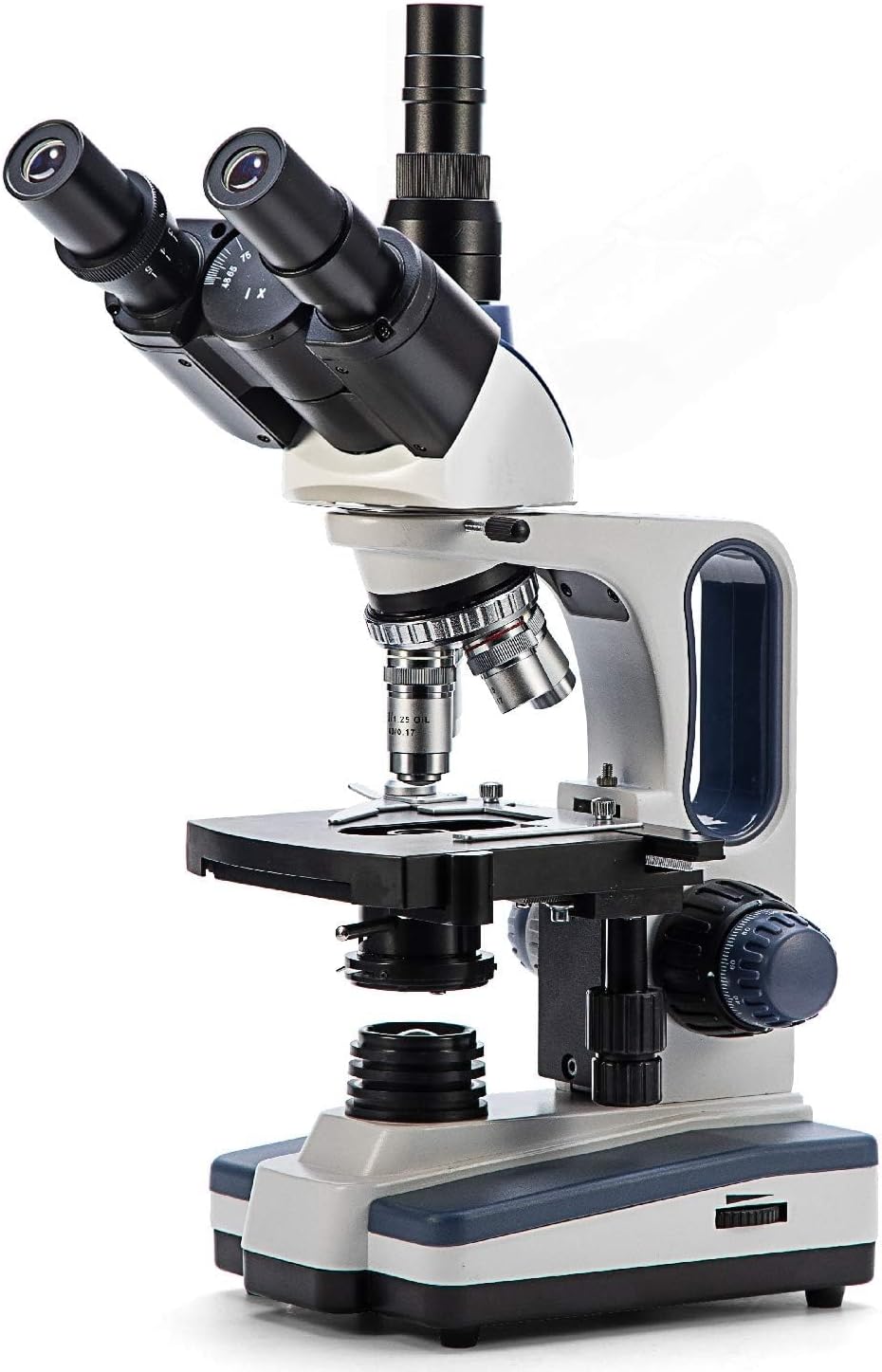
Figure 1: The SWIFT SW350T Trinocular Compound Lab Microscope, showcasing its robust design and key optical components.
2. ఉత్పత్తి ముగిసిందిview మరియు భాగాలు
Familiarize yourself with the various parts of your SWIFT SW350T microscope. Understanding each component's function is crucial for effective operation.

Figure 2: Detailed diagram illustrating the main components of the SWIFT SW350T microscope.
ముఖ్య భాగాలు:
- Siedentopf Head: Fully rotatable for shared viewing, equipped with trinocular port for camera attachments.
- కనురెప్పలు: Interchangeable wide-field 10X and 25X glass eyepieces, ergonomically tilted at 30 degrees.
- రివాల్వింగ్ నోస్పీస్: Holds 4 DIN Achromatic objective lenses (4X, 10X, 40X, 100X Oil).
- ఆబ్జెక్టివ్ లెన్స్లు: Provide magnification levels of 40X, 100X, 250X, 400X, 1000X, 2500X.
- మెకానికల్ ఎస్tage: Double-layered with a secure slide holder for precise specimen positioning.
- అబ్బే కండెన్సర్: Illuminates slide specimens from below, with adjustable brightness.
- Coarse and Fine Adjustment Knobs: For precise focusing.
- LED లైట్ సోర్స్: Brilliant and adjustable illumination.
- కెమెరా పోర్ట్: Dedicated port for connecting microscope cameras (not included).
3. సెటప్ సూచనలు
Follow these steps to set up your microscope for the first time.
- అన్ప్యాకింగ్: ప్యాకేజింగ్ నుండి అన్ని భాగాలను జాగ్రత్తగా తొలగించండి. భవిష్యత్తులో నిల్వ లేదా రవాణా కోసం అసలు ప్యాకేజింగ్ను ఉంచండి.
- ప్లేస్మెంట్: Place the microscope on a stable, level surface away from direct sunlight, excessive dust, and vibrations.
- Head Installation: Gently attach the Siedentopf head to the microscope body. Secure it with the set screw, ensuring it is firmly in place but not overtightened.
- Eyepiece Insertion: Insert the desired wide-field eyepieces (10X or 25X) into the eyepiece tubes on the Siedentopf head.
- Objective Lens Installation: Ensure the objective lenses are securely screwed into the revolving nosepiece. The 4X objective should be aligned with the light path for initial setup.
- పవర్ కనెక్షన్: Connect the power cord to the microscope's power input and then to a standard electrical outlet (110 Volts AC).

Figure 3: The SWIFT SW350T microscope along with its power cord, additional eyepieces, and other accessories, ready for setup.
4. Operating Your Microscope
4.1 Powering On and Illumination
Locate the power switch on the base of the microscope and turn it on. Adjust the brightness of the LED illumination using the dimming handwheel to achieve optimal viewing conditions for your specimen.
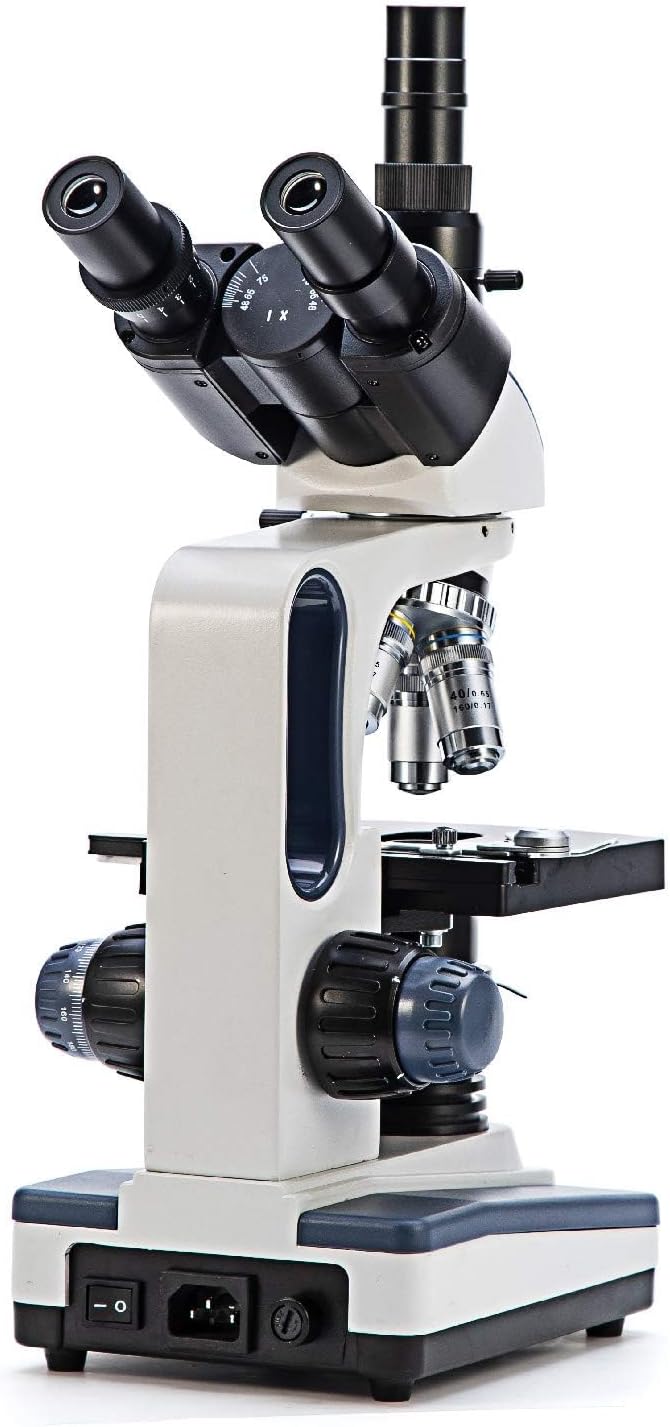
చిత్రం 4: వెనుక view of the microscope, highlighting the power input and switch for operation.
4.2 Placing a Specimen Slide
Place your prepared specimen slide onto the mechanical stage. Use the slide holder clips to secure the slide in place.

చిత్రం 5: క్లోజప్ view మెకానికల్ లుtage, showing the slide holder and X-Y translational axis controls.
4.3 మాగ్నిఫికేషన్ సర్దుబాటు
Rotate the revolving nosepiece to select the desired objective lens. Start with the lowest magnification (4X or 10X) for initial viewing and then gradually increase as needed. The total magnification is calculated by multiplying the eyepiece magnification by the objective lens magnification.
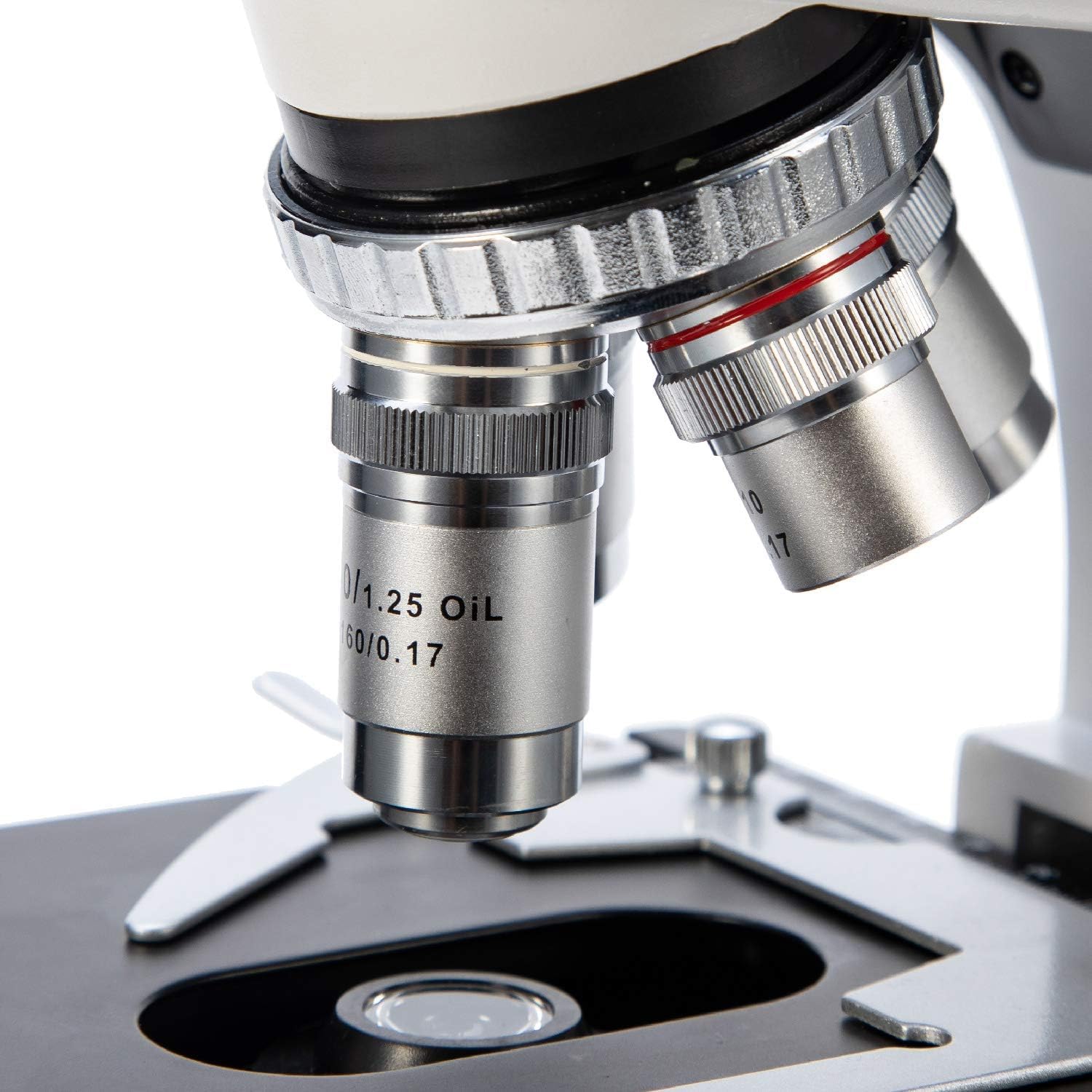
చిత్రం 6: వివరణాత్మక view of the objective lenses mounted on the revolving nosepiece.
4.4 దృష్టి కేంద్రీకరించడం
Use the coarse adjustment knob for large focus changes, typically with lower magnification objectives. Once the image is roughly in focus, use the fine adjustment knob for precise focusing, especially at higher magnifications.
4.5 Using the Abbe Condenser
The Abbe condenser, located beneath the stage, helps to concentrate and direct light through the specimen. Adjust its height and the iris diaphragm to control contrast and resolution. For optimal viewing, the condenser should be raised close to the stage for higher magnifications and lowered for lower magnifications.

Figure 7: Close-up of the Abbe condenser and the light source beneath the mechanical stage.
4.6 Using the Trinocular Port (Camera Compatibility)
The SW350T features a dedicated trinocular port for attaching microscope cameras (sold separately). This allows for digital imaging, live streaming, and recording of your observations. To use, simply insert your compatible microscope camera into the trinocular port and follow the camera's specific instructions for setup and software installation.

చిత్రం 8: క్లోజప్ view of the trinocular head, showing the dedicated camera port for digital imaging.
5. నిర్వహణ మరియు సంరక్షణ
Proper maintenance will extend the life and performance of your microscope.
- క్లీనింగ్ ఆప్టిక్స్: Use only specialized lens cleaning paper and optical cleaning solution for objective lenses and eyepieces. Gently wipe in a circular motion from the center outwards. Avoid touching optical surfaces with bare hands.
- శరీరాన్ని శుభ్రపరచడం: మైక్రోస్కోప్ బాడీని మృదువైన, d తో తుడవండి.amp వస్త్రం. కఠినమైన రసాయనాలు లేదా రాపిడి క్లీనర్లను ఉపయోగించవద్దు.
- నిల్వ: When not in use, cover the microscope with the provided dust cover to protect it from dust and debris. Store in a cool, dry place.
- నిర్వహణ: Always carry the microscope by its arm and base. Avoid sudden movements or impacts.
- Oil Immersion (100X Objective): If using the 100X oil immersion objective, ensure to clean off immersion oil immediately after use to prevent damage to the lens.
6. ట్రబుల్షూటింగ్ గైడ్
సాధారణ సమస్యలు మరియు వాటి పరిష్కారాల కోసం క్రింది పట్టికను చూడండి.
| సమస్య | సాధ్యమైన కారణం | పరిష్కారం |
|---|---|---|
| వెలుతురు లేదు | Power switch off, power cord disconnected, brightness knob set to minimum. | Turn on power switch, check power cord connection, increase brightness. |
| Image blurry or out of focus | Incorrect focus adjustment, slide upside down, objective lens not fully engaged. | Adjust coarse and fine focus, ensure slide is correctly oriented, rotate nosepiece until objective clicks into place. |
| Dark or uneven field of view | Condenser not adjusted correctly, iris diaphragm closed too much, objective lens dirty. | Adjust condenser height, open iris diaphragm, clean objective lens. |
| Dust or spots visible in image | Dust on eyepiece, objective, or slide. | Clean eyepieces, objectives, and slide using appropriate cleaning methods. |
7. సాంకేతిక లక్షణాలు
Detailed specifications for the SWIFT SW350T microscope.
| ఫీచర్ | స్పెసిఫికేషన్ |
|---|---|
| బ్రాండ్ | స్విఫ్ట్ |
| మోడల్ సంఖ్య | EF12021 |
| మాగ్నిఫికేషన్ గరిష్టం | 2500X |
| కనుబొమ్మలు | Wide-Field 10X and 25X |
| ఆబ్జెక్టివ్ లెన్సులు | 4 DIN Achromatic (4X, 10X, 40X, 100X Oil) |
| తల రకం | Siedentopf Trinocular, 30-degree inclined, 360-degree rotatable |
| Stage | Double-layered Mechanical Stage |
| కండెన్సర్ | Abbe Condenser with Iris Diaphragm |
| కాంతి మూలం రకం | LED, adjustable brightness |
| విద్యుత్ సరఫరా | 110 వోల్ట్లు (AC) |
| మెటీరియల్ | మెటల్ |
| రంగు | నలుపు, వెండి, తెలుపు |
| వస్తువు బరువు | 7.81 పౌండ్లు (3.55 కిలోగ్రాములు) |
| ప్యాకేజీ కొలతలు | 18.35 x 12.8 x 9.09 అంగుళాలు |
| అనుకూల పరికరాలు | Laptop, Personal Computer (via camera port) |
| మొదటి తేదీ అందుబాటులో ఉంది | జనవరి 29, 2019 |
| తయారీదారు | NJEDU |
8. వారంటీ మరియు మద్దతు
8.1 వారంటీ సమాచారం
Your SWIFT SW350T microscope is covered by a manufacturer's warranty. Please refer to the official SWIFT website or the included warranty card for specific terms and conditions regarding coverage and duration.
8.2 మరింత మద్దతు
For more detailed information, advanced techniques, or specific inquiries, please consult the comprehensive User Guide PDF available online: SWIFT SW350T User Guide (PDF). You may also visit the official SWIFT store on Amazon for additional resources and product information.