
1. పరిచయం
The OWON B41T+ is a high-precision 4 1/2 digit (21999 counts) True RMS digital multimeter designed for accurate electrical measurements. It features Bluetooth connectivity, allowing seamless integration with Android (4.3+) and iOS (7.0+) smartphones and tablets. This device supports various measurement functions including voltage, current, resistance, capacitance, frequency, duty cycle, and temperature. Advanced features include standalone data logging, graphical display of measurements on connected smart devices, and Japanese voice output for readings.
2. భద్రతా సమాచారం
Please read and understand all safety instructions before operating the OWON B41T+ Digital Multimeter. Failure to follow these instructions may result in electric shock, fire, or damage to the device.
- Always ensure the multimeter is in the correct function mode before connecting test leads to a circuit.
- Do not exceed the maximum input limits for any measurement range.
- Inspect test leads for damage before each use. Replace damaged leads immediately.
- Avoid using the multimeter in wet environments or during electrical storms.
- Always disconnect power to the circuit under test before measuring resistance, capacitance, or continuity.
- వాల్యూమ్తో పని చేస్తున్నప్పుడు జాగ్రత్త వహించండిtag30V AC RMS, 42V పీక్ లేదా 60V DC కంటే ఎక్కువ, ఎందుకంటే ఇవి షాక్ ప్రమాదాన్ని కలిగిస్తాయి.
3. ఉత్పత్తి ముగిసిందిview మరియు భాగాలు
The OWON B41T+ Digital Multimeter is designed for ease of use and durability. Below are the main components and included accessories.
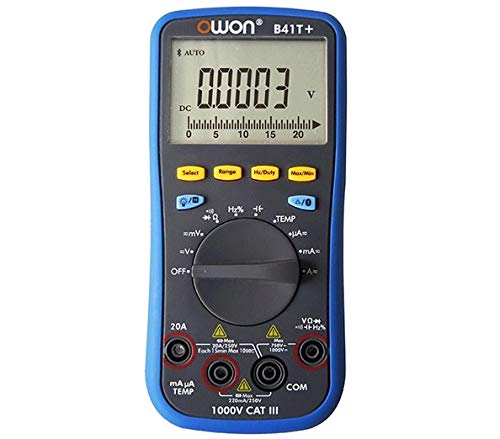
మూర్తి 3.1: ముందు మరియు వైపు view of the OWON B41T+ Digital Multimeter, showing the display, function dial, and input jacks.
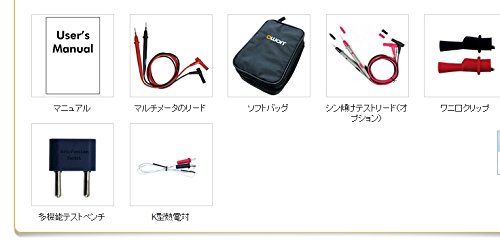
మూర్తి 3.2: Included accessories: User's Manual, Multimeter test leads, Soft bag, K-type thermocouple (temperature probe), and a multi-function test bench adapter.
4. సెటప్
4.1 బ్యాటరీ ఇన్స్టాలేషన్
The OWON B41T+ is powered by batteries. To install or replace batteries:
- మల్టీమీటర్ ఆఫ్ చేయబడిందని నిర్ధారించుకోండి.
- పరికరం వెనుక భాగంలో బ్యాటరీ కంపార్ట్మెంట్ కవర్ను గుర్తించండి.
- బ్యాటరీ కంపార్ట్మెంట్ను తెరవడానికి స్క్రూడ్రైవర్ని ఉపయోగించండి.
- సరైన ధ్రువణతను గమనిస్తూ, అవసరమైన బ్యాటరీలను చొప్పించండి.
- బ్యాటరీ కంపార్ట్మెంట్ కవర్ను సురక్షితంగా మూసివేయండి.
4.2 యాప్ ఇన్స్టాలేషన్ మరియు బ్లూటూత్ జత చేయడం
To utilize the smart device connectivity features, download the OWON multimeter application from your device's app store (compatible with Android 4.3+ and iOS 7.0+).
- Download and install the official OWON multimeter app on your smartphone or tablet.
- Turn on the OWON B41T+ multimeter.
- మీ స్మార్ట్ పరికరంలో బ్లూటూత్ను ప్రారంభించండి.
- Open the OWON app and follow the on-screen instructions to search for and pair with your B41T+ device. The Bluetooth icon on the multimeter display will indicate a successful connection.
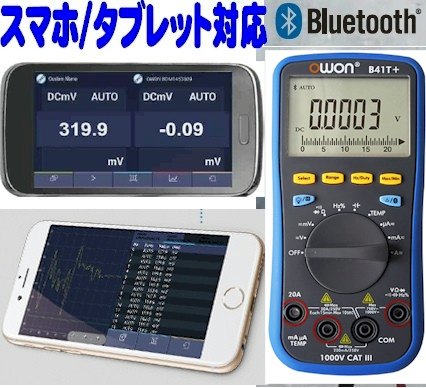
మూర్తి 4.1: The OWON B41T+ multimeter displaying a measurement, with a smartphone screen showing the corresponding app interface.
5. ఆపరేటింగ్ సూచనలు
The OWON B41T+ offers a wide range of measurement functions. Use the central rotary dial to select the desired measurement mode.
5.1 ప్రాథమిక కొలతలు
To perform a basic measurement:
- Select the appropriate function (e.g., V for voltage, A for current, Ω for resistance) using the rotary dial.
- Connect the test leads to the correct input jacks on the multimeter (e.g., COM and VΩmA for voltage/resistance, COM and 20A or mAμA for current).
- పరీక్ష లీడ్లను పరీక్షించబడుతున్న సర్క్యూట్ లేదా కాంపోనెంట్కు కనెక్ట్ చేయండి.
- Read the measurement value on the multimeter's display.
5.2 Advanced Features with Bluetooth Connectivity
When connected to a smartphone or tablet via Bluetooth, the OWON B41T+ provides enhanced functionality:
- డేటా లాగింగ్: Record measurement data over time directly to your smart device.
- గ్రాఫికల్ డిస్ప్లే: View real-time measurement trends and historical data in graphical format.
- వాయిస్ అవుట్పుట్: The device can announce measurement readings in Japanese, allowing for hands-free operation.
- డేటా నిర్వహణ: Save, store, print, and email measurement data (CSV format) directly from the app.
- బహుళ-పరికర కనెక్షన్: Connect two OWON B41T+ units simultaneously to your smart device to monitor two different parameters (e.g., voltage and current, or voltage and resistance) on a dual-screen display.
- రిమోట్ ఆపరేషన్: Utilize remote desktop applications like TeamViewer to control the connected smartphone/tablet from anywhere, enabling remote monitoring and operation of the multimeter.

మూర్తి 5.1: Illustration of advanced features including simultaneous measurement with two multimeters, data logging, graphical display, and voice output.
6. స్పెసిఫికేషన్లు
The following table details the technical specifications of the OWON B41T+ Digital Multimeter.

మూర్తి 6.1: Detailed specifications including measurement ranges, resolution, and accuracy.
| పరామితి | పరిధి | రిజల్యూషన్ | ఖచ్చితత్వం |
|---|---|---|---|
| DC సంtagఇ (వి) | 220mV, 2.2V, 22V, 220V, 1000V | 0.01mV, 0.1mV, 1mV, 10mV, 0.1V | ±(0.05%+10dig) to ±(0.8%+25dig) |
| AC వాల్యూమ్tagఇ (వి) | 220mV, 2.2V, 22V, 220V, 750V | 0.01mV, 0.1mV, 1mV, 10mV, 0.1V | ±(1.0%+25dig) |
| DC కరెంట్ (A) | 220μA, 2200μA, 22mA, 220mA, 20A | 0.01μA, 0.1μA, 1μA, 10μA, 1mA | ±(0.8%+10dig) to ±(2.0%+25dig) |
| ఎసి కరెంట్ (ఎ) | 220μA, 2200μA, 22mA, 220mA, 20A | 0.01μA, 0.1μA, 1μA, 10μA, 1mA | ±(1.5%+25dig) to ±(2.5%+35dig) |
| ప్రతిఘటన (Ω) | 220Ω, 2.2kΩ, 22kΩ, 220kΩ, 2.2MΩ, 22MΩ, 220MΩ | 0.01Ω, 0.1Ω, 1Ω, 10Ω, 100Ω, 1kΩ, 10kΩ | ±(0.4%+5dig) to ±(5%+10dig) |
| కెపాసిటెన్స్ (F) | 2.2nF, 22nF, 220nF, 2.2μF, 22μF, 220μF, 2.2mF, 22mF | 1pF, 10pF, 100pF, 1nF, 10nF, 100nF, 1μF, 10μF | ±(2.5%+15dig) |
| ఫ్రీక్వెన్సీ (Hz) | 220Hz, 2.2kHz, 22kHz, 220kHz, 2.2MHz, 22MHz | 0.01Hz, 0.1Hz, 1Hz, 10Hz, 100Hz, 1kHz | ±(0.1%+4dig) |
| డ్యూటీ సైకిల్ | 0.1% - 99.9% (>1kHz) | 0.1% | ±(1.2%+3dig) |
| ఉష్ణోగ్రత (°C / °F) | -50°C నుండి 400°C, -58°F నుండి 752°F వరకు | 0.1°C, 0.1°F | ±(2.5%+3dig) to ±(1.2%+8dig) |
| గరిష్ట సంఖ్య | 21999 | ||
| ప్రదర్శన Sampలింగ్ | 3 సార్లు / సెకను | ||
| ఆటో రేంజ్ | అవును | ||
| డేటా లాగర్ | 10 hours, 10,000 points | ||
| నిజమైన RMS | అవును | ||
| బ్యాక్లైట్ | అవును | ||
| డయోడ్ టెస్ట్ | అవును | ||
| కంటిన్యుటీ టెస్ట్ | అవును | ||
| ఓవర్ కరెంట్ రక్షణ | CAT III 1000V, CAT IV 600V | ||
| శక్తి మూలం | 3V (1.5V x 2) AA Alkaline Batteries | ||
| బ్లూటూత్ | ఆండ్రాయిడ్ 4.3+, iOS 7.0+ | ||
| కొలతలు | 85mm x 185mm x 30mm | ||
| బరువు | సుమారు 320గ్రా | ||
7. నిర్వహణ
Proper maintenance ensures the longevity and accuracy of your OWON B41T+ Digital Multimeter.
- శుభ్రపరచడం: పరికరాన్ని పొడి, మృదువైన గుడ్డతో తుడవండి. రాపిడి క్లీనర్లను లేదా ద్రావకాలను ఉపయోగించవద్దు.
- బ్యాటరీ భర్తీ: Replace batteries promptly when the low battery indicator appears on the display. Refer to Section 4.1 for battery installation instructions.
- నిల్వ: Store the multimeter in a cool, dry place away from direct sunlight and extreme temperatures. If storing for extended periods, remove the batteries to prevent leakage.
- టెస్ట్ లీడ్స్: Regularly inspect test leads for any signs of wear, cuts, or damage. Replace them if necessary to ensure safe and accurate measurements.
8. ట్రబుల్షూటింగ్
If you encounter issues with your OWON B41T+ Digital Multimeter, refer to the following common problems and solutions:
| సమస్య | సాధ్యమైన కారణం | పరిష్కారం |
|---|---|---|
| పరికరం పవర్ ఆన్ చేయదు. | డెడ్ లేదా తప్పుగా ఇన్స్టాల్ చేయబడిన బ్యాటరీలు. | సరైన ధ్రువణతను నిర్ధారించుకోవడానికి, బ్యాటరీలను మార్చండి. |
| రీడింగ్ లేదా 'OL' (ఓవర్లోడ్) ప్రదర్శించబడలేదు. | తప్పు ఫంక్షన్ ఎంచుకోబడింది, ఓపెన్ సర్క్యూట్ లేదా కొలత పరిధిని మించిపోయింది. | Select the correct function. Check for proper circuit connection. Switch to a higher range if available. |
| బ్లూటూత్ కనెక్షన్ విఫలమైంది. | Bluetooth not enabled, app not running, or device out of range. | Ensure Bluetooth is on for both devices. Restart the app. Move devices closer. Check app compatibility with OS version. |
| సరికాని రీడింగ్లు. | Damaged test leads, environmental interference, or incorrect measurement technique. | Inspect and replace test leads if damaged. Ensure proper connection. Avoid strong electromagnetic fields. |
9. వారంటీ మరియు మద్దతు
For warranty information and technical support, please refer to the documentation included with your purchase or visit the official OWON website. If you require further assistance, contact OWON customer service through their designated support channels.


