
1. పరిచయం
This manual provides essential information for the safe and efficient operation of your Strong SRT 32HB3003 32-inch HD LED TV. Please read these instructions carefully before using the television and retain them for future reference.
2. భద్రతా సమాచారం
విద్యుత్ షాక్, మంటలు లేదా టెలివిజన్కు నష్టం జరగకుండా నిరోధించడానికి ఎల్లప్పుడూ ఈ క్రింది భద్రతా జాగ్రత్తలను పాటించండి:
- వర్షం లేదా తేమకు టీవీని బహిర్గతం చేయవద్దు.
- టీవీ తెరవవద్దు casing; అన్ని సర్వీసింగ్లను అర్హత కలిగిన సిబ్బందికి సూచించండి.
- టీవీ చుట్టూ సరైన వెంటిలేషన్ ఉండేలా చూసుకోండి.
- మెరుపు తుఫానుల సమయంలో లేదా ఎక్కువసేపు ఉపయోగించనప్పుడు టీవీని అన్ప్లగ్ చేయండి.
- టీవీని వేడి వనరుల నుండి మరియు ప్రత్యక్ష సూర్యకాంతి నుండి దూరంగా ఉంచండి.
3. ప్యాకేజీ విషయాలు
ప్యాకేజింగ్లో అన్ని వస్తువులు ఉన్నాయని నిర్ధారించుకోండి:
- Strong SRT 32HB3003 LED TV
- రిమోట్ కంట్రోల్
- 2x AAA బ్యాటరీలు
- టీవి స్టాండ్
- వినియోగదారు మాన్యువల్

Image: The Strong SRT 32HB3003 TV packaging, highlighting key features such as DVB-T2/C/S2 tuner, HDMI, USB, and Dolby Audio.
4. సెటప్
4.1 స్టాండ్ ఇన్స్టాలేషన్
టీవీ స్టాండ్ను ఇన్స్టాల్ చేయడానికి:
- స్క్రీన్ దెబ్బతినకుండా ఉండటానికి టీవీ ముఖాన్ని మృదువైన, శుభ్రమైన ఉపరితలంపై జాగ్రత్తగా ఉంచండి.
- టీవీ దిగువన ఉన్న సంబంధిత స్లాట్లతో స్టాండ్ బేస్లను సమలేఖనం చేయండి.
- అందించిన స్క్రూలను ఉపయోగించి స్టాండ్లను భద్రపరచండి.
4.2 కనెక్షన్లు
Connect your external devices to the TV using the appropriate ports.
- యాంటెన్నా/కేబుల్: Connect your DVB-T2 or DVB-C antenna/cable to the 'ANT IN' port.
- ఉపగ్రహం: Connect your satellite dish to the 'SATELLITE IN' port for DVB-S2 reception.
- HDMI పరికరాలు: Use HDMI ports for high-definition devices like Blu-ray players, game consoles, or set-top boxes. HDMI 1 supports ARC (Audio Return Channel).
- USB పరికరాలు: Insert USB drives into the USB 2.0 ports for media playback.
- CI+ Module: Insert a CI+ module (Common Interface) into the CI+ slot for encrypted channels.
- ఆడియో అవుట్పుట్: Use the Headphone jack for private listening or the Digital Optical Output (TOS-Link) for external audio systems.
- AV IN: For older devices, use the AV IN port.

చిత్రం: వెనుక view of the Strong SRT 32HB3003 TV, illustrating the placement of connection ports including HDMI, USB, and antenna inputs.

Image: A diagram detailing the Common Interface (CI) slot and other connectivity options such as USB, headphone jack, AV IN, HDMI 1, HDMI 2, Satellite IN, and S/PDIF (digital optical audio out).
4.3 First Time Installation
After connecting the power cable and turning on the TV, the First Time Installation wizard will guide you through initial setup steps, including language selection, country, and channel scanning for DVB-T2, DVB-C, or DVB-S2.
5. ఆపరేటింగ్
5.1 రిమోట్ కంట్రోల్ ఓవర్view
రిమోట్ కంట్రోల్ అన్ని టీవీ ఫంక్షన్లను యాక్సెస్ చేయడానికి మిమ్మల్ని అనుమతిస్తుంది. రెండు AAA బ్యాటరీలను రిమోట్ కంట్రోల్లోకి చొప్పించండి, సరైన ధ్రువణతను నిర్ధారించుకోండి.

Image: The remote control for the Strong SRT 32HB3003 TV, featuring buttons for power, numerical input, volume control, channel selection, menu access, source input, and media playback functions.
5.2 ప్రాథమిక విధులు
- శక్తి: నొక్కండి red power button to turn the TV on or off.
- వాల్యూమ్: ఉపయోగించండి VOL +/- వాల్యూమ్ సర్దుబాటు చేయడానికి బటన్లు.
- ఛానెల్: ఉపయోగించండి CH +/- ఛానెల్లను మార్చడానికి బటన్లు.
- మ్యూట్: నొక్కండి మ్యూట్ ఆడియోను తాత్కాలికంగా నిశ్శబ్దం చేయడానికి బటన్.
5.3 మూలం ఎంపిక
నొక్కండి మూలం button on the remote control to select the desired input source (e.g., HDMI 1, HDMI 2, DVB-T2, DVB-C, DVB-S2, AV).
5.4 మెనూ నావిగేషన్
నొక్కండి మెనూ button to access the main menu. Use the arrow buttons to navigate and OK to confirm selections. The వెనుకకు button returns to the previous menu or exits the current menu.
5.5 మీడియా ప్లేబ్యాక్ (USB)
Insert a USB storage device into one of the USB ports. The TV supports playback of photos, videos, and music files. Access the media player through the main menu or by selecting the USB source.
5.6 ఎలక్ట్రానిక్ ప్రోగ్రామ్ గైడ్ (EPG)
నొక్కండి EPG బటన్ view the Electronic Program Guide, which displays program schedules for digital channels.
5.7 హోటల్ మోడ్
The TV features a Hotel Mode, which allows for restricted access to certain settings and functions, ideal for hospitality environments. Consult the advanced settings menu for Hotel Mode configuration.
6. నిర్వహణ
6.1 శుభ్రపరచడం
- శుభ్రం చేసే ముందు టీవీని ఎల్లప్పుడూ అన్ప్లగ్ చేయండి.
- స్క్రీన్ మరియు క్యాబినెట్ను తుడవడానికి మృదువైన, పొడి వస్త్రాన్ని ఉపయోగించండి.
- మొండి గుర్తులకు, తేలికగా dampఎలక్ట్రానిక్స్ కోసం ప్రత్యేకంగా రూపొందించిన నీటితో లేదా తేలికపాటి, రాపిడి లేని క్లీనర్తో వస్త్రాన్ని శుభ్రం చేయండి.
- Never spray cleaning liquids directly onto the TV.
6.2 నిల్వ
If storing the TV for an extended period, ensure it is kept in a cool, dry place, protected from dust and extreme temperatures. It is recommended to use the original packaging for storage.
7. ట్రబుల్షూటింగ్
మీ టీవీలో మీకు సమస్యలు ఎదురైతే, ఈ క్రింది సాధారణ పరిష్కారాలను చూడండి:
| సమస్య | సాధ్యమైన కారణం / పరిష్కారం |
|---|---|
| శక్తి లేదు | Check if the power cable is securely connected. Ensure the power outlet is functional. |
| చిత్రం లేదు, కానీ ధ్వని ఉంది | ఇన్పుట్ సోర్స్ ఎంపికను తనిఖీ చేయండి. బాహ్య పరికరాలు ఆన్ చేయబడి, సరిగ్గా కనెక్ట్ చేయబడ్డాయని నిర్ధారించుకోండి. |
| శబ్దం లేదు, కానీ చిత్రం ఉంది | Check volume level and mute status. Verify audio settings in the menu. |
| రిమోట్ కంట్రోల్ పనిచేయడం లేదు | Check and replace batteries. Ensure no obstructions between remote and TV sensor. |
| పేలవమైన చిత్ర నాణ్యత | Check antenna/cable connection. Adjust picture settings in the menu. |
8. స్పెసిఫికేషన్లు
Detailed technical specifications for the Strong SRT 32HB3003 HD LED TV:
| ఫీచర్ | స్పెసిఫికేషన్ |
|---|---|
| మోడల్ సంఖ్య | SRT 32HB3003 |
| స్క్రీన్ పరిమాణం | 32 అంగుళాలు (80 సెం.మీ.) |
| రిజల్యూషన్ | 1366 x 768 pixels (HD-Ready) |
| ప్రదర్శన సాంకేతికత | LED |
| రిఫ్రెష్ రేట్ | 60 Hz |
| ట్యూనర్ టెక్నాలజీ | DVB-C, DVB-S2, DVB-T2 |
| HDMI పోర్ట్లు | 2 (1x HDMI ARC) |
| USB 2.0 పోర్ట్లు | 2 |
| ఇతర ఇంటర్ఫేస్లు | Headphone, Digital Optical Out (TOS-Link), CI+ interface, AV IN |
| ప్రత్యేక లక్షణాలు | Electronic Program Guide (EPG), USB Media Playback, Parental Control, Hotel Mode |
| విద్యుత్ వినియోగం | 50 వాట్ |
| ఎనర్జీ ఎఫిషియెన్సీ క్లాస్ | A+ |
| వార్షిక శక్తి వినియోగం | 45 kWh/సంవత్సరానికి |
| ఉత్పత్తి కొలతలు (W x H x D) | 73.2 x 43.5 x 7.78 సెం.మీ |
| బరువు | 4.15 కిలోలు |

Image: The energy efficiency label for the Strong SRT 32HB3003, indicating an A+ rating and an annual energy consumption of 45 kWh.
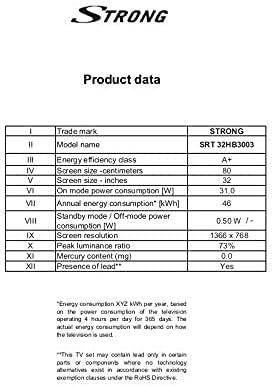
Image: A product data table providing detailed specifications for the Strong SRT 32HB3003, including screen size, resolution, and power consumption.
9. వారంటీ మరియు మద్దతు
Your Strong SRT 32HB3003 TV comes with a limited warranty. For specific warranty terms and conditions, please refer to the warranty card included in your product packaging or visit the official Strong website. For technical support, troubleshooting assistance, or service inquiries, please contact Strong customer service through their official channels.
మరింత సహాయం కోసం, దయచేసి సందర్శించండి Strong official webసైట్.