
పరిచయం
Welcome to the Ipega PG-9033 Bluetooth Gamepad user manual. This guide provides detailed instructions for setting up, operating, maintaining, and troubleshooting your new wireless controller. Please read this manual carefully before use to ensure optimal performance and longevity of your device.
ఉత్పత్తి ముగిసిందిview
The Ipega PG-9033 is a versatile Bluetooth gamepad designed for an enhanced gaming experience across multiple platforms, including Android, iOS, and PC. It features an adjustable phone holder, dual analog sticks, a D-pad, and action buttons.

Figure 1: The Ipega PG-9033 Bluetooth Gamepad with a smartphone securely mounted in its adjustable holder, actively displaying a racing game. This illustrates the controller's primary use for mobile gaming.
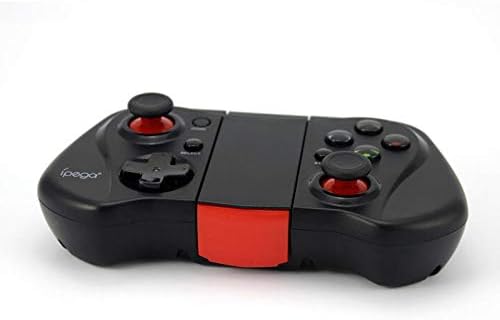
చిత్రం 2: ఒక వైపు view of the Ipega PG-9033 Bluetooth Gamepad, showcasing its ergonomic design and compact form factor when not in use. The red accent on the central hinge is visible.
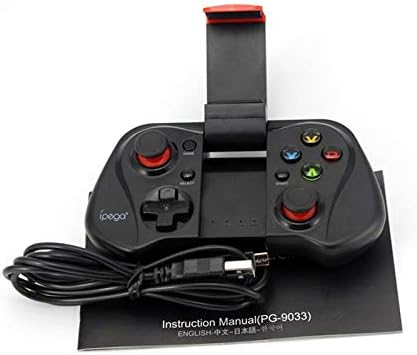
Figure 3: The Ipega PG-9033 Bluetooth Gamepad displayed alongside its USB charging cable and the included instruction manual, which clearly indicates the model number PG-9033.

చిత్రం 4: వెనుక భాగం view of the Ipega PG-9033 Bluetooth Gamepad, featuring a label with technical details such as "BLUETOOTH CONTROLLER," working voltage, working current, and input specifications.
సెటప్
గేమ్ప్యాడ్ను ఛార్జ్ చేస్తోంది
Before first use, fully charge the gamepad using the provided USB cable.
- Connect the micro-USB end of the charging cable to the gamepad's charging port.
- Connect the USB-A end to a USB power source (e.g., computer, USB wall adapter).
- The charging indicator light will illuminate. It will typically turn off or change color when fully charged.
పరికరంతో జత చేయడం
The PG-9033 supports different pairing modes for various operating systems.
Android జత చేయడం
- Ensure the gamepad is off.
- నొక్కండి మరియు పట్టుకోండి హోమ్ బటన్ మరియు X button simultaneously until the indicator light flashes rapidly. This puts the gamepad into Android pairing mode.
- On your Android device, go to Bluetooth settings and search for available devices.
- Select "PG-9033" from the list to pair. The indicator light will become solid when connected.
iOS Pairing (iCade Mode)
- Ensure the gamepad is off.
- నొక్కండి మరియు పట్టుకోండి హోమ్ బటన్ మరియు B button simultaneously until the indicator light flashes rapidly. This puts the gamepad into iOS iCade pairing mode.
- On your iOS device, go to Bluetooth settings and search for available devices.
- Select "PG-9033" from the list to pair. The indicator light will become solid when connected.
Note: iCade mode has limited game compatibility. For broader iOS compatibility, check specific game requirements.
PC జత చేయడం
- Ensure the gamepad is off.
- నొక్కండి మరియు పట్టుకోండి హోమ్ బటన్ మరియు A button simultaneously until the indicator light flashes rapidly. This puts the gamepad into PC pairing mode.
- On your PC, go to Bluetooth settings and search for available devices.
- Select "PG-9033" from the list to pair. The indicator light will become solid when connected.
Note: A Bluetooth adapter may be required for PCs without built-in Bluetooth.
ఆపరేటింగ్ సూచనలు
మీ స్మార్ట్ఫోన్ను అటాచ్ చేస్తోంది
- Gently extend the adjustable phone holder located on the top of the gamepad.
- Carefully place your smartphone into the holder, ensuring it is securely gripped and centered.
- ఆప్టిమల్ కోసం కోణాన్ని సర్దుబాటు చేయండి viewing.
Game Mode Selection
The gamepad automatically enters the last used mode upon reconnection. To switch modes, disconnect the gamepad and re-pair using the desired mode's button combination (HOME + X for Android, HOME + B for iOS, HOME + A for PC).
పవర్ ఆన్/ఆఫ్
పవర్ ఆన్ చేయడానికి, నొక్కండి హోమ్ బటన్. పవర్ ఆఫ్ చేయడానికి, నొక్కి పట్టుకోండి హోమ్ button for approximately 5 seconds until the indicator light turns off. The gamepad will automatically power off after a period of inactivity.
నిర్వహణ
To ensure the longevity and proper functioning of your Ipega PG-9033 gamepad, follow these maintenance guidelines:
- పరికరాన్ని పొడిగా ఉంచండి. తేమ లేదా ద్రవాలకు గురికాకుండా ఉండండి.
- గేమ్ప్యాడ్ను మృదువైన, పొడి వస్త్రంతో శుభ్రం చేయండి. కఠినమైన రసాయనాలు లేదా రాపిడి క్లీనర్లను ఉపయోగించవద్దు.
- గేమ్ప్యాడ్ను ప్రత్యక్ష సూర్యకాంతి మరియు తీవ్రమైన ఉష్ణోగ్రతలు పడకుండా చల్లని, పొడి ప్రదేశంలో నిల్వ చేయండి.
- గేమ్ప్యాడ్ను బలమైన ప్రభావాలకు గురిచేయడం లేదా పడవేయడం మానుకోండి.
- బ్యాటరీ ఆరోగ్యాన్ని కాపాడుకోవడానికి, ఉపయోగంలో లేకపోయినా, క్రమం తప్పకుండా బ్యాటరీని ఛార్జ్ చేయండి.
Do not attempt to disassemble the gamepad. This will void the warranty and may cause damage.
ట్రబుల్షూటింగ్
Gamepad not connecting or pairing:
- గేమ్ప్యాడ్ పూర్తిగా ఛార్జ్ అయ్యిందని నిర్ధారించుకోండి.
- మీ పరికరంలో బ్లూటూత్ ప్రారంభించబడిందని ధృవీకరించండి.
- Make sure the gamepad is in the correct pairing mode for your device (Android, iOS, or PC).
- మీ బ్లూటూత్ సెట్టింగ్లలో పరికరాన్ని మర్చిపోయి తిరిగి జత చేయడానికి ప్రయత్నించండి.
- గేమ్ప్యాడ్ మరియు మీ పరికరం రెండింటినీ పునఃప్రారంభించండి.
బటన్లు లేదా జాయ్స్టిక్లు స్పందించకపోవడం:
- గేమ్ప్యాడ్ సరిగ్గా కనెక్ట్ చేయబడిందో లేదో తనిఖీ చేయండి.
- మీరు ఆడుతున్న ఆట బాహ్య కంట్రోలర్లకు మద్దతు ఇస్తుందని నిర్ధారించుకోండి.
- Some games may require specific controller mapping or settings adjustments within the game.
- If the issue persists, try resetting the gamepad (if a reset button is available, typically a small pinhole).
లాగ్ లేదా ఇన్పుట్ ఆలస్యం:
- Ensure your device is not too far from the gamepad. Maintain a clear line of sight.
- ఇతర వైర్లెస్ పరికరాల నుండి జోక్యాన్ని తగ్గించండి.
- మీ పరికరంలో అనవసరమైన బ్యాక్గ్రౌండ్ అప్లికేషన్లను మూసివేయండి.
Phone not fitting in holder:
- The holder is designed for most smartphones. Ensure your phone's dimensions are within the supported range.
- సురక్షితంగా అమర్చడాన్ని నిరోధించే ఏవైనా పెద్ద ఫోన్ కేసులను తీసివేయండి.
స్పెసిఫికేషన్లు
| ఫీచర్ | వివరాలు |
|---|---|
| మోడల్ | PG-9033 |
| బ్రాండ్ | ఇపెగా |
| కనెక్టివిటీ | బ్లూటూత్ |
| అనుకూలత | Android, iOS (iCade), PC |
| వర్కింగ్ వాల్యూమ్tage | DC 3.7V |
| వర్కింగ్ కరెంట్ | 30mA |
| ఇన్పుట్ వాల్యూమ్tage | DC 5V 500mA |
| ASIN | B07P52YH7M |
వారంటీ మరియు మద్దతు
For warranty information and technical support, please refer to the official Ipega webసైట్లో లేదా మీ రిటైలర్ను సంప్రదించండి. కొనుగోలు రుజువుగా మీ కొనుగోలు రసీదును ఉంచండి.
ఈ మాన్యువల్ సమాచార ప్రయోజనాల కోసం మాత్రమే. స్పెసిఫికేషన్లు నోటీసు లేకుండా మారవచ్చు.