
పరిచయం
This manual provides essential information for the proper use and maintenance of your Easytry123 replacement remote control. This remote is designed to function with various Hitachi 3LCD projector models, offering a convenient way to control your projector's features. Please read these instructions carefully before use.
అనుకూలత
This replacement remote control is compatible with the following Hitachi 3LCD Projector models:
- CP-X275WA
- CP-X300
- CP-X301
- CP-X3010
- CP-X308
- CP-X320W
- CP-X325W
- CP-X3010EN
- CP-X3010Z
- CP-X3011N
Note: While designed for broad compatibility, some advanced or specific functions of your original projector remote may not be fully supported by this replacement unit.
ప్యాకేజీ విషయాలు
మీ ప్యాకేజీలో ఈ క్రింది అంశాలు ఉండాలి:
- 1 x Easytry123 Replacement Remote Control
బ్యాటరీలు చేర్చబడలేదు మరియు విడిగా కొనుగోలు చేయాలి.
సెటప్
బ్యాటరీలను ఇన్స్టాల్ చేస్తోంది
- రిమోట్ కంట్రోల్ వెనుక బ్యాటరీ కంపార్ట్మెంట్ను గుర్తించండి.
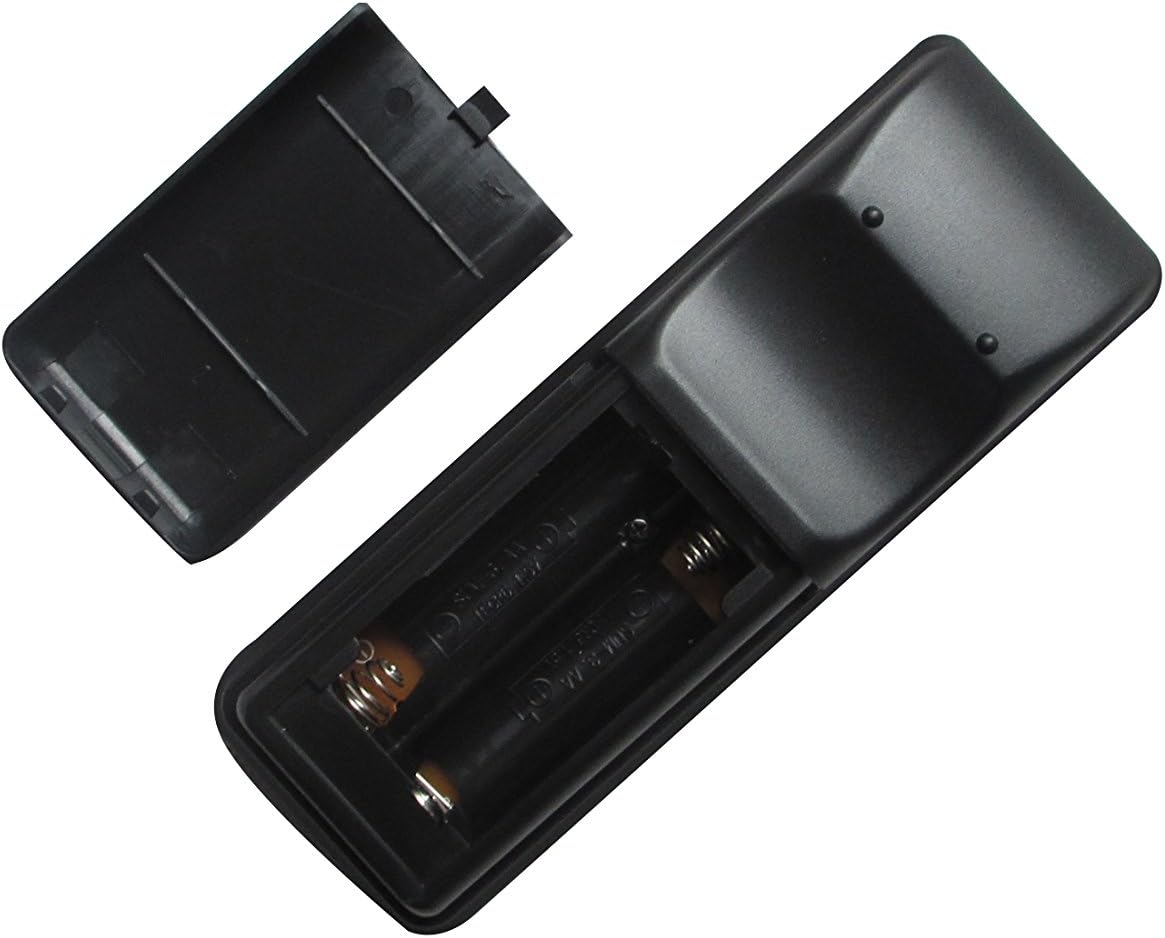
- బ్యాటరీ కంపార్ట్మెంట్ కవర్ను క్రిందికి జారండి లేదా లాచ్ నొక్కి, దాన్ని తెరవండి.
- రెండు (2) AA బ్యాటరీలను చొప్పించండి, పాజిటివ్ (+) మరియు నెగటివ్ (-) టెర్మినల్స్ కంపార్ట్మెంట్ లోపల ఉన్న గుర్తులతో సరిగ్గా సమలేఖనం చేయబడ్డాయని నిర్ధారించుకోండి.
- బ్యాటరీ కంపార్ట్మెంట్ కవర్ సురక్షితంగా క్లిక్ అయ్యే వరకు దాన్ని తిరిగి స్థానంలోకి జారడం ద్వారా దాన్ని మార్చండి.

Image: The remote control with its battery cover removed, revealing the two AA battery slots. Observe the correct polarity markings (+/-) inside the compartment for proper battery insertion.
After installing the batteries, the remote control is ready for use. No additional pairing or programming is typically required for this replacement unit.
ఆపరేటింగ్ సూచనలు
Point the remote control directly at the infrared receiver on your Hitachi projector. Ensure there are no obstructions between the remote and the projector.
చిత్రం: ముందు భాగం view of the Easytry123 replacement remote control, displaying its array of function buttons for projector operation.
ప్రాథమిక విధులు:
- పవర్ ఆన్/ఆఫ్: నొక్కండి శక్తి ప్రొజెక్టర్ను ఆన్ లేదా ఆఫ్ చేయడానికి బటన్.
- ఇన్పుట్ ఎంపిక: ఉపయోగించండి ఇన్పుట్ or dedicated input buttons (e.g., HDMI, VGA) to cycle through available input sources.
- మెను నావిగేషన్: ఉపయోగించండి మెనూ button to access the projector's on-screen display (OSD) menu. Use the arrow keys (అప్, డౌన్, లెఫ్ట్, రైట్) నావిగేట్ చేయడానికి మరియు ENTER/OK ఎంపికలను నిర్ధారించడానికి.
- వాల్యూమ్ నియంత్రణ: If your projector supports audio output, use the VOL+ మరియు VOL- వాల్యూమ్ సర్దుబాటు చేయడానికి బటన్లు.
- కారక నిష్పత్తి: Some remotes include an ASPECT button to change the display aspect ratio.
నిర్వహణ
రిమోట్ శుభ్రపరచడం
రిమోట్ కంట్రోల్ను శుభ్రం చేయడానికి, దాని ఉపరితలాన్ని మృదువైన, పొడి గుడ్డతో సున్నితంగా తుడవండి. మొండి ధూళి కోసం, కొద్దిగా dampen గుడ్డను నీటితో శుభ్రం చేసుకోండి. కఠినమైన రసాయనాలు, రాపిడి క్లీనర్లు లేదా అధిక తేమను ఉపయోగించకుండా ఉండండి, ఎందుకంటే ఇవి రిమోట్ను దెబ్బతీస్తాయి.
బ్యాటరీ భర్తీ
Replace the batteries when the remote control's responsiveness decreases or it stops functioning. Always replace both batteries at the same time with new AA batteries. Do not mix old and new batteries, or different types of batteries.
నిల్వ
When not in use for extended periods, remove the batteries from the remote control to prevent leakage and potential damage. Store the remote in a cool, dry place away from direct sunlight and extreme temperatures.
ట్రబుల్షూటింగ్
- రిమోట్ స్పందించడం లేదు:
- బ్యాటరీలు సరైన ధ్రువణతతో సరిగ్గా చొప్పించబడ్డాయో లేదో తనిఖీ చేయండి.
- బ్యాటరీలను కొత్త వాటితో భర్తీ చేయండి.
- రిమోట్ మరియు ప్రొజెక్టర్ యొక్క IR రిసీవర్ మధ్య ఎటువంటి అడ్డంకులు లేవని నిర్ధారించుకోండి.
- Confirm the remote is pointed directly at the projector.
- కొన్ని విధులు పనిచేయవు:
- This replacement remote may not support all advanced or specific functions of your original projector remote. Refer to your projector's original manual for specific function requirements.
- Projector turns on/off unexpectedly:
- Ensure no other infrared devices are interfering with the projector's receiver.
స్పెసిఫికేషన్లు
- బ్రాండ్: ఈజీట్రీ123
- అనుకూల పరికరాలు: Hitachi 3LCD Projectors (listed models)
- కనెక్టివిటీ టెక్నాలజీ: ఇన్ఫ్రారెడ్ (IR)
- నియంత్రిక రకం: బటన్ నియంత్రణ
- శక్తి మూలం: 2 x AA బ్యాటరీలు (చేర్చబడలేదు)
- ప్రత్యేక ఫీచర్: ఎర్గోనామిక్ డిజైన్

చిత్రం: వెనుక view of the Easytry123 replacement remote control, showing its ergonomic shape and battery compartment.