
1. పరిచయం
The AMTAST AMT599 Colorimeter is a precise digital instrument designed for accurate color difference measurement. It is widely used in various industries for quality control and analysis of color in coatings, printing, and other materials. This manual provides essential information for the proper setup, operation, maintenance, and troubleshooting of your AMT599 Colorimeter.
The device features a high-accuracy sensor and stable signal processing, ensuring reliable measurement results. It supports multiple color space displays and offers quick measurement times.
2. సెటప్
2.1 అన్ప్యాకింగ్
Carefully remove the AMT599 Colorimeter and all accessories from its packaging. Verify that all components are present and undamaged.
2.2 Power Supply and Battery Installation
The AMT599 Colorimeter can be powered by four AA 1.5V alkaline batteries, nickel-metal hydride (Ni-MH) rechargeable batteries, or a DC5V adapter.
- పరికరంలో బ్యాటరీ కంపార్ట్మెంట్ను గుర్తించండి.
- Insert four AA 1.5V batteries, ensuring correct polarity (+/-).
- Alternatively, connect the DC5V adapter to the power input port on the device and to a suitable power outlet.
2.3 ప్రారంభ పవర్ ఆన్
Press and hold the power button until the display illuminates. The device will perform a self-check before entering the measurement interface.
2.4 క్రమాంకనం
Before first use and periodically thereafter, calibrate the device using the provided white calibration board to ensure measurement accuracy.
- Ensure the device is powered on and in measurement mode.
- Place the measurement port firmly against the white calibration board.
- Follow the on-screen prompts to initiate and complete the calibration process.
3. ఆపరేటింగ్ సూచనలు
3.1 ప్రాథమిక కొలత
To perform a color measurement:
- Ensure the device is calibrated.
- Place the measurement port (8mm diameter) firmly and flat against the surface of the sample కొలవాలి.
- Press the measurement button. The measurement will typically complete in about 0.5 seconds.
- కొలత ఫలితాలు తెరపై ప్రదర్శించబడతాయి.

Figure 1: The AMTAST AMT599 Colorimeter displaying various color measurement parameters such as Reflectance, CIE-Lab, CIE-LCh, HunterLab, CIE Luv, XYZ, Yxy, RGB, Color difference (ΔE*ab, ΔE*cmc, ΔE*94, ΔE*00), WI (ASTM E313-00, ASTM E313-73, CIE, ISO2470/R457, AATCC), Hunter, Taube Berger Stensby, YI (ASTM D1925, ASTM E313-00, ASTM E313-73), Blackness (My,dM), and Color Fastness.
3.2 కొలత మోడ్లు
The device supports multiple color space display values including L*a*b, L*c*h, and Yxy. Navigate through the menu to select the desired measurement mode for your application.
3.3 డేటా నిల్వ మరియు నిర్వహణ
The AMT599 Colorimeter can store up to 10 sets of standard samples, with up to 100 measurements under each standard sample. Use the device's menu to save, recall, and manage your measurement data.
For advanced data management, the device can be connected to a computer via its USB2.0 port. Free management software is available to help control and convert color data.
3.4 భాషా సెట్టింగ్లు
The device supports multiple languages, including Chinese and English. Access the system settings to change the display language as needed.
4 కీ ఫీచర్లు
- Dual Optical Path Design: Improves repeatability accuracy with a ΔE*ab ≤ 0.03.
- Innovative Optics: Features 5-micron thick nano-integrated optics.
- Evaluation Light Sources: Capable of evaluating color under nearly 40 different light sources.
- SCI Measurement Mode: Contains SCI measurement mode for precise readings.
- UV Fluorescent Color Measurement: Includes UV for fluorescent color measurement.
- Robust Calibration: Calibration base and zirconium reference with a Mohs hardness of 9 ensure long-term stability.
- Built-in HD Camera: Provides clear observation of the measured area.
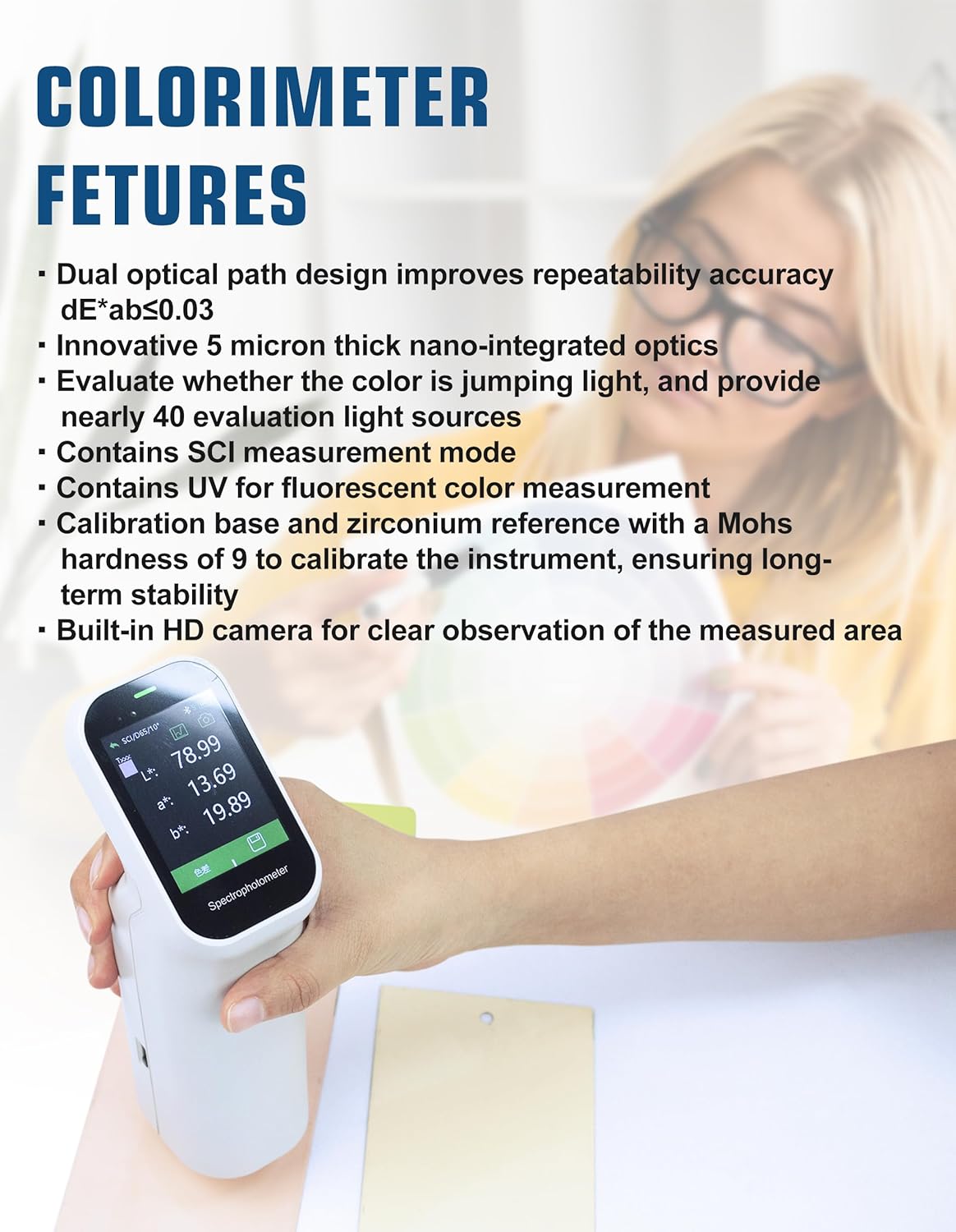
Figure 2: The AMTAST AMT599 Colorimeter in use, demonstrating its display and highlighting key features such as dual optical path design and innovative optics.
5. నిర్వహణ
5.1 శుభ్రపరచడం
To maintain optimal performance and accuracy:
- Gently wipe the exterior of the device with a soft, dry cloth.
- Keep the measurement port clean and free of dust or debris. Use a soft brush or lens cloth if necessary.
- Do not use abrasive cleaners or solvents, as these can damage the device.
5.2 నిల్వ
When not in use, store the AMT599 Colorimeter in a clean, dry environment, away from direct sunlight, extreme temperatures, and high humidity. Remove batteries if the device will not be used for an extended period to prevent leakage.

Figure 3: The AMTAST AMT599 Colorimeter, emphasizing its durability with a life of 10 years and 1 million cycles, and a storage capacity of 10,000 data points.
6. ట్రబుల్షూటింగ్
| సమస్య | సాధ్యమైన కారణం | పరిష్కారం |
|---|---|---|
| పరికరం పవర్ ఆన్ చేయదు | Low or dead batteries; Power adapter not connected properly | Replace batteries or ensure power adapter is securely connected. |
| సరికాని రీడింగ్లు | Device not calibrated; Measurement port dirty; Sample surface uneven | Perform calibration; Clean measurement port; Ensure sample surface is flat and clean. |
| Display issues (e.g., blank screen, flickering) | Software glitch; Battery issue | Restart the device; Check battery level or try using the DC adapter. |
| PC కి కనెక్ట్ చేయడం సాధ్యం కాలేదు. | USB cable faulty; Driver not installed; Software not running | Try a different USB cable; Install necessary drivers; Ensure data management software is open. |
7. స్పెసిఫికేషన్లు

Figure 4: The AMTAST AMT599 Colorimeter displaying its technical specifications on the screen.
- మోడల్: AMT599
- ప్రకాశం వ్యవస్థ: 8/d (8°/diffused illumination) SCI
- Testing Port Diameter: సుమారు 8 మి.మీ
- Measuring Conditions: CIE 10° standard observer; CIE D65 light source
- కొలిచే పరిధి: L*: 1-100
- పునరావృతం: Standard deviation within ΔE*ab*, below 0.1 (testing condition: measure the white calibration board for average)
- నిల్వ: 10 sets of standard samples; up to 100 under each standard sample
- కొలిచే సమయం: సుమారు 0.5 సెకన్లు
- Measuring Light Source: LED
- భాషలు: చైనీస్, ఇంగ్లీష్
- శక్తి: Four AA 1.5V Alkaline battery or nickel-metal hydride battery; or DC5V adapter
- పోర్ట్: USB2.0 (for printer/PC connection)
- వస్తువు బరువు: సుమారు 2.09 పౌండ్లు (0.95 కిలోలు)
- Neck Diameter: 8మి.మీ
- ప్రదర్శన ఖచ్చితత్వం: 0.01
- ఎపర్చరును కొలవడం: Φ8mm (also mentioned Φ11mm, Φ6mm, ▽11mm, ▽6mm in image, but 8mm is consistent with description)
- Source Condition: A, B, C, D50, D55, D65, D75, F1-F12, CWF, U30, U35, DLF, NBF, TL83, TL84, ID50, ID65, LED-B1, LED-B2, LED-B3, LED-B4, LED-B5, LED-BH1, LED-RGB1, LED-V1, LED-V2
- పరిశీలకుడు: 2°, 10°
- Integrating Sphere Diameter: 40మి.మీ
- ప్రమాణాలు: CIE No.15, GB/T 3978, GB 2893, GB/T 18833, ISO7724-1, ASTM E1164, DIN5033 Teil7
- తరంగదైర్ఘ్యం విరామం: 10nm
- తరంగదైర్ఘ్యం పరిధి: 400-700nm
- Reflectance Determination Range: 0–200%
- Reflectance Resolution: 0.01%
- కొలత విధానం: ఒకే కొలత, సగటు కొలత (2 నుండి 99 కొలతలు)
- Life of Light Source: 10 years / 1 million cycles
- డేటా నిల్వ సామర్థ్యం: 10,000 డేటా పాయింట్లు
8. వారంటీ
AMTAST products are manufactured to high-quality standards. This product is covered by a limited warranty against defects in materials and workmanship. Please refer to the warranty card included with your product or visit the official AMTAST webవివరణాత్మక వారంటీ నిబంధనలు మరియు షరతుల కోసం సైట్.
9. కస్టమర్ మద్దతు
For technical assistance, troubleshooting, or service inquiries, please contact AMTAST customer support:
- ఇమెయిల్: support@amtast.com
- Webసైట్: www.amtast.com/support
Please have your model number (AMT599) and purchase information ready when contacting support.