
1. పరిచయం
Thank you for choosing the INSMART Bluetooth Smart Body Fat Scale. This device is designed to provide comprehensive body composition analysis, helping you track your health and fitness progress. By connecting to the INSMART Health app on your smartphone, you can monitor 17 key body metrics with ease and accuracy.

The INSMART Smart Body Fat Scale offers a sleek design and advanced health tracking capabilities.
2. భద్రతా సమాచారం
- Always place the scale on a hard, flat floor for accurate measurements. Avoid carpets or uneven surfaces.
- Ensure your feet are dry, bare, and touching all four electrode areas on the scale for proper body composition analysis.
- మీరు గర్భవతి అయితే ఈ పరికరాన్ని ఉపయోగించవద్దు.
- Measurements are for reference only and are not suitable for diagnosing medical conditions. Consult a healthcare professional for medical advice.
- Enter correct personal information into the app before use to ensure accurate readings.
3. ఏమి చేర్చబడింది
- INSMART Body Fat Scale
- వినియోగదారు మాన్యువల్ (ఈ పత్రం)
- AAA బ్యాటరీలు (2 అవసరం, చేర్చబడ్డాయి)
4. ఉత్పత్తి ముగిసిందిview
The INSMART Smart Body Fat Scale is designed for high precision and ease of use, offering a comprehensive view of your body composition. It features a 5mm high-quality toughened glass plate and 4 high-precision sensors for accurate measurements.
ముఖ్య లక్షణాలు:
- 17 Body Data Metrics: Measures Weight, BMI, Body Fat, Fat-free Body Weight, Subcutaneous Fat, Visceral Fat, Body Water, Skeletal Muscle, Muscle Mass, Bone Mass, Protein, BMR, Standard Weight, Body Type, Obesity Level, Muscle Rate, and Metabolic Age.
- అధిక ఖచ్చితత్వం: Increments of 0.2lb / 0.05kg with a maximum capacity of 180kg/400lbs.
- LED డిస్ప్లే: Self-illuminated LED display provides clear readouts in any lighting condition.
- మన్నికైన డిజైన్: Rounded corners for safety, especially in households with children.
- స్మార్ట్ కనెక్టివిటీ: Connects via Bluetooth 4.0 to the INSMART Health app (iOS 8.0 / Android 6.0 or higher).
- బహుళ-వినియోగదారు మద్దతు: Tracks unlimited users, making it suitable for the entire family.
- డేటా సమకాలీకరణ: Automatically syncs data to the app and can integrate with other fitness programs.
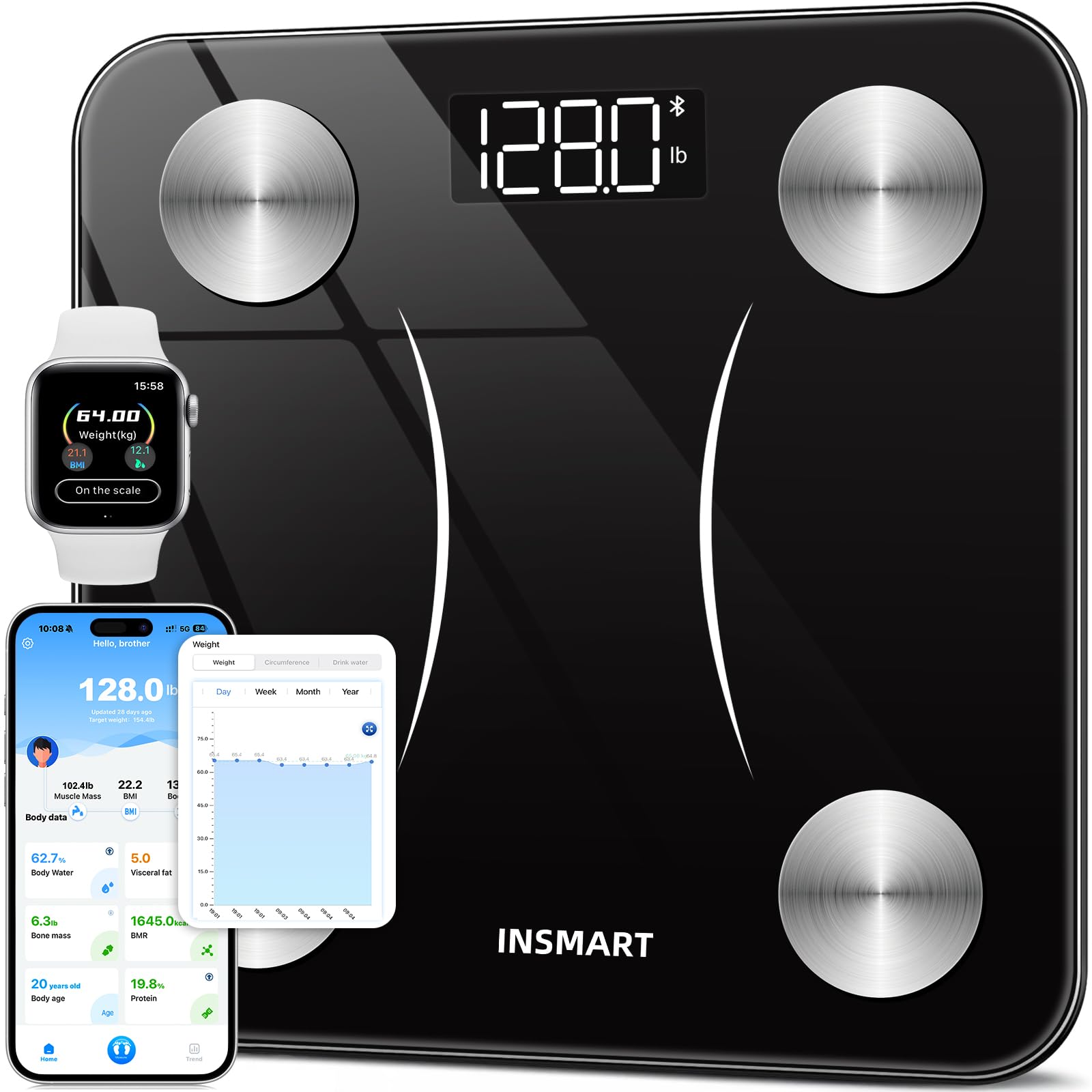
The INSMART Smart Body Fat Scale features a sleek black design with four conductive pads for comprehensive body analysis.
5. Setup and App Installation
5.1. యాప్ డౌన్లోడ్
The INSMART Health app is essential for accessing all body composition data. You can download it from the App Store (for iOS devices) or Google Play Store (for Android devices). Alternatively, scan the QR code provided in the physical user manual or on the product packaging.

The INSMART Health app integrates with popular fitness platforms like Apple Health, Fitbit, and Google Fit.
5.2. ప్రారంభ సెటప్ మరియు బ్లూటూత్ జత చేయడం
- Insert the included AAA batteries into the battery compartment on the underside of the scale.
- Place the scale on a hard, flat, and dry surface.
- మీ స్మార్ట్ఫోన్లో బ్లూటూత్ ప్రారంభించబడిందని నిర్ధారించుకోండి.
- Open the INSMART Health app.
- Follow the in-app instructions to pair your scale. Typically, you will need to step on the scale briefly to activate it and allow the app to detect it.
- Once paired, the app will guide you through setting up your user profile (gender, height, age, etc.). This information is crucial for accurate body composition calculations.
Watch this video for a visual guide on unboxing, setting up the scale, and connecting it to the INSMART Health app.
6. స్కేల్ను నిర్వహించడం
To obtain a full body composition analysis, follow these steps:
- Open the INSMART Health app on your smartphone.
- Step barefoot onto the scale, ensuring your feet are positioned on the four metal electrode pads.
- Stand still for approximately 10 seconds until the measurement is complete. The scale's LED display will show your weight.
- The app will automatically synchronize all 17 body composition data points.
You can weigh yourself at any time without opening your phone; the weight data will sync to the INSMART Health app once connected. Even without a network connection, you can still use the scale to check your basic body information.

The scale features a clear LED display and high-precision sensors for accurate measurements.
7. Understanding Your Body Data
The INSMART Health app provides detailed insights into your body composition. Here are the 17 key metrics measured:
- బరువు: మీ మొత్తం శరీర ద్రవ్యరాశి.
- BMI (బాడీ మాస్ ఇండెక్స్): ఎత్తు మరియు బరువు ఆధారంగా శరీర కొవ్వు కొలత.
- శరీరపు కొవ్వు: శాతంtagమీ శరీరంలో కొవ్వు శాతం.
- కొవ్వు రహిత శరీర బరువు: మీ మొత్తం శరీర బరువు నుండి శరీర కొవ్వును తీసివేయండి.
- సబ్కటానియస్ ఫ్యాట్: చర్మం కింద నేరుగా నిల్వ చేయబడిన కొవ్వు.
- విసెరల్ ఫ్యాట్: Fat stored around your organs.
- శరీర నీరు: శాతంtagమీ శరీరంలో నీటి ఇ.
- అస్థిపంజర కండరం: ఎముకలకు అనుసంధానించబడిన కండరం, కదలికకు బాధ్యత వహిస్తుంది.
- కండర ద్రవ్యరాశి: Total weight of muscles in your body.
- ఎముక ద్రవ్యరాశి: మీ శరీరంలోని ఎముక ఖనిజ బరువు.
- ప్రోటీన్: శాతంtagమీ శరీరంలో ప్రోటీన్ ఎంత?
- BMR (బేసల్ మెటబాలిక్ రేట్): మీ శరీరం ప్రాథమిక, జీవనాధార విధులను నిర్వహించడానికి అవసరమైన కేలరీల సంఖ్య.
- ప్రామాణిక బరువు: An ideal weight range based on your profile.
- శరీర రకం: Classification of your physique.
- Obesity Level: An indicator of your body fat level relative to healthy ranges.
- Muscle Rate: The proportion of muscle mass to total body weight.
- జీవక్రియ వయస్సు: Compares your BMR to the average BMR for your chronological age group.
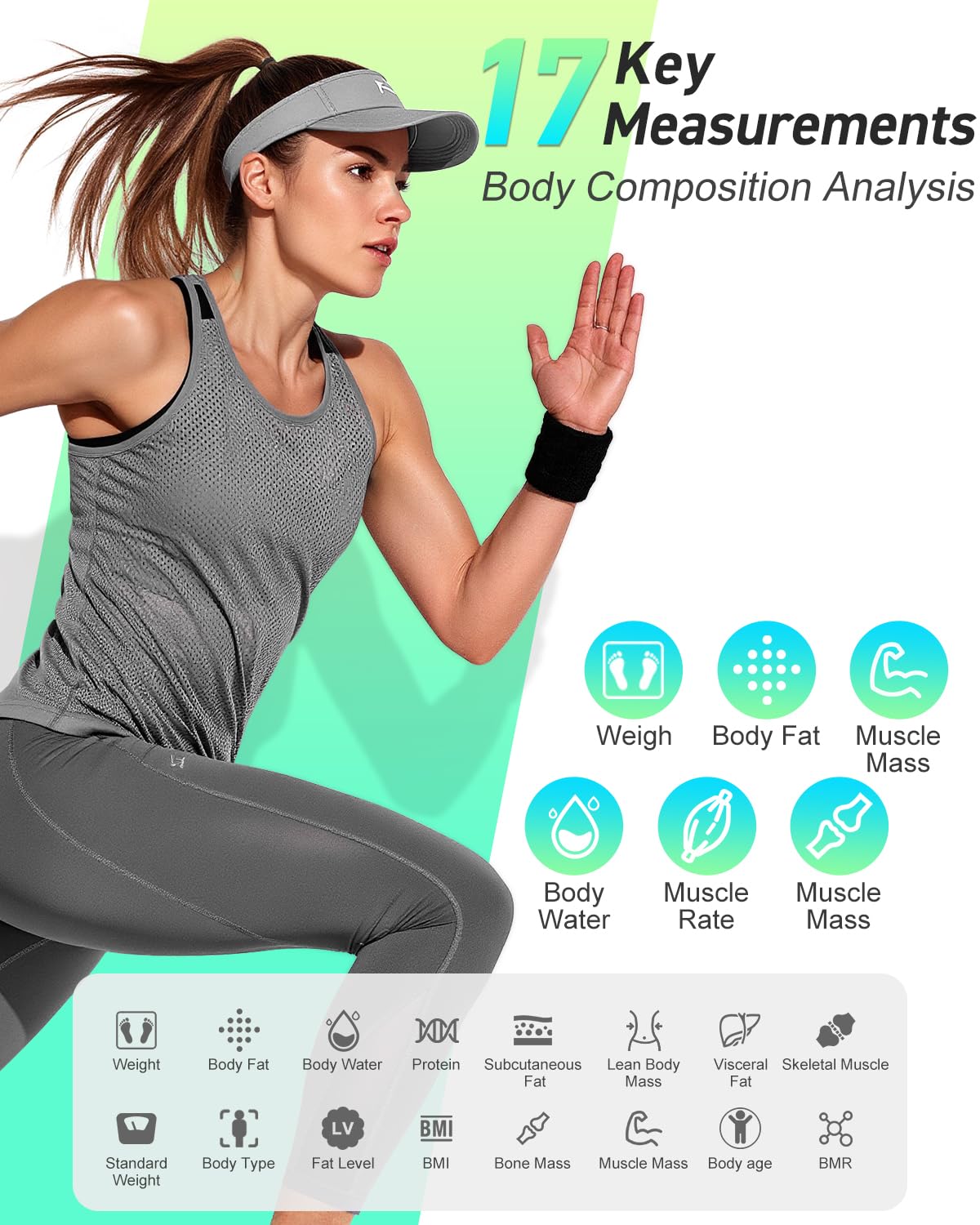
Visual representation of the 17 body metrics tracked by the INSMART Smart Body Fat Scale.

The INSMART Health app provides a detailed dashboard of your body data, allowing you to track progress over time.
8. నిర్వహణ మరియు సంరక్షణ
- స్కేల్ ఉపరితలాన్ని మృదువైన, d తో శుభ్రం చేయండి.amp వస్త్రం. రాపిడి క్లీనర్లను ఉపయోగించవద్దు లేదా స్కేల్ను నీటిలో ముంచవద్దు.
- Avoid dropping the scale or subjecting it to strong impacts, as this may damage the sensors.
- ప్రత్యక్ష సూర్యకాంతి మరియు తీవ్రమైన ఉష్ణోగ్రతలకు దూరంగా చల్లని, పొడి ప్రదేశంలో స్కేల్ను నిల్వ చేయండి.
- స్కేల్ను ఎక్కువ కాలం ఉపయోగించకపోతే, లీకేజీని నివారించడానికి బ్యాటరీలను తీసివేయండి.
9. ట్రబుల్షూటింగ్
No Bluetooth connection to my scale:
- Make sure your phone's network is enabled (for registered users).
- Ensure that Bluetooth and GPS connection are enabled on your phone.
- Pair the device and take a measurement when the app is open.
- If you failed to get a connection to the app, proceed as below:
- Tap the "Setting" button in the app.
- Then tap "Device Binding".
- Tap "+" to search and pair the Bluetooth Scale.
- Go back to the home page, tap the "Measure" button to start weighing.

Visual guide for troubleshooting Bluetooth connection problems with the INSMART Smart Body Fat Scale.
ఖచ్చితత్వ లోపం:
- If the display shows "Err", the scale is overloaded. Maximum capacity is 180kg/400lbs.
- If the display shows "Lo", the battery is low. Replace the AAA batteries.
10. స్పెసిఫికేషన్లు
| ఫీచర్ | వివరాలు |
|---|---|
| మోడల్ సంఖ్య | FG260 |
| ఉత్పత్తి కొలతలు | 26 x 26 x 2.45 సెం.మీ |
| వస్తువు బరువు | 1 కిలోలు |
| గరిష్ట బరువు సామర్థ్యం | 180 Kilograms / 400 lbs |
| రీడౌట్ ఖచ్చితత్వం | 0.2 పౌండ్లు / 0.05 కిలోలు |
| మెటీరియల్ | గాజు |
| ప్రదర్శన రకం | LED |
| కనెక్టివిటీ | బ్లూటూత్ 4.0 |
| అనువర్తన అనుకూలత | iOS 8.0 / Android 6.0 లేదా అంతకంటే ఎక్కువ |
| బ్యాటరీలు | 2 AAA బ్యాటరీలు (చేర్చబడినవి) |
| ఆటో షట్ ఆఫ్ | Yes (within 10 seconds of inactivity) |
11. వారంటీ మరియు మద్దతు
The INSMART Bluetooth Smart Body Fat Scale comes with a 1 సంవత్సరాల వారంటీ from the date of purchase. For warranty claims, technical support, or any inquiries, please contact INSMART customer service through the contact information provided on the product packaging or the official INSMART webసైట్.
వారంటీ ధ్రువీకరణ కోసం దయచేసి మీ కొనుగోలు రుజువును ఉంచుకోండి.