
Sidiwen SDW-US-I8
వినియోగదారు మాన్యువల్
Sidiwen 2.4GHz Backlit Mini Keyboard Touchpad Mouse
1. ఉత్పత్తి ముగిసిందిview
This manual provides detailed instructions for the Sidiwen 2.4GHz Backlit Mini Keyboard Touchpad Mouse, model SDW-US-I8. This compact wireless device integrates a QWERTY keyboard, a multi-touch touchpad, and LED backlighting, designed for versatile use across various operating systems and devices.

Image: The Sidiwen 2.4GHz Backlit Mini Keyboard, showcasing its compact design and various backlight color options. The USB receiver is also visible.
2. ప్యాకేజీ విషయాలు
- 1 x Mini Wireless Keyboard
- 1 x USB Dongle (Wireless receiver, located in the back of the remote inside the battery compartment)
- 1 x USB ఛార్జింగ్ కేబుల్
- 1 x యూజర్ మాన్యువల్ (ఈ పత్రం)
- 1 x పునర్వినియోగపరచదగిన బ్యాటరీ
3 ఫీచర్లు
- 3-in-1 Multifunction: Integrates a 2.4GHz wireless QWERTY keyboard, touchpad, and LED backlit functions.
- Multi-Touch Touchpad: Supports various gestures:
- Single finger click: Left mouse function.
- Double finger click: Right mouse function.
- Double finger drag: Scrolling screen.
- Changeable Backlight: Features 7 different backlight colors. Hold "Fn" and press "F2" to cycle through colors or turn on/off. Long press "Fn" and move two fingers up/down on the touchpad to switch colors.
- మల్టీమీడియా షార్ట్కట్ కీలు: Includes 8 dedicated multimedia function keys for quick access to functions like on/off switch, mail, mute, search, my computer, and browser home page.
- Auto Sleep and Wake Mode: Designed for power conservation.
- సర్దుబాటు చేయగల DPI: Touchpad DPI can be adjusted using "Fn" and "Space" keys.
- ఎర్గోనామిక్ డిజైన్: Handheld design for comfortable operation.
- పునర్వినియోగపరచదగిన బ్యాటరీ: Removable rechargeable battery for extended standby time.
- విస్తృత అనుకూలత: Compatible with PC, Tablets, Windows, Mac OS, Android, Linux systems, TV Box, Smart TV, HTPC, PS3, Smart Phone, Raspberry Pi, etc. (Note: For Amazon Fire TV 4K and Fire Stick, a Micro USB host OTG cable is required).
- వైర్లెస్ పరిధి: Operational range up to 10 meters.

చిత్రం: వివరణాత్మకం view of the Sidiwen Mini Keyboard, highlighting the layout of keys, touchpad, and multimedia function buttons, along with a diagram explaining various shortcut combinations.
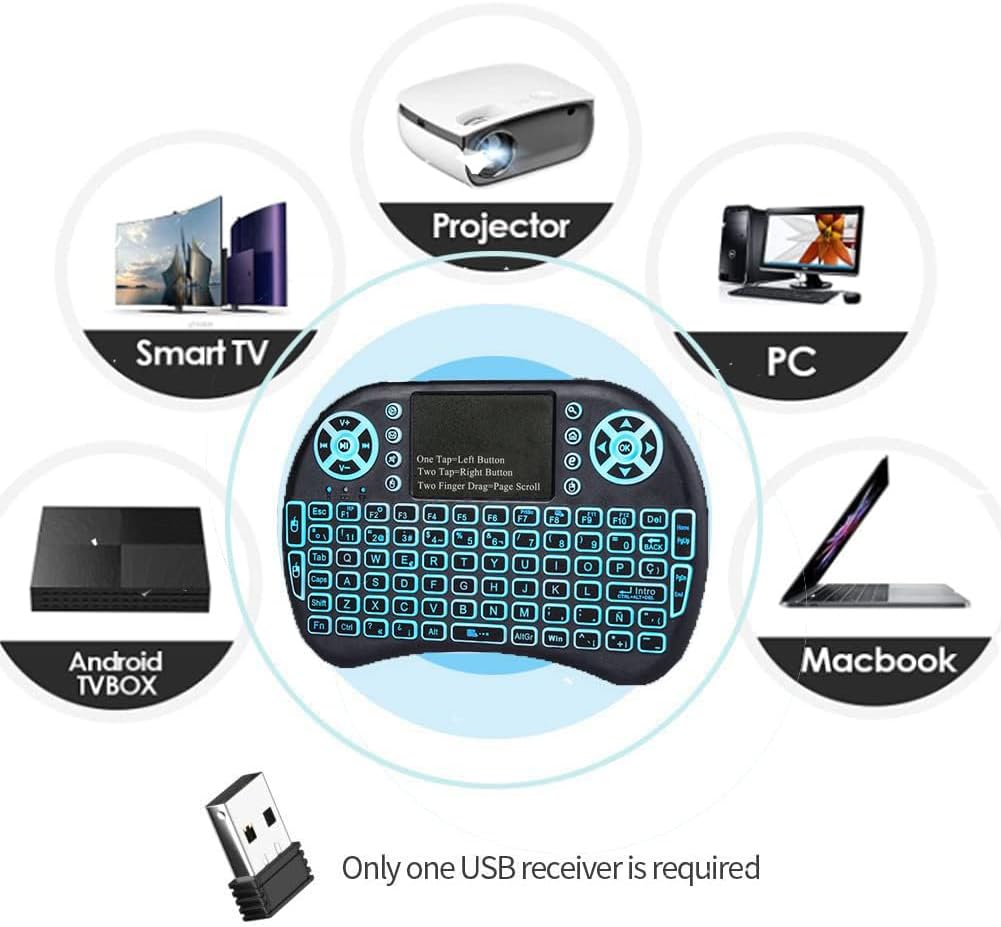
Image: Illustration showing the broad compatibility of the Sidiwen Mini Keyboard with devices such as Smart TVs, Projectors, PCs, Macbooks, and Android TV Boxes.
4. సెటప్ గైడ్
4.1 బ్యాటరీని ఛార్జ్ చేయడం
- Locate the Mini USB Port on the keyboard.
- Connect the provided USB Charging Cable to the keyboard and a USB power source (e.g., computer USB port, USB wall adapter).
- ఛార్జింగ్ ఇండికేటర్ లైట్ వెలుగుతుంది. పూర్తిగా ఛార్జ్ అయిన తర్వాత, లైట్ రంగు మారవచ్చు లేదా ఆపివేయబడవచ్చు.
- A full charge is recommended before first use.
4.2 వైర్లెస్ రిసీవర్ను కనెక్ట్ చేస్తోంది
- Open the battery compartment on the back of the mini keyboard.
- Remove the USB wireless receiver (dongle) stored inside.
- Insert the USB wireless receiver into an available USB port on your target device (e.g., Smart TV, PC, Android TV Box).
- The device should automatically recognize the receiver and install necessary drivers.
4.3 పవర్ చేయడం ఆన్/ఆఫ్
- Locate the ON/OFF switch on the side of the keyboard.
- Slide the switch to the "ON" position to power on the keyboard.
- Slide the switch to the "OFF" position to power off the keyboard when not in use to conserve battery.

చిత్రం: ఎ view of the Sidiwen Mini Keyboard illustrating its compact dimensions and the location of the ON/OFF switch, Mini USB port, and the internal storage for the wireless receiver.
5. ఆపరేటింగ్ సూచనలు
5.1 కీబోర్డ్ వాడకం
The keyboard functions like a standard QWERTY keyboard. Press keys to input characters. Use the "Shift", "Fn", and "AltGr" keys for special characters and functions.
5.2 టచ్ప్యాడ్ వాడకం
- ఎడమ క్లిక్ చేయండి: Tap the touchpad once with a single finger.
- కుడి క్లిక్ చేయండి: Tap the touchpad once with three fingers.
- స్క్రోలింగ్: Drag two fingers up or down on the touchpad.
- Mouse Sensitivity (DPI) Adjustment: Press and hold the "Fn" key, then press the "Space" key repeatedly to cycle through DPI settings.
5.3 బ్యాక్లైట్ నియంత్రణ
- బ్యాక్లైట్ని ఆన్/ఆఫ్ చేయండి: Hold "Fn" and press "F2".
- బ్యాక్లైట్ రంగును మార్చండి: While the backlight is on, long press the "Fn" button, then move two fingers up or down on the touchpad to switch between the 7 available colors.
5.4 మల్టీమీడియా కీలు
The keyboard features dedicated multimedia keys for quick access:
- Email Icon: డిఫాల్ట్ ఇమెయిల్ క్లయింట్ను తెరుస్తుంది.
- Magnifying Glass Icon: Opens search function.
- ఇంటి చిహ్నం: Returns to browser home page.
- Speaker Icon (Mute): ఆడియోను మ్యూట్ చేస్తుంది/అన్మ్యూట్ చేస్తుంది.
- Play/Pause, Next, Previous Track: Standard media controls.
- వాల్యూమ్ అప్/డౌన్: సిస్టమ్ వాల్యూమ్ను సర్దుబాటు చేస్తుంది.
6. నిర్వహణ
- శుభ్రపరచడం: Use a soft, dry cloth to clean the keyboard surface. For stubborn dirt, a slightly damp పరికరంలోకి ద్రవం ప్రవేశించకుండా చూసుకోవడానికి వస్త్రాన్ని ఉపయోగించవచ్చు.
- నిల్వ: కీబోర్డ్ను ప్రత్యక్ష సూర్యకాంతి మరియు తీవ్రమైన ఉష్ణోగ్రతలకు దూరంగా చల్లని, పొడి ప్రదేశంలో నిల్వ చేయండి.
- బ్యాటరీ సంరక్షణ:
- బ్యాటరీ ఆరోగ్యాన్ని కాపాడుకోవడానికి, తరచుగా ఉపయోగించకపోయినా, బ్యాటరీని క్రమం తప్పకుండా ఛార్జ్ చేయండి.
- బ్యాటరీని తరచుగా పూర్తిగా డిశ్చార్జ్ చేయడాన్ని నివారించండి.
- ఎక్కువ కాలం నిల్వ చేస్తే, నిల్వ చేయడానికి ముందు బ్యాటరీని దాదాపు 50% ఛార్జ్ చేయండి.
- USB రిసీవర్: When not in use, store the USB receiver in its designated slot within the battery compartment to prevent loss.
7. ట్రబుల్షూటింగ్
| సమస్య | సాధ్యమైన కారణం | పరిష్కారం |
|---|---|---|
| కీబోర్డ్ స్పందించడం లేదు. | Low battery; Keyboard is off; USB receiver not connected or recognized; Out of range. | Charge the keyboard; Turn on the keyboard; Ensure USB receiver is properly inserted and recognized by the device; Move closer to the receiver (within 10m). |
| Touchpad erratic or unresponsive. | Dirty touchpad surface; Interference; Incorrect DPI setting. | Clean the touchpad surface; Move away from other wireless devices; Adjust DPI setting (Fn + Space). |
| Backlight not working or changing colors. | Backlight off; Low battery; Incorrect key combination. | Press Fn + F2 to turn on/off; Charge the keyboard fully; Ensure correct key combination (Fn + F2 for on/off, long press Fn + two-finger swipe on touchpad for color change). |
| Keys not typing correctly or repeating. | Low battery; Interference; Software issue on host device. | Charge the keyboard; Reduce interference; Restart the host device; Try on another device to isolate the problem. |
| Cannot connect to Amazon Fire TV/Stick. | Requires OTG cable. | Ensure you are using a Micro USB host OTG cable for connection. |
8. స్పెసిఫికేషన్లు
| మోడల్: | SDW-US-I8 |
| బ్రాండ్: | Sidiwen |
| కనెక్టివిటీ: | 2.4 GHz వైర్లెస్ (USB రిసీవర్) |
| ఆపరేషనల్ వాల్యూమ్tage: | 3.3V |
| ఆపరేటింగ్ కరెంట్: | 50mA (on), 1mA (sleep mode) |
| నియంత్రణ దూరం: | 10 మీటర్ వరకు |
| కొలతలు: | Approx. 14.7 x 9.8 x 1.9 cm (5.8 x 3.8 x 0.75 inch) |
| బరువు: | సుమారు 116 గ్రా |
| మెటీరియల్: | Plastic and Silicone (Acrylonitrile Butadiene Styrene) |
| బ్యాటరీ రకం: | Rechargeable Lithium-ion (included) |
| బ్యాక్లైట్ రంగులు: | 7 Colors (RGB) |
| అనుకూల OS: | Android, Linux, Mac OS, Windows |
9. వారంటీ మరియు మద్దతు
For warranty information and technical support, please refer to the seller's policy on the platform where the product was purchased or contact Sidiwen customer service directly. Keep your purchase receipt as proof of purchase.
సంప్రదింపు సమాచారం: Please refer to the official Sidiwen store page on Amazon or the contact details provided with your purchase for the most up-to-date support information.
Link to Sidiwen Store: Sidiwen Official Store
Ask a question about this manual
Ask about setup, troubleshooting, compatibility, parts, safety, or missing instructions. Manuals+ will review the question and use this page’s manual context to help answer it.