
1. పరిచయం మరియు ఓవర్view
The Xiaomi Redmi AirDots TWS Bluetooth Sports Earphones are designed to provide a seamless and high-quality audio experience. Featuring Bluetooth 5.0 technology, these true wireless stereo (TWS) earbuds offer stable connectivity and clear stereo bass audio. Their compact and lightweight design ensures comfortable wear for extended periods, making them ideal for music listening during various activities, including sports, thanks to their waterproof rating.
The package includes the earphones and a charging case, providing convenience and portability.
2. ప్యాకేజీ విషయాలు
ప్యాకేజీని తెరిచినప్పుడు, అన్ని భాగాలు ఉన్నాయని నిర్ధారించుకోండి:
- Xiaomi Redmi AirDots TWS Earphones (Left and Right)
- ఛార్జింగ్ కేసు
- వినియోగదారు మాన్యువల్ (ఈ పత్రం)
- అదనపు ఇయర్ టిప్స్ (వివిధ పరిమాణాలు)


3. సెటప్
3.1. ప్రారంభ ఛార్జింగ్
Before first use, fully charge the earphones and the charging case. The charging time for the earphones is approximately 1.5 hours. Use a standard USB charger (not included) to connect to the micro-USB port on the charging case.
3.2. బ్లూటూత్ పెయిరింగ్
The Redmi AirDots utilize Bluetooth 5.0 for stable and efficient wireless connectivity. Follow these steps to pair your earphones with a device:
- ఇయర్ఫోన్లు పూర్తిగా ఛార్జ్ అయ్యాయని నిర్ధారించుకోండి.
- ఛార్జింగ్ కేస్ నుండి రెండు ఇయర్ఫోన్లను బయటకు తీయండి. అవి స్వయంచాలకంగా పవర్ ఆన్ అవుతాయి మరియు ఒకదానితో ఒకటి జత చేయడానికి ప్రయత్నిస్తాయి.
- మీ పరికరంలో (స్మార్ట్ఫోన్, టాబ్లెట్, మొదలైనవి), బ్లూటూత్ను ప్రారంభించండి.
- కోసం వెతకండి available Bluetooth devices. The earphones should appear as "Redmi AirDots" or "MI AirDots".
- Select the earphones from the list to complete the pairing process.
- Once paired, the earphones will automatically connect to your device when taken out of the case and Bluetooth is enabled on your device.
4. ఆపరేటింగ్ సూచనలు
4.1. ఇయర్ఫోన్లు ధరించడం
The Redmi AirDots are designed for an in-ear fit. Choose the appropriate eartip size for a secure and comfortable fit. Gently insert each earbud into your ear canal and twist slightly to lock it in place. A proper seal is crucial for optimal sound quality and bass response.

4.2. నియంత్రణలు
The earphones feature media control and voice control capabilities. Specific functions are typically managed via a multi-function button on each earbud:
- ప్లే/పాజ్: ఏ ఇయర్బడ్లోనైనా బటన్ను ఒకసారి నొక్కండి.
- సమాధానం/ముగింపు కాల్: ఏ ఇయర్బడ్లోనైనా బటన్ను ఒకసారి నొక్కండి.
- కాల్ని తిరస్కరించండి: ఏ ఇయర్బడ్లోనైనా బటన్ను నొక్కి పట్టుకోండి.
- వాయిస్ అసిస్టెంట్ను సక్రియం చేయండి: Double-press the button on either earbud (e.g., Siri, Google Assistant).
- తదుపరి ట్రాక్: Double-press the button on the right earbud (may vary based on model/firmware).
- మునుపటి ట్రాక్: Double-press the button on the left earbud (may vary based on model/firmware).
Refer to the quick start guide included in your package for precise button functions, as these can sometimes vary slightly between production batches.
5. నిర్వహణ
5.1. శుభ్రపరచడం
Regular cleaning helps maintain sound quality and hygiene. Use a soft, dry, lint-free cloth to wipe the earphones and charging case. For eartips, remove them from the earbuds and clean with a mild soap solution if necessary, then rinse thoroughly and dry completely before reattaching.
5.2. నిల్వ
Always store the earphones in their charging case when not in use to protect them from dust, damage, and to keep them charged. Store in a cool, dry place away from extreme temperatures.
5.3. నీటి నిరోధకత
The Redmi AirDots are rated as waterproof, offering protection against sweat and light splashes. They are not designed for submersion in water. Avoid exposing them to heavy rain or showering with them.
6. ట్రబుల్షూటింగ్
| సమస్య | సాధ్యమైన కారణం | పరిష్కారం |
|---|---|---|
| ఇయర్ఫోన్లు పరికరంతో జత కావడం లేదు. | Bluetooth off, earphones not in pairing mode, interference. | Ensure Bluetooth is on. Place earphones back in case, then remove to re-enter pairing mode. Forget device on your phone and re-pair. |
| ఒక ఇయర్బడ్ మాత్రమే పనిచేస్తోంది. | Earbuds not paired with each other, low battery. | Place both earbuds back in the charging case, close the lid, then open and remove them simultaneously. Ensure both are charged. |
| తక్కువ వాల్యూమ్ లేదా తక్కువ ధ్వని నాణ్యత. | Improper fit, dirty eartips/speakers, device volume low. | Adjust eartips for a secure seal. Clean eartips and speaker mesh. Increase volume on your device. |
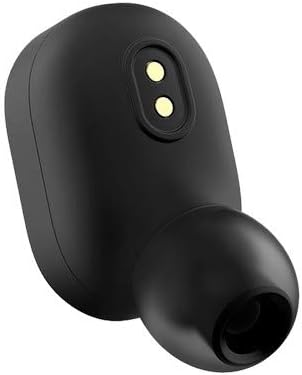
| ఇయర్ఫోన్లు ఛార్జింగ్ కావడం లేదు. | Poor contact with charging pins, faulty cable/charger. | Ensure earbuds are correctly seated in the case. Clean charging contacts on earbuds and case. Try a different charging cable or adapter. |
7. స్పెసిఫికేషన్లు
| ఫీచర్ | వివరాలు |
|---|---|
| బ్రాండ్ | Xiaomi |
| మోడల్ | Redmi Airdots |
| కనెక్టివిటీ టెక్నాలజీ | వైర్లెస్ (బ్లూటూత్ 5.0) |
| చెవి ప్లేస్మెంట్ | చెవిలో |
| ఫారమ్ ఫ్యాక్టర్ | చెవిలో |
| బ్యాటరీ లైఫ్ (ఇయర్బడ్స్) | 4 గంటల వరకు |
| ఛార్జింగ్ సమయం | సుమారు 1.5 గంటలు |
| నియంత్రణ రకం | మీడియా కంట్రోల్, వాయిస్ కంట్రోల్ |
| నీటి నిరోధక స్థాయి | Waterproof (Sweat and splash resistant) |
| ఫ్రీక్వెన్సీ రేంజ్ | 20 హెర్ట్జ్ - 20 కిలోహెర్ట్జ్ |
| మెటీరియల్ | ప్లాస్టిక్ |
| ఉత్పత్తి కొలతలు | 1.57 x 1.18 x 2.36 అంగుళాలు |
| వస్తువు బరువు | 1.23 ఔన్సులు (0.04 కిలోగ్రాములు) |
| నాయిస్ కంట్రోల్ | ఏదీ లేదు |
8. వారంటీ మరియు మద్దతు
వారంటీ సమాచారం మరియు సాంకేతిక మద్దతు కోసం, దయచేసి అధికారిక Xiaomi వెబ్సైట్ను చూడండి. website or contact their customer service directly. Details can typically be found on the product packaging or the official brand store page.
తయారీదారు: షియోమి
మరింత సమాచారం కోసం, సందర్శించండి అమెజాన్లో Xiaomi స్టోర్.