
1. పరిచయం
This manual provides comprehensive instructions for the Calvas R06/BGE infrared remote control, designed for use with Condor air conditioning units. It covers setup, operation, maintenance, and troubleshooting to ensure optimal performance and longevity of your remote control.
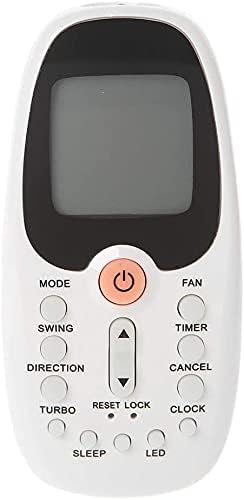
మూర్తి 1: ముందు view of the R06/BGE remote control, showing the display screen and various control buttons.
2. సెటప్
2.1 బ్యాటరీ ఇన్స్టాలేషన్
- రిమోట్ కంట్రోల్ వెనుక బ్యాటరీ కంపార్ట్మెంట్ను గుర్తించండి.
- బ్యాటరీ కవర్ను స్లైడ్తో తెరవండి.
- కంపార్ట్మెంట్ లోపల సూచించిన విధంగా సరైన ధ్రువణత (+ మరియు -) ఉండేలా చూసుకోవడానికి, రెండు AAA బ్యాటరీలను (చేర్చబడలేదు) చొప్పించండి.
- బ్యాటరీ కవర్ను సురక్షితంగా మూసివేయండి.

మూర్తి 2: వెనుకకు view of the remote control, highlighting the battery compartment and product label.
3. ఆపరేటింగ్ సూచనలు
3.1 బటన్ విధులు పూర్తయ్యాయిview
The R06/BGE remote control features a clear digital display and intuitive buttons for controlling your air conditioner. Below is a description of the main buttons:
- POWER (Orange Button): ఎయిర్ కండిషనర్ను ఆన్ లేదా ఆఫ్ చేస్తుంది.
- DIRECTIONS: ఆపరేటింగ్ మోడ్ల ద్వారా చక్రాలు (ఉదా., కూల్, హీట్, ఫ్యాన్, డ్రై, ఆటో).
- అభిమాని: ఫ్యాన్ వేగాన్ని సర్దుబాటు చేస్తుంది (ఉదా., తక్కువ, మధ్యస్థం, అధికం, ఆటో).
- స్వింగ్: ఎయిర్ కండిషనర్ లౌవర్ల నిలువు స్వింగ్ను నియంత్రిస్తుంది.
- దిశ: వాయు ప్రవాహం యొక్క క్షితిజ సమాంతర దిశను సర్దుబాటు చేస్తుంది.
- టైమర్: Sets the timer for automatic ON/OFF operations.
- రద్దు చేయండి: Cancels the currently set timer or other functions.
- టర్బో: త్వరిత ఉష్ణోగ్రత మార్పుల కోసం వేగవంతమైన శీతలీకరణ లేదా తాపనాన్ని సక్రియం చేస్తుంది.
- రీసె: రిమోట్ కంట్రోల్ సెట్టింగ్లను డిఫాల్ట్కు రీసెట్ చేస్తుంది.
- లాక్: ప్రమాదవశాత్తు మార్పులను నివారించడానికి రిమోట్ కంట్రోల్ బటన్లను లాక్ చేస్తుంది.
- గడియారం: రిమోట్ డిస్ప్లేలో ప్రస్తుత సమయాన్ని సెట్ చేస్తుంది.
- నిద్ర: రాత్రిపూట సౌకర్యవంతంగా పనిచేయడానికి స్లీప్ మోడ్ను సక్రియం చేస్తుంది.
- LED: Turns the display backlight or unit's LED indicator ON/OFF.
- ఉష్ణోగ్రత పైకి/క్రిందికి బాణాలు: కావలసిన ఉష్ణోగ్రత సెట్టింగ్ను సర్దుబాటు చేస్తుంది.
3.2 ప్రాథమిక ఆపరేషన్
- ఆన్/ఆఫ్ చేయడం: నారింజ నొక్కండి శక్తి ఎయిర్ కండిషనర్ను ఆన్ లేదా ఆఫ్ చేయడానికి బటన్.
- సర్దుబాటు ఉష్ణోగ్రత: ఉపయోగించండి Up మరియు క్రిందికి arrow buttons to set your desired temperature.
- మారుతున్న మోడ్: నొక్కండి మోడ్ button repeatedly to cycle through available operating modes until the desired mode is displayed.
- ఫ్యాన్ వేగాన్ని సర్దుబాటు చేయడం: నొక్కండి అభిమాని కావలసిన ఫ్యాన్ వేగాన్ని ఎంచుకోవడానికి బటన్.
4. నిర్వహణ
4.1 రిమోట్ కంట్రోల్ క్లీనింగ్
- రిమోట్ కంట్రోల్ యొక్క ఉపరితలాన్ని మృదువైన, పొడి వస్త్రంతో తుడవండి.
- మొండి ధూళికి, కొద్దిగా dampనీరు మరియు తేలికపాటి డిటర్జెంట్తో గుడ్డను తుడిచి, వెంటనే ఆరబెట్టండి.
- Do not use abrasive cleaners, alcohol, or corrosive liquids, as these may damage the remote's surface or internal components.
4.2 బ్యాటరీ భర్తీ
- Replace batteries when the display becomes dim or the remote control's response becomes sluggish.
- ఎల్లప్పుడూ రెండు బ్యాటరీలను ఒకే సమయంలో ఒకే రకమైన (AAA) కొత్త వాటితో భర్తీ చేయండి.
- లీకేజీ మరియు నష్టాన్ని నివారించడానికి రిమోట్ కంట్రోల్ ఎక్కువ కాలం ఉపయోగించబడకపోతే బ్యాటరీలను తీసివేయండి.
5. ట్రబుల్షూటింగ్
If you encounter issues with your remote control, refer to the table below for common problems and their solutions:
| సమస్య | సాధ్యమైన కారణం | పరిష్కారం |
|---|---|---|
| Remote not responding to air conditioner. |
|
|
| డిస్ప్లే మసకగా లేదా ఖాళీగా ఉంది. |
|
|
| బటన్లు స్పందించడం లేదు. |
|
|
6. స్పెసిఫికేషన్లు
Key technical specifications for the Calvas R06/BGE remote control:
| ఫీచర్ | వివరాలు |
|---|---|
| మోడల్ సంఖ్య | R06/BGE |
| బ్రాండ్ | బట్టతల మచ్చలు |
| వైర్లెస్ కమ్యూనికేషన్ | ఇన్ఫ్రారెడ్ (IR) |
| ఫ్రీక్వెన్సీ | 433 MHz |
| అనుకూల పరికరాలు | Condor Air Conditioners |
| గరిష్ట పరిధి | 10 మీటర్లు |
| ప్రత్యేక ఫీచర్ | డిజిటల్ డిస్ప్లే |
| కొలతలు | 11cm (పొడవు) x 5cm (వెడల్పు) x 1.5cm (మందం) |

మూర్తి 3: వైపు view of the remote control, illustrating its approximate dimensions.
7. వారంటీ మరియు మద్దతు
For any product-related inquiries, technical support, or warranty information, please contact the manufacturer, Calvas, or your original point of purchase. Keep your purchase receipt as proof of purchase for any warranty claims.