
1. ముఖ్యమైన భద్రతా సూచనలు
Please read all instructions carefully before using the UNIC UC28+ projector. Keep this manual for future reference.
- విద్యుత్ సరఫరా: Use only the specified power adapter. Ensure the power outlet voltage ప్రొజెక్టర్ అవసరాలకు సరిపోతుంది.
- వెంటిలేషన్: వెంటిలేషన్ ఓపెనింగ్లను బ్లాక్ చేయవద్దు. వేడెక్కకుండా నిరోధించడానికి సరైన గాలి ప్రవాహం కోసం ప్రొజెక్టర్ చుట్టూ తగినంత స్థలం ఉండేలా చూసుకోండి.
- వేడి: ప్రొజెక్టర్ ఎల్amp generates heat. Avoid touching the lens or ventilation areas immediately after use.
- తేమ: Do not expose the projector to rain, moisture, or immerse it in water. Keep liquids away from the device.
- శుభ్రపరచడం: శుభ్రపరిచే ముందు ప్రొజెక్టర్ను అన్ప్లగ్ చేయండి. మృదువైన, పొడి వస్త్రాన్ని ఉపయోగించండి. ద్రవ లేదా ఏరోసోల్ క్లీనర్లను ఉపయోగించవద్దు.
- కంటి భద్రత: l ఉన్నప్పుడు ప్రొజెక్టర్ లెన్స్లోకి నేరుగా చూడకండిamp ఆన్లో ఉంది. ప్రకాశవంతమైన కాంతి కంటికి హాని కలిగించవచ్చు.
- ప్లేస్మెంట్: Place the projector on a stable, flat surface. Avoid placing it in direct sunlight or near heat sources.
- సర్వీసింగ్: ఈ ఉత్పత్తిని మీరే సేవ చేయడానికి ప్రయత్నించవద్దు. అర్హత కలిగిన సేవా సిబ్బందికి అన్ని సర్వీసులను చూడండి.
2. ఉత్పత్తి ముగిసిందిview
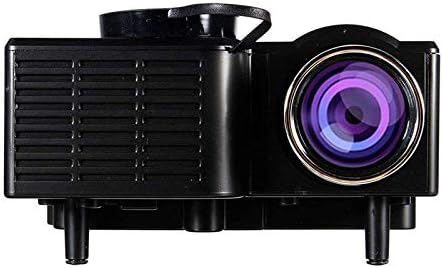
The UNIC UC28+ is a portable LED projector designed for home cinema and entertainment. It supports a native resolution of 1920x1080 and offers multiple input options for versatile connectivity.
2.1 ప్రొజెక్టర్ భాగాలు

చిత్రం 1: టాప్ view of the UNIC UC28+ projector. This image displays the manual control buttons located on the top panel, including 'ENTER', navigation arrows, 'INPUT' for source selection, and 'ESC' for exiting menus. The focus ring is also visible at the front.

చిత్రం 2: ముందు మరియు వైపు view of the UNIC UC28+ projector. This image highlights the main projection lens and the ventilation grilles on the side, essential for heat dissipation during operation.
చిత్రం 3: వైపు view of the UNIC UC28+ projector. This image clearly shows the various input ports available: HDMI, USB, AV, SD card slot, and VGA, providing multiple options for connecting external devices.
3. సెటప్
3.1 ప్యాకేజీ విషయాలు
- UNIC UC28+ LED Projector
- పవర్ అడాప్టర్
- రిమోట్ కంట్రోల్
- AV కేబుల్
- వినియోగదారు మాన్యువల్
3.2 ప్రొజెక్టర్ ప్లేస్మెంట్
Position the projector on a stable, flat surface. Ensure the projection surface (screen or wall) is clean and smooth. The optimal projection distance will vary based on desired screen size. Adjust the projector's angle to achieve a rectangular image.
3.3 పవర్ కనెక్షన్
- పవర్ అడాప్టర్ను ప్రొజెక్టర్ పవర్ ఇన్పుట్ పోర్ట్కు కనెక్ట్ చేయండి.
- పవర్ అడాప్టర్ను తగిన ఎలక్ట్రికల్ అవుట్లెట్లోకి ప్లగ్ చేయండి.
- ప్రొజెక్టర్లోని పవర్ ఇండికేటర్ లైట్ వెలుగుతుంది.
3.4 ఇన్పుట్ పరికరాలను కనెక్ట్ చేయడం
The UC28+ supports various input sources:
- HDMI: Connect a device (e.g., laptop, Blu-ray player, gaming console) using an HDMI cable to the HDMI port.
- USB: మీడియాను ప్లే చేయడానికి USB పోర్ట్లోకి USB ఫ్లాష్ డ్రైవ్ను చొప్పించండి. fileనేరుగా లు.
- యొక్క: Use the provided AV cable to connect older devices (e.g., DVD player, VCR) to the AV port.
- SD కార్డ్: మీడియాను ప్లే చేయడానికి SD కార్డ్ స్లాట్లో SD కార్డ్ను చొప్పించండి. files.
- వీజీఏ: Connect a computer or laptop using a VGA cable to the VGA port.

చిత్రం 4: Connectivity diagram for the UNIC UC28+ projector. This illustration demonstrates how various external devices such as computers, gaming consoles, smartphones, and media players can be connected to the projector using its multiple input options.
3.5 ఫోకస్ సర్దుబాటు
After powering on and selecting an input source, rotate the focus ring located around the lens until the projected image appears clear and sharp.
4. ఆపరేటింగ్ సూచనలు
4.1 పవర్ చేయడం ఆన్/ఆఫ్
- పవర్ ఆన్: Press the power button on the projector or the remote control. The projector will start up, and the lamp ప్రకాశిస్తుంది.
- పవర్ ఆఫ్: Press the power button again. The projector will initiate a shutdown sequence. Allow the projector to cool down completely before unplugging or moving it.
4.2 ఇన్పుట్ సోర్స్ ఎంపిక
Press the 'INPUT' button on the projector or remote control to cycle through available input sources (HDMI, USB, AV, SD, VGA). Select the source corresponding to your connected device.
4.3 మెనూ నావిగేషన్
Use the navigation arrows on the projector or remote control to move through menu options. Press 'ENTER' to confirm a selection and 'ESC' to go back or exit the menu.
4.4 ప్రాథమిక సెట్టింగ్లు
- చిత్ర మోడ్: Adjust brightness, contrast, color, and sharpness.
- కారక నిష్పత్తి: Select between 16:9, 4:3, or Auto to match your content.
- ధ్వని: Adjust volume or mute the audio output.
5. నిర్వహణ
క్రమం తప్పకుండా నిర్వహణ సరైన పనితీరును నిర్ధారిస్తుంది మరియు మీ ప్రొజెక్టర్ జీవితకాలం పొడిగిస్తుంది.
- లెన్స్ క్లీనింగ్: Use a soft, lint-free cloth or lens cleaning paper to gently wipe the lens. Avoid abrasive materials or excessive pressure.
- ప్రొజెక్టర్ బాడీ క్లీనింగ్: Wipe the exterior of the projector with a soft, dry cloth. Do not use harsh chemicals or solvents.
- వెంటిలేషన్: గాలి ప్రవాహానికి ఆటంకం కలిగించే మరియు వేడెక్కడానికి కారణమయ్యే దుమ్ము పేరుకుపోకుండా ఉండటానికి వెంటిలేషన్ గ్రిల్స్ను క్రమానుగతంగా తనిఖీ చేసి శుభ్రం చేయండి. మృదువైన బ్రష్ లేదా కంప్రెస్డ్ ఎయిర్ను ఉపయోగించండి.
- నిల్వ: When not in use for extended periods, store the projector in a cool, dry, dust-free environment. Use the original packaging or a protective case.
6. ట్రబుల్షూటింగ్
మీ ప్రొజెక్టర్తో మీకు సమస్యలు ఎదురైతే, ఈ క్రింది సాధారణ సమస్యలు మరియు పరిష్కారాలను చూడండి:
| సమస్య | సాధ్యమైన కారణం | పరిష్కారం |
|---|---|---|
| పవర్ లేదు | పవర్ కేబుల్ డిస్కనెక్ట్ చేయబడింది, పవర్ అవుట్లెట్ సమస్య ఉంది | పవర్ కేబుల్ కనెక్షన్ను తనిఖీ చేయండి. వేరే పవర్ అవుట్లెట్ను ప్రయత్నించండి. |
| చిత్రం లేదు | Incorrect input source, cable not connected, device not powered on | Select correct input source. Ensure all cables are securely connected. Power on the source device. |
| అస్పష్టమైన చిత్రం | Focus not adjusted, incorrect projection distance | Adjust the focus ring. Reposition the projector for optimal distance. |
| సౌండ్ లేదు | Volume too low, audio cable disconnected, source device muted | Increase projector volume. Check audio cable connections. Unmute source device. |
| వేడెక్కడం హెచ్చరిక | Blocked ventilation, prolonged use | Ensure ventilation openings are clear. Allow the projector to cool down. |
7. స్పెసిఫికేషన్లు
| ఫీచర్ | వివరాలు |
|---|---|
| బ్రాండ్ | యూనిక్ |
| మోడల్ సంఖ్య | UC28+ |
| ప్రదర్శన రకం | LED |
| స్థానిక రిజల్యూషన్ | 1920 x 1080 పిక్సెల్లు |
| గరిష్ట డిస్ప్లే రిజల్యూషన్ | 1920 x 1080 పిక్సెల్లు |
| ప్రకాశం | 400 ల్యూమెన్స్ |
| కనెక్టివిటీ టెక్నాలజీ | HDMI, USB, AV, SD, VGA |
| ఫారమ్ ఫ్యాక్టర్ | పోర్టబుల్ |
| మౌంటు రకం | టాబ్లెట్ మౌంట్ |
| విద్యుత్ వినియోగం | 70 వాట్స్ |
8. వారంటీ మరియు మద్దతు
For warranty information or technical support, please refer to the warranty card included with your product or contact the retailer where the product was purchased. Keep your proof of purchase for warranty claims.