
Jectse Jectseh4tnewb30y-03
Jectse Timer Soft Starter Instruction Manual
Model: Jectseh4tnewb30y-03
1. ఉత్పత్తి ముగిసిందిview
The Jectse Timer Soft Starter is a versatile delay relay motor starter designed for efficient motor start control. It features adjustable delay ranges and wide working voltage compatibility, making it suitable for various industrial and scientific applications.

మూర్తి 1: ముందు view of the Jectse Timer Soft Starter, showing the control knobs and indicator lights.
2 కీ ఫీచర్లు
- Adjustable Start Delay (T1): Range from 0.1 seconds to 10 minutes, set via knob.
- Adjustable Conversion Time (T2): Range from 0.1 seconds to 1 second, set via knob.
- వైడ్ వర్కింగ్ వాల్యూమ్tage: Supports AC/DC 12V to 240V.
- LED సూచికలు: Clearly shows the working status of the relay.
- కాంపాక్ట్ డిజైన్: Super small size, only 18mm wide, designed for 35mm rail mounting.

Figure 2: The soft starter unit highlighting its compact size and adjustable settings.
3. భద్రతా సమాచారం
Please read and understand all safety instructions before installing or operating this device. Failure to follow these instructions may result in electrical shock, fire, or serious injury.
- ఏదైనా ఇన్స్టాలేషన్ లేదా వైరింగ్ చేసే ముందు విద్యుత్తు డిస్కనెక్ట్ చేయబడిందని నిర్ధారించుకోండి.
- ఇన్స్టాలేషన్ను అర్హత కలిగిన సిబ్బంది మాత్రమే నిర్వహించాలి.
- సరైన సంపుటాన్ని ధృవీకరించండిtagవిద్యుత్ వనరుకు కనెక్ట్ చేయడానికి ముందు e మరియు కరెంట్ రేటింగ్లు.
- పరికరాన్ని తేమ లేదా తీవ్రమైన ఉష్ణోగ్రతలకు బహిర్గతం చేయవద్దు.
- అవసరమైన చోట సరైన గ్రౌండింగ్ ఉండేలా చూసుకోండి.
4. ప్యాకేజీ విషయాలు
ప్యాకేజీ వీటిని కలిగి ఉంటుంది:
- 1 x Jectse Timer Soft Starter
5. సెటప్ మరియు ఇన్స్టాలేషన్
The Jectse Timer Soft Starter is designed for 35mm DIN rail mounting. Follow these steps for proper installation:
- Ensure all power to the circuit is turned off at the main breaker.
- Mount the soft starter securely onto a standard 35mm DIN rail. The red clips on the side facilitate easy mounting and removal.
- Connect the power supply to terminals A1 and A2. The device supports AC/DC 12-240V.
- Connect the motor control wiring to the output terminals (15, 16, 18, 25, 26, 28) as per your application's wiring diagram. Refer to the diagram on the side of the unit for specific connections.
- Ensure all wiring connections are secure and meet the specified wiring capacity (1x2.5mm² or 2x 1.5mm²).
- శక్తిని పునరుద్ధరించడానికి ముందు అన్ని కనెక్షన్లను రెండుసార్లు తనిఖీ చేయండి.
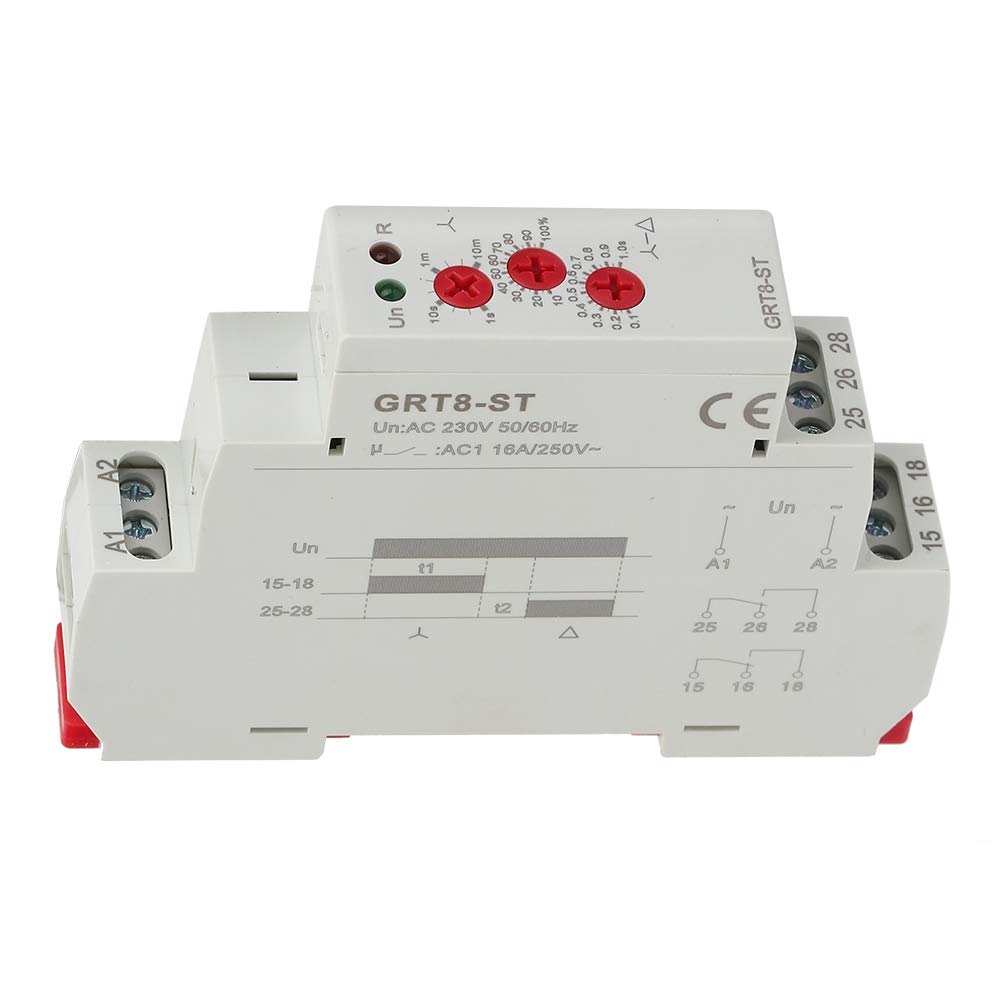
మూర్తి 3: క్లోజ్-అప్ view of the wiring terminals and the integrated wiring diagram on the unit.

మూర్తి 4: వైపు view illustrating the red clips for DIN rail mounting.
6. ఆపరేటింగ్ సూచనలు
Once installed and powered, the Timer Soft Starter operates based on its configured delay settings.
- Setting Start Delay (T1): Use the knob labeled 'T1' to adjust the initial start delay from 0.1 seconds to 10 minutes. This delay determines how long the soft starter waits before initiating the motor start sequence.
- Setting Conversion Time (T2): Use the knob labeled 'T2' to set the conversion time from 0.1 seconds to 1 second. This time is crucial for the smooth transition during the motor's soft start phase.
- LED సూచికలు:
- A green LED indicates the power status (Un).
- A red LED indicates the relay's working status (R).
వీడియో 1: ఒక ఓవర్view of the Jectse Timer Soft Starter, demonstrating its features and appearance.
7. నిర్వహణ
The Jectse Timer Soft Starter is designed for long-term reliability with minimal maintenance. However, regular checks can ensure optimal performance:
- వైరింగ్ కనెక్షన్లను బిగుతుగా ఉన్నాయా మరియు అరిగిపోయిన లేదా తుప్పు పట్టిన సంకేతాల కోసం కాలానుగుణంగా తనిఖీ చేయండి.
- యూనిట్ను శుభ్రంగా మరియు దుమ్ము మరియు చెత్త లేకుండా ఉంచండి. శుభ్రం చేయడానికి పొడి, మృదువైన గుడ్డను ఉపయోగించండి.
- ఆపరేటింగ్ వాతావరణం పేర్కొన్న ఉష్ణోగ్రత మరియు తేమ పరిధిలో ఉండేలా చూసుకోండి.
- యూనిట్ను మీరే తెరవడానికి లేదా మరమ్మతు చేయడానికి ప్రయత్నించవద్దు. అర్హత కలిగిన సేవా సిబ్బందిని సంప్రదించండి.
8. ట్రబుల్షూటింగ్
If you encounter issues with your Timer Soft Starter, consider the following common problems and solutions:
| సమస్య | సాధ్యమైన కారణం | పరిష్కారం |
|---|---|---|
| Unit not powering on (Green LED off) | No power supply; Incorrect wiring; Faulty unit. | Check power source; Verify A1/A2 wiring; Contact support if power is present and wired correctly. |
| Motor not starting after delay | Incorrect output wiring; Relay not activating; Motor issue. | Check output terminals (15, 16, 18, 25, 26, 28) connections; Observe red LED for relay status; Test motor independently. |
| Delay times are inaccurate | Knob settings incorrect; Environmental factors. | Re-adjust T1 and T2 knobs carefully; Ensure stable operating environment. |
If the problem persists after attempting these solutions, please contact Jectse customer support.
9. స్పెసిఫికేషన్లు
| పరామితి | విలువ |
|---|---|
| టైప్ చేయండి | AC/DC 12V~240V |
| Rated Control Power Supply Voltage | AC/DC 12-240V (50/60Hz) |
| విద్యుత్ వినియోగం | AC 0.7-3VA / DC 0.5-1.7W |
| Starting Delay (T1) | 0.1s - 10min |
| Conversion Delay (T2) | 0.1సె - 1సె |
| అమరిక ఖచ్చితత్వం | 5% |
| రిపీట్ ఖచ్చితత్వం | 0.2% |
| అవుట్పుట్ | Two sets of conversion contacts 16A/AC250VAC |
| Minimum Switching Power | 500మె.వా |
| మెకానికల్ లైఫ్ | 1 x 10,000,000 cycles |
| Electrical Life (Load) | 1,000,000 చక్రాలు |
| సమయాన్ని రీసెట్ చేయండి | గరిష్టంగా 200మి.సి |
| పని పర్యావరణ ఉష్ణోగ్రత | -20°C ~ 55°C |
| నిల్వ మరియు రవాణా ఉష్ణోగ్రత | -35°C ~ 75°C |
| సంస్థాపన | 35mm రైలు మౌంటు |
| రక్షణ స్థాయి | IP20 |
| సంస్థాపనా ఎత్తు | 2000 మీటర్లు |
| కాలుష్య స్థాయి | 2 |
| వైరింగ్ కెపాసిటీ | 1x2.5mm² or 2x 1.5mm² |
| కొలతలు | 90 x 18 x 64mm (3.5 x 0.7 x 2.5in) |
| ప్రమాణానికి అనుగుణంగా | GB14048.5.IEC/EN 60255-1 |
| బరువు | సుమారు. 96 గ్రా (3.4oz) |
10. వారంటీ మరియు మద్దతు
For warranty information or technical support, please contact Jectse customer service. Keep your purchase receipt for any warranty claims.
తయారీదారు: జెక్ట్సే
మోడల్ సంఖ్య: Jectseh4tnewb30y-03
మొదటి తేదీ అందుబాటులో ఉంది: మే 4, 2019
Ask a question about this manual
Ask about setup, troubleshooting, compatibility, parts, safety, or missing instructions. Manuals+ will review the question and use this page’s manual context to help answer it.