
ఉత్పత్తి ముగిసిందిview
This document provides instructions for the Easytry123 Replacement Remote Control, model RAV325, designed for various Yamaha AV receivers. This remote is a replacement unit and may not offer all functions identical to your original remote. Please verify button layout for compatibility.
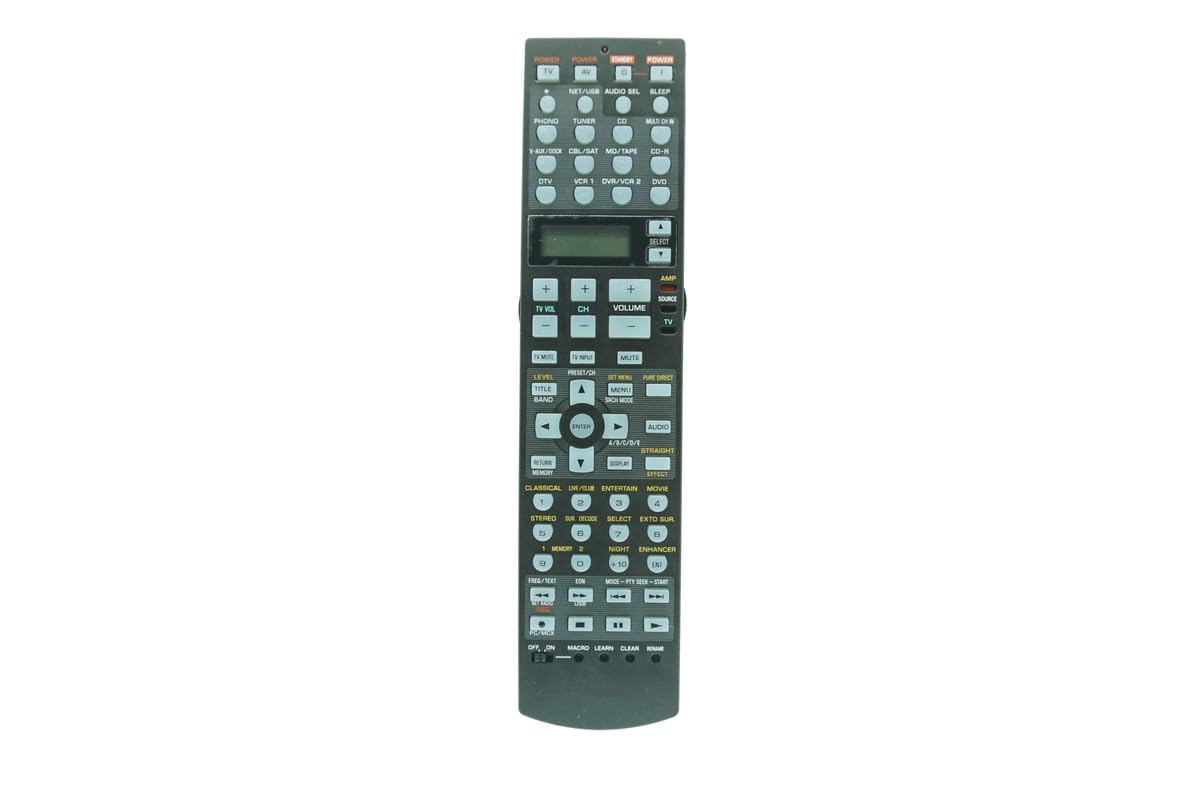
చిత్రం: ముందు భాగం view of the Easytry123 RAV325 replacement remote control. It features a black body with various control buttons for audio/video functions, including power, input selection, volume, and navigation.
అనుకూల నమూనాలు
This replacement remote control is compatible with a range of Yamaha AV receiver models. While the specific model of this remote is RAV325, it is designed to replace and function with the following Yamaha remote models:
- RAV250
- WC552800
- HTR-5740
- HTR-5750
- RX-V450
- DSPAX450
- HTR-5740B
- HTR-5740S
- HTR-5750S
- RAV272
- RAV273
- RAV353
- RAV352
- RAV323
- RAV361
- RAV362
- RAV358
- RAV359
- RAV363 (or other compatible part numbers)
Before use, compare the button layout of this remote with your original remote to ensure all desired functions are present.
సెటప్
బ్యాటరీ సంస్థాపన
The remote control requires two (2) AA batteries (not included). Follow these steps to install the batteries:
- రిమోట్ కంట్రోల్ వెనుక బ్యాటరీ కంపార్ట్మెంట్ కవర్ను గుర్తించండి.
- Press down on the latch and slide the cover downwards to open the compartment.
- రెండు AA బ్యాటరీలను చొప్పించండి, పాజిటివ్ (+) మరియు నెగటివ్ (-) టెర్మినల్స్ కంపార్ట్మెంట్ లోపల ఉన్న గుర్తులతో సరిగ్గా సమలేఖనం చేయబడ్డాయని నిర్ధారించుకోండి.
- బ్యాటరీ కంపార్ట్మెంట్ కవర్ సురక్షితంగా క్లిక్ అయ్యే వరకు దాన్ని తిరిగి స్థానంలోకి స్లైడ్ చేయండి.
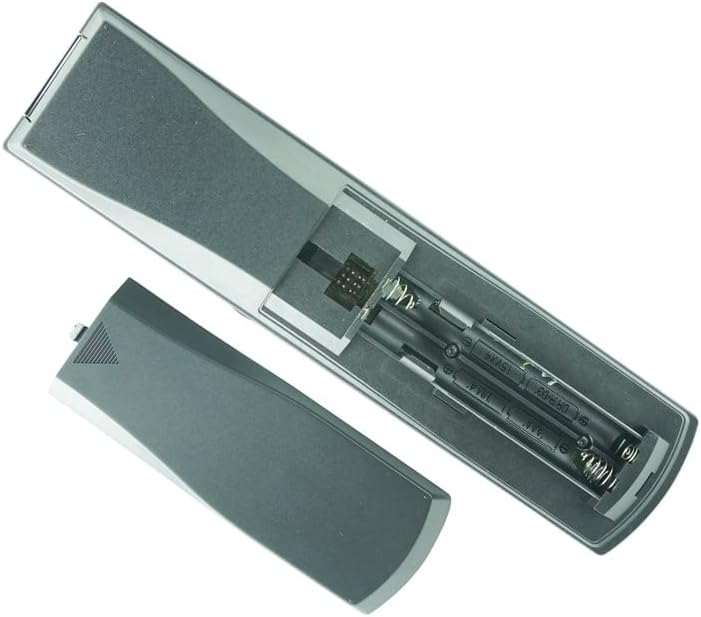
Image: Back of the remote control with the battery cover removed, revealing the battery slots. Two AA batteries are shown correctly inserted.
గమనిక:
- పాత మరియు కొత్త బ్యాటరీలను కలపవద్దు.
- ఆల్కలీన్, స్టాండర్డ్ (కార్బన్-జింక్) లేదా రీఛార్జ్ చేయగల (నికెల్-కాడ్మియం) బ్యాటరీలను కలపవద్దు.
- రిమోట్ కంట్రోల్ ఎక్కువ కాలం ఉపయోగించబడకపోతే బ్యాటరీలను తీసివేయండి.
ఆపరేటింగ్ సూచనలు
This remote control is designed to function immediately upon battery installation for compatible Yamaha AV receivers. No programming is typically required for basic functions.
ప్రాథమిక విధులు
- శక్తి: నొక్కండి శక్తి button to turn the AV receiver on or off.
- ఇన్పుట్ ఎంపిక: Use the input buttons (e.g., CD, DVD, ట్యూనర్) to select the desired audio/video source.
- వాల్యూమ్ నియంత్రణ: ఉపయోగించండి వాల్యూమ్ + మరియు వాల్యూమ్ - ధ్వని స్థాయిని సర్దుబాటు చేయడానికి బటన్లు.
- మ్యూట్: నొక్కండి మ్యూట్ button to temporarily silence the audio. Press again to restore sound.
- నావిగేషన్: దిశాత్మక బాణం బటన్లను ఉపయోగించండి (UP, డౌన్, ఎడమ, కుడి) మరియు నమోదు చేయండి మెనూ నావిగేషన్ కోసం బటన్.
Advanced Functions (if applicable)
Some advanced functions, such as programming or specific receiver settings, may require referring to your Yamaha AV receiver's original manual for detailed instructions, as this replacement remote's functionality may vary slightly from the original.
Video: Demonstration of a similar Yamaha AV receiver remote control. This video illustrates the physical appearance and basic handling of the remote, including button presses and battery compartment access. While the video shows a RAV315 model, the general operation and battery installation steps are similar for the RAV325.
నిర్వహణ
- శుభ్రపరచడం: రిమోట్ కంట్రోల్ శుభ్రం చేయడానికి మృదువైన, పొడి వస్త్రాన్ని ఉపయోగించండి. ద్రవ క్లీనర్లు లేదా రాపిడి పదార్థాలను ఉపయోగించవద్దు.
- నిల్వ: రిమోట్ కంట్రోల్ను ప్రత్యక్ష సూర్యకాంతి మరియు తీవ్రమైన ఉష్ణోగ్రతల నుండి దూరంగా చల్లని, పొడి ప్రదేశంలో నిల్వ చేయండి.
- బ్యాటరీ భర్తీ: Replace batteries when the remote's response becomes inconsistent or stops working.
ట్రబుల్షూటింగ్
| సమస్య | సాధ్యమైన కారణం | పరిష్కారం |
|---|---|---|
| రిమోట్ స్పందించడం లేదు | Dead or incorrectly installed batteries. Obstruction between remote and receiver. Remote out of range. | Replace batteries, ensuring correct polarity. Remove any obstructions. Move closer to the receiver. |
| కొన్ని విధులు పనిచేయడం లేదు | Remote is a replacement and may not have all original functions. Incorrect mode selected on receiver. | Refer to your AV receiver's manual for specific function compatibility. Ensure the receiver is in the correct operating mode. |
| Remote LED not lighting up | Batteries are completely dead or remote is faulty. | బ్యాటరీలను మార్చండి. సమస్య కొనసాగితే, కస్టమర్ సపోర్ట్ను సంప్రదించండి. |
స్పెసిఫికేషన్లు
- మోడల్ సంఖ్య: RAV325
- బ్రాండ్: ఈజీట్రీ123
- మెటీరియల్: ABS ప్లాస్టిక్
- శక్తి మూలం: 2 x AA బ్యాటరీలు (చేర్చబడలేదు)
- రంగు: నలుపు
- మద్దతు ఉన్న పరికరాల గరిష్ట సంఖ్య: 1 (for direct control of the specified Yamaha AV receiver)
వారంటీ మరియు మద్దతు
For warranty information or technical support, please refer to the seller's policies or contact the seller directly through the platform where the product was purchased. This manual does not include specific warranty details as they may vary.