
1. పరిచయం
Thank you for choosing the Wendry Ergonomic Vertical USB Wired Mouse. This manual provides essential information for setting up, operating, and maintaining your new mouse. Designed for left-handed users, this vertical mouse promotes a natural hand and wrist posture, aiming to reduce strain and discomfort during extended computer use. Its ergonomic design, adjustable DPI settings, and programmable buttons enhance productivity and comfort for various tasks, including office work, graphic design, and gaming.
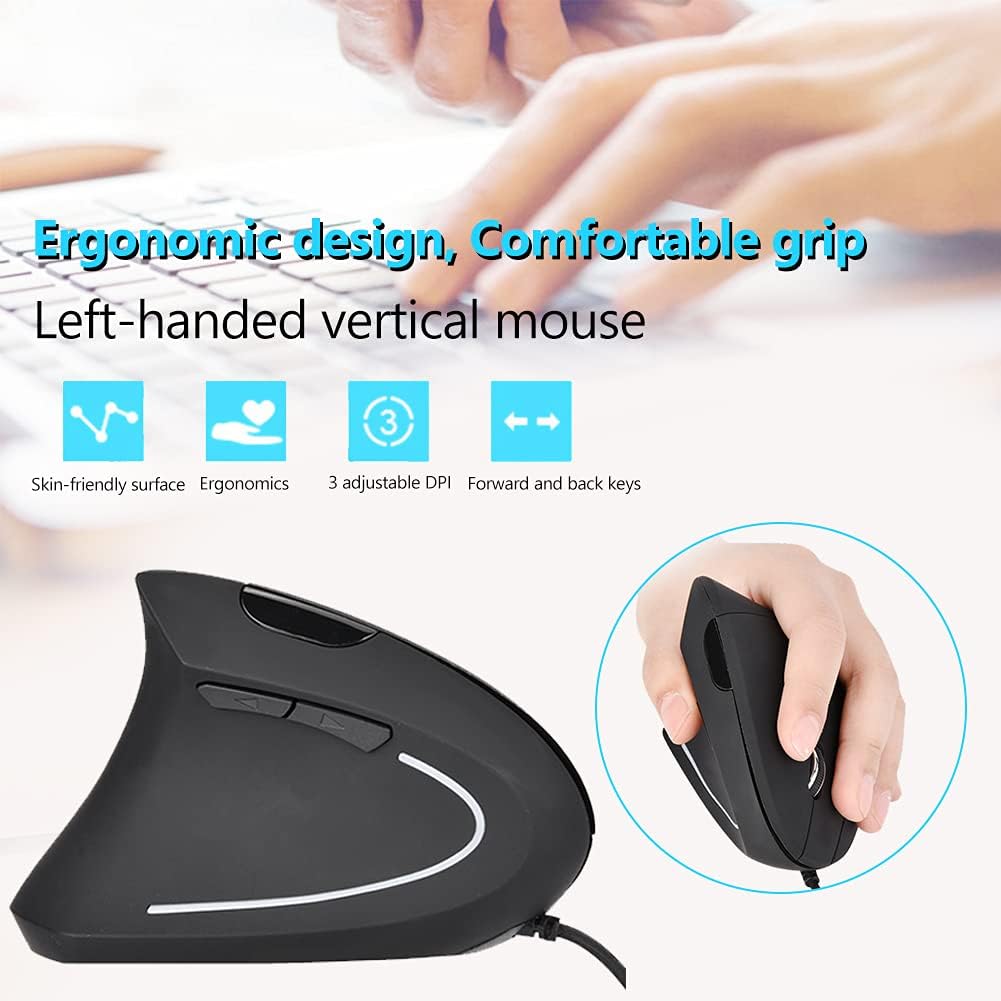
Image 1: The Wendry Ergonomic Vertical USB Wired Mouse, showcasing its design features including a skin-friendly surface, ergonomic shape, 3 adjustable DPI settings, and dedicated forward/back keys.
2. ఉత్పత్తి ముగిసిందిview
The Wendry Ergonomic Vertical USB Wired Mouse is engineered to provide a comfortable and efficient user experience. Key features include:
- ఎర్గోనామిక్ డిజైన్: Vertical orientation to relieve wrist tension through comfortable thumb and pinky support, and contoured palm support.
- Left-Handed Specific: Tailored for left-handers to align with palm and wrist muscles.
- సర్దుబాటు చేయగల DPI: Three levels of DPI settings (800/1200/1600) for precise cursor control.
- 6 ప్రోగ్రామబుల్ బటన్లు: Customize functions for enhanced workflow.
- Web Switch Keys: Dedicated forward and back buttons for easy web పేజీ నావిగేషన్.
- Optical Tracking Technology: Premium optical engine for quicker response, smoother tracking, and higher precision.
- విస్తృత అనుకూలత: Supports most operating systems including Windows 2000, 7, 8, 98, Vista, ME, and OS.
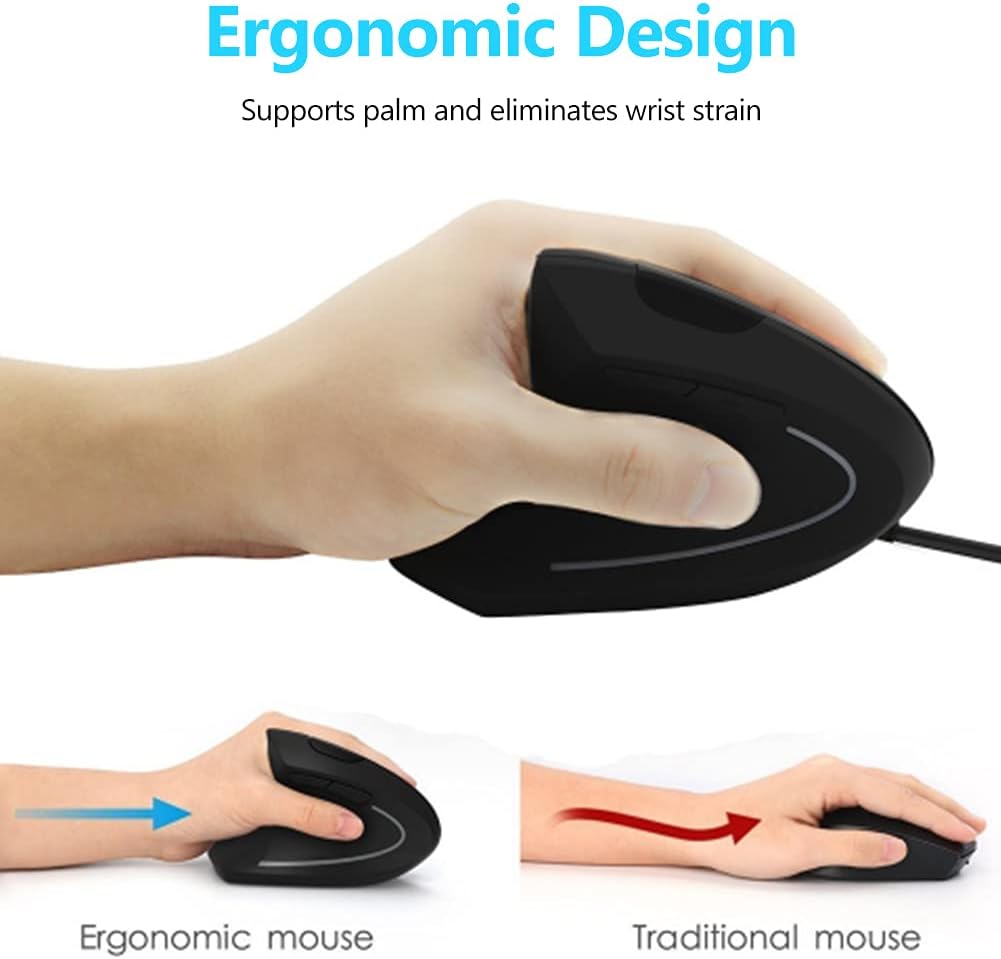
Image 2: A visual comparison demonstrating the ergonomic advantage of the vertical mouse, showing how it supports the palm and reduces wrist strain compared to a traditional horizontal mouse.
3. సెటప్ సూచనలు
Setting up your Wendry Ergonomic Vertical USB Wired Mouse is a simple plug-and-play process:
- USB కేబుల్ను కనెక్ట్ చేయండి: Locate an available USB port on your computer (laptop, desktop, notebook, PC, etc.).
- Insert the USB connector of the mouse firmly into the USB port.
- డ్రైవర్ ఇన్స్టాలేషన్: The mouse is plug-and-play and typically does not require any additional driver installation. Your operating system should automatically detect and configure the device.
- ఉపయోగం కోసం సిద్ధంగా ఉంది: కనెక్ట్ అయిన తర్వాత, మౌస్ తక్షణ వినియోగానికి సిద్ధంగా ఉంటుంది.

చిత్రం 3: వివరణాత్మక view of the USB connector, which is used to connect the mouse to your computer.
4. ఆపరేటింగ్ సూచనలు
Familiarize yourself with the various buttons and functions of your vertical mouse for optimal control:
- ఎడమ బటన్: ప్రామాణిక ఎడమ-క్లిక్ ఫంక్షన్.
- కుడి బటన్: ప్రామాణిక కుడి-క్లిక్ ఫంక్షన్.
- స్క్రోల్ వీల్: పత్రాల ద్వారా పైకి లేదా క్రిందికి స్క్రోల్ చేయండి మరియు web పేజీలు. మిడిల్-క్లిక్ కార్యాచరణ కోసం కూడా క్లిక్ చేయవచ్చు.
- DPI బటన్: Located on the top of the mouse, press this button to cycle through the 3 adjustable DPI settings (800/1200/1600). This allows you to adjust cursor sensitivity to your preference.
- ముందుకు/వెనుకకు బటన్లు: Located on the side, these buttons allow for quick navigation between web pages or folders (e.g., going back or forward in your browser history).

Image 4: An illustration detailing the location and labels of the six programmable buttons on the vertical mouse, including the DPI button, left/right click, scroll wheel, and forward/backward buttons.

Image 5: A visual guide to using the forward and back buttons, highlighting their convenience for navigating web పేజీలు మరియు files with a single click.
అధికారిక ఉత్పత్తి వీడియో
Video 1: An official product video from Wendryer demonstrating the Ergonomic Vertical USB Wired Mouse in use, highlighting its design and functionality.
5. నిర్వహణ
To ensure the longevity and optimal performance of your mouse, follow these simple maintenance tips:
- శుభ్రపరచడం: మౌస్ ఉపరితలాన్ని తుడవడానికి మృదువైన, పొడి వస్త్రాన్ని ఉపయోగించండి. మొండి ధూళి కోసం, కొద్దిగా dampen గుడ్డను నీటితో లేదా తేలికపాటి శుభ్రపరిచే ద్రావణంతో తుడవండి. కఠినమైన రసాయనాలు లేదా రాపిడి పదార్థాలను నివారించండి.
- ఆప్టికల్ సెన్సార్: Periodically check the optical sensor on the underside of the mouse for dust or debris. Use a cotton swab or compressed air to gently clean it.
- కేబుల్ కేర్: Avoid sharply bending or pulling the USB cable to prevent damage. Store the cable neatly when not in use.
6. ట్రబుల్షూటింగ్
If you encounter any issues with your mouse, refer to the following troubleshooting steps:
- మౌస్ స్పందించడం లేదు:
- మీ కంప్యూటర్లోని పనిచేసే USB పోర్ట్లోకి USB కేబుల్ సురక్షితంగా ప్లగ్ చేయబడిందని నిర్ధారించుకోండి.
- మౌస్ని వేరే USB పోర్ట్లోకి ప్లగ్ చేసి ప్రయత్నించండి.
- మీ కంప్యూటర్ని పునఃప్రారంభించండి.
- Inaccurate or Jerky Cursor Movement:
- మౌస్ కింద ఉన్న ఆప్టికల్ సెన్సార్ను శుభ్రం చేయండి.
- మీరు మౌస్ను తగిన ఉపరితలంపై ఉపయోగిస్తున్నారని నిర్ధారించుకోండి (ఉదా., మౌస్ ప్యాడ్ లేదా ప్రతిబింబించని, ఏకరీతి ఉపరితలం).
- Adjust the DPI setting using the DPI button to see if a different sensitivity improves performance.
- పనిచేయని బటన్లు:
- మౌస్ సరిగ్గా కనెక్ట్ చేయబడిందని నిర్ధారించుకోండి.
- సమస్య మౌస్తోనా లేదా కంప్యూటర్ సెట్టింగ్లతోనా అని తెలుసుకోవడానికి మరొక కంప్యూటర్లో మౌస్ను పరీక్షించండి.
7. స్పెసిఫికేషన్లు
Detailed specifications for your Wendry Ergonomic Vertical USB Wired Mouse:
| ఫీచర్ | స్పెసిఫికేషన్ |
|---|---|
| ఉత్పత్తి కొలతలు | 4.92 x 2.95 x 2.44 అంగుళాలు |
| వస్తువు బరువు | 4.9 ఔన్సులు |
| అంశం మోడల్ సంఖ్య | Wendrymcb5iqnw3g |
| కనెక్టివిటీ టెక్నాలజీ | USB, వైర్డ్ |
| ప్రత్యేక ఫీచర్ | ఎర్గోనామిక్ డిజైన్ |
| మూవ్మెంట్ డిటెక్షన్ టెక్నాలజీ | ఆప్టికల్ |
| సర్దుబాటు చేయగల DPI స్థాయిలు | 800/1200/1600 |
| బటన్ల సంఖ్య | 6 |
| రంగు | నలుపు |
| తయారీదారు | Wendry |
| మొదట అందుబాటులో ఉన్న తేదీ | మే 28, 2019 |
8. వారంటీ మరియు మద్దతు
For any product inquiries, technical assistance, or warranty claims, please contact Wendry customer support through the retailer's platform or the official brand webసైట్. వారంటీ ధ్రువీకరణ కోసం దయచేసి మీ కొనుగోలు రుజువును ఉంచుకోండి.