
1. పరిచయం
ఈ మాన్యువల్ మీ Lenovo ThinkPad E495 ల్యాప్టాప్ను సెటప్ చేయడం, ఆపరేట్ చేయడం, నిర్వహించడం మరియు ట్రబుల్షూటింగ్ కోసం అవసరమైన సమాచారాన్ని అందిస్తుంది. సరైన ఉపయోగాన్ని నిర్ధారించుకోవడానికి మరియు మీ పరికరం యొక్క పనితీరు మరియు దీర్ఘాయువును పెంచడానికి దయచేసి ఈ గైడ్ను పూర్తిగా చదవండి.
The Lenovo ThinkPad E495 is a 14-inch Full HD laptop powered by an AMD Ryzen 5 3500U processor, equipped with 8GB of memory and a 256GB SSD, running Windows 10 Pro.
2. ఉత్పత్తి ముగిసిందిview
Familiarize yourself with the main components of your ThinkPad E495 laptop.
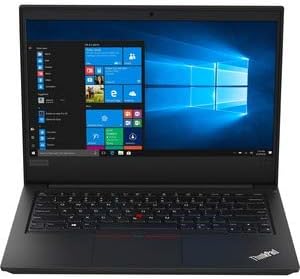
మూర్తి 2.1: ముందు view of the Lenovo ThinkPad E495 laptop, open with the screen displaying the Windows 10 desktop and the keyboard visible.
2.1 కీలక భాగాలు
- ప్రదర్శన: 14-inch Full HD (1920x1080) LCD screen.
- కీబోర్డ్: Chiclet-style keyboard with TrackPoint.
- టచ్ప్యాడ్: Multi-touch enabled touchpad for navigation.
- Webక్యామ్: ఇంటిగ్రేటెడ్ webవీడియో కాన్ఫరెన్సింగ్ కోసం కెమెరా.
- పోర్టులు: USB ports, HDMI output, Ethernet, Audio jack.
- పవర్ బటన్: Located on the side or top deck.
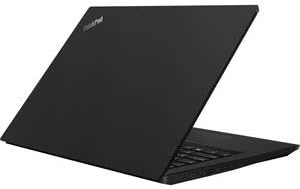
మూర్తి 2.2: వైపు view of the Lenovo ThinkPad E495 laptop in a closed position, highlighting its slim profile.
3. సెటప్
3.1 అన్బాక్సింగ్
ప్యాకేజింగ్ నుండి ల్యాప్టాప్ మరియు అన్ని ఉపకరణాలను జాగ్రత్తగా తొలగించండి. కింది అంశాలు ఉన్నాయని నిర్ధారించుకోండి:
- లెనోవా థింక్ప్యాడ్ E495 ల్యాప్టాప్
- AC అడాప్టర్
- పవర్ కేబుల్
- Battery (may be integrated)
3.2 కనెక్ట్ పవర్
- పవర్ కేబుల్ను AC అడాప్టర్కు కనెక్ట్ చేయండి.
- AC అడాప్టర్ను పవర్ అవుట్లెట్లోకి ప్లగ్ చేయండి.
- Connect the AC adapter's output plug to the power input port on your laptop.
- ప్రారంభ వినియోగానికి ముందు కనీసం 30 నిమిషాలు లేదా బ్యాటరీ సూచిక తగినంత ఛార్జ్ చూపించే వరకు బ్యాటరీని ఛార్జ్ చేయడానికి అనుమతించండి.
3.3 Initial Boot-Up and Windows Setup
- ల్యాప్టాప్ను ఆన్ చేయడానికి పవర్ బటన్ను నొక్కండి.
- Follow the on-screen instructions to complete the Windows 10 Pro setup process. This typically involves selecting your region, language, accepting terms, and creating a user account.
- Connect to a Wi-Fi network when prompted to ensure updates can be downloaded.
4. మీ ల్యాప్టాప్ను ఆపరేట్ చేయడం
4.1 పవర్ మేనేజ్మెంట్
- పవర్ ఆన్: పవర్ బటన్ను నొక్కండి.
- స్లీప్ మోడ్: మూత మూసివేయండి లేదా నొక్కండి Fn + F4 (or equivalent sleep key).
- షట్ డౌన్: స్టార్ట్ బటన్ క్లిక్ చేసి, ఆపై పవర్ > షట్ డౌన్ క్లిక్ చేయండి.
- పునఃప్రారంభించు: స్టార్ట్ బటన్ క్లిక్ చేసి, ఆపై పవర్ > రీస్టార్ట్ క్లిక్ చేయండి.
4.2 కీబోర్డ్ మరియు ఇన్పుట్ పరికరాలు
- కీబోర్డ్: Use the full-sized keyboard for typing. Function keys (F1-F12) often have secondary functions accessible via the Fn కీ.
- ట్రాక్పాయింట్: The red pointing stick in the center of the keyboard allows for precise cursor control. Use the associated buttons below the spacebar for left, right, and middle clicks.
- టచ్ప్యాడ్: The multi-touch touchpad supports gestures for scrolling, zooming, and other functions. Refer to Windows settings for customization.
4.3 కనెక్ట్ పెరిఫెరల్స్
Your ThinkPad E495 supports various external devices:
- USB పరికరాలు: Connect USB drives, mice, keyboards, or other USB accessories to the available USB ports.
- HDMI: Use the HDMI port to connect to an external monitor or projector.
- Wi-Fi: Connect to wireless networks via the built-in Wi-Fi. Access Wi-Fi settings through the Windows taskbar network icon.
- బ్లూటూత్: Pair Bluetooth-enabled devices such as headphones, speakers, or mice. Enable Bluetooth in Windows settings.
- ఈథర్నెట్: Connect to a wired network using the Ethernet port.

Figure 4.1: The Lenovo ThinkPad E495 laptop in use, displaying a video conference application on its screen.
5. నిర్వహణ
5.1 మీ ల్యాప్టాప్ను శుభ్రపరచడం
- స్క్రీన్: మెత్తని, మెత్తని బట్టను తేలికగా ఉపయోగించండి డిampనీరు లేదా స్క్రీన్ క్లీనర్తో నింపబడి ఉండాలి. స్క్రీన్పై నేరుగా ద్రవాన్ని పిచికారీ చేయవద్దు.
- కీబోర్డ్ మరియు చాసిస్: Use a soft cloth, slightly dampened with water or a mild cleaning solution. Avoid excessive moisture. An air duster can remove debris from between keys.
- పోర్టులు: Keep ports free of dust and debris. Use compressed air if necessary.
5.2 సాఫ్ట్వేర్ నవీకరణలు
సరైన పనితీరు మరియు భద్రతను నిర్ధారించడానికి మీ ఆపరేటింగ్ సిస్టమ్ మరియు డ్రైవర్లను క్రమం తప్పకుండా నవీకరించండి.
- విండోస్ నవీకరణలు: ప్రారంభం > సెట్టింగ్లు > నవీకరణ & భద్రత > విండోస్ నవీకరణకు వెళ్లండి.
- డ్రైవర్ నవీకరణలు: అధికారిక లెనోవా మద్దతును సందర్శించండి website for the latest drivers for your ThinkPad E495 model.
5.3 డేటా బ్యాకప్
డేటా నష్టాన్ని నివారించడానికి మీ ముఖ్యమైన డేటాను బాహ్య డ్రైవ్ లేదా క్లౌడ్ నిల్వకు క్రమం తప్పకుండా బ్యాకప్ చేయండి.
6. ట్రబుల్షూటింగ్
| సమస్య | పరిష్కారం |
|---|---|
| ల్యాప్టాప్ పవర్ ఆన్ చేయడం లేదు. | AC అడాప్టర్ ల్యాప్టాప్ మరియు పనిచేసే పవర్ అవుట్లెట్ రెండింటికీ సురక్షితంగా కనెక్ట్ చేయబడిందని నిర్ధారించుకోండి. పవర్ అవుట్లెట్ పనిచేస్తుందో లేదో తనిఖీ చేయండి. వేరే పవర్ అవుట్లెట్ను ప్రయత్నించండి. |
| Screen is blank or not displaying. | నొక్కండి Fn + F7 (or the display toggle key) to cycle through display modes. Ensure the laptop is not in sleep mode. Connect to an external monitor to check if the issue is with the laptop's display. |
| Wi-Fi కనెక్షన్ సమస్యలు. | Check if Wi-Fi is enabled in Windows settings. Restart your router and modem. Ensure you are within range of a Wi-Fi network. Update Wi-Fi drivers from the Lenovo support webసైట్. |
| కీబోర్డ్ లేదా టచ్ప్యాడ్ స్పందించడం లేదు. | ల్యాప్టాప్ను పునఃప్రారంభించండి. ఏవైనా భౌతిక అడ్డంకులు ఉన్నాయా అని తనిఖీ చేయండి. డ్రైవర్లు తాజాగా ఉన్నాయని నిర్ధారించుకోండి. |
| సిస్టమ్ నెమ్మదిగా ఉంది లేదా స్పందించడం లేదు. | Close unnecessary applications. Check Task Manager for processes consuming high CPU or memory. Run a virus scan. Ensure Windows and drivers are updated. Consider freeing up disk space. |
మరింత వివరణాత్మక ట్రబుల్షూటింగ్ కోసం, Lenovo మద్దతును చూడండి. webసైట్ లేదా కస్టమర్ సేవను సంప్రదించండి.
7. స్పెసిఫికేషన్లు
| ఫీచర్ | వివరాలు |
|---|---|
| బ్రాండ్ | లెనోవో |
| మోడల్ పేరు | లెనోవా థింక్ప్యాడ్ E495 |
| మోడల్ సంఖ్య | 20NE0002US |
| స్క్రీన్ పరిమాణం | 14 అంగుళాలు |
| డిస్ప్లే రిజల్యూషన్ | 1920 x 1080 పిక్సెల్లు (పూర్తి HD) |
| CPU మోడల్ | AMD Ryzen 5 3500U (2.1 GHz, up to 3.7 GHz) |
| RAM మెమరీ | 8 GB DDR4 (2400 MHz) |
| హార్డ్ డిస్క్ పరిమాణం | 256 GB SSD |
| ఆపరేటింగ్ సిస్టమ్ | Windows 10 ప్రో |
| గ్రాఫిక్స్ కోప్రాసెసర్ | AMD రేడియన్ వేగా 8 (ఇంటిగ్రేటెడ్) |
| కనెక్టివిటీ | Bluetooth 5.0, Ethernet (1 Gbps), USB, Wi-Fi |
| ఓడరేవులు | HDMI, USB ports, Headphones (Audio Output) |
| Webకెమెరా | అవును |
| బ్యాటరీ | 3-cell, 45 Watt Hours |
| వస్తువు బరువు | 3.86 పౌండ్లు |
| కొలతలు (L x W x Th) | 14.14" x 9.28" x 0.78" |
| UPC | 193386253563 |
8. వారంటీ మరియు మద్దతు
8.1 ఉత్పత్తి వారంటీ
Your Lenovo ThinkPad E495 laptop comes with a 1-year limited warranty. This warranty covers manufacturing defects and hardware failures under normal use conditions. For specific terms and conditions, please refer to the warranty documentation included with your product or visit the official Lenovo support webసైట్.
8.2 కస్టమర్ మద్దతు
For technical assistance, warranty claims, or additional support, please visit the official Lenovo support webసైట్. మీరు అక్కడ డ్రైవర్లు, తరచుగా అడిగే ప్రశ్నలు మరియు కస్టమర్ సేవ కోసం సంప్రదింపు సమాచారాన్ని కనుగొనవచ్చు.
లెనోవా సపోర్ట్ Webసైట్: support.lenovo.com