
పరిచయం
This manual provides essential instructions for the setup, operation, and maintenance of your Easytry123 replacement remote control. This remote is designed to function with various ONKYO AV A/V Receiver models, including RC-745M, TX-NR1007, TX-NR807, RC-717M, RC-738M, TX-SR607, TX-SR607S, RC-742M, and TX-SR707.
ముఖ్యమైన గమనిక: As a replacement unit, this remote control may not support all advanced functions or features present on your original ONKYO remote. Its primary purpose is to provide core control over your AV receiver. Please ensure your receiver model is listed above for compatibility.
సెటప్
1. బ్యాటరీ ఇన్స్టాలేషన్
రిమోట్ కంట్రోల్కు రెండు AAA బ్యాటరీలు అవసరం (చేర్చబడలేదు). వాటిని ఇన్స్టాల్ చేయడానికి ఈ దశలను అనుసరించండి:
- రిమోట్ కంట్రోల్ వెనుక బ్యాటరీ కంపార్ట్మెంట్ కవర్ను గుర్తించండి.
- కంపార్ట్మెంట్ తెరవడానికి ట్యాబ్పై క్రిందికి నొక్కి, కవర్ను క్రిందికి జారండి.
- రెండు AAA బ్యాటరీలను చొప్పించండి, పాజిటివ్ (+) మరియు నెగటివ్ (-) టెర్మినల్స్ కంపార్ట్మెంట్ లోపల ఉన్న గుర్తులతో సరిగ్గా సమలేఖనం చేయబడ్డాయని నిర్ధారించుకోండి. తప్పుగా చొప్పించడం వలన రిమోట్ పనిచేయకుండా నిరోధించవచ్చు.
- బ్యాటరీ కంపార్ట్మెంట్ కవర్ సురక్షితంగా క్లిక్ అయ్యే వరకు దాన్ని తిరిగి స్థానంలోకి స్లైడ్ చేయండి.
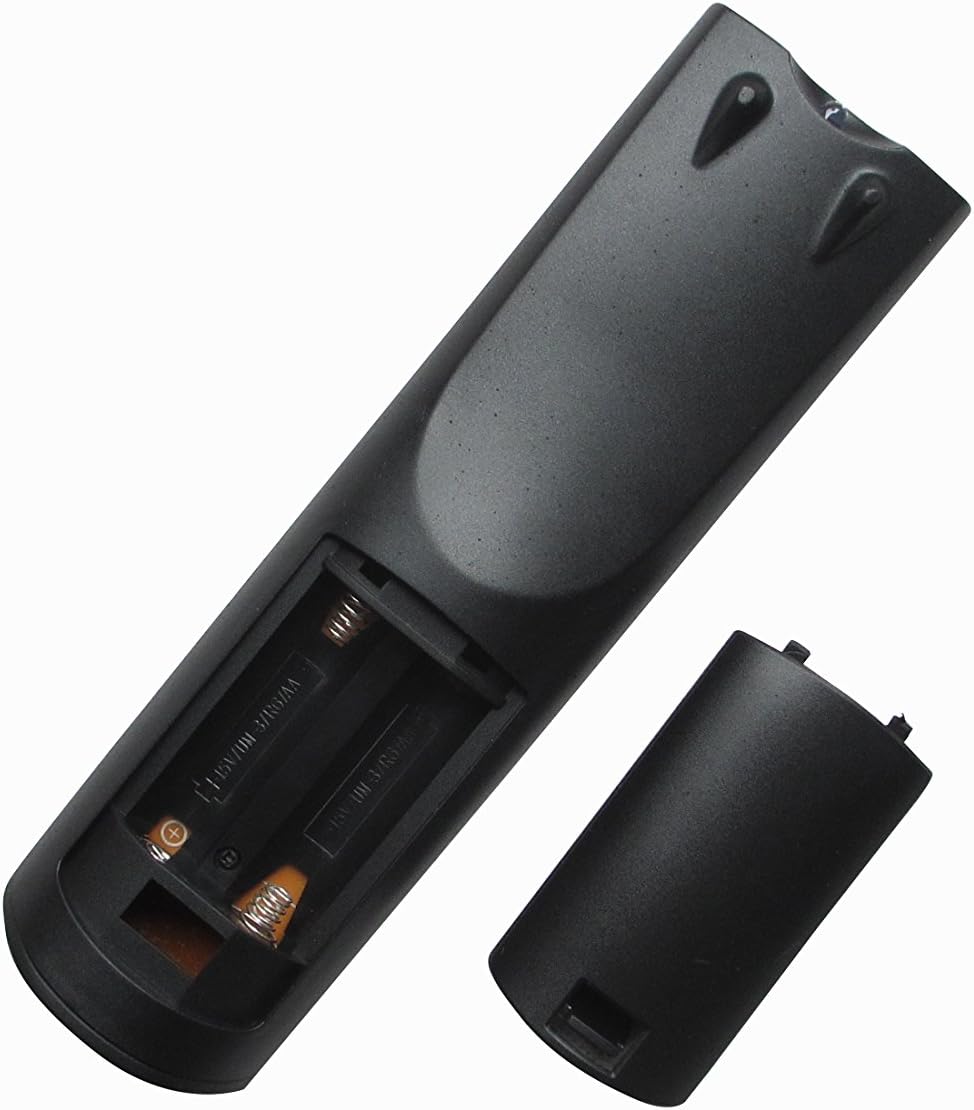
చిత్రం 1: వెనుక view of the remote control with the battery compartment open, ready for battery insertion. Note the spring contacts for the negative terminals and raised contacts for the positive terminals.

చిత్రం 2: మరొకటి view of the remote's battery compartment, illustrating the correct orientation for AAA battery placement.
2. ప్రారంభ ఉపయోగం
This replacement remote control is pre-programmed for the listed ONKYO AV A/V Receiver models. No additional programming or pairing steps are typically required. Once batteries are installed, the remote should be ready for immediate use with your compatible receiver.
Point the remote control directly at your ONKYO AV A/V Receiver and press the desired function button.
ఆపరేటింగ్ సూచనలు
The Easytry123 replacement remote control provides intuitive access to the primary functions of your ONKYO AV A/V Receiver. While the exact button layout may vary slightly from your original remote, the core functions are generally mapped to standard remote control buttons.
- పవర్ ఆన్/ఆఫ్: ఉపయోగించండి శక్తి button to turn your receiver on or off.
- వాల్యూమ్ నియంత్రణ: Adjust the audio level using the వాల్యూమ్ + మరియు వాల్యూమ్ - బటన్లు.
- ఇన్పుట్ ఎంపిక: Cycle through available audio/video inputs (e.g., HDMI 1, DVD, CD) using the ఇన్పుట్ or dedicated input selection buttons.
- మ్యూట్: Temporarily silence the audio output with the మ్యూట్ బటన్.
- నావిగేషన్: Use the directional arrow buttons and నమోదు చేయండి or OK button for menu navigation on your receiver's display.
For specific advanced functions or detailed operation of your ONKYO receiver's features, please refer to your receiver's original instruction manual.
నిర్వహణ
రిమోట్ శుభ్రపరచడం
రిమోట్ కంట్రోల్ యొక్క రూపాన్ని మరియు కార్యాచరణను నిర్వహించడానికి:
- మృదువైన, పొడి వస్త్రంతో ఉపరితలాన్ని తుడవండి.
- మొండి ధూళికి, తేలికగా డిampen the cloth with water or a mild, non-abrasive cleaner. Do not use harsh chemicals or solvents.
- Avoid getting moisture into the battery compartment or any openings.
బ్యాటరీ భర్తీ
Replace the batteries when the remote's response becomes sluggish or it stops functioning. Always replace both batteries at the same time with new AAA batteries. Do not mix old and new batteries, or different types of batteries.
నిల్వ
రిమోట్ కంట్రోల్ ఎక్కువ కాలం ఉపయోగించబడకపోతే, లీకేజీని నివారించడానికి మరియు రిమోట్కు సంభావ్య నష్టం జరగకుండా బ్యాటరీలను తీసివేయండి.
ట్రబుల్షూటింగ్
మీ రిమోట్ కంట్రోల్తో మీకు సమస్యలు ఎదురైతే, దయచేసి ఈ క్రింది సాధారణ పరిష్కారాలను చూడండి:
- రిమోట్ స్పందించడం లేదు:
- బ్యాటరీలు సరైన ధ్రువణతతో (+/-) సరిగ్గా చొప్పించబడ్డాయో లేదో తనిఖీ చేయండి.
- తాజా AAA బ్యాటరీలతో బ్యాటరీలను భర్తీ చేయండి.
- Ensure there are no obstructions between the remote control and the ONKYO receiver's infrared sensor.
- Make sure you are within the effective range of the receiver and pointing the remote directly at it.
- కొన్ని విధులు పనిచేయవు:
- As a replacement remote, it may not support all functions of your original ONKYO remote. Focus on core functions like power, volume, and input selection.
- Verify that your ONKYO receiver model is listed as compatible in the introduction section.
- Consult your ONKYO receiver's original manual for specific function details.
- రిమోట్ అడపాదడపా పనిచేస్తుంది:
- ఇది తరచుగా తక్కువ బ్యాటరీ శక్తిని సూచిస్తుంది. బ్యాటరీలను మార్చండి.
- Ensure a clear line of sight to the receiver.
If problems persist after trying these steps, please contact the seller for further assistance.
స్పెసిఫికేషన్లు
| మోడల్ సంఖ్య: | ఆర్ఎం-736ఎం |
| బ్రాండ్: | ఈజీట్రీ123 |
| అనుకూల పరికరాలు: | ONKYO AV A/V Receivers (Models: RC-745M, TX-NR1007, TX-NR807, RC-717M, RC-738M, TX-SR607, TX-SR607S, RC-742M, TX-SR707) |
| కనెక్టివిటీ టెక్నాలజీ: | ఇన్ఫ్రారెడ్ (IR) |
| ప్రత్యేక ఫీచర్: | ఎర్గోనామిక్ డిజైన్ |
| మద్దతు ఉన్న పరికరాల గరిష్ట సంఖ్య: | 1 |
| శక్తి మూలం: | 2 x AAA బ్యాటరీలు (చేర్చబడలేదు) |
వారంటీ మరియు మద్దతు
Specific warranty information for this replacement remote control is typically provided by the seller at the time of purchase. Please refer to your purchase documentation or contact the seller directly for details regarding warranty coverage and support.
For technical assistance or inquiries not covered in this manual, please reach out to the Easytry123 customer support or the retailer from whom you purchased the product.