
Easytry123 Easytry7607
Easytry123 Replacement Remote Control User Manual
Model: Easytry7607 for Integra A/V Receivers
పరిచయం
This manual provides instructions for the Easytry123 Replacement Remote Control, Model Easytry7607. This remote is designed as a replacement for various Integra A/V Receiver models, including DTR-40.4, DTR-40.3, DTR-30.7, DTR-20.7, DTR-30.4, DHC-80.3, and DTR-50.3, and their corresponding original remote models like RC-833M, RC-899M, RC-838M, and RC-811M. Please read this manual carefully before use to ensure proper operation.
సెటప్
1. బ్యాటరీ ఇన్స్టాలేషన్
రిమోట్ కంట్రోల్కు రెండు AAA బ్యాటరీలు అవసరం (చేర్చబడలేదు). వాటిని ఇన్స్టాల్ చేయడానికి ఈ దశలను అనుసరించండి:
- రిమోట్ కంట్రోల్ వెనుక బ్యాటరీ కంపార్ట్మెంట్ను గుర్తించండి.
- ట్యాబ్ను క్రిందికి నొక్కి, బ్యాటరీ కవర్ను క్రిందికి జారవిడిచి దాన్ని తెరవండి.
- రెండు AAA బ్యాటరీలను చొప్పించండి, పాజిటివ్ (+) మరియు నెగటివ్ (-) టెర్మినల్స్ కంపార్ట్మెంట్ లోపల ఉన్న గుర్తులతో సరిగ్గా సమలేఖనం చేయబడ్డాయని నిర్ధారించుకోండి.
- సురక్షితంగా క్లిక్ చేసే వరకు బ్యాటరీ కవర్ను తిరిగి స్థానంలోకి జారండి.
చిత్రం 1: Back of the remote control with the battery cover removed, illustrating the battery insertion process. Note the polarity markings inside the compartment.
ముఖ్యమైన: Ensure batteries are inserted with correct polarity. Incorrect installation can damage the remote control. Do not mix old and new batteries, or different types of batteries.
ఆపరేషన్
ప్రాథమిక విధులు
This replacement remote control operates using infrared (IR) technology. Point the remote directly at your Integra A/V Receiver. Ensure there are no obstructions between the remote and the receiver's IR sensor.

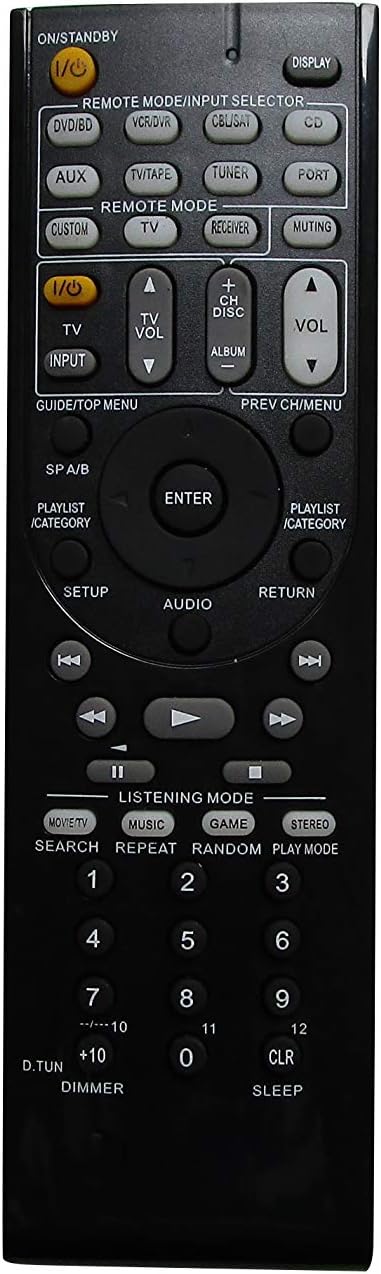
చిత్రం 2: ముందు view of the remote control, showing the layout of all buttons for various functions.
The remote features standard buttons for power, volume control, input selection, and navigation. Refer to చిత్రం 2 for the button layout. Press the corresponding button for the desired function.
అనుకూలత గమనికలు
- This remote is a replacement and may not offer all the exact same features or button functions as your original Integra remote.
- It does not support programming or learning functions. Remote codes cannot be entered or modified.
- Functionality is dependent on the specific Integra A/V Receiver model. While designed for compatibility, some advanced or model-specific functions may not be supported.
నిర్వహణ
క్లీనింగ్
రిమోట్ కంట్రోల్ను శుభ్రం చేయడానికి, దానిని మృదువైన, పొడి గుడ్డతో సున్నితంగా తుడవండి. లిక్విడ్ క్లీనర్లు, స్ప్రేలు లేదా రాపిడి పదార్థాలను ఉపయోగించవద్దు, ఎందుకంటే ఇవి రిమోట్ ఉపరితలం లేదా అంతర్గత భాగాలను దెబ్బతీస్తాయి.
బ్యాటరీ భర్తీ
Replace batteries when the remote's response becomes sluggish or stops working. Follow the battery installation steps outlined in the సెటప్ section. Always replace both batteries at the same time with new AAA alkaline batteries.
ట్రబుల్షూటింగ్
- రిమోట్ స్పందించడం లేదు:
- బ్యాటరీలు సరైన ధ్రువణతతో సరిగ్గా చొప్పించబడ్డాయో లేదో తనిఖీ చేయండి.
- పాత బ్యాటరీలను కొత్త AAA ఆల్కలీన్ బ్యాటరీలతో భర్తీ చేయండి.
- Ensure there is a clear line of sight between the remote control and the A/V receiver's IR sensor. Remove any obstructions.
- రిమోట్ నేరుగా రిసీవర్ వైపు చూపించబడిందని ధృవీకరించండి.
- కొన్ని విధులు పనిచేయవు:
- This is a replacement remote and may not support all functions of your original Integra remote. Refer to the అనుకూలత గమనికలు in the Operation section.
- The remote does not support programming or learning functions.
- Remote feels loose or rattles:
- బ్యాటరీ కవర్ సురక్షితంగా మూసివేయబడిందని నిర్ధారించుకోండి.
- If internal components feel loose, contact the seller for assistance.
స్పెసిఫికేషన్లు
| బ్రాండ్ | ఈజీట్రీ123 |
| మోడల్ సంఖ్య | ఈజీట్రీ7607 |
| అనుకూల పరికరాలు | Integra A/V Receivers (DTR-40.4, DTR-40.3, DTR-30.7, DTR-20.7, DTR-30.4, DHC-80.3, DTR-50.3, etc.) |
| కనెక్టివిటీ టెక్నాలజీ | ఇన్ఫ్రారెడ్ (IR) |
| కంట్రోలర్ రకం | బటన్ నియంత్రణ |
| బ్యాటరీ రకం | 2 x AAA ఆల్కలీన్ బ్యాటరీలు (చేర్చబడలేదు) |
| రంగు | నలుపు |
| ప్రత్యేక ఫీచర్ | ఎర్గోనామిక్ డిజైన్ |
వారంటీ సమాచారం
Specific warranty details for this product are provided by the seller, Easytry123. Please refer to your purchase documentation or contact the seller directly for information regarding warranty coverage and terms.
కస్టమర్ మద్దతు
For any questions, concerns, or technical assistance not covered in this manual, please contact the seller, Easytry123, through the platform where the purchase was made. Provide your order number and a detailed description of the issue for prompt support.
Ask a question about this manual
Ask about setup, troubleshooting, compatibility, parts, safety, or missing instructions. Manuals+ will review the question and use this page’s manual context to help answer it.