
పరిచయం
This manual provides detailed instructions for the proper setup, operation, and maintenance of your ALINCO DX-10 10-Meter Multi-Mode Emitter. Please read this manual thoroughly before using the device to ensure optimal performance and safety. Retain this manual for future reference.
ప్యాకేజీ విషయాలు
క్రింద జాబితా చేయబడిన అన్ని అంశాలు మీ ప్యాకేజీలో ఉన్నాయని నిర్ధారించుకోండి:
- CB రేడియో
- మైక్రోఫోన్
- మైక్రోఫోన్ హోల్డర్
- Mounting Support for CB Radio
- పవర్ కార్డ్

Image: The ALINCO DX-10 radio, microphone, and its packaging box, illustrating the items included in the product package.
ఉత్పత్తి లక్షణాలు
The ALINCO DX-10 is a versatile 10-meter multi-mode emitter designed for reliable communication. Key features include:
- బహుళ-మోడ్ ఆపరేషన్: Supports LSB, USB, AM, FM, and CW modes.
- ఫ్రీక్వెన్సీ పరిధి: 28,000-29,700 MHz (Programmable).
- ఛానెల్లు: 40 programmable channels per band.
- పవర్ అవుట్పుట్: 1-12 W (FM/AM/CW) and 0-25 W (USB/LSB) adjustable.
- Frequency Jumps: 10Hz, 100Hz, 1kHz, and 10kHz.
- ప్రదర్శన: Large backlit display with 7 selectable colors.
- విధులు: Dual Watch, Scan, RF Gain, Mic Gain, NB (Noise Blanker), ANL (Automatic Noise Limiter), Roger Beep, Clarifier, Squelch (SQ), RF PWR, SWR meter, S-meter, TOT (Time Out Timer), Echo function, and emergency channel (9/19) button.
- కనెక్టివిటీ: 6-pin microphone connector, additional external speaker jack (3.5 mm), CW connection.

Image: Front panel of the ALINCO DX-10, highlighting the multi-color display, channel selector, mode switch, and various control knobs and buttons.
సెటప్ సూచనలు
- పవర్ కనెక్షన్: Connect the supplied power cord to the 13.8 VDC power source, ensuring correct polarity. The radio requires 13.8 VDC +/-15%.
- యాంటెన్నా కనెక్షన్: Connect a suitable 10-meter antenna to the antenna connector on the rear panel of the radio. Ensure the antenna is properly tuned for the 10-meter band to prevent damage to the transceiver.
- మైక్రోఫోన్ కనెక్షన్: Plug the 6-pin microphone connector into the microphone jack on the front panel.
- మౌంటు: Use the provided mounting support to securely install the CB radio in your desired location (e.g., vehicle or base station).
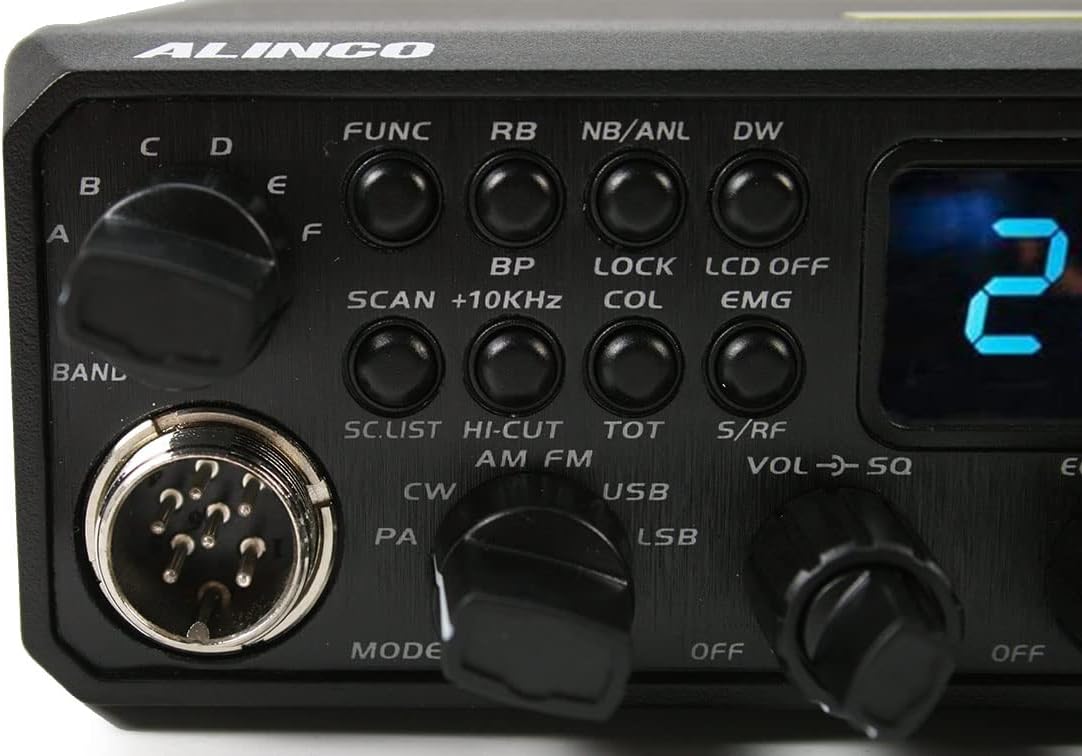
Image: Rear panel of the ALINCO DX-10, displaying the antenna connector, power input, and other rear panel connections.
ఆపరేటింగ్ సూచనలు
ప్రాథమిక ఆపరేషన్
- పవర్ ఆన్/ఆఫ్: Turn the VOL/SQ knob clockwise to power on the unit. Turn counter-clockwise until it clicks to power off.
- వాల్యూమ్ సర్దుబాటు: Rotate the outer ring of the VOL/SQ knob to adjust the audio output volume.
- స్క్వెల్చ్ సర్దుబాటు: Rotate the inner knob of VOL/SQ to adjust the squelch level. Adjust until background noise disappears, but signals are still received clearly.
- ఛానెల్ ఎంపిక: Use the CHANNEL knob on the right side of the front panel to select your desired operating channel.
- మోడ్ ఎంపిక: Use the MODE switch (AM/FM/USB/LSB/CW/PA) to select the desired modulation mode.
- Frequency Adjustment (Clarifier): Use the CLARIFIER knob for fine-tuning the receive frequency, especially in SSB modes (USB/LSB), to ensure clear audio.
అధునాతన విధులు
- FUNC బటన్: Press the FUNC button to access secondary functions indicated above the primary buttons.
- డ్యూయల్ వాచ్ (DW): Activates monitoring of two channels simultaneously.
- స్కాన్: Initiates scanning through active channels.
- నాయిస్ బ్లాంకర్ (NB) / ఆటోమేటిక్ నాయిస్ లిమిటర్ (ANL): Press NB/ANL to reduce impulse noise.
- Roger Beep (RB): Activates an audible tone at the end of your transmission.
- ఎకో ఫంక్షన్: Engages the echo effect for transmissions.
- RF లాభం: Adjusts the sensitivity of the receiver.
- మైక్ గెయిన్: Adjusts the microphone input sensitivity.
- అత్యవసర ఛానల్ (EMG): Quickly switches to emergency channels 9 or 19.
- Display Color (COL): Changes the backlight color of the display.

చిత్రం: వివరణాత్మకం view of the ALINCO DX-10 control panel, showing the mode selector, function buttons, and various adjustment knobs for fine-tuning operation.
నిర్వహణ
Proper maintenance ensures the longevity and optimal performance of your ALINCO DX-10.
- శుభ్రపరచడం: Use a soft, dry cloth to clean the exterior of the radio. Do not use abrasive cleaners, solvents, or harsh chemicals.
- వెంటిలేషన్: Ensure the ventilation fins on the side and rear of the unit are clear of obstructions to prevent overheating during operation.
- విద్యుత్ సరఫరా: Always use a stable 13.8 VDC power supply within the specified tolerance. Unstable power can damage the unit.
- యాంటెన్నా: Regularly inspect your antenna and coaxial cable for any signs of damage or corrosion. Ensure all connections are secure.
ట్రబుల్షూటింగ్
If you encounter issues with your ALINCO DX-10, refer to the following common problems and solutions:
- శక్తి లేదు: Check the power cord connection and the power supply voltage. Ensure the power switch (VOL/SQ knob) is turned on.
- ఆడియో లేదు: Adjust the volume knob. Check squelch setting; if set too high, it may block weak signals. Ensure the microphone is properly connected.
- Poor Transmission/Reception: Verify antenna connection and ensure the antenna is properly tuned for the operating frequency. Check the selected mode (AM/FM/SSB). Adjust RF Gain and Mic Gain.
- వక్రీకరించిన ఆడియో: Adjust Clarifier for SSB modes. Check Mic Gain setting. Ensure the microphone is not damaged.
For persistent issues not resolved by these steps, contact ALINCO customer support or a qualified service technician.
స్పెసిఫికేషన్లు
| ఫీచర్ | స్పెసిఫికేషన్ |
|---|---|
| ఫ్రీక్వెన్సీ రేంజ్ | 28,000-29,700 MHz (Programmable) |
| మాడ్యులేషన్ మోడ్లు | AM, FM, LSB, USB, CW |
| ఛానెల్లు | 40 programmable channels per band |
| విద్యుత్ సరఫరా | 13.8 VDC +/-15% |
| Transmission Power (FM/AM/CW) | 1-12 W adjustable |
| Transmission Power (USB/LSB) | 0-25 W adjustable |
| శోషించబడిన కరెంట్ | 6A గరిష్టంగా |
| Audio Power Speaker | 3 W |
| మైక్రోఫోన్ రకం | 6 పిన్స్ |
| కొలతలు (W x H x D) | 238 x 173 x 51 మిమీ (9.37 x 6.81 x 2.01 అంగుళాలు) |
| బరువు | 1687 గ్రా (3.72 పౌండ్లు) |
| ఇంపెడెన్స్ | 50 ఓం |

చిత్రం: పై నుండి క్రిందికి view of the ALINCO DX-10 radio with its physical dimensions (length, width, height) indicated in centimeters.
వారంటీ మరియు మద్దతు
For warranty information and technical support, please refer to the official ALINCO website or contact your authorized ALINCO dealer. Keep your purchase receipt as proof of purchase.
ఆన్లైన్ వనరులు: For additional information, firmware updates, and frequently asked questions, visit the official ALINCO support page.