
1. పరిచయం
ఈ మాన్యువల్ మీ సరైన సంస్థాపన, ఆపరేషన్ మరియు నిర్వహణ కోసం అవసరమైన సమాచారాన్ని అందిస్తుంది ViewSonic VX3276-4K-MHD 32 Inch 4K UHD Monitor. Designed with a modern, minimalist style and ultra-thin bezels, this monitor delivers stunning 3840x2160p resolution, HDR10 content support, and versatile connectivity options for both home and office environments. Please read this manual thoroughly before using your monitor to ensure optimal performance and safety.

చిత్రం: ది ViewSonic VX3276-4K-MHD monitor displayed on a desk, highlighting its modern aesthetic and ultra-slim profile, suitable for office, graphic design, and home entertainment.

చిత్రం: క్లోజప్ view emphasizing the ultra-slim panel of the monitor, contributing to its sleek design.

చిత్రం: మానిటర్ షోasing its frameless design, providing an expansive viewing అనుభవం.
2. భద్రతా సమాచారం
- మానిటర్ పడిపోకుండా ఉండటానికి ఎల్లప్పుడూ స్థిరమైన, చదునైన ఉపరితలంపై ఉంచండి.
- వెంటిలేషన్ ఓపెనింగ్లను బ్లాక్ చేయవద్దు. సరైన గాలి ప్రసరణ కోసం మానిటర్ చుట్టూ తగినంత స్థలం ఉండేలా చూసుకోండి.
- తయారీదారు అందించిన పవర్ అడాప్టర్ మరియు కేబుల్లను మాత్రమే ఉపయోగించండి.
- మానిటర్ను నీరు, తేమ మరియు తీవ్రమైన ఉష్ణోగ్రతల నుండి దూరంగా ఉంచండి.
- Avoid exposing the screen to direct sunlight for extended periods.
- మానిటర్ను మీరే రిపేర్ చేయడానికి ప్రయత్నించవద్దు. అన్ని సర్వీసింగ్లను అర్హత కలిగిన సర్వీస్ సిబ్బందికి సూచించండి.
- శుభ్రపరిచే ముందు పవర్ అవుట్లెట్ నుండి మానిటర్ను అన్ప్లగ్ చేయండి.
3. పెట్టెలో ఏముంది
ప్యాకేజీని తెరిచినప్పుడు, కింది అంశాలన్నీ ఉన్నాయని నిర్ధారించుకోండి:
- ViewSonic VX3276-4K-MHD Monitor
- పవర్ కేబుల్
- HDMI కేబుల్
- త్వరిత ప్రారంభ గైడ్
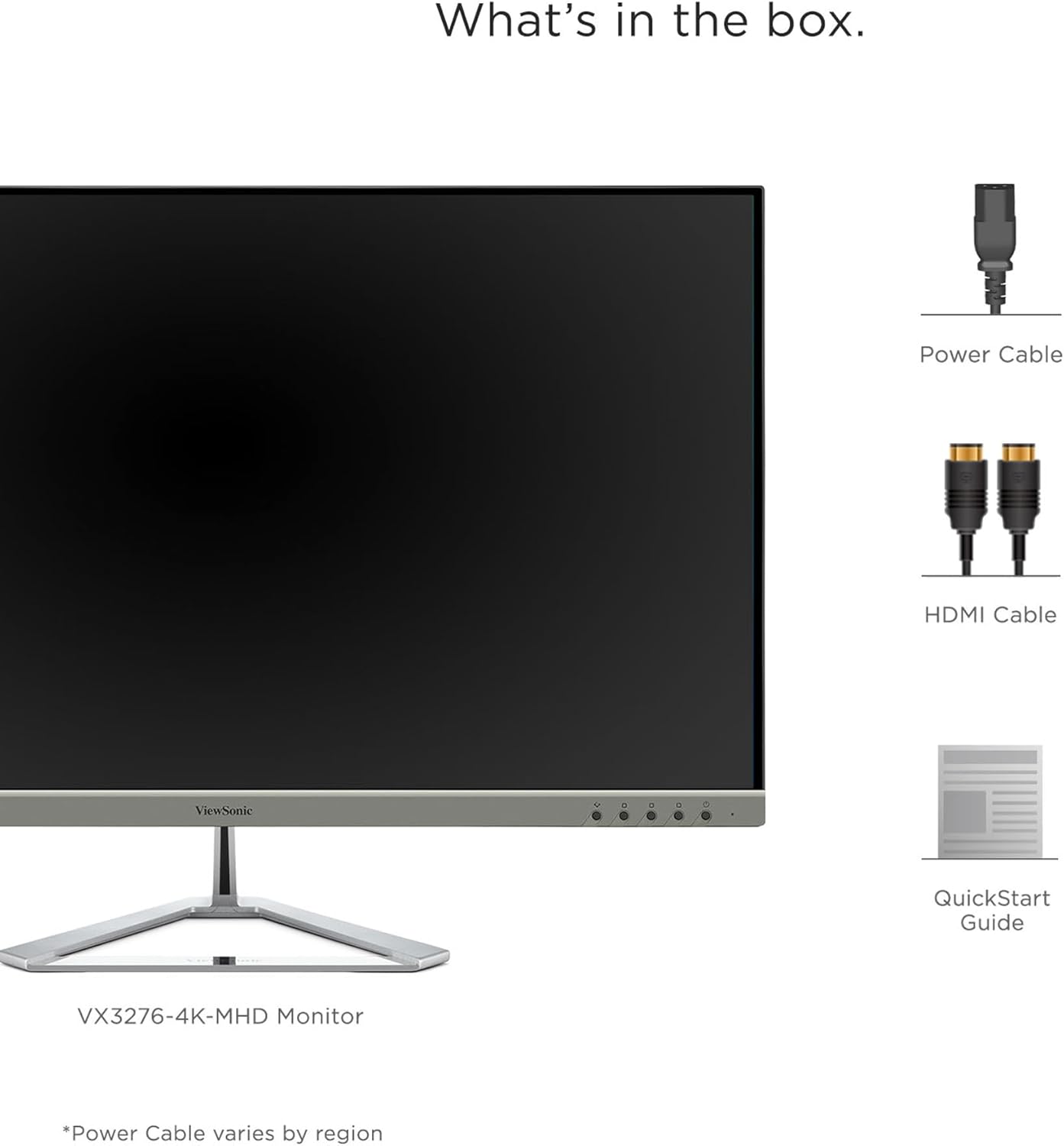
Image: A visual representation of the items included in the ViewSonic VX3276-4K-MHD monitor package.
4. సెటప్
4.1 స్టాండ్ను అసెంబుల్ చేయడం
Carefully remove the monitor and stand components from the packaging. Attach the stand base to the stand neck, then secure the assembled stand to the back of the monitor. Ensure all screws are tightened appropriately.
4.2 మానిటర్ను కనెక్ట్ చేస్తోంది
The VX3276-4K-MHD monitor offers versatile connectivity options. Connect your computer or other devices using the appropriate cables:
- HDMI: Use the provided HDMI cable to connect to your computer's HDMI port. The monitor features two HDMI 2.0 inputs.
- డిస్ప్లేపోర్ట్: Connect using a DisplayPort cable for high-resolution video and audio transmission.
- మినీ డిస్ప్లేపోర్ట్: Use a Mini DisplayPort cable for compatible devices.
- ఆడియో అవుట్: Connect external speakers or headphones to the 3.5mm audio out jack.

Image: The back of the monitor displaying the various input ports, including HDMI, DisplayPort, Mini DisplayPort, and Audio Out, along with the integrated 2-Watt speakers.

Image: An illustration highlighting the versatile connectivity options of the monitor, including HDMI, DisplayPort, and Mini DisplayPort.
4.3 పవర్ కనెక్షన్
Connect the power cable to the monitor's AC input and then plug it into a grounded electrical outlet.
4.4 VESA మౌంటింగ్ (ఐచ్ఛికం)
The monitor is VESA compatible (100x100mm) for wall mounting or use with compatible monitor arms. Ensure you use appropriate VESA-compliant mounting hardware (not included) and follow the mounting instructions provided with your VESA mount.

Image: The VESA compatible mounting points on the rear of the monitor, allowing for flexible installation options.
5. ఆపరేటింగ్ సూచనలు
5.1 పవర్ చేయడం ఆన్/ఆఫ్
Press the power button located on the lower left side of the monitor to turn it on or off. The power LED will indicate the monitor's status.
5.2 ఆన్-స్క్రీన్ డిస్ప్లే (OSD) మెనూ
Use the physical buttons on the back of the monitor to navigate and adjust settings within the On-Screen Display (OSD) menu. These buttons allow you to control various display parameters such as brightness, contrast, color settings, and input selection.
5.3 Optimized View సెట్టింగులు (Viewఫ్యాషన్)
The monitor features exclusive ViewMode presets to optimize screen performance for different applications. These presets include "Game," "Movie," "Web," "Text," and "Mono." Select the appropriate mode for your current activity to enhance your viewing అనుభవం.

Image: An illustration demonstrating the different ViewMode settings (Game, Movie, Web, Text, Mono) that optimize the display for specific content.
5.4 Display Quality and HDR10 Support
Experience stunning 4K UHD (3840x2160p) resolution with the MVA panel technology, offering ultra-wide viewing angles and vibrant colors. HDR10 content support delivers a high dynamic range for deep contrast, rich color, and detailed visuals.

Image: A visual comparison highlighting the clarity and detail provided by the 4K Ultra HD resolution.

Image: A comparison demonstrating the superior contrast and vibrant colors achieved with HDR10 content support compared to conventional display.

Image: An illustration demonstrating the wide 178-degree viewing angles provided by MVA Panel Technology.
5.5 మెరుగుపరచబడింది Viewing Comfort (Eye-Care)
The monitor incorporates Flicker-Free technology and a Blue Light Filter to reduce eye fatigue during prolonged use, promoting a more comfortable viewing అనుభవం.

Image: A simulated comparison showing the benefits of Flicker-Free and Blue Light technology in reducing eye strain.
5.6 ఇంటిగ్రేటెడ్ స్పీకర్లు
The monitor includes dual integrated 2-Watt speakers for audio output. You can also connect external audio devices via the Audio Out port.

Image: An illustration indicating the location and function of the dual integrated 2-Watt speakers on the monitor.
5.7 Multi-Tasking and Productivity
The large 32-inch screen and 4K resolution provide ample screen real estate for multi-tasking, allowing you to open multiple windows side-by-side for enhanced productivity.

Image: The monitor set up in a home office, demonstrating its capability to display multiple applications simultaneously for efficient multi-tasking.
6. నిర్వహణ
6.1 స్క్రీన్ను శుభ్రపరచడం
స్క్రీన్ను శుభ్రం చేయడానికి, మృదువైన, మెత్తటి బట్టతో సున్నితంగా తుడవండి. మొండి మరకల కోసం, తేలికగా dampen the cloth with water or a mild, non-abrasive screen cleaner. Never spray liquid directly onto the screen.
6.2 సి ని శుభ్రపరచడంasing
మానిటర్ను శుభ్రం చేయడానికి మృదువైన, పొడి వస్త్రాన్ని ఉపయోగించండి casing. Avoid using strong detergents or abrasive cleaners, as they may damage the surface.
7. ట్రబుల్షూటింగ్
7.1 తెరపై చిత్రం లేదు
- పవర్ కేబుల్ మానిటర్ మరియు పవర్ అవుట్లెట్ రెండింటికీ సురక్షితంగా కనెక్ట్ చేయబడిందని నిర్ధారించుకోండి.
- Verify that the video cable (HDMI, DisplayPort, Mini DisplayPort) is firmly connected to both the monitor and your computer.
- OSD మెనులో సరైన ఇన్పుట్ సోర్స్ ఎంచుకోబడిందో లేదో తనిఖీ చేయండి.
- మీ కంప్యూటర్ ఆన్లో ఉందని మరియు స్లీప్ మోడ్లో లేదని నిర్ధారించుకోండి.
7.2 చిత్రం అస్పష్టంగా లేదా వక్రీకరించబడింది
- Adjust the display resolution on your computer to the monitor's native resolution (3840x2160).
- ఏదైనా నష్టం లేదా వదులుగా ఉన్న కనెక్షన్ల కోసం వీడియో కేబుల్ను తనిఖీ చేయండి.
- OSD మెను ద్వారా మానిటర్ను ఫ్యాక్టరీ డిఫాల్ట్ సెట్టింగ్లకు రీసెట్ చేయండి.
7.3 No Sound from Speakers
- Ensure the volume on the monitor and your computer is not muted and is set to an audible level.
- Verify that the audio output is correctly configured on your computer to use the monitor's speakers.
- If using an external audio device, ensure it is properly connected to the Audio Out port.
8. స్పెసిఫికేషన్లు

Image: A diagram illustrating the physical dimensions of the ViewSonic VX3276-4K-MHD monitor, including screen size and overall measurements.
| ఫీచర్ | వివరాలు |
|---|---|
| బ్రాండ్ | Viewసోనిక్ |
| మోడల్ సంఖ్య | VX3276-4K-MHD |
| స్క్రీన్ పరిమాణం | 32 అంగుళాలు |
| రిజల్యూషన్ | 4K UHD (3840x2160p) |
| కారక నిష్పత్తి | 16:9 |
| రిఫ్రెష్ రేట్ | 60 Hz |
| ప్రతిస్పందన సమయం | 4 మిల్లీసెకన్లు |
| ప్రదర్శన రకం | LED LCD (MVA Panel Technology) |
| ప్రకాశం | 300 cd/m2 |
| కాంట్రాస్ట్ రేషియో | 2500:1 |
| Viewing యాంగిల్ | 178 డిగ్రీలు |
| కనెక్టివిటీ | 2x HDMI, 1x DisplayPort, 1x Mini DisplayPort |
| ఆడియో | Dual Integrated 2W Speakers, 1x Audio Out |
| ప్రత్యేక లక్షణాలు | HDR10 Support, Flicker-Free, Blue Light Filter, ViewMode Presets, Anti-Glare Screen, FreeSync |
| మౌంటు రకం | VESA అనుకూలమైనది (100x100mm) |
| కొలతలు (D x W x H) | 9.1"డి x 28.1"వా x 19.9"హ |
| వస్తువు బరువు | 15 పౌండ్లు |
| విద్యుత్ వినియోగం | 56 వాట్స్ |
9. వారంటీ & సపోర్ట్
9.1 వారంటీ సమాచారం
ది ViewSonic VX3276-4K-MHD monitor comes with a Three-year limited warranty on parts, labor, and backlightవారంటీ క్లెయిమ్ల కోసం దయచేసి మీ కొనుగోలు రుజువును ఉంచుకోండి.
9.2 కస్టమర్ మద్దతు
For technical assistance, product registration, or further information, please visit the official Viewసోనిక్ website or contact their customer support. Refer to the Quick Start Guide for specific contact details or scan the QR code on the back of your monitor for support resources.
Video: An official ViewSonic video showcasing the features and design of the ViewSonic 32 Inch VX3276-4K-MHD Monitor. This video provides a general overview ఉత్పత్తి యొక్క.