
పరిచయం
This manual provides instructions for the Ematic NSWC012W Wired Controller. This controller is designed for use with Nintendo Switch and PC devices, offering an ergonomic design, responsive controls, rumble feedback, and a 7.2-foot USB cable for a reliable gaming experience.
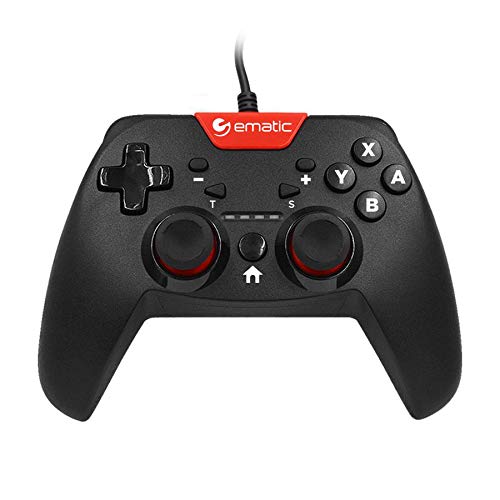
Image: Two individuals are shown holding Ematic wired controllers, actively engaged in a video game displayed on a television. The controllers are black with red accents, featuring joysticks and face buttons.
ప్యాకేజీ విషయాలు
- Ematic NSWC012W Wired Controller
- సూచనల మాన్యువల్ (ఈ పత్రం)
సెటప్
నింటెండో స్విచ్కి కనెక్ట్ అవుతోంది
- Ensure your Nintendo Switch console is powered on and docked.
- Plug the USB connector of the Ematic NSWC012W controller into an available USB port on the Nintendo Switch dock.
- The controller should be automatically recognized by the console. You may need to navigate to the 'Controllers' menu on your Switch to confirm connection.
- నియంత్రిక ఇప్పుడు ఉపయోగం కోసం సిద్ధంగా ఉంది.
PC (Windows) కి కనెక్ట్ అవుతోంది
- మీ PC పవర్ ఆన్ చేయబడిందని నిర్ధారించుకోండి.
- Plug the USB connector of the Ematic NSWC012W controller into an available USB port on your computer.
- The operating system will typically install the necessary drivers automatically. This process may take a few moments.
- Once drivers are installed, the controller will be recognized as a standard game controller. You can verify its functionality in your PC's device settings or within compatible games.
ఆపరేటింగ్ సూచనలు
కంట్రోలర్ లేఅవుట్ మరియు విధులు
The Ematic NSWC012W controller features a standard button layout for intuitive gameplay.
- అనలాగ్ స్టిక్స్: Two clickable analog sticks for precise movement and camera control.
- డైరెక్షనల్ ప్యాడ్ (డి-ప్యాడ్): For directional input in games.
- ఫేస్ బటన్లు (A, B, X, Y): Action buttons for in-game commands.
- భుజం బటన్లు (L, R): పైన అమర్చబడిన బటన్లు.
- Trigger Buttons (ZL, ZR): Bottom-mounted triggers.
- హోమ్ బటన్: Returns to the console's home screen (Nintendo Switch).
- PLUS (+) / MINUS (-) Buttons: For in-game menu navigation and options.
- స్క్రీన్షాట్ బటన్: Captures screenshots during gameplay (Nintendo Switch).
- TURBO బటన్: కేటాయించిన బటన్ల కోసం టర్బో ఫంక్షన్ను సక్రియం చేస్తుంది.
Using TURBO Mode
- నొక్కండి మరియు పట్టుకోండి టర్బో బటన్.
- పట్టుకొని ఉండగా టర్బో, press the desired action button (e.g., A, B, X, Y, L, R, ZL, ZR) you wish to assign the turbo function to.
- Release both buttons. The assigned button will now rapidly repeat its input when held down.
- To disable TURBO mode for a specific button, repeat steps 1 and 2.
స్క్రీన్షాట్ ఫంక్షన్
నొక్కండి స్క్రీన్ షాట్ బటన్ during gameplay on Nintendo Switch to capture an image of your screen. The captured image will be saved to your console's album.
నిర్వహణ
- కంట్రోలర్ను మృదువైన, పొడి గుడ్డతో తుడిచి శుభ్రంగా ఉంచండి.
- నియంత్రికను తీవ్రమైన ఉష్ణోగ్రతలు, తేమ లేదా ప్రత్యక్ష సూర్యకాంతికి గురిచేయకుండా ఉండండి.
- కంట్రోలర్పై రాపిడి క్లీనర్లు లేదా ద్రావకాలను ఉపయోగించవద్దు.
- కేబుల్ లేదా బటన్లకు నష్టం జరగకుండా ఉండటానికి కంట్రోలర్ను ఉపయోగంలో లేనప్పుడు సురక్షితమైన స్థలంలో నిల్వ చేయండి.
- కంట్రోలర్ను విడదీయడానికి ప్రయత్నించవద్దు, ఎందుకంటే ఇది వారంటీని రద్దు చేస్తుంది.
ట్రబుల్షూటింగ్
కంట్రోలర్ స్పందించడం లేదు
- కేబుల్ కనెక్షన్ని తనిఖీ చేయండి: USB కేబుల్ కంట్రోలర్ మరియు కన్సోల్/PC రెండింటికీ సురక్షితంగా ప్లగ్ చేయబడిందని నిర్ధారించుకోండి.
- వేరే USB పోర్ట్ని ప్రయత్నించండి: Connect the controller to another USB port on your console or PC.
- పరికరాన్ని పునఃప్రారంభించండి: Restart your Nintendo Switch or PC and try connecting the controller again.
- PC Driver Check: On PC, verify that the controller drivers are installed correctly in Device Manager.
Buttons or Joysticks Not Working Correctly
- క్లీన్ కంట్రోలర్: బటన్లు లేదా జాయ్స్టిక్ల చుట్టూ ఎటువంటి శిధిలాలు పేరుకుపోకుండా చూసుకోండి.
- Test in Another Game/Application: Determine if the issue is specific to one game or widespread.
- Recalibrate (PC): On PC, you may be able to recalibrate the controller through Windows Game Controller settings.
స్పెసిఫికేషన్లు
| మోడల్ సంఖ్య | NSWC012W |
| బ్రాండ్ | ఎమాటిక్ |
| అనుకూల పరికరాలు | Nintendo Switch, PC, Windows |
| కనెక్టివిటీ టెక్నాలజీ | USB |
| కేబుల్ పొడవు | 7.2 అడుగులు (సుమారు 2.2 మీటర్లు) |
| అదనపు ఫీచర్లు | Ergonomic design, Rumble feedback, TURBO button, Screenshot button |
| బటన్ పరిమాణం | 10 (excluding D-Pad and analog stick clicks) |
| శక్తి మూలం | కార్డెడ్ ఎలక్ట్రిక్ (USB ద్వారా) |
| UPC | 815592024156 |
వారంటీ సమాచారం
This Ematic product is covered by a STANDARD 90 DAYS warranty from the date of purchase. This warranty covers manufacturing defects under normal use. It does not cover damage caused by misuse, accidents, unauthorized modifications, or normal wear and tear. Please retain your proof of purchase for warranty claims.
మద్దతు
For further assistance, technical support, or warranty inquiries, please refer to the official Ematic webసైట్లో లేదా వారి కస్టమర్ సర్వీస్ విభాగాన్ని సంప్రదించండి. సంప్రదింపు సమాచారం సాధారణంగా ఉత్పత్తి ప్యాకేజింగ్లో లేదా తయారీదారు అధికారిక వెబ్సైట్లో చూడవచ్చు. webసైట్.
గమనిక: ఉత్పత్తి వివరణలు మరియు లక్షణాలు ముందస్తు నోటీసు లేకుండానే మారవచ్చు.