
1. పరిచయం
The iKiKin M11 Car HUD Display is a versatile head-up display system designed to project essential driving information onto your windshield. It features a dual system, supporting both OBD2 and GPS modes, allowing compatibility with a wide range of vehicles. This manual provides detailed instructions for installation, operation, maintenance, and troubleshooting to ensure optimal performance and safe use of your device.
Important Safety Note: While the iKiKin M11 offers dual OBD2 and GPS modes, some vehicles may experience compatibility issues with OBD2 devices. If your vehicle's dashboard warning lights illuminate or the vehicle experiences operational issues immediately after connecting the HUD in OBD2 mode, disconnect the device immediately. Consult your vehicle's manufacturer or a qualified mechanic for advice. iKiKin is not responsible for vehicle damage caused by incompatible OBD2 usage.
2. ఉత్పత్తి లక్షణాలు
- Dual System (OBD2 & GPS): Offers two independent operating modes with two USB ports for flexible connectivity and data transmission. Users can switch between modes with a single click.
- Professional & Innovative Design: Features an integrated raised key for easy operation and a high-performance processing chip for smooth, high-speed data handling.
- Clear & Legible Display: Utilizes nano-technology to eliminate double reflection and includes an integrated sun shade to ensure clear visibility day or night, reducing glare.
- Automatic & Energy-Saving: Equipped with an auto power on/off function, the device activates when the car starts and shuts down when the car turns off, conserving energy and simplifying use.
- బహుళ ప్రదర్శన మోడ్లు: Provides 24 distinct display modes, including common standard and high-speed safety modes, offering various visual options for a richer and more convenient reading experience.
- మన్నికైన నిర్మాణం: Made from PC and ABS materials, ensuring high temperature resistance (up to 176°F) and cold resistance (down to -40°F).
3. ప్యాకేజీ విషయాలు
దయచేసి మీ ప్యాకేజీలో ఈ క్రింది అన్ని అంశాలు చేర్చబడ్డాయని ధృవీకరించండి:
- iKiKin M11 Head-up Display Host
- USB కేబుల్
- OBD కేబుల్
- రిఫ్లెక్టివ్ ఫిల్మ్
- వినియోగదారు మాన్యువల్ (ఈ పత్రం)
- నాన్-స్లిప్ మ్యాట్

Image: Contents of the iKiKin M11 Car HUD Display package, including the main unit, cables, film, and mat.
4. సెటప్ మరియు ఇన్స్టాలేషన్
Follow these steps to install your iKiKin M11 Car HUD Display:
- Choose Installation Mode:
- OBD మోడ్: Locate your vehicle's OBD2 port (usually under the dashboard on the driver's side). Insert the provided OBD cable connector firmly into the OBD2 port.
- GPS మోడ్: Connect the provided USB cable to the HUD display and then plug the other end into a car charger (not included) or a suitable USB power source in your vehicle.
- Position the HUD: Place the non-slip mat on your dashboard in a position that allows for clear projection onto the windshield without obstructing your view రహదారి.
- కేబుల్ను రూట్ చేయండి: Carefully route the connecting cable (OBD or USB) along the dashboard and tuck it into the A-pillar seal or other trim to keep it tidy and secure, preventing interference with driving controls.
- Apply Reflective Film (Optional): If the projection on your windshield appears blurry or has a double image, apply the reflective film to the windshield directly above the HUD unit. Clean the windshield thoroughly before application.
- పవర్ ఆన్: The HUD will automatically power on when your vehicle starts.

Image: Visual guide for installing the HUD in OBD mode (connecting to OBD port), GPS mode (connecting via USB to car charger), and routing the wire into the A-pillar seal.

చిత్రం: వివిధ views of the iKiKin M11 HUD, showing its front, oblique side, rear oblique side, and back, along with dimensions.
5. ఆపరేటింగ్ సూచనలు
The iKiKin M11 HUD offers intuitive controls and multiple display options.
5.1. సిస్టమ్ స్విచింగ్
The device supports both OBD2 and GPS modes. To switch between these modes, use the designated button on the unit. A single click typically toggles between the two systems.
5.2. Main Functions Displayed

Image: Diagram illustrating the main functions available in OBD mode (Speed, Engine RPM, Voltage, Water Temperature, Single Mileage, °C/°F Switch, Buzzer Switch, KM/MPH Switch, Automatic Brightness Adjustment) and GPS mode (Speed, Voltage, Buzzer Switch, Single Mileage, Number of Satellites, Compass, KM/MPH Switch, Speed Alarm, Automatic Brightness Adjustment).
- OBD Main Functions: Speed, Engine RPM, Voltage, Water Temperature, Single Mileage Measurement, °C/°F Switch, Buzzer Switch, KM/MPH Switch, Automatic Brightness Adjustment.
- GPS Main Functions: Speed, Voltage, Buzzer Switch, Single Mileage Measurement, Number of Satellites, Compass, KM/MPH Switch, Speed Alarm, Automatic Brightness Adjustment.
5.3. డిస్ప్లే మోడ్లు
The M11 offers 24 display modes to suit various preferences and driving conditions. These include:
- Decorative Light Mode: Provides visual flair.
- RPM (OBD mode) Mode: Focuses on engine RPM display.
- సాధారణ మోడ్: Presents essential information concisely.
- Other modes for specific data like speed, water temperature, and battery voltage.

చిత్రం: ఉదాamples of multiple display modes, showing how Speed, Water Temperature, and Battery Voltage are presented in Decorative Light, RPM (OBD mode), and Simple modes.
5.4. Button Settings
The device features an integrated raised key design with multiple buttons for easy control:

Image: Close-up of the iKiKin M11 HUD's side, showing the control buttons labeled "Menu", "Parameter-", "Parameter+", and "Power".
- మెనూ బటన్: Used to access settings and navigate through options.
- Parameter - Button: ఎంపికల ద్వారా విలువలను తగ్గిస్తుంది లేదా వెనుకకు కదులుతుంది.
- Parameter + Button: విలువలను పెంచుతుంది లేదా ఎంపికల ద్వారా ముందుకు కదులుతుంది.
- పవర్ బటన్: Turns the device on/off manually (though auto on/off is standard).
Refer to the detailed user manual (physical copy) for specific instructions on navigating menus and adjusting parameters.
5.5. Display Components Overview
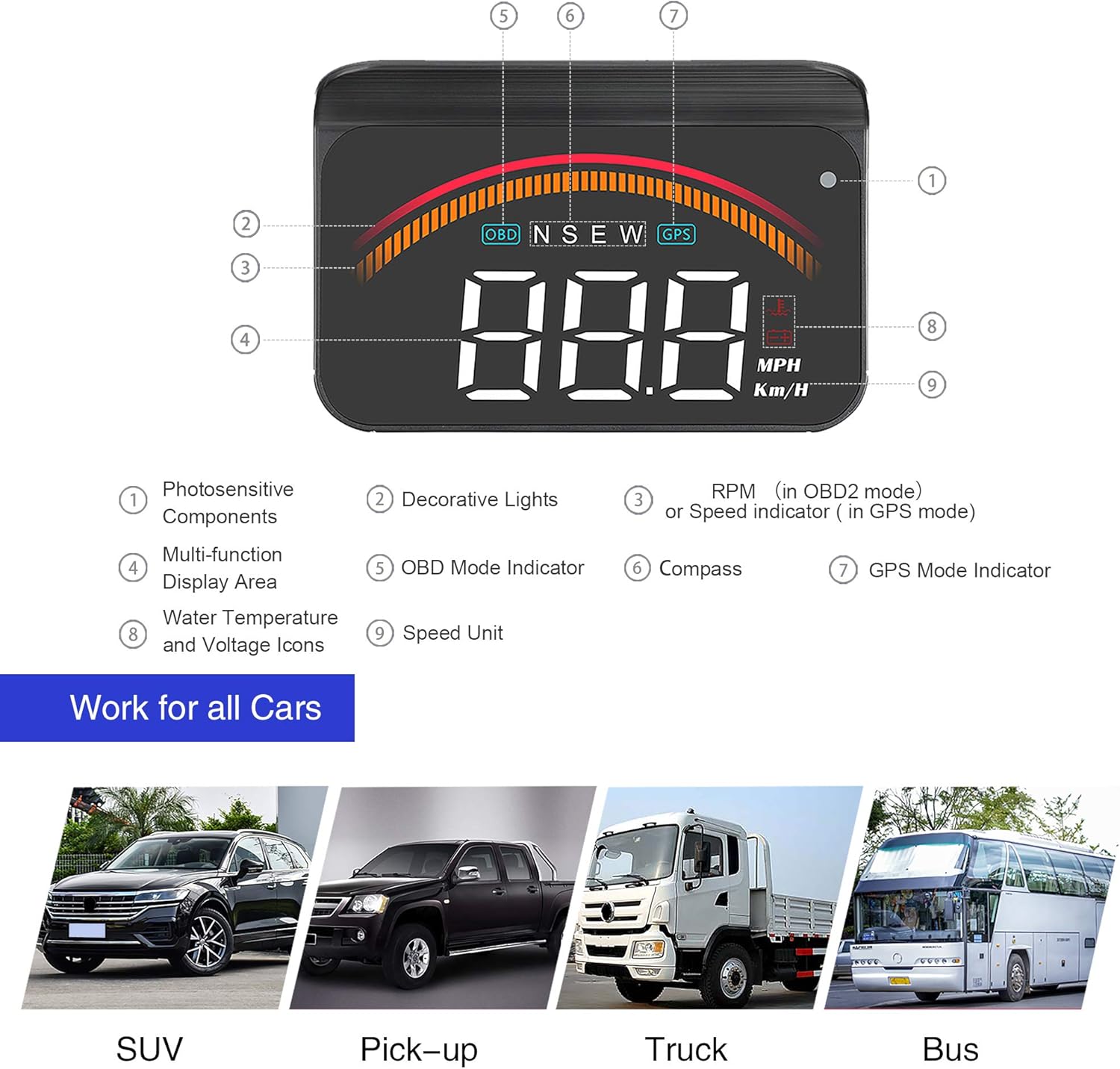
Image: Labeled diagram of the iKiKin M11 HUD display, pointing out Photosensitive Components, Decorative Lights, RPM (in OBD2 mode) or Speed indicator (in GPS mode), Multi-function Display Area, OBD Mode Indicator, Compass, GPS Mode Indicator, Water Temperature and Voltage Icons, and Speed Unit.
- ఫోటోసెన్సిటివ్ భాగాలు
- అలంకార లైట్లు
- RPM (in OBD2 mode) or Speed indicator (in GPS mode)
- Multi-function Display Area
- OBD Mode Indicator
- దిక్సూచి
- GPS మోడ్ సూచిక
- Water Temperature and Voltagఇ చిహ్నాలు
- Speed Unit (MPH/Km/H)
6. నిర్వహణ
- శుభ్రపరచడం: Use a soft, dry, lint-free cloth to clean the display screen and the device body. Avoid using abrasive cleaners, solvents, or spray cleaners directly on the unit.
- నిల్వ: ఎక్కువసేపు ఉపయోగంలో లేనప్పుడు, పరికరాన్ని ప్రత్యక్ష సూర్యకాంతి మరియు తీవ్రమైన ఉష్ణోగ్రతలకు దూరంగా చల్లని, పొడి ప్రదేశంలో నిల్వ చేయండి.
- మన్నిక: The iKiKin M11 is constructed from durable PC and ABS materials, designed to withstand temperatures from -40°F to 176°F. However, avoid exposing the device to excessive moisture or physical impact.
7. ట్రబుల్షూటింగ్
If you encounter issues with your iKiKin M11 HUD, please refer to the following common solutions:
- పరికరం ఆన్ చేయడం లేదు:
- Ensure the OBD or USB cable is securely connected to both the HUD and the vehicle's port/charger.
- Check your vehicle's ignition status; the device powers on automatically with the car.
- If using OBD mode, verify your vehicle's OBD2 port is functional.
- Inaccurate Speed/Data Readings:
- GPS మోడ్లో, పరికరం స్పష్టంగా ఉందని నిర్ధారించుకోండి view of the sky to acquire satellite signals. Allow a few minutes for initial satellite lock.
- In OBD mode, ensure the connection is stable. Some vehicle models may have slight variations in data reporting.
- Check the KM/MPH switch setting to ensure the correct unit is selected.
- Display Blurry or Double Image:
- Adjust the position of the HUD on the dashboard.
- Apply the provided reflective film to the windshield directly above the HUD for clearer projection.
- Display Stops Intermittently (GPS Mode):
- Ensure a stable power supply from the USB car charger.
- Verify that the device has a continuous, unobstructed view GPS సిగ్నల్ రిసెప్షన్ కోసం ఆకాశం యొక్క.
- Vehicle Warning Lights On (OBD Mode):
- Immediately disconnect the OBD cable from your vehicle. This indicates a potential incompatibility or issue with your vehicle's system. Do not continue using the HUD in OBD mode. Consult a professional mechanic.
For more detailed troubleshooting or issues not listed here, please refer to the comprehensive user manual included in your package or contact iKiKin customer support.
8. స్పెసిఫికేషన్లు
| బ్రాండ్ | iKiKin |
| తయారీదారు | iKiKin |
| మోడల్ | M11 |
| పార్ట్ నంబర్ | M1111 |
| అనుకూల పరికరాలు | Vehicles with OBD2 port, or any vehicle via GPS mode |
| స్టాండింగ్ స్క్రీన్ డిస్ప్లే సైజు | 3.5 అంగుళాలు |
| ప్రదర్శన రకం | LED |
| మొత్తం USB పోర్ట్లు | 2 |
| కనెక్టర్ రకం | USB, OBD2 |
| మెటీరియల్ రకం | అక్రిలోనిట్రైల్ బ్యూటాడిన్ స్టైరీన్ (ABS), పాలికార్బోనేట్ (PC) |
| ఉత్పత్తి కొలతలు (L x W x H) | 10 x 6 x 3 సెం.మీ (3.94 x 2.36 x 1.18 అంగుళాలు) |
| వస్తువు బరువు | 0.28 కిలోలు |
| UPC | 724873492167 |
9. వారంటీ & సపోర్ట్
For information regarding the product warranty, please refer to the warranty card included in your product packaging or visit the official iKiKin website. For technical support, troubleshooting assistance beyond what is provided in this manual, or to inquire about replacement parts, please contact iKiKin customer service through the contact information provided on the product packaging or their official webసైట్.
ఆన్లైన్ వనరులు: For the most up-to-date information and support, please visit the iKiKin official webసైట్.