
పరిచయం
This manual provides comprehensive instructions for the setup, operation, and maintenance of your Zerone Universal Remote Control. This remote is designed to function with various Pioneer DVD player models, offering a convenient replacement or secondary control unit.
అనుకూలత
The Zerone Universal Remote Control is compatible with the following Pioneer DVD player models:
- పయనీర్ VXX2811
- పయనీర్ VXX2914
- పయనీర్ VXX3218
- పయనీర్ VXX2801
- పయనీర్ VXX2800
- పయనీర్ VXX2913
For optimal performance, ensure your DVD player model is listed above.
సెటప్
1. బ్యాటరీ ఇన్స్టాలేషన్
- రిమోట్ కంట్రోల్ వెనుక బ్యాటరీ కంపార్ట్మెంట్ను గుర్తించండి.
- బ్యాటరీ కవర్ను క్రిందికి జారండి లేదా తెరవడానికి గడియను నొక్కి, ఎత్తండి.
- Insert two (2) AA 1.5V batteries, ensuring the positive (+) and negative (-) terminals align correctly with the markings inside the compartment.
- బ్యాటరీ కవర్ సురక్షితంగా క్లిక్ అయ్యే వరకు దాన్ని తిరిగి స్థానానికి స్లైడ్ చేయడం ద్వారా దాన్ని భర్తీ చేయండి.
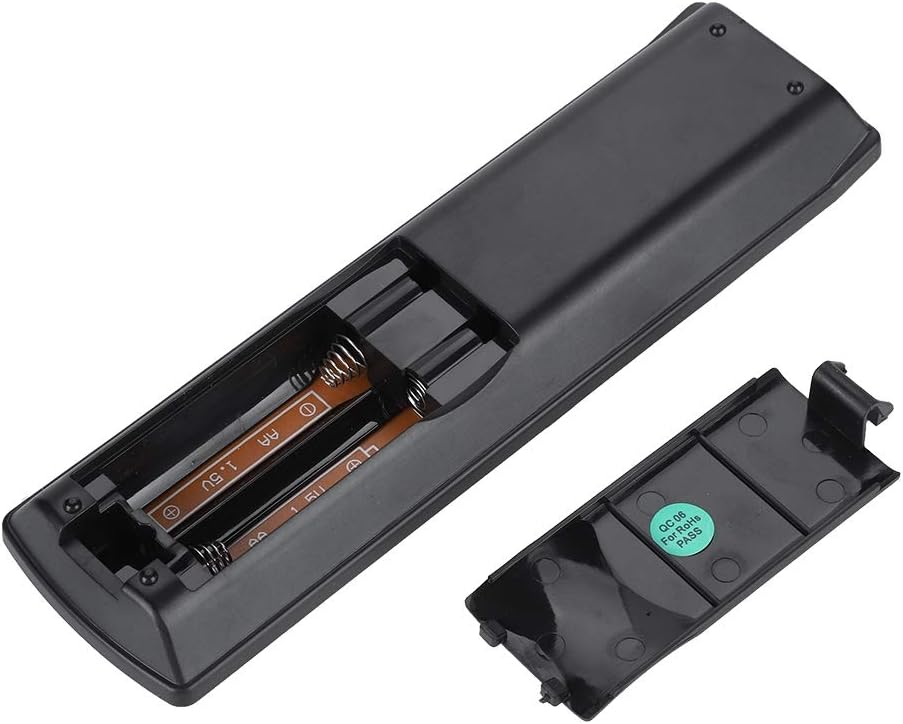
చిత్రం: వెనుక view of the Zerone remote control, showing the battery compartment cover.

Image: The battery compartment of the remote control with two AA batteries correctly inserted.
No programming or setup is required. Once batteries are installed, the remote is ready for use with compatible Pioneer DVD players.
ఆపరేటింగ్ సూచనలు
Point the remote control directly at your Pioneer DVD player. The effective control distance is typically over 8 meters (approximately 26 feet), though this may vary based on environmental factors and the specific DVD player model.

చిత్రం: ముందు భాగం view of the Zerone Universal Remote Control, displaying all buttons and their labels.
ముఖ్య విధులు:
- స్టాండ్బై/ఆన్: Powers the DVD player on or off.
- తెరుచుట మూయుట: డిస్క్ ట్రేని తెరుస్తుంది లేదా మూసివేస్తుంది.
- ఆడియో: Selects audio tracks or languages.
- ఉపశీర్షిక: ఉపశీర్షిక ఎంపికలను టోగుల్ చేస్తుంది లేదా ఎంచుకుంటుంది.
- కోణం: మారుస్తుంది viewing angle if supported by the DVD.
- సంఖ్య బటన్లు (0-9): Direct track selection or input.
- క్లియర్: Clears numerical input.
- నమోదు చేయండి: ఎంపికలను నిర్ధారిస్తుంది.
- టాప్ మెనూ: Accesses the main menu of the DVD.
- మెను: డిస్క్ మెనూను యాక్సెస్ చేస్తుంది.
- HOME MENU: Navigates to the home menu of the DVD player.
- వాపసు: మునుపటి స్క్రీన్ లేదా మెనూకు తిరిగి వెళుతుంది.
- Directional Pad (Up, Down, Left, Right) & ENTER: మెనూలను నావిగేట్ చేస్తుంది మరియు ఎంపికలను నిర్ధారిస్తుంది.
- Playback Controls (Play, Pause, Stop, Fast Forward, Rewind, Skip Forward, Skip Backward): Standard media playback functions.
- ఆడే విధానం: ప్లేబ్యాక్ మోడ్లను ఎంచుకుంటుంది (ఉదా., పునరావృతం, షఫుల్).
- సరౌండ్: Adjusts surround sound settings.
- జూమ్: Zooms in or out on the video.
- ప్రదర్శన: ఆన్-స్క్రీన్ డిస్ప్లే సమాచారాన్ని చూపుతుంది.

Image: A hand holding the Zerone remote control, demonstrating its ergonomic design and ease of use.

Image: The remote control positioned in front of a television displaying content, illustrating its intended use.

Image: A visual representation of the remote control's effective operating distance, indicating a range of over 8 meters.
నిర్వహణ
- శుభ్రపరచడం: రిమోట్ కంట్రోల్ను మృదువైన, పొడి గుడ్డతో తుడవండి. ద్రవ క్లీనర్లను లేదా రాపిడి పదార్థాలను ఉపయోగించవద్దు.
- బ్యాటరీ భర్తీ: రిమోట్ స్పందన మందగించినప్పుడు లేదా పనిచేయడం ఆగిపోయినప్పుడు బ్యాటరీలను మార్చండి. ఎల్లప్పుడూ రెండు బ్యాటరీలను ఒకే సమయంలో కొత్త వాటితో భర్తీ చేయండి.
- నిల్వ: రిమోట్ను ప్రత్యక్ష సూర్యకాంతి మరియు తీవ్రమైన ఉష్ణోగ్రతలకు దూరంగా చల్లని, పొడి ప్రదేశంలో నిల్వ చేయండి.
- నష్టాన్ని నివారించండి: రిమోట్ను పడవేయవద్దు లేదా నీటికి బహిర్గతం చేయవద్దు.
ట్రబుల్షూటింగ్
- రిమోట్ స్పందించడం లేదు:
- సరైన ధ్రువణతతో బ్యాటరీలు సరిగ్గా ఇన్స్టాల్ చేయబడ్డాయని నిర్ధారించుకోండి.
- పాత బ్యాటరీలను కొత్త AA బ్యాటరీలతో భర్తీ చేయండి.
- Check for any obstructions between the remote control and the DVD player's infrared sensor.
- Ensure you are within the effective operating range (typically within 8 meters).
- పనిచేయని కొన్ని విధులు:
- Verify that your Pioneer DVD player model is listed in the compatibility section.
- Some advanced functions may be specific to the original remote or not supported by all DVD player models.
స్పెసిఫికేషన్లు
| షెల్ మెటీరియల్ | High-grade ABS |
| నియంత్రణ దూరం | > 8 meters (316 inches) |
| బ్యాటరీ రకం | 2 x AA 1.5V Batteries (Not included) |
| కొలతలు | సుమారుగా 174 x 49 x 20 మిమీ (6.85 x 1.93 x 0.79 అంగుళాలు) |
| బరువు | సుమారు 75 గ్రా (2.46 ఔన్సులు) |
| మోడల్ సంఖ్య | 743562180017 |
వారంటీ మరియు మద్దతు
For warranty information or technical support, please refer to the documentation provided with your purchase or contact the manufacturer, Zerone, directly through their official channels. Keep your purchase receipt as proof of purchase.