
1. పరిచయం
This manual provides essential information for the safe and efficient operation of your Artlii Q Mini Portable Projector. Please read this manual thoroughly before using the product and retain it for future reference.
2. భద్రతా సమాచారం
ప్రొజెక్టర్ దెబ్బతినకుండా నిరోధించడానికి మరియు వినియోగదారు భద్రతను నిర్ధారించడానికి క్రింది భద్రతా జాగ్రత్తలను గమనించండి:
- వెంటిలేషన్ ఓపెనింగ్లను బ్లాక్ చేయవద్దు. వేడెక్కకుండా నిరోధించడానికి ప్రొజెక్టర్ చుట్టూ తగినంత గాలి ప్రవాహాన్ని నిర్ధారించుకోండి.
- Avoid direct exposure to the projector lens light. The bright light can cause eye strain.
- Do not place the projector in unstable locations. Ensure it is on a flat, stable surface.
- ప్రొజెక్టర్ను నీరు లేదా ఇతర ద్రవాలకు దూరంగా ఉంచండి.
- ప్రొజెక్టర్తో సరఫరా చేయబడిన పవర్ అడాప్టర్ను మాత్రమే ఉపయోగించండి.
- ప్రొజెక్టర్ను మీరే తెరవడానికి లేదా మరమ్మతు చేయడానికి ప్రయత్నించవద్దు. అన్ని సర్వీసింగ్లను అర్హత కలిగిన సిబ్బందికి సూచించండి.
3. ఉత్పత్తి ముగిసిందిview
The Artlii Q Mini Portable Projector is a compact and versatile device designed for various projection needs. It features a manual focus system, automatic sleep function, and supports a wide range of input sources.

మూర్తి 3.1: ముందు మరియు ఎగువ view of the Artlii Q Mini Portable Projector, highlighting the lens and control buttons.

మూర్తి 3.2: వెనుక view of the projector, illustrating the various input and output ports available for connectivity.
3.1 ముఖ్య లక్షణాలు
- పోర్టబుల్ డిజైన్: Compact and lightweight, ideal for transport.
- అంతర్నిర్మిత బ్యాటరీ: Offers 1-1.5 hours of operation on battery power.
- మాన్యువల్ ఫోకస్: Allows for precise image clarity adjustments.
- విస్తృత అనుకూలత: Connects to various devices including USB sticks, PCs, Macs, and TV sticks.
- తక్కువ నాయిస్ ఆపరేషన్: Engineered for quiet performance.

మూర్తి 3.3: The projector's internal battery, providing portable power for extended use.

మూర్తి 3.4: Demonstrating the projector's portability, easily fitting into a backpack.
4. సెటప్
4.1 పవర్ చేయడం ఆన్/ఆఫ్
- పవర్ అడాప్టర్ను ప్రొజెక్టర్ మరియు పవర్ అవుట్లెట్కి కనెక్ట్ చేయండి.
- Press the power button located on the top panel of the projector to turn it on.
- To turn off, press the power button again. The projector also features an automatic sleep function.
4.2 ఫోకస్ సర్దుబాటు చేయడం
The projector features a manual focus adjustment to ensure a clear image.
- ప్రొజెక్టర్ను ఆన్ చేసి, చిత్రాన్ని ప్రదర్శించండి.
- Locate the focus knob near the lens.
- Rotate the focus knob clockwise or counter-clockwise until the projected image appears sharp and clear.

మూర్తి 4.1: Diagram showing the focus knob and various projection sizes from 14 to 72 inches at different distances.
4.3 Projection Distance and Size
The projector can display images from 14 to 72 inches, depending on the distance from the projection surface. Refer to Figure 4.1 for approximate distances.
5. ఆపరేటింగ్ సూచనలు
5.1 మెనూను నావిగేట్ చేయడం
Use the directional buttons (up, down, left, right) and the 'OK' button on the projector's top panel or remote control to navigate through the on-screen menu. The 'Return' button allows you to go back to the previous menu.
5.2 మూలం ఎంపిక
After powering on, select your desired input source (e.g., HDMI, USB, AV) from the main menu. Ensure your external device is connected before selecting the source.
6 కనెక్టివిటీ
The Artlii Q Mini Portable Projector offers a variety of connection options for different devices.
6.1 అనుకూల పరికరాలు
ప్రొజెక్టర్ విస్తృత శ్రేణి పరికరాలకు అనుకూలంగా ఉంటుంది, వాటిలో:
- Laptops/PCs
- Gaming Consoles (e.g., Nintendo Switch, PS5)
- USB ఫ్లాష్ డ్రైవ్లు
- TV Sticks (e.g., Fire TV Stick)
- బ్లూ-రే ప్లేయర్స్
- కెమెరాలు
- TF Cards (MicroSD)
- U Disks
- Chromecast
- Home Cinema Systems
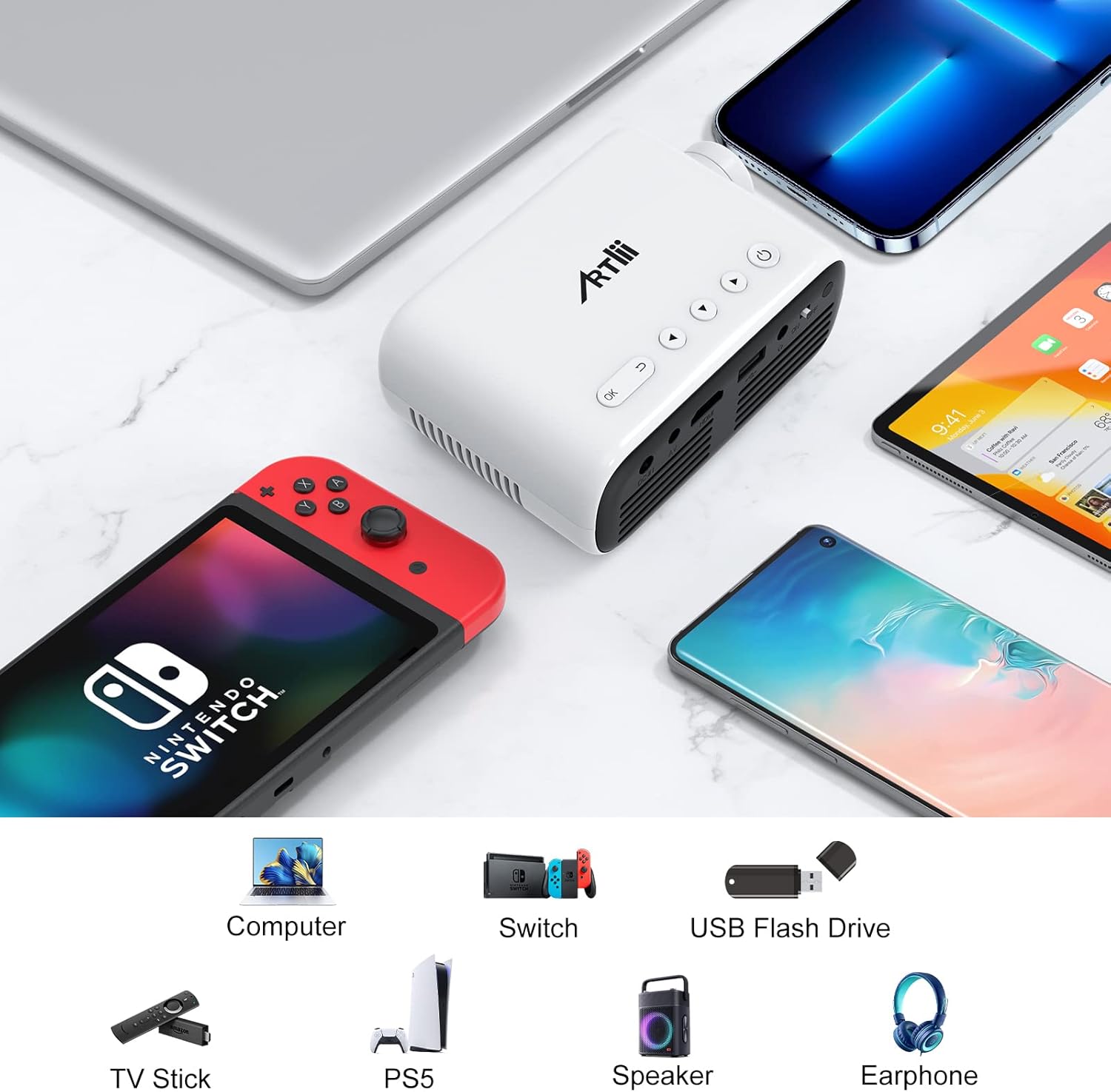
మూర్తి 6.1: Examples of devices that can be connected to the Artlii Q Mini Portable Projector.

మూర్తి 6.2: Further compatible devices and an illustration of connecting phones/tablets via a separate WiFi display dongle (not included).
6.2 Connecting to Phones/Tablets
To connect your phone or tablet, a separate WiFi display dongle (not included) is required. Connect the dongle to the projector's HDMI port and follow the dongle's instructions for screen mirroring.
7. నిర్వహణ
7.1 లెన్స్ శుభ్రపరచడం
Use a soft, lint-free cloth specifically designed for optical lenses to gently wipe the projector lens. Avoid using abrasive cleaners or excessive force.
7.2 ప్రొజెక్టర్ బాడీని శుభ్రపరచడం
ప్రొజెక్టర్ బయటి భాగాన్ని మృదువైన, పొడి గుడ్డతో తుడవండి. ద్రవ లేదా ఏరోసోల్ క్లీనర్లను ఉపయోగించవద్దు.
7.3 నిల్వ
ఎక్కువసేపు ఉపయోగంలో లేనప్పుడు, ప్రొజెక్టర్ను చల్లని, పొడి ప్రదేశంలో, ప్రత్యక్ష సూర్యకాంతి మరియు తీవ్రమైన ఉష్ణోగ్రతలకు దూరంగా నిల్వ చేయండి. దుమ్ము పేరుకుపోవడం మరియు నష్టాన్ని నివారించడానికి అసలు ప్యాకేజింగ్ లేదా రక్షణ కేసును ఉపయోగించండి.
8. ట్రబుల్షూటింగ్
మీ ప్రొజెక్టర్తో మీకు సమస్యలు ఎదురైతే, ఈ క్రింది సాధారణ పరిష్కారాలను చూడండి:
| సమస్య | సాధ్యమైన కారణం | పరిష్కారం |
|---|---|---|
| ఏ చిత్రం ప్రదర్శించబడలేదు | Power not connected, incorrect input source, loose cable connection | Check power cable, select correct input source, ensure all cables are securely connected. |
| చిత్రం అస్పష్టంగా ఉంది | Focus not adjusted, projector too close/far | Adjust the manual focus knob. Adjust projection distance. |
| శబ్దం లేదు | Volume too low, external device volume low, audio cable not connected | Increase projector volume. Increase external device volume. Ensure audio cables are connected correctly. |
| ప్రొజెక్టర్ వేడెక్కుతుంది | Blocked ventilation, prolonged use | Ensure ventilation openings are clear. Allow the projector to cool down. |
9. స్పెసిఫికేషన్లు
| ఫీచర్ | స్పెసిఫికేషన్ |
|---|---|
| బ్రాండ్ | Artlii |
| మోడల్ | HD Videoprojecteur |
| ఉత్పత్తి కొలతలు | 31 x 24 x 11 సెం.మీ |
| వస్తువు బరువు | 3.34 కిలోలు |
| హార్డ్వేర్ ఇంటర్ఫేస్ | AV, HDMI, Infrared, MicroSD, USB, VGA |
| అనుకూల పరికరాలు | Laptop, Gaming Consoles, USB Sticks, TV Sticks, Blu-ray Players, Cameras, Phones/Tablets (with dongle) |
| అదనపు ఫీచర్లు | Large projection size, High compatibility, Lightweight and portable, Powerful and clear sound, Clear and fresh image |
| స్క్రీన్ టెక్నాలజీ | LCD |
| స్క్రీన్ పరిమాణం | Up to 200 Inches (Optimal 14-72 inches) |
| ఇమేజ్ కాంట్రాస్ట్ రేషియో | 3000:1 |
| కారక నిష్పత్తి | 16:9, 4:3 |
| స్థానిక రిజల్యూషన్ | 1280 x 800 |
| గరిష్ట డిస్ప్లే రిజల్యూషన్ | 1920 x 1080 (1080p supported) |
| శబ్దం స్థాయి | 40 డిబి |
| కనెక్టివిటీ రకం | HDMI, USB, VGA |
| ఫారమ్ ఫ్యాక్టర్ | పోర్టబుల్ |
| మౌంటు రకం | సీలింగ్ |
| ప్రకాశం | 3400 lm |
| రంగు | నలుపు |
10. వారంటీ మరియు మద్దతు
Artlii provides a one-year warranty for this product. Additionally, a 3-month worry-free refund policy is offered. For any defective products or support inquiries, please contact Artlii customer service for a free replacement or a full refund.
మరింత సహాయం కోసం, దయచేసి సందర్శించండి Artlii Store on Amazon.