
Prtukyt 6S
Prtukyt 6S Wireless Headphones User Manual
Model: 6S | Brand: Prtukyt
పరిచయం
Thank you for choosing the Prtukyt 6S Wireless Headphones. This manual provides detailed instructions on how to set up, operate, and maintain your headphones to ensure optimal performance and longevity. Please read this manual thoroughly before using the product.

Image: Prtukyt 6S Wireless Headphones in black and red, showcasing మొత్తం డిజైన్.
కీ ఫీచర్లు
- HI-FI Stereo Sound: High-definition audio with deep bass and crystal-clear treble, powered by a 57mm driver for precise sound reproduction.
- అధునాతన బ్లూటూత్ 5.0: Ensures fast, stable connections and low latency for audio/video streaming.
- సుదీర్ఘ బ్యాటరీ జీవితం: Up to 40 hours of continuous playtime on a single charge, thanks to a 500mAh lithium-polymer battery.
- సౌకర్యవంతమైన డిజైన్: Features super soft, skin-texture simulating ear cushions and an adjustable, padded headband for extended wear comfort.
- ఫోల్డబుల్ మరియు పోర్టబుల్: Ergonomic, foldable design for easy storage and transport, ideal for travel and daily use.
- మల్టీ-మోడ్ ప్లేబ్యాక్: Supports wireless Bluetooth, wired 3.5mm audio connection, Micro SD/TF card playback, and FM radio.
- అంతర్నిర్మిత మైక్రోఫోన్: High-quality microphone for clear, hands-free calls.

చిత్రం: పైగాview of the headphones' key features, including Hi-Fi sound, comfortable earmuffs, radio receiver, long battery life, foldable design, and HD call capability.

Image: Close-up of the headphone earcup highlighting the Bluetooth 5.0 chip, Hi-Fi sound, 57mm driver, and extra bass capabilities.
ప్యాకేజీ విషయాలు
దయచేసి ఈ క్రింది అంశాల కోసం పెట్టెను ఎంచుకోండి:
- Prtukyt 6S Wireless Headphones
- USB ఛార్జింగ్ కేబుల్
- 3.5mm ఆడియో కేబుల్
- వినియోగదారు మాన్యువల్

Image: Visual representation of the items included in the product packaging: the headphones, a USB charging cable, and a 3.5mm audio cable.
సెటప్
1. హెడ్ఫోన్లను ఛార్జ్ చేయడం
Before first use, fully charge the headphones. A full charge takes approximately 3 hours and provides up to 40 hours of playtime.
- USB ఛార్జింగ్ కేబుల్ యొక్క చిన్న చివరను హెడ్ఫోన్ ఇయర్కప్లోని ఛార్జింగ్ పోర్ట్కు కనెక్ట్ చేయండి.
- USB ఛార్జింగ్ కేబుల్ యొక్క పెద్ద చివరను USB పవర్ అడాప్టర్ (చేర్చబడలేదు) లేదా కంప్యూటర్ యొక్క USB పోర్ట్కి కనెక్ట్ చేయండి.
- The LED indicator light will show charging status (e.g., red for charging, off when fully charged).

Image: Visual representation of the headphones' long battery life, indicating up to 40 hours of playtime on a single charge.
2. బ్లూటూత్ పెయిరింగ్
Pair your headphones with your Bluetooth-enabled device (smartphone, tablet, PC).
- హెడ్ఫోన్లు ఛార్జ్ చేయబడి, ఆఫ్ చేయబడి ఉన్నాయని నిర్ధారించుకోండి.
- LED సూచిక నీలం మరియు ఎరుపు రంగుల్లో ప్రత్యామ్నాయంగా మెరిసే వరకు పవర్/మల్టీ-ఫంక్షన్ బటన్ను నొక్కి పట్టుకోండి, ఇది జత చేసే మోడ్ను సూచిస్తుంది.
- మీ పరికరంలో, బ్లూటూత్ని ప్రారంభించి, అందుబాటులో ఉన్న పరికరాల కోసం వెతకండి.
- Select "6S" from the list of found devices.
- జత చేసిన తర్వాత, LED సూచిక నెమ్మదిగా నీలం రంగులో మెరుస్తుంది మరియు మీరు నిర్ధారణ టోన్ వింటారు.
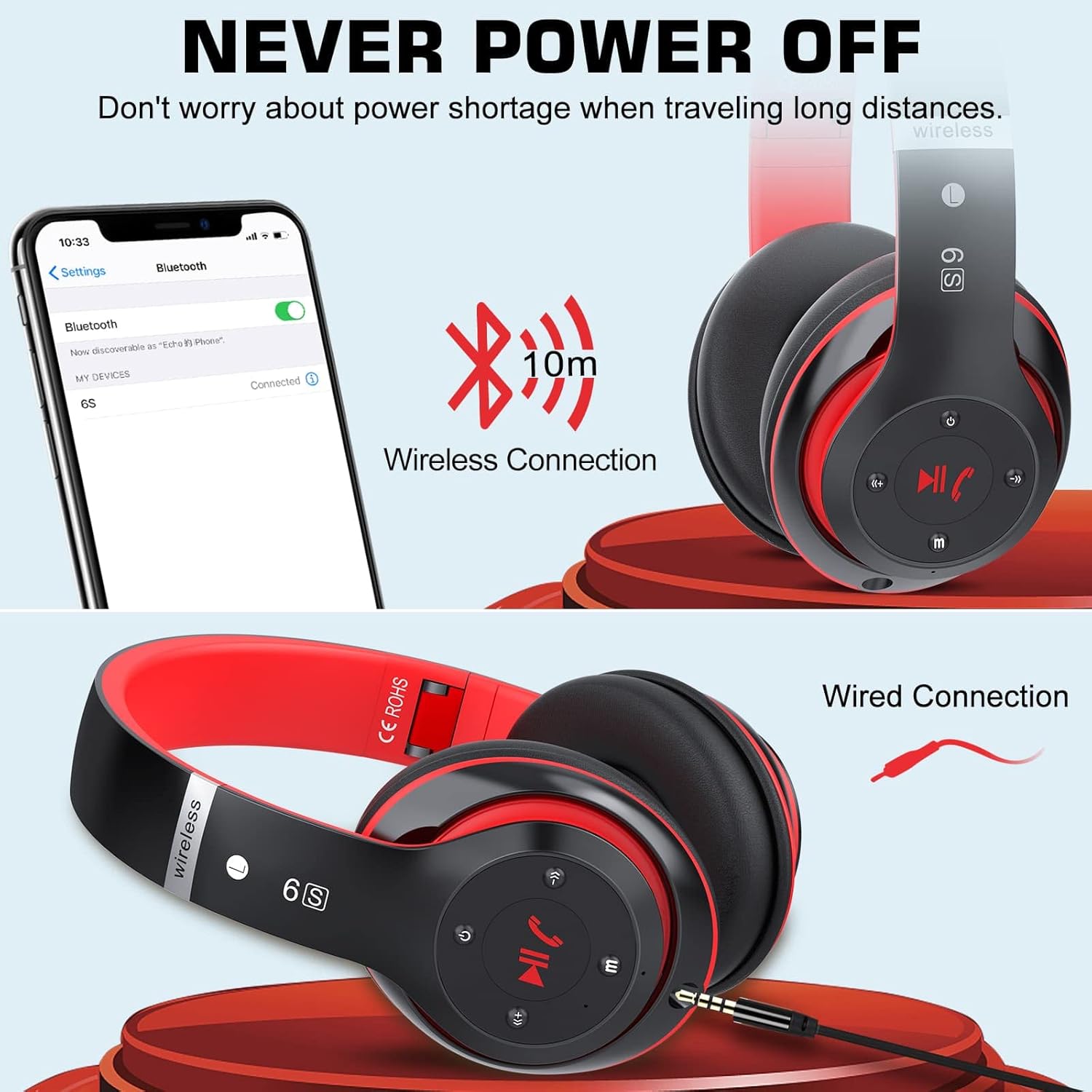
Image: Demonstrates both wireless Bluetooth connection (up to 10m range) and wired connection options for the headphones.
3. వైర్డు కనెక్షన్ (ఆక్స్ మోడ్)
Use the included 3.5mm audio cable for a wired connection, especially when the battery is low or for non-Bluetooth devices.
- Plug one end of the 3.5mm audio cable into the audio input port on the headphone earcup.
- మరొక చివరను మీ పరికరం యొక్క 3.5mm ఆడియో జాక్లోకి ప్లగ్ చేయండి.
- హెడ్ఫోన్లు స్వయంచాలకంగా వైర్డు మోడ్కి మారుతాయి.
4. Micro SD/TF Card Playback
Insert a Micro SD/TF card loaded with MP3 audio files into the designated slot on the headphones.
- Locate the Micro SD/TF card slot on the headphone earcup.
- Gently insert the Micro SD/TF card until it clicks into place.
- The headphones will automatically switch to TF card playback mode. Use the control buttons to navigate tracks.
5. FM రేడియో మోడ్
The headphones can receive FM radio signals. For best reception, ensure the 3.5mm audio cable is plugged in, as it acts as an antenna.
- హెడ్ఫోన్లను ఆన్ చేయండి.
- Press the "M" (Mode) button to switch to FM radio mode.
- అందుబాటులో ఉన్న FM స్టేషన్లను ఆటో-స్కాన్ చేయడానికి మరియు సేవ్ చేయడానికి ప్లే/పాజ్ బటన్ను నొక్కండి.
- సేవ్ చేసిన స్టేషన్ల మధ్య మారడానికి మునుపటి/తదుపరి ట్రాక్ బటన్లను ఉపయోగించండి.
ఆపరేటింగ్ సూచనలు
Familiarize yourself with the control buttons located on the earcup for easy operation.

Image: Detailed diagram showing the location and function of each button on the headphone earcup, including power, track control, volume, mode, and call handling.
| బటన్/యాక్షన్ | ఫంక్షన్ |
|---|---|
| పవర్ బటన్ (ఆన్/ఆఫ్) | పవర్ ఆన్/ఆఫ్ చేయడానికి నొక్కి పట్టుకోండి. |
| Play/Pause / Answer/Hang Up | Press once to play/pause music. Press once to answer/end a call. Press and hold to reject a call. |
| Previous Song / Volume Down (-) | Short press for previous song. Long press to decrease volume. |
| Next Song / Volume Up (+) | Short press for next song. Long press to increase volume. |
| మోడ్ బటన్ (M) | Press to switch between Bluetooth, TF Card, and FM Radio modes. |
| Audio Cable Link Hole | Connect 3.5mm audio cable for wired playback. |
నిర్వహణ
- శుభ్రపరచడం: హెడ్ఫోన్లను శుభ్రం చేయడానికి మృదువైన, పొడి వస్త్రాన్ని ఉపయోగించండి. రాపిడి క్లీనర్లు లేదా ద్రావకాలను ఉపయోగించవద్దు.
- నిల్వ: ఉపయోగంలో లేనప్పుడు, హెడ్ఫోన్లను చల్లని, పొడి ప్రదేశంలో, ప్రత్యక్ష సూర్యకాంతి మరియు తీవ్రమైన ఉష్ణోగ్రతలకు దూరంగా నిల్వ చేయండి. ఫోల్డబుల్ డిజైన్ కాంపాక్ట్ నిల్వను అనుమతిస్తుంది.
- బ్యాటరీ సంరక్షణ: బ్యాటరీ జీవితకాలం పొడిగించడానికి, హెడ్ఫోన్లను తరచుగా పూర్తిగా డిశ్చార్జ్ చేయకుండా ఉండండి. ఎక్కువసేపు ఉపయోగించకపోయినా, వాటిని క్రమం తప్పకుండా ఛార్జ్ చేయండి.
- తేమను నివారించండి: హెడ్ఫోన్లను నీటికి లేదా అధిక తేమకు గురిచేయవద్దు.

Image: The headphones in their folded state, illustrating their compact and portable design for easy carrying and storage.
ట్రబుల్షూటింగ్
| సమస్య | సాధ్యమైన కారణం | పరిష్కారం |
|---|---|---|
| హెడ్ఫోన్లు పవర్ ఆన్ చేయవు. | తక్కువ బ్యాటరీ. | హెడ్ఫోన్లను పూర్తిగా ఛార్జ్ చేయండి. |
| బ్లూటూత్ పరికరంతో జత చేయడం సాధ్యపడదు. | హెడ్ఫోన్లు జత చేసే మోడ్లో లేవు; పరికరం బ్లూటూత్ ఆఫ్లో ఉంది; పరికరం నుండి చాలా దూరంలో ఉంది. | Ensure headphones are in pairing mode (flashing blue/red). Turn on Bluetooth on your device. Move headphones closer to the device (within 10m). |
| బ్లూటూత్ మోడ్లో ధ్వని లేదు. | Volume too low; not properly paired; wrong audio output selected on device. | Increase headphone and device volume. Re-pair the headphones. Select "6S" as the audio output on your device. |
| FM రేడియో స్పందన సరిగా లేదు. | యాంటెన్నా కనెక్ట్ కాలేదు; సిగ్నల్ బలహీనంగా ఉంది. | Plug in the 3.5mm audio cable (acts as antenna). Try auto-scanning again. Move to an area with better signal. |
| Micro SD/TF card not recognized. | Card not inserted correctly; unsupported format. | Re-insert the card firmly. Ensure card contains MP3 files. |
స్పెసిఫికేషన్లు
| ఫీచర్ | వివరాలు |
|---|---|
| మోడల్ పేరు | 6S |
| బ్రాండ్ | ప్రతుకిట్ |
| కనెక్టివిటీ టెక్నాలజీ | వైర్లెస్ (బ్లూటూత్ 5.0) |
| వైర్లెస్ కమ్యూనికేషన్ టెక్నాలజీ | బ్లూటూత్ |
| ఆడియో ఇన్పుట్ | 3.5 మిమీ జాక్ |
| ఫారమ్ ఫ్యాక్టర్ | చెవి పైన (సర్కమ్-ఆరిక్యులర్) |
| బ్యాటరీ రకం | లిథియం-పాలిమర్ (500mAh) |
| ఆట సమయం | 40 గంటల వరకు |
| ఛార్జింగ్ సమయం | సుమారు 3 గంటలు |
| వైర్లెస్ రేంజ్ | 10 మీటర్లు (33 అడుగులు) వరకు |
| మెటీరియల్ | తోలు, ప్లాస్టిక్ |
| రంగు | నలుపు/ఎరుపు |

Image: Illustration of a 40mm stereo driver, emphasizing its role in delivering sound purity and precision.
వారంటీ మరియు మద్దతు
Prtukyt provides a 12-month warranty for this product. If you encounter any issues or have questions regarding your Prtukyt 6S Wireless Headphones, please contact our customer support for assistance. We are committed to ensuring your satisfaction.
Contact information for support is typically found on the product packaging or the brand's official webసైట్.
Ask a question about this manual
Ask about setup, troubleshooting, compatibility, parts, safety, or missing instructions. Manuals+ will review the question and use this page’s manual context to help answer it.