
1. పరిచయం
This manual provides essential information for the safe and efficient operation of your Eurom DryBest 30 WiFi dehumidifier. Please read these instructions carefully before use and retain them for future reference. This appliance is designed to reduce humidity levels in indoor environments, improving air quality and preventing issues related to excessive moisture.
2. భద్రతా సూచనలు
అగ్ని ప్రమాదం, విద్యుత్ షాక్ లేదా గాయం ప్రమాదాన్ని తగ్గించడానికి ఎల్లప్పుడూ క్రింది భద్రతా జాగ్రత్తలను గమనించండి.
- విద్యుత్ సరఫరా వాల్యూమ్ నిర్ధారించుకోండిtage యూనిట్లోని రేటింగ్ లేబుల్తో సరిపోలుతుంది.
- దెబ్బతిన్న త్రాడు లేదా ప్లగ్తో డీహ్యూమిడిఫైయర్ను ఆపరేట్ చేయవద్దు.
- ఉపకరణాన్ని వేడి వనరులు, ప్రత్యక్ష సూర్యకాంతి మరియు మండే పదార్థాల నుండి దూరంగా ఉంచండి.
- గాలి ప్రవేశ ద్వారం లేదా నిష్క్రమణను నిరోధించవద్దు. యూనిట్ చుట్టూ కనీసం 20 సెం.మీ. క్లియరెన్స్ నిర్వహించండి.
- వస్తువులను ఎప్పుడూ గాలి గుంటలలోకి చొప్పించవద్దు.
- యూనిట్ను శుభ్రపరిచే ముందు, నిర్వహణ చేసే ముందు లేదా ఉపయోగంలో లేనప్పుడు అన్ప్లగ్ చేయండి.
- Do not use the appliance in bathrooms or other excessively wet environments where it could come into contact with water.
- ఈ ఉపకరణం వారి భద్రతకు బాధ్యత వహించే వ్యక్తి ద్వారా ఉపకరణాన్ని ఉపయోగించడం గురించి పర్యవేక్షణ లేదా సూచనలను అందిస్తే తప్ప, శారీరక, ఇంద్రియ లేదా మానసిక సామర్థ్యాలు తగ్గిన వ్యక్తులు (పిల్లలతో సహా) లేదా అనుభవం మరియు జ్ఞానం లేకపోవడం కోసం ఉద్దేశించబడలేదు.
- పిల్లలు ఉపకరణంతో ఆడకుండా ఉండేలా పర్యవేక్షించాలి.
- సరఫరా త్రాడు దెబ్బతిన్నట్లయితే, ప్రమాదాన్ని నివారించడానికి తయారీదారు, దాని సేవా ఏజెంట్ లేదా అదే విధంగా అర్హత కలిగిన వ్యక్తులు దానిని భర్తీ చేయాలి.
3. ఉత్పత్తి ముగిసిందిview
The Eurom DryBest 30 WiFi is a powerful and efficient dehumidifier designed for domestic use. It features a quiet operation and can be controlled via WiFi for convenience.
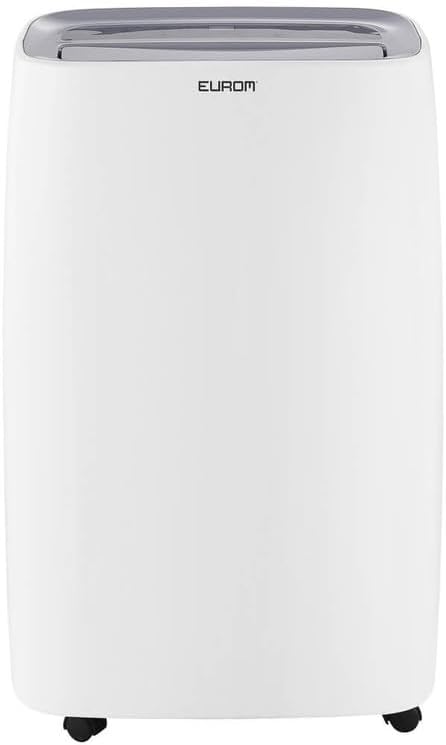
మూర్తి 3.1: ముందు view of the Eurom DryBest 30 WiFi dehumidifier. This image displays the unit's overall appearance, highlighting its modern white casing and integrated handles for portability.
3.1 ప్రధాన భాగాలు
- నియంత్రణ ప్యానెల్: Located on the top of the unit for easy access to settings and indicators.
- ఎయిర్ అవుట్లెట్: Top-mounted grille for expelling dry air.
- ఎయిర్ ఇన్లెట్/ఫిల్టర్: Rear-mounted for drawing in humid air, equipped with a removable air filter.
- నీటి ట్యాంక్: Removable tank for collecting condensed water.
- నిరంతర డ్రెయిన్ అవుట్లెట్: Port for connecting a hose for continuous drainage.
- కాస్టర్లు: Wheels at the base for easy movement.
4. సెటప్
4.1 అన్ప్యాకింగ్
- దాని ప్యాకేజింగ్ నుండి డీహ్యూమిడిఫైయర్ను జాగ్రత్తగా తొలగించండి.
- ఏదైనా టేప్ లేదా రక్షిత ఫిల్మ్లతో సహా అన్ని ప్యాకింగ్ పదార్థాలను తీసివేయండి.
- Inspect the unit for any signs of damage. If damaged, do not operate and contact your retailer.
4.2 ప్లేస్మెంట్
- Place the dehumidifier on a firm, level surface to prevent vibration and water leakage.
- సరైన గాలి ప్రసరణ కోసం యూనిట్ చుట్టూ కనీసం 20 సెం.మీ (8 అంగుళాలు) స్థలం ఉందని నిర్ధారించుకోండి. గాలి ఇన్లెట్లు లేదా అవుట్లెట్లకు ఆటంకం కలిగించే గోడ లేదా ఫర్నిచర్కు వ్యతిరేకంగా దానిని ఉంచవద్దు.
- For optimal performance, place the unit in the center of the room or area requiring dehumidification.
- వేడిని ఉత్పత్తి చేసే ఉపకరణాల దగ్గర లేదా ప్రత్యక్ష సూర్యకాంతిలో యూనిట్ను ఉంచకుండా ఉండండి.
4.3 పవర్ కనెక్షన్
- పవర్ కార్డ్ను గ్రౌన్దేడ్ ఎలక్ట్రికల్ అవుట్లెట్లోకి ప్లగ్ చేయండి.
- Ensure the outlet meets the electrical requirements of the unit (230V, 50Hz).
4.4 డ్రైనేజీ ఎంపికలు
The dehumidifier offers two drainage methods: manual tank emptying or continuous drainage.
4.4.1 మాన్యువల్ డ్రైనేజీ (నీటి ట్యాంక్)
- When the water tank is full, the "FULL" indicator light will illuminate, and the unit will automatically stop operating.
- యూనిట్ ముందు నుండి వాటర్ ట్యాంక్ను జాగ్రత్తగా బయటకు తీయండి.
- సేకరించిన నీటిని ఖాళీ చేయండి.
- ఖాళీ నీటి ట్యాంక్ సురక్షితంగా క్లిక్ అయ్యే వరకు దాన్ని తిరిగి దాని స్థానానికి జారండి. యూనిట్ తిరిగి పనిచేయడం ప్రారంభిస్తుంది.
4.4.2 నిరంతర పారుదల
- For continuous operation without emptying the tank, connect a suitable drain hose (not included) to the continuous drain outlet at the back of the unit.
- Ensure the hose is sloped downwards to allow gravity to drain the water into a floor drain or larger container.
- Verify that the hose connection is secure to prevent leaks.
4.5 వైఫై సెటప్
The DryBest 30 WiFi can be controlled remotely via a smartphone app.
- Download the "Eurom Smart" app (or similar specified app) from your device's app store.
- Follow the in-app instructions to register an account and add your dehumidifier.
- Ensure your dehumidifier is powered on and the WiFi indicator light is blinking, indicating pairing mode.
- Once connected, the WiFi indicator light will become solid.
5. ఆపరేటింగ్ సూచనలు

మూర్తి 5.1: Control Panel of the Eurom DryBest 30 WiFi. This image details the various buttons and indicators for operating the dehumidifier.
5.1 కంట్రోల్ ప్యానెల్ ఓవర్view
- పవర్ బటన్: యూనిట్ని ఆన్ లేదా ఆఫ్ చేస్తుంది.
- మోడ్ బటన్: ఆపరేటింగ్ మోడ్ల ద్వారా చక్రాలు (ఉదా., ఆటో, కంటిన్యూయస్, లాండ్రీ).
- పైకి/క్రింది బటన్లు: Adjust desired humidity level or timer settings.
- స్పీడ్ బటన్: ఫ్యాన్ వేగాన్ని (ఎక్కువ, తక్కువ) ఎంచుకుంటుంది.
- TIMER బటన్: ఆటో-ఆన్ లేదా ఆటో-ఆఫ్ టైమర్ను సెట్ చేస్తుంది.
- స్వింగ్ బటన్: Activates or deactivates the oscillating air outlet.
- పంప్ బటన్: Activates the internal pump for continuous drainage (if applicable and hose connected).
- లాక్ బటన్: Child lock function to prevent accidental changes.
- WIFI సూచిక: Shows WiFi connection status.
- FULL Indicator: వాటర్ ట్యాంక్ నిండినప్పుడు వెలుగుతుంది.
- LAUNDRY Indicator: Illuminates when Laundry mode is active.
- FAN Indicator: Illuminates when fan is operating.
5.2 ప్రాథమిక ఆపరేషన్
- పవర్ ఆన్: నొక్కండి శక్తి button. The unit will start in its default or last-used mode.
- కావలసిన తేమను సెట్ చేయండి: ఉపయోగించండి UP మరియు డౌన్ buttons to set the target humidity level (e.g., 40% - 60% relative humidity is generally recommended). The unit will operate until this level is reached, then cycle on and off to maintain it.
- మోడ్ని ఎంచుకోండి: నొక్కండి మోడ్ button to choose between different operating modes.
- ఆటో మోడ్: The unit automatically adjusts operation based on the ambient humidity.
- నిరంతర మోడ్: The unit runs continuously regardless of humidity level. Ideal for very damp conditions or for use with continuous drainage.
- లాండ్రీ మోడ్: Designed to quickly dry clothes indoors. The unit operates at high fan speed and continuous dehumidification.
- ఫ్యాన్ వేగాన్ని సర్దుబాటు చేయండి: నొక్కండి వేగం అధిక మరియు తక్కువ ఫ్యాన్ వేగాల మధ్య టోగుల్ చేయడానికి బటన్.
- టైమర్ సెట్ చేయండి: నొక్కండి టైమర్ బటన్, ఆపై ఉపయోగించండి UP మరియు డౌన్ to set the desired operating duration (e.g., 2 hours, 4 hours).
- స్వింగ్ ఫంక్షన్: నొక్కండి స్వింగ్ button to activate the oscillating louvers, distributing dry air more evenly.
- చైల్డ్ లాక్: నొక్కండి మరియు పట్టుకోండి లాక్ button for a few seconds to activate/deactivate the child lock.
- పవర్ ఆఫ్: నొక్కండి శక్తి యూనిట్ను ఆపివేయడానికి మళ్లీ బటన్.

మూర్తి 5.2: Dehumidifier in use, illustrating its application for drying laundry. The image shows the unit positioned near a clothes rack, indicating its effectiveness in reducing drying times indoors.
6. నిర్వహణ
క్రమం తప్పకుండా నిర్వహణ సరైన పనితీరును నిర్ధారిస్తుంది మరియు మీ డీహ్యూమిడిఫైయర్ యొక్క జీవితకాలం పొడిగిస్తుంది.
6.1 ఎయిర్ ఫిల్టర్ను శుభ్రపరచడం
గాలి నాణ్యత మరియు దాని వాడకాన్ని బట్టి ప్రతి రెండు వారాలకు ఒకసారి లేదా అంతకంటే ఎక్కువసార్లు ఎయిర్ ఫిల్టర్ను శుభ్రం చేయాలి.
- పవర్ అవుట్లెట్ నుండి డీహ్యూమిడిఫైయర్ను అన్ప్లగ్ చేయండి.
- యూనిట్ వెనుక నుండి ఎయిర్ ఫిల్టర్ను తొలగించండి.
- Gently vacuum any dust or debris from the filter. For heavy dirt, wash the filter with lukewarm water and a mild detergent.
- Rinse thoroughly and allow the filter to air dry completely before reinstalling. Do not expose to direct sunlight or high heat.
- డ్రై ఫిల్టర్ను యూనిట్లోకి తిరిగి చొప్పించండి.
6.2 వాటర్ ట్యాంక్ శుభ్రపరచడం
బూజు మరియు బూజు పెరుగుదలను నివారించడానికి నీటి ట్యాంక్ను క్రమం తప్పకుండా శుభ్రం చేయండి.
- యూనిట్ను అన్ప్లగ్ చేయండి.
- నీటి ట్యాంక్ తొలగించి ఖాళీ చేయండి.
- ట్యాంక్ను గోరువెచ్చని నీరు మరియు తేలికపాటి డిటర్జెంట్తో కడగాలి. బాగా కడగాలి.
- ట్యాంక్ను తిరిగి యూనిట్లో ఉంచే ముందు పూర్తిగా ఆరబెట్టండి.
6.3 నిల్వ
డీహ్యూమిడిఫైయర్ ఎక్కువ కాలం ఉపయోగించబడకపోతే:
- యూనిట్ను అన్ప్లగ్ చేసి, వాటర్ ట్యాంక్ను ఖాళీ చేయండి.
- ఎయిర్ ఫిల్టర్ మరియు యూనిట్ వెలుపలి భాగాన్ని శుభ్రం చేయండి.
- లోపల బూజు పెరగకుండా నిరోధించడానికి బాగా వెంటిలేషన్ ఉన్న ప్రదేశంలో యూనిట్ను కనీసం 24 గంటలు ఆరనివ్వండి.
- డీహ్యూమిడిఫైయర్ను ప్రత్యక్ష సూర్యకాంతి మరియు తీవ్రమైన ఉష్ణోగ్రతలకు దూరంగా చల్లని, పొడి ప్రదేశంలో నిటారుగా నిల్వ చేయండి.
7. ట్రబుల్షూటింగ్
కస్టమర్ సపోర్ట్ను సంప్రదించే ముందు, సాధారణ సమస్యల కోసం దయచేసి కింది ట్రబుల్షూటింగ్ గైడ్ను చూడండి.
| సమస్య | సాధ్యమైన కారణం | పరిష్కారం |
|---|---|---|
| యూనిట్ ఆన్ చేయబడలేదు. | No power, power cord loose, water tank full. | Check power connection, ensure tank is empty and correctly inserted. |
| నీరు సేకరించబడలేదు / తక్కువ తేమ శాతం. | Humidity level too low, air filter clogged, room temperature too low, unit size too small for area. | Increase desired humidity setting, clean air filter, ensure room temperature is above 5°C (41°F), close doors/windows. |
| యూనిట్ ధ్వనించే ఉంది. | యూనిట్ సమతల ఉపరితలంపై లేదు, ఎయిర్ ఫిల్టర్ మూసుకుపోయింది. | Place on a flat, stable surface. Clean air filter. |
| యూనిట్ నుండి నీరు లీక్ అవుతుంది. | Water tank not inserted correctly, continuous drain hose loose or blocked. | Reinsert water tank properly. Check continuous drain hose for secure connection and obstructions. |
| WiFi కనెక్షన్ సమస్యలు. | Incorrect app, poor WiFi signal, incorrect pairing procedure. | Ensure correct app is used, check router and signal strength, repeat WiFi setup steps. |
8. స్పెసిఫికేషన్లు
| ఫీచర్ | స్పెసిఫికేషన్ |
|---|---|
| మోడల్ పేరు | DryBest 30 WiFi |
| సూచన సంఖ్య | 1052 |
| బ్రాండ్ | యూరోమ్ |
| డీహ్యూమిడిఫికేషన్ సామర్థ్యం | 30 లీటర్లు/24 గంటలు |
| విద్యుత్ వినియోగం | 580 W |
| గాలి ప్రవాహ సామర్థ్యం | 350 m³/గంట |
| శబ్దం స్థాయి | <47 dBA |
| కొలతలు (L x W x H) | 64.2 x 43.1 x 30.1 సెం.మీ |
| బరువు | 15.5 కిలోలు |
| వాటర్ ట్యాంక్ వాల్యూమ్ | 6 Liters / 10 Liters (depending on mode/configuration) |
| ప్రత్యేక లక్షణాలు | Silent operation, Adjustable humidity control, WiFi connectivity |
| సిఫార్సు ఉపయోగం | దేశీయ |
| రంగు | తెలుపు |
9. వారంటీ మరియు మద్దతు
For warranty information, please refer to the terms and conditions provided at the time of purchase or contact your retailer. If you encounter any issues not covered in the troubleshooting section, or require further assistance, please contact Eurom customer support or your authorized dealer.
ఏవైనా వారంటీ క్లెయిమ్లకు కొనుగోలు రుజువుగా మీ కొనుగోలు రసీదును ఉంచండి.