
పరిచయం
This manual provides comprehensive instructions for the proper use and maintenance of your ELECTROPRIME 8GB Rechargeable USB LCD Digital Voice Recorder, Model ASH20BEBUBEB26998. Please read this manual thoroughly before operating the device to ensure optimal performance and longevity. Keep this manual for future reference.
ఉత్పత్తి ముగిసిందిview
The ELECTROPRIME Digital Voice Recorder is a compact and versatile device designed for high-quality audio recording and MP3 playback. It features an LCD screen for easy navigation, 8GB of internal storage, and a rechargeable battery.
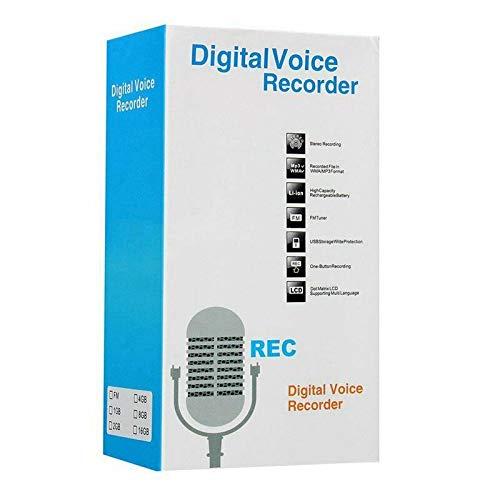
Figure 1: ELECTROPRIME Digital Voice Recorder with included accessories, including earphones, USB cable, and telephone adapter.
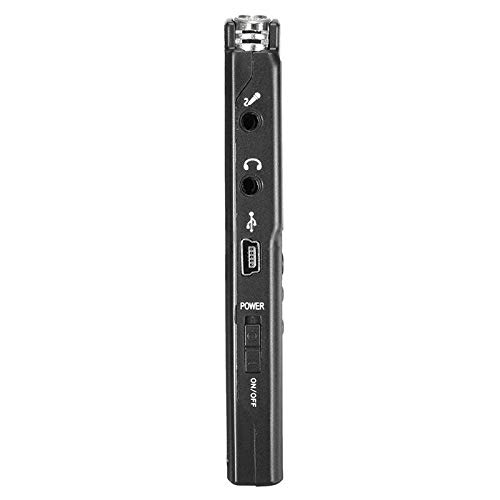
మూర్తి 2: వైపు view of the recorder, highlighting the USB port, headphone jack, microphone input, and power switch.
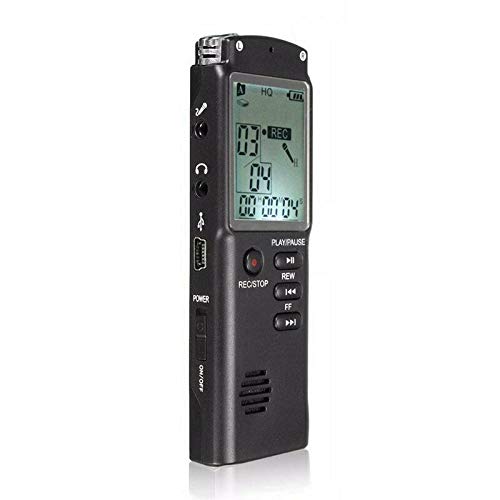
మూర్తి 3: ముందు view of the recorder, displaying the LCD screen with recording information and control buttons.
సెటప్
- పరికరాన్ని ఛార్జ్ చేస్తోంది: Connect the recorder to a computer's USB port or a USB wall adapter using the provided USB cable. The LCD screen will indicate charging status. A full charge typically takes 2-3 hours.
- పవర్ ఆన్/ఆఫ్: Locate the ON/OFF switch on the side of the device. Slide it to the "ON" position to power on and to the "OFF" position to power off.
- మొదటి ఏర్పాటు: Upon first power-on, you may need to set the date and time. Use the navigation buttons (REW, FF) and Play/Pause button to adjust and confirm settings.
ఆపరేటింగ్ సూచనలు
రికార్డింగ్ ఆడియో
- రికార్డింగ్ ప్రారంభించండి: పరికరం ఆన్లో ఉన్నప్పుడు, నొక్కండి REC/STOP button once. The LCD will display "REC" and a timer, indicating that recording has started.
- రికార్డింగ్ను పాజ్ చేయండి: రికార్డింగ్ సమయంలో, నొక్కండి ప్లే/పాజ్ చేయండి పాజ్ చేయడానికి బటన్. పునఃప్రారంభించడానికి దాన్ని మళ్ళీ నొక్కండి.
- రికార్డింగ్ ఆపివేయి: నొక్కండి REC/STOP button again to stop recording. The recording will be saved automatically.
రికార్డింగ్లను ప్లే చేయడం
- యాక్సెస్ రికార్డింగ్లు: In standby mode, use the REW or FF buttons to navigate through your saved recordings.
- ప్లే/పాజ్: నొక్కండి ప్లే/పాజ్ చేయండి button to start playback of the selected recording. Press again to pause.
- వాల్యూమ్ సర్దుబాటు: Use the volume control buttons (if present, typically on the side or via menu) to adjust playback volume.
బదిలీ చేస్తోంది Fileఒక కంప్యూటర్కు లు
- కనెక్ట్ చేయండి: Connect the recorder to your computer using the USB cable.
- Access Device: రికార్డర్ మీ కంప్యూటర్లో తొలగించగల డిస్క్ డ్రైవ్గా కనిపిస్తుంది.
- బదిలీ: Open the drive, locate your audio files (usually in a folder like "RECORD" or "VOICE"), and copy them to your computer.
Using as an MP3 Player
ఈ పరికరం MP3 ఆడియో ప్లేబ్యాక్కు మద్దతు ఇస్తుంది. MP3ని బదిలీ చేయండి files to the device's internal storage via USB connection. Use the REW మరియు FF buttons to select tracks and ప్లే/పాజ్ చేయండి ప్లేబ్యాక్ను నియంత్రించడానికి.
నిర్వహణ
- శుభ్రపరచడం: పరికరం యొక్క బాహ్య భాగాన్ని శుభ్రం చేయడానికి మృదువైన, పొడి వస్త్రాన్ని ఉపయోగించండి. ద్రవ క్లీనర్లను లేదా ద్రావకాలను ఉపయోగించవద్దు.
- బ్యాటరీ సంరక్షణ: To prolong battery life, avoid fully discharging the device frequently. Charge the device regularly, even if not in use for extended periods.
- నిల్వ: పరికరాన్ని ప్రత్యక్ష సూర్యకాంతి, విపరీతమైన ఉష్ణోగ్రతలు మరియు అధిక తేమ నుండి దూరంగా చల్లని, పొడి ప్రదేశంలో నిల్వ చేయండి.
- ప్రభావాన్ని నివారించండి: అంతర్గత భాగాలకు నష్టం కలిగించే చుక్కలు మరియు ప్రభావాల నుండి పరికరాన్ని రక్షించండి.
ట్రబుల్షూటింగ్
| సమస్య | సాధ్యమైన పరిష్కారం |
|---|---|
| పరికరం పవర్ ఆన్ చేయదు. | Ensure the battery is charged. Connect to a USB power source and try again. Check the ON/OFF switch position. |
| Cannot record audio. | Check if the device has sufficient memory. Delete old files if necessary. Ensure the microphone is not obstructed. |
| కంప్యూటర్ ద్వారా పరికరం గుర్తించబడలేదు. | వేరే USB పోర్ట్ లేదా కేబుల్ని ప్రయత్నించండి. కనెక్ట్ చేసినప్పుడు పరికరం ఆన్ చేయబడిందని నిర్ధారించుకోండి. మీ కంప్యూటర్ను పునఃప్రారంభించండి. |
| పేలవమైన ఆడియో నాణ్యత. | Ensure the recording environment is quiet. Keep the device close to the audio source. Check recording settings (if adjustable). |
స్పెసిఫికేషన్లు
- బ్రాండ్: ఎలక్ట్రోప్రైమ్
- మోడల్ సంఖ్య: ASH20BEBUBEB26998
- మెమరీ స్టోరేజ్ కెపాసిటీ: 8 GB
- ఆడియో ఫార్మాట్: MP3
- హార్డ్వేర్ ఇంటర్ఫేస్: USB
- అనుకూల పరికరాలు: MP3 ప్లేయర్
- శక్తి మూలం: Rechargeable Battery (USB charging)
వారంటీ మరియు మద్దతు
Specific warranty information for this product is not provided in the available documentation. For warranty claims or technical support, please contact your retailer or the manufacturer, ELECTROPRIME, directly. Retain your proof of purchase for any warranty-related inquiries.
For further assistance, please refer to the official ELECTROPRIME webసైట్ లేదా వారి కస్టమర్ సేవా విభాగాన్ని సంప్రదించండి.