
1. పరిచయం
Thank you for choosing the BESTEK PD20W Power Strip Tower. This manual provides essential information for the safe and efficient use of your device. Please read it thoroughly before operation and retain it for future reference.
This compact power strip is designed to provide convenient power and charging solutions for multiple electronic devices. It features a vertical cube design, optimizing space and offering versatile placement options.

Image: The BESTEK PD20W Power Strip Tower, showcasing its 7-in-1 functionality with 3 AC outlets, 3 USB-A ports, and 1 USB-C port, connected to various devices on a nightstand.
2. ముఖ్యమైన భద్రతా సూచనలు
- గరిష్ట లోడ్ సామర్థ్యం 15 మించకూడదు Amps.
- ఈ పరికరం ఇండోర్ ఉపయోగం కోసం మాత్రమే. తేమ లేదా తడి పరిస్థితులకు గురికావద్దు.
- పిల్లలకు దూరంగా ఉంచండి.
- Do not disassemble or modify the power strip.
- Ensure the power strip is fully plugged into a grounded outlet.
- ఇతర పవర్ స్ట్రిప్స్ లేదా ఎక్స్టెన్షన్ కార్డ్లతో కలిపి ఉపయోగించడం మానుకోండి.
- ఉత్పత్తి ఓవర్వోల్ను కలిగి ఉంటుందిtage, short circuit, overload, and overcurrent protection. If the power strip trips, unplug all devices and reset the power switch.
- The housing is made of flame-retardant PC material for enhanced safety.
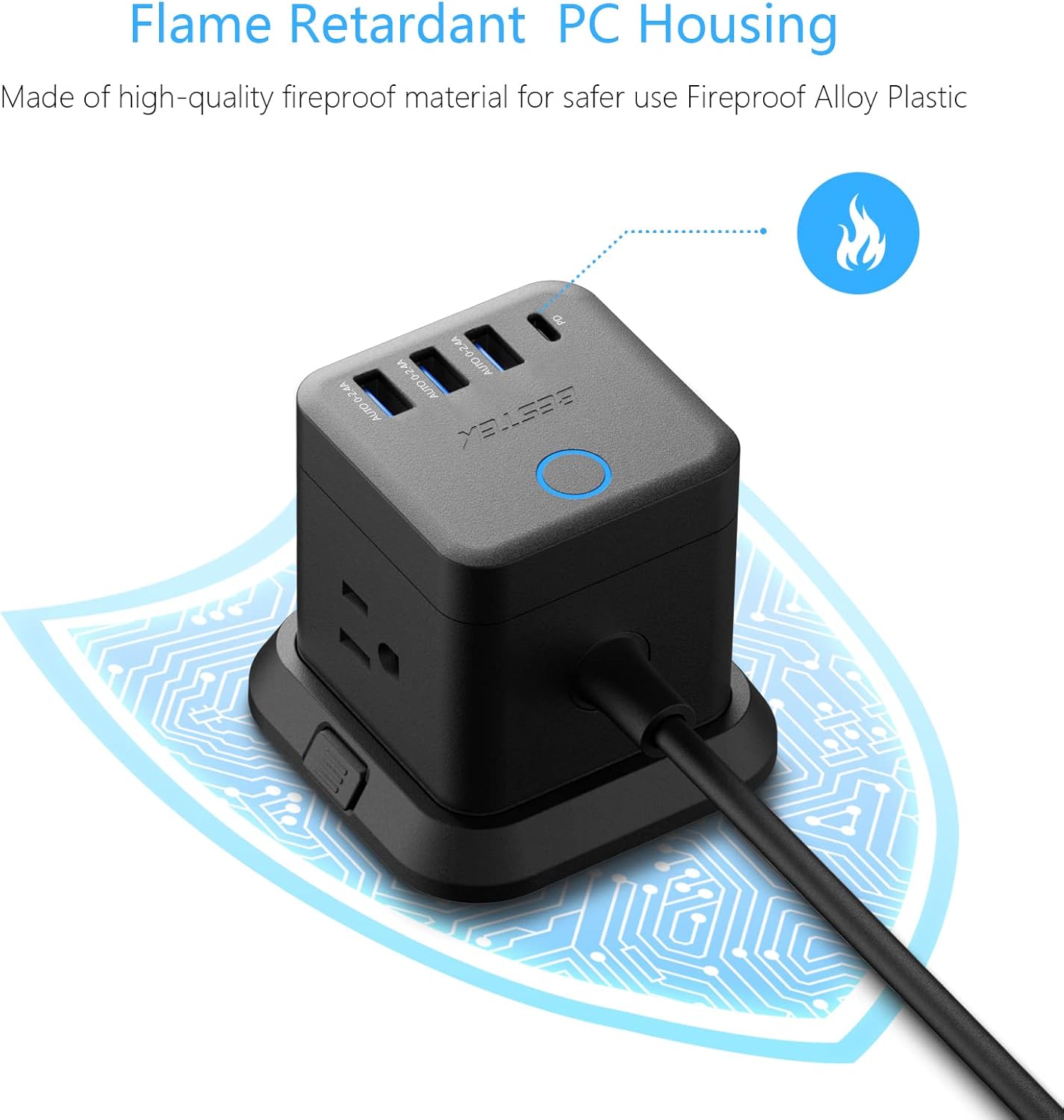
Image: Close-up of the power strip highlighting its flame-retardant PC housing, indicated by a flame icon and a protective circuit board graphic.
3. ఉత్పత్తి భాగాలు
The BESTEK PD20W Power Strip Tower includes the following components:
- 3 AC అవుట్లెట్లు: Standard North American Type B - 3 pin outlets.
- 3 USB-A పోర్ట్లు: వివిధ USB-A అనుకూల పరికరాలను ఛార్జ్ చేయడానికి.
- 1 USB-C PD 20W Port: వేగంగా ఛార్జింగ్ చేయగల USB-C పరికరాల కోసం.
- 5-Foot Extension Cord: ప్లేస్మెంట్లో సౌలభ్యాన్ని అందిస్తుంది.
- వేరు చేయగలిగిన బేస్: Allows for stable desktop use or mounting.
- పవర్ స్విచ్: Controls power to all outlets and USB ports.
- 45-Degree Flat Plug: Designed to fit in narrow spaces behind furniture.

Image: Illustration showing the 45-degree flat plug design, demonstrating how it allows furniture to sit closer to the wall.
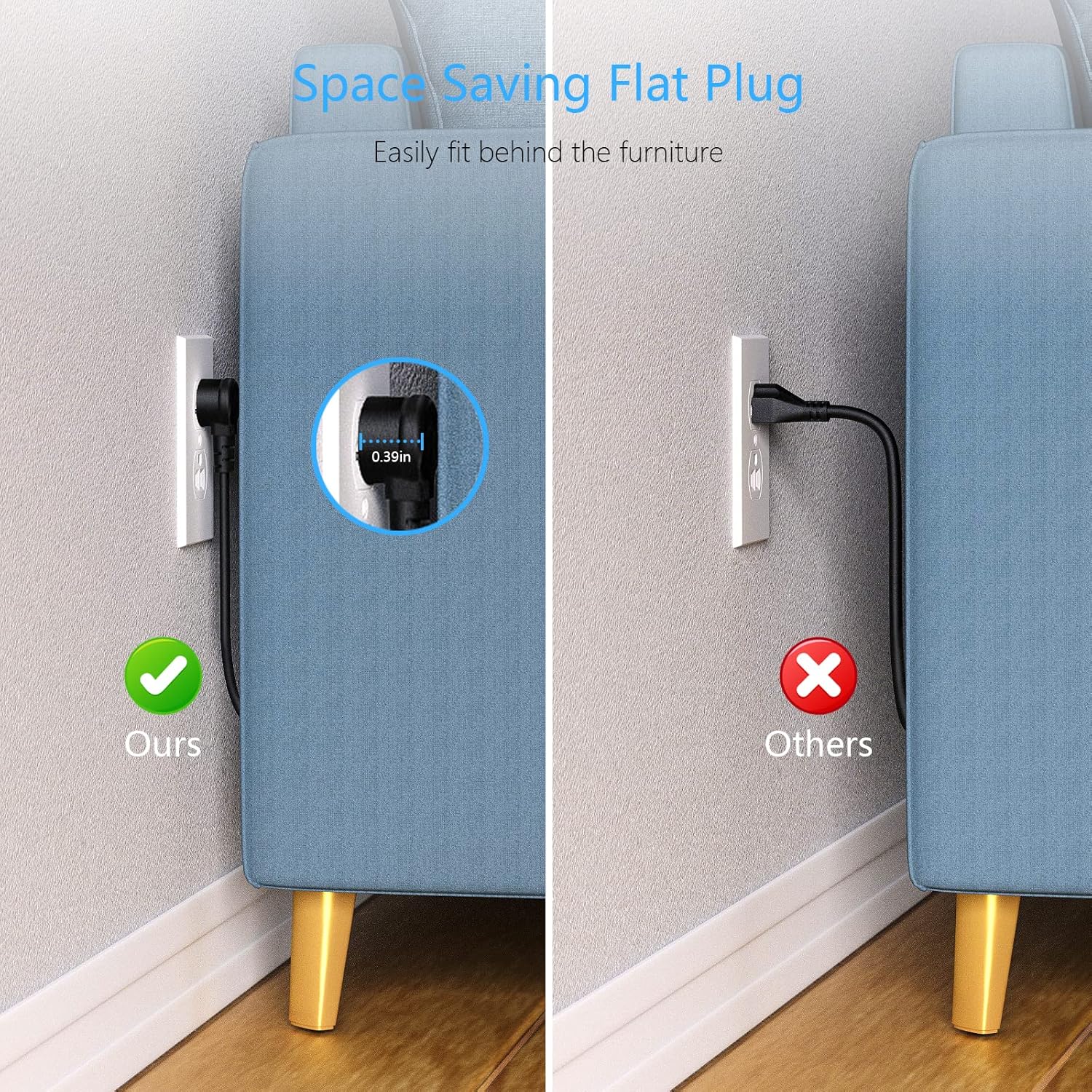
Image: A comparison showing the space-saving benefit of the flat plug, allowing a couch to be placed closer to the wall compared to a standard plug.
4. సెటప్ & ఇన్స్టాలేషన్
4.1 డెస్క్టాప్ వాడకం
- Place the power strip on a stable, flat surface.
- Ensure the detachable base is securely attached for stability.
- Plug the power strip's 5-foot extension cord into a grounded wall outlet.
- Press the power switch on top of the unit to turn it on. The indicator light will illuminate.

Image: The BESTEK Power Strip Tower placed on a desk, ready for use.
4.2 మౌంటు ఐచ్ఛికాలు
The power strip can be mounted using screws or adhesive (included). Ensure the mounting surface is clean, dry, and suitable for holding the device and connected cables.
- స్క్రూ ఫిక్సింగ్:
- Detach the base from the power strip.
- Use the provided screws to secure the base to your desired surface (e.g., under a desk, on a wall).
- Reattach the power strip to the secured base.
- 3M Glue Fixing (Adhesive):
- మౌంటు ఉపరితలాన్ని పూర్తిగా శుభ్రం చేయండి.
- Apply the 3M adhesive pads to the bottom of the detachable base.
- Press the base firmly onto the desired surface for at least 30 seconds.
- Allow the adhesive to cure for 24 hours before attaching the power strip and connecting devices.

Image: The BESTEK Power Strip Tower mounted discreetly under a desk, demonstrating its space-saving capability.

చిత్రం: వివరణాత్మకం view of the screw fixing method for mounting the power strip's base.

చిత్రం: వివరణాత్మకం view of the 3M adhesive fixing method for mounting the power strip's base.
5. ఆపరేటింగ్ సూచనలు
5.1 కనెక్ట్ చేసే పరికరాలు
- Ensure the power strip is plugged into a wall outlet and the power switch is ON.
- For AC Powered Devices: మీ పరికరాలను 3 AC అవుట్లెట్లలో దేనికైనా నేరుగా ప్లగ్ చేయండి.
- For USB-A Powered Devices: Connect your device's USB-A charging cable to one of the 3 USB-A ports. These ports provide up to 2.4A Max output per port.
- For USB-C Powered Devices: Connect your device's USB-C charging cable to the USB-C PD 20W port. This port supports PD3.0 with output options of 5V/3A, 9V/2.22A, or 12V/1.67A for fast charging compatible devices.
The built-in smart technology detects connected devices and delivers optimal charging speed automatically.
Video: A demonstration of the BESTEK Power Strip Tower, showcasing its compact design and various ports for connecting multiple devices simultaneously.
6. నిర్వహణ
- Unplug the power strip from the wall outlet before cleaning.
- Wipe the exterior with a soft, dry cloth. Do not use liquid cleaners or aerosols.
- Keep the power strip away from dust and debris to ensure proper ventilation.
- Regularly check the power cord for any signs of damage. If damaged, discontinue use immediately.
7. ట్రబుల్షూటింగ్
| సమస్య | సాధ్యమైన కారణం | పరిష్కారం |
|---|---|---|
| పరికరాలకు శక్తి లేదు. | Power switch is off, power strip is unplugged, or circuit breaker tripped. | Ensure power switch is ON. Check if the power strip is securely plugged into a live wall outlet. If the power strip has an overload protection reset button, press it. Reduce the number of connected devices if overloaded. |
| Devices not charging via USB ports. | Cable issue, device not compatible, or power strip is off. | Try a different USB cable. Ensure your device is compatible with the USB port type (USB-A or USB-C PD). Verify the power strip is on. |
| పవర్ స్ట్రిప్ వెచ్చగా అనిపిస్తుంది. | Normal operation or excessive load. | A slight warmth during operation is normal. If it feels excessively hot, unplug all devices immediately and reduce the load. Ensure proper ventilation around the unit. |
8. స్పెసిఫికేషన్లు
- బ్రాండ్: బెస్టెక్
- మోడల్ సంఖ్య: 1
- రంగు: నలుపు
- మొత్తం పవర్ అవుట్లెట్లు: 3 AC అవుట్లెట్లు
- మొత్తం USB పోర్ట్లు: 4 (3 USB-A, 1 USB-C)
- USB-A అవుట్పుట్: 2.4A Max per port
- USB-C అవుట్పుట్ (PD3.0): 5V/3A, 9V/2.22A, 12V/1.67A (20W గరిష్టం)
- గరిష్ట కరెంట్: 15 Amps
- ఉప్పెన రక్షణ రేటింగ్: 600 జౌల్స్
- పవర్ ప్లగ్ రకం: టైప్ B - 3 పిన్ (ఉత్తర అమెరికా)
- తాడు పొడవు: 5 అడుగులు
- మెటీరియల్: Copper, Plastic, Rubber (Flame Retardant PC Housing)
- ప్రత్యేక లక్షణాలు: Compact, Portable, Detachable Base, 45-Degree Flat Plug
- అనుకూల పరికరాలు: Camera, Laptop, Personal Computer, Printer, Router, Scanner, Smartphone, Smartwatch, Speaker, Tablet
9. వారంటీ & సపోర్ట్
This BESTEK product comes with a 24 నెలల రక్షణ ప్రణాళిక. In addition, a 30-రోజుల రిటర్న్ పాలసీ is available for refunds or replacements. Please refer to your purchase documentation for specific terms and conditions.
For technical support or warranty claims, please contact BESTEK customer service:
- ఇమెయిల్: Refer to your product packaging or the official BESTEK webసంప్రదింపు వివరాల కోసం సైట్.
- ఫోన్: Refer to your product packaging or the official BESTEK webసంప్రదింపు వివరాల కోసం సైట్.
- ఆన్లైన్ మద్దతు: Visit the official BESTEK webతరచుగా అడిగే ప్రశ్నలు మరియు మద్దతు వనరుల కోసం సైట్.
Image: Icons representing BESTEK's service plan (24 months protection, 30 days return, return on defects) and customer support options (24H, Email, Phone).