
1. పరిచయం
Thank you for choosing the Wendry 9601G Car Stereo. This multimedia player is designed to enhance your in-car entertainment and connectivity. It features a 7-inch high-definition touchscreen, Bluetooth for hands-free calls and music streaming, and support for various media formats via USB and TF card. This manual provides essential information for installation, operation, maintenance, and troubleshooting to ensure optimal performance and user satisfaction.
2. భద్రతా సమాచారం
- సంస్థాపన మరియు ఆపరేషన్ ముందు అన్ని సూచనలను జాగ్రత్తగా చదవండి.
- Installation should be performed by a qualified technician to prevent damage to the unit or vehicle.
- మీ డ్రైవింగ్ దృష్టి మరల్చే విధంగా యూనిట్ను ఆపరేట్ చేయవద్దు. ఎల్లప్పుడూ రోడ్డు భద్రతకు ప్రాధాన్యత ఇవ్వండి.
- Avoid exposing the unit to extreme temperatures, direct sunlight for prolonged periods, or moisture.
- Use only specified power supply (DC12V). For 24V systems, a transformer is required.
- యూనిట్ను విడదీయడానికి లేదా సవరించడానికి ప్రయత్నించవద్దు. ఇది వారంటీని రద్దు చేసి నష్టాన్ని కలిగించవచ్చు.
3. ప్యాకేజీ విషయాలు
ప్యాకేజీలో అన్ని అంశాలు ఉన్నాయని నిర్ధారించుకోండి:
- 1 x Main Unit (Wendry 9601G Car Stereo)
- 1 x ఇన్ఫ్రారెడ్ రిమోట్ కంట్రోల్
- 1 x ఇన్స్ట్రక్షన్ మాన్యువల్ (ఈ డాక్యుమెంట్)
- 1 x పవర్ కేబుల్
- 1 x Disassembly Tool
- 1 x Reversing Camera Kit
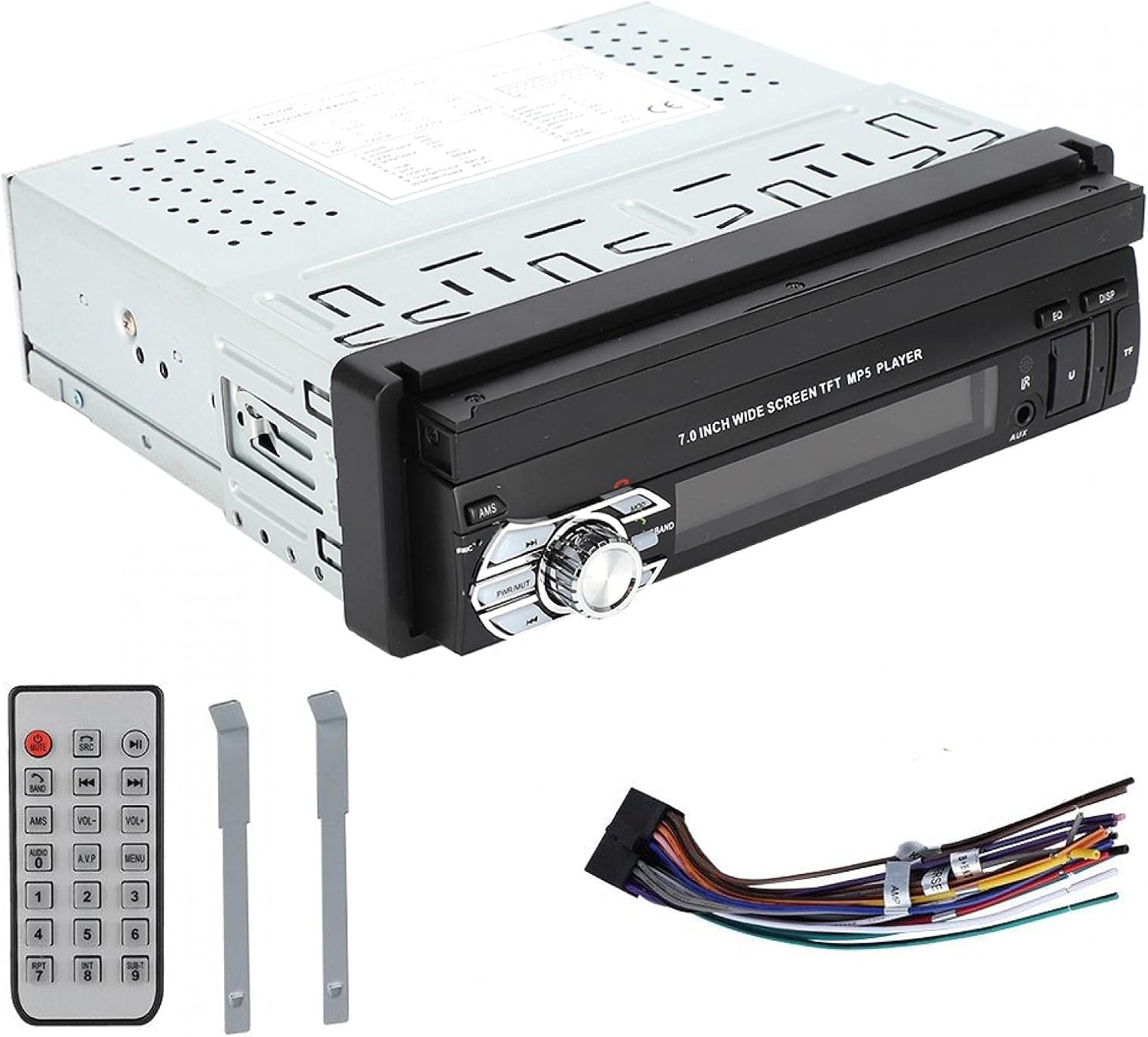
Image: Included accessories: remote control, wiring harness, and disassembly tools.
4. ఉత్పత్తి ముగిసిందిview
The Wendry 9601G is a single DIN car multimedia player featuring a retractable 7-inch touchscreen. It supports various audio and video formats, Bluetooth connectivity, and includes inputs for USB, TF card, and a reverse camera.
ముఖ్య లక్షణాలు:
- 7-inch High-Definition Retractable Touchscreen
- Bluetooth for Hands-Free Calling and Music Streaming
- Supports 24-bit 96kHz WAV audio format for high-fidelity sound
- USB 2.0 Interface for U disks and mobile hard drives
- TF Card Slot for media playback
- Reverse Video Input with reversing priority (requires compatible camera)
- Dynamic Menu Interface

Image: The Wendry 9601G car stereo with its 7-inch screen extended, showing multimedia playback.

చిత్రం: ముందు భాగం view of the car stereo with the screen retracted, showing the 'BT AUDIO' display.
5. సెటప్ మరియు ఇన్స్టాలేషన్
5.1 వైరింగ్ రేఖాచిత్రం
Refer to the wiring diagram provided on the unit's casing or in the separate wiring guide for correct connections. Incorrect wiring can cause damage to the unit or your vehicle's electrical system.

చిత్రం: వెనుక view of the car stereo, illustrating the connection ports for power, audio, video, and reverse camera input.
5.2 సాధారణ సంస్థాపనా దశలు
- బ్యాటరీని డిస్కనెక్ట్ చేయండి: ప్రారంభించడానికి ముందు, విద్యుత్ షార్ట్లను నివారించడానికి మీ వాహనం బ్యాటరీ యొక్క నెగటివ్ టెర్మినల్ను డిస్కనెక్ట్ చేయండి.
- పాత యూనిట్ తొలగించండి: Carefully remove your existing car stereo using appropriate tools.
- వైరింగ్ కనెక్ట్ చేయండి: Connect the power cable, speaker wires, antenna, and any other necessary cables (e.g., reverse camera, external amplifier) to the new unit according to the wiring diagram. Ensure all connections are secure.
- పరీక్ష కార్యాచరణ: Before fully mounting, reconnect the battery and briefly test the unit's basic functions (power on/off, audio, screen operation).
- మౌంట్ యూనిట్: Slide the stereo into the single DIN slot and secure it using the provided mounting brackets or screws.
- బ్యాటరీని మళ్లీ కనెక్ట్ చేయండి: బ్యాటరీ యొక్క ప్రతికూల టెర్మినల్ను మళ్లీ కనెక్ట్ చేయండి.
6. ఆపరేటింగ్ సూచనలు
6.1 Power On/Off and Screen Operation
- శక్తి: Press the power button (usually labeled PWR/MUTE) to turn the unit on or off.
- స్క్రీన్ ఉపసంహరణ: The 7-inch screen is retractable. Use the dedicated button or menu option to extend or retract the screen.
- టచ్స్క్రీన్: Navigate through menus and control functions by touching the icons on the screen.

Image: The car stereo's screen extended, showing video playback.
6.2 బ్లూటూత్ కనెక్టివిటీ
- బ్లూటూత్ని ప్రారంభించండి: On the stereo, navigate to the Bluetooth menu. Ensure Bluetooth is enabled on your mobile device.
- జత చేయడం: కోసం వెతకండి available devices on your mobile phone. Select "9601G" (or similar device name) from the list. Enter the default PIN (usually "0000" or "1234") if prompted.
- హ్యాండ్స్-ఫ్రీ కాల్స్: Once paired, you can make and receive calls directly through the stereo.
- మ్యూజిక్ స్ట్రీమింగ్: Play music from your paired device, and control playback (play/pause, skip) via the stereo's touchscreen or remote control.
6.3 Media Playback (USB/TF Card)
- మీడియాను చొప్పించు: Insert a USB drive into the USB 2.0 port or a TF card into the TF card slot.
- మూలాన్ని ఎంచుకోండి: On the stereo, select the USB or TF card source from the main menu.
- బ్రౌజ్ చేయండి Files: Use the touchscreen to browse and select audio or video fileప్లేబ్యాక్ కోసం లు.
- USB ఛార్జింగ్: The USB port supports high current output, allowing you to charge most mobile phones.

Image: The car stereo's USB port can charge mobile phones.
6.4 Reverse Camera Input
If a compatible reverse camera is connected, the stereo will automatically switch to the camera view when the vehicle is put into reverse gear. This feature provides reversing priority for enhanced safety.
7. నిర్వహణ
- స్క్రీన్ క్లీనింగ్: టచ్స్క్రీన్ను సున్నితంగా తుడవడానికి మృదువైన, మెత్తటి బట్టను ఉపయోగించండి. రాపిడి క్లీనర్లను లేదా ద్రావకాలను ఉపయోగించవద్దు.
- సాధారణ శుభ్రపరచడం: Keep the unit free from dust and debris. Use a soft, dry cloth for cleaning the main body.
- ద్రవాలను నివారించండి: యూనిట్ మీద ద్రవాలను చిందించవద్దు.
- ఉష్ణోగ్రత: Avoid leaving the unit in extreme hot or cold conditions for extended periods.
8. ట్రబుల్షూటింగ్
| సమస్య | సాధ్యమైన కారణం | పరిష్కారం |
|---|---|---|
| యూనిట్ పవర్ ఆన్ చేయదు. | తప్పు వైరింగ్; పేలిన ఫ్యూజ్; వాహన బ్యాటరీ సమస్య. | Check power connections; Inspect vehicle fuse box; Verify battery charge. |
| శబ్దం లేదు. | వాల్యూమ్ చాలా తక్కువగా ఉంది; మ్యూట్ యాక్టివేట్ చేయబడింది; స్పీకర్ వైరింగ్ తప్పు. | వాల్యూమ్ పెంచండి; మ్యూట్ను నిష్క్రియం చేయండి; స్పీకర్ కనెక్షన్లను తనిఖీ చేయండి. |
| బ్లూటూత్ కనెక్ట్ కావడం లేదు. | Bluetooth not enabled; Device out of range; Pairing issue. | Ensure Bluetooth is on for both devices; Bring devices closer; Re-attempt pairing. |
| USB/TF కార్డ్ గుర్తించబడలేదు. | Unsupported format; Corrupted files; Loose connection. | తనిఖీ చేయండి file formats; Try a different USB/TF card; Ensure secure connection. |
| Reverse camera not displaying. | Camera not connected; Incorrect wiring; Faulty camera. | Verify camera connection; Check reverse trigger wire; Test camera functionality. |
ఈ పరిష్కారాలను ప్రయత్నించిన తర్వాత కూడా సమస్యలు కొనసాగితే, దయచేసి కస్టమర్ మద్దతును సంప్రదించండి.
9. స్పెసిఫికేషన్లు
| బ్రాండ్ | Wendry |
| మోడల్ | 9601G |
| విద్యుత్ సరఫరా వాల్యూమ్tage | DC12V (24V requires transformer) |
| స్క్రీన్ పరిమాణం | 7 అంగుళాలు |
| కనెక్టివిటీ టెక్నాలజీ | బ్లూటూత్, USB |
| అనుకూల పరికరాలు | స్మార్ట్ఫోన్, టాబ్లెట్, పర్సనల్ కంప్యూటర్ |
| ప్రత్యేక లక్షణాలు | టచ్ స్క్రీన్ |
| ఆడియో అవుట్పుట్ మోడ్ | స్టీరియో |
| ఉత్పత్తి కొలతలు | 18.4 x 17.8 x 6.2 సెం.మీ (7.2 x 7.0 x 2.4 అంగుళాలు) |
| ఉత్పత్తి బరువు | 1.42 కిలోలు (59.3 oz) |

Image: Dimensions of the Wendry 9601G car stereo.
10. వారంటీ మరియు మద్దతు
For warranty information, please refer to the documentation provided at the time of purchase or contact your retailer. If you encounter any issues or require technical assistance, please reach out to Wendry customer support through the official channels provided by your seller.