
Bluedio H-T-19
Bluedio Bluetooth 5.0 Over-Ear Headphones User Manual
Model: H-T-19 | Brand: Bluedio
పరిచయం
This manual provides detailed instructions for the Bluedio Bluetooth 5.0 Over-Ear Headphones. It covers product features, setup, operation, maintenance, and troubleshooting to ensure optimal performance and user experience.
పెట్టెలో ఏముంది
- Bluedio HT wireless headphones
- మైక్రో USB ఛార్జింగ్ కేబుల్
- 3.5 మిమీ ఆడియో కేబుల్
- వినియోగదారు మాన్యువల్
ఉత్పత్తి ముగిసిందిview
Familiarize yourself with the various components and controls of your Bluedio headphones.

Figure 1: Headset Overview లేబుల్ చేయబడిన భాగాలతో.
- వాల్యూమ్ అప్ బటన్: ఆడియో వాల్యూమ్ని పెంచుతుంది.
- వాల్యూమ్ డౌన్ బటన్: ఆడియో వాల్యూమ్ను తగ్గిస్తుంది.
- LED సూచిక: Displays device status (e.g., pairing, connected, charging).
- Power/MF Button (Multi-Function Button): Powers on/off, controls playback, answers/ends calls.
- Wheel Switch: Used for previous/next track selection.
- USB ఛార్జింగ్ సాకెట్: హెడ్ఫోన్లను ఛార్జ్ చేయడానికి.
- మైక్రోఫోన్: Built-in for calls and voice commands.
- ఆడియో జాక్ (3.5mm): వైర్డు ఆడియో కనెక్షన్ కోసం.
సెటప్
హెడ్ఫోన్లను ఛార్జ్ చేస్తోంది
Before first use, fully charge your headphones. Use the provided Micro USB charging cable to connect the headphones to a power source.

Figure 2: Long Working Time and Battery.
- బ్యాటరీ కెపాసిటీ: 650 mAh
- ఛార్జింగ్ సమయం: పూర్తిగా ఛార్జ్ చేయడానికి దాదాపు 1 గంట పడుతుంది.
- సంగీతం ప్లేబ్యాక్ సమయం: పూర్తిగా ఛార్జ్ చేస్తే 40 గంటల వరకు.
- చర్చ సమయం: పూర్తిగా ఛార్జ్ చేస్తే 45 గంటల వరకు.
- స్టాండ్బై సమయం: 30 రోజుల వరకు.
Pairing with Your Mobile Phone
Follow these steps to pair your Bluedio headphones with your device via Bluetooth:

Figure 3: Bluetooth Pairing Guide.
- హెడ్సెట్ మరియు మీ మొబైల్ ఫోన్ మధ్య దూరాన్ని 1 మీటర్ లోపల ఉంచండి. ఎంత దగ్గరగా ఉంటే అంత మంచిది.
- When the headset is off (if not, turn off the headphones first), press and hold the Power/MF Button for 5 seconds or so, only when you see the blue light stays on (instead of blinking), can you release the button. The headset is in pairing mode.
- మీ మొబైల్ ఫోన్ యొక్క బ్లూటూత్ను ఆన్ చేయండి, పరికరాలను జోడించండి / శోధించండి.
- When "H" or "Bluedio" appears, select it. If asked for a pass code: Enter "0000".
శ్రద్ధ:
If pairing is not successful within 60 seconds, the LED goes out and the headset is out of pairing mode. Repeat the pairing procedure.
ఆపరేటింగ్ సూచనలు
మ్యూజిక్ ప్లేబ్యాక్
The headphones feature a Hurricane turbine housing design for powerful bass resonance and CD lossless sound with SNR up to 98dB for crystal-clear audio.

Figure 4: High-Fidelity Audio Experience.
- ప్లే/పాజ్: నొక్కండి Power/MF Button ఒకసారి.
- తదుపరి ట్రాక్: ఉపయోగించండి చక్రాల స్విచ్ ముందుకు.
- మునుపటి ట్రాక్: ఉపయోగించండి చక్రాల స్విచ్ వెనుకబడిన.
- వాల్యూమ్ నియంత్రణ: వాల్యూమ్ అప్/డౌన్ బటన్లను ఉపయోగించండి.
- సంగీతం భాగస్వామ్యం: Connect another headphone (e.g., Bluedio Shooting Brake) via the 3.5mm audio cable to share music instantly. (Recommended to use earphones with impedance of at least 32Ω).
కాల్ నిర్వహణ
The built-in microphone and echo suppression ensure clear communication during calls.
- సమాధానం/ముగింపు కాల్: నొక్కండి Power/MF Button ఒకసారి.
- కాల్ని తిరస్కరించండి: నొక్కండి మరియు పట్టుకోండి Power/MF Button 2 సెకన్లు.
- చివరి నంబర్ని మళ్లీ డయల్ చేయండి: రెండుసార్లు నొక్కండి Power/MF Button.
Voice Prompts and Smart Features
The headphones offer voice prompts in multiple languages and integrate with cloud services for enhanced functionality.

Figure 5: Voice Prompt and Bluetooth 5.0 Features.
- Voice Prompt Languages: English, Chinese, Spanish, French. Switch by pressing the Power/MF Button మరియు వాల్యూమ్ డౌన్ బటన్ ఏకకాలంలో.
- Cloud Service Integration: Supports Baidu Cloud Engine and Amazon Cloud. Download the Bluedio APP to access your AWS account for music, weather, news, and agenda.
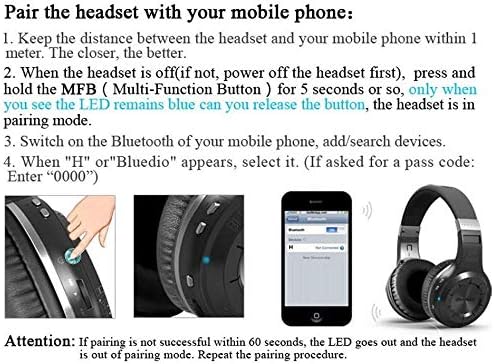
Figure 6: Smart Features with Cloud Service.
స్పెసిఫికేషన్లు
| ఫీచర్ | వివరాలు |
|---|---|
| బ్లూటూత్ వెర్షన్ | 5.0 |
| మద్దతు ప్రోfiles | A2DP, AVRCP, HTSP, HTFP |
| కమ్యూనికేషన్ దూరం | 10 మీటర్లు |
| డైనమిక్ రేంజ్ | 118 డిబి |
| డ్రైవ్ యూనిట్ | 57 మి.మీ |
| హార్న్ ఇంపెడెన్స్ | 16 Ω |
| టోటల్ హార్మోనిక్ డిస్టార్షన్ (THD) | <0.5% |
| బ్యాటరీ కెపాసిటీ | 650 mAh |
| సంగీతం ప్లేబ్యాక్ సమయం | 40 గంటలు |
| టాక్ టైమ్ | 45 గంటలు |
| స్టాండ్బై సమయం | 30 రోజులు |
| ఛార్జింగ్ సమయం | 1 గంట |
| కొలతలు | 7.09 x 6.69 x 1.97 అంగుళాలు |
| వస్తువు బరువు | 15.5 ఔన్సులు |
| నాయిస్ కంట్రోల్ | యాక్టివ్ నాయిస్ రద్దు |
| హెడ్ఫోన్స్ జాక్ | 3.5 మి.మీ జాక్ |
| నియంత్రణ రకం | మీడియా నియంత్రణ, వాయిస్ |
నిర్వహణ
సరైన నిర్వహణ మీ హెడ్ఫోన్ల దీర్ఘాయువు మరియు పనితీరును నిర్ధారిస్తుంది.
- శుభ్రపరచడం: ఇయర్కప్లు మరియు హెడ్బ్యాండ్ను మృదువైన, పొడి గుడ్డతో సున్నితంగా తుడవండి. కఠినమైన రసాయనాలు లేదా రాపిడి పదార్థాలను ఉపయోగించవద్దు.
- నిల్వ: Store the headphones in a cool, dry place away from direct sunlight and extreme temperatures. When not in use, it is recommended to store them in a protective case to prevent damage.
- బ్యాటరీ సంరక్షణ: బ్యాటరీని తరచుగా పూర్తిగా డిశ్చార్జ్ చేయవద్దు. దీర్ఘకాలిక నిల్వ కోసం, ప్రతి కొన్ని నెలలకు బ్యాటరీని దాదాపు 50% వరకు ఛార్జ్ చేయండి.
- కేబుల్ నిర్వహణ: Handle the charging and audio cables carefully to prevent kinks or damage.
ట్రబుల్షూటింగ్
మీ హెడ్ఫోన్లతో సమస్యలు ఎదురైతే, ఈ క్రింది సాధారణ పరిష్కారాలను చూడండి:
- జత చేయలేము:
- హెడ్ఫోన్లు పూర్తిగా ఛార్జ్ అయ్యాయని నిర్ధారించుకోండి.
- Make sure the headphones are in pairing mode (blue LED stays on).
- Turn off and on the Bluetooth on your device.
- మీ పరికరంలో మునుపటి బ్లూటూత్ కనెక్షన్లను క్లియర్ చేయండి.
- పరికర-నిర్దిష్ట సమస్యలను తోసిపుచ్చడానికి వేరే పరికరంతో జత చేయడానికి ప్రయత్నించండి.
- ధ్వని లేదు:
- హెడ్ఫోన్లు మరియు మీ కనెక్ట్ చేయబడిన పరికరం రెండింటిలోనూ వాల్యూమ్ స్థాయిని తనిఖీ చేయండి.
- హెడ్ఫోన్లు సరిగ్గా జత చేయబడి కనెక్ట్ అయ్యాయని నిర్ధారించుకోండి.
- If using a wired connection, ensure the 3.5mm audio cable is fully inserted into both the headphones and the audio source.
- Try restarting both the headphones and the audio source device.
- పేలవమైన ధ్వని నాణ్యత:
- జోక్యం లేదా పరిధికి దూరంగా ఉండకుండా ఉండటానికి మీ కనెక్ట్ చేయబడిన పరికరానికి దగ్గరగా వెళ్లండి.
- హెడ్ఫోన్లు మరియు పరికరం మధ్య ఎటువంటి భౌతిక అడ్డంకులు లేవని నిర్ధారించుకోండి.
- ఆడియో సోర్స్ నాణ్యత ఎక్కువగా ఉందో లేదో తనిఖీ చేయండి.
- హెడ్ఫోన్లు ఆన్ చేయడం లేదు:
- హెడ్ఫోన్లు పూర్తిగా ఛార్జ్ అయ్యాయని నిర్ధారించుకోండి.
- Press and hold the Power/MF button for a longer duration (e.g., 5-7 seconds).
వారంటీ మరియు మద్దతు
Bluedio offers a comprehensive warranty and support for your product.
- రిటర్న్ పాలసీ: 30 days with no reason to return for your Bluedio Bluetooth headphone.
- వారంటీ: 12 Months worry-free warranty.
- For further assistance or warranty claims, please refer to the contact information provided in your product packaging or visit the official Bluedio support webసైట్.
Ask a question about this manual
Ask about setup, troubleshooting, compatibility, parts, safety, or missing instructions. Manuals+ will review the question and use this page’s manual context to help answer it.