
1. ముఖ్యమైన భద్రతా సూచనలు
ఈ టెలివిజన్ని ఉపయోగించే ముందు దయచేసి అన్ని భద్రతా మరియు ఆపరేటింగ్ సూచనలను జాగ్రత్తగా చదవండి. భవిష్యత్తు సూచన కోసం ఈ సూచనలను ఉంచండి.
- వర్షం లేదా తేమకు టీవీని బహిర్గతం చేయవద్దు.
- వెంటిలేషన్ ఓపెనింగ్స్ను నిరోధించవద్దు.
- విద్యుత్ భద్రత కోసం సరైన గ్రౌండింగ్ను నిర్ధారించుకోండి.
- మెరుపు తుఫానుల సమయంలో లేదా ఎక్కువసేపు ఉపయోగించనప్పుడు టీవీని అన్ప్లగ్ చేయండి.
- అన్ని సేవలను అర్హత కలిగిన సేవా సిబ్బందికి సూచించండి.
2. ప్యాకేజీ విషయాలు
ప్యాకేజీలో అన్ని అంశాలు ఉన్నాయని నిర్ధారించుకోండి:
- ONIDA 32HAF 32-inch LED Smart TV
- టీవీ స్టాండ్ (2 ముక్కలు)
- రిమోట్ కంట్రోల్
- వినియోగదారు మాన్యువల్ (ఈ పత్రం)
- పవర్ కార్డ్
- స్టాండ్ అసెంబ్లీ కోసం స్క్రూలు

చిత్రం 1: ముందు view of the ONIDA 32HAF 32-inch LED Smart TV. The screen displays a city skyline at night. The TV has a slim black bezel and two stand feet at the bottom corners.

Image 2: The black remote control for the ONIDA Smart TV. It features various buttons including power, source, HDMI, volume, channel, navigation keys, and number pad.
3. సెటప్
3.1 టీవీ స్టాండ్ అటాచ్ చేయడం
- స్క్రీన్ దెబ్బతినకుండా ఉండటానికి టీవీ ముఖాన్ని మృదువైన, శుభ్రమైన ఉపరితలంపై జాగ్రత్తగా ఉంచండి.
- ప్రతి స్టాండ్ ముక్కను టీవీ దిగువన ఉన్న సంబంధిత స్లాట్లతో సమలేఖనం చేయండి.
- అందించిన స్క్రూలను ఉపయోగించి స్టాండ్లను భద్రపరచండి. అవి గట్టిగా బిగించబడ్డాయని నిర్ధారించుకోండి.
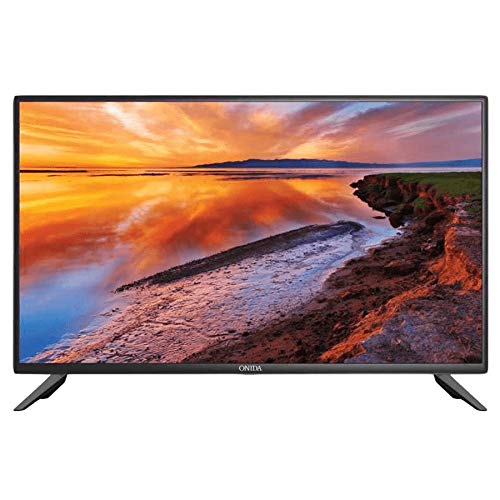
Image 3: The ONIDA 32HAF TV displayed with its stand attached, showing a scenic landscape on the screen. This illustrates the TV ready for placement on a flat surface.
3.2 వాల్ మౌంటింగ్ (ఐచ్ఛికం)
If you choose to wall mount your TV, please consult a professional installer. The TV supports standard VESA wall mounts. Refer to the wall mount kit instructions for proper installation.
3.3 కనెక్ట్ పెరిఫెరల్స్
- శక్తి: పవర్ కార్డ్ను టీవీ పవర్ ఇన్పుట్కి మరియు తరువాత వాల్ అవుట్లెట్కి కనెక్ట్ చేయండి.
- HDMI: Use HDMI cables to connect external devices like set-top boxes, gaming consoles, or Blu-ray players.
- USB: Insert USB drives for media playback or software updates.
- యాంటెన్నా/కేబుల్: మీ యాంటెన్నా లేదా కేబుల్ టీవీ ఫీడ్ను RF ఇన్పుట్కి కనెక్ట్ చేయండి.
3.4 ప్రారంభ పవర్ ఆన్ మరియు సెటప్ విజార్డ్
- టీవీని ప్లగ్ చేసి రిమోట్ కంట్రోల్లోని పవర్ బటన్ను నొక్కండి.
- మీ భాష, దేశం మరియు నెట్వర్క్ సెట్టింగ్లను (Wi-Fi లేదా ఈథర్నెట్) ఎంచుకోవడానికి స్క్రీన్పై ఉన్న సూచనలను అనుసరించండి.
- Complete the channel scan for DVB-T/DVB-T2 signals if using an antenna.
4. మీ స్మార్ట్ టీవీని ఆపరేట్ చేయడం
4.1 రిమోట్ కంట్రోల్ విధులు
సులభమైన నావిగేషన్ మరియు నియంత్రణ కోసం రిమోట్ కంట్రోల్ బటన్లతో మిమ్మల్ని మీరు పరిచయం చేసుకోండి.
- శక్తి: టీవీని ఆన్ లేదా ఆఫ్ చేస్తుంది.
- మూలం: ఇన్పుట్ మూలాలను (HDMI, USB, TV) ఎంచుకుంటుంది.
- వాల్యూమ్ +/-: వాల్యూమ్ స్థాయిని సర్దుబాటు చేస్తుంది.
- ఛానెల్ +/-: టీవీ ఛానళ్లు మారుస్తాడు.
- Navigation (Arrow) Keys & OK: మెనూలను నావిగేట్ చేస్తుంది మరియు ఎంపికలను నిర్ధారిస్తుంది.
- మెను: ప్రధాన సెట్టింగ్ల మెనుని యాక్సెస్ చేస్తుంది.
- వెనుకకు/నిష్క్రమించు: మునుపటి స్క్రీన్కు తిరిగి వస్తుంది లేదా మెనూ నుండి నిష్క్రమిస్తుంది.
4.2 స్మార్ట్ టీవీ ఫీచర్లు (ఆండ్రాయిడ్ OS)
Your ONIDA 32HAF TV runs on Android OS, providing access to various smart features:
- యాప్ స్టోర్: Download and install applications for streaming, news, and more.
- బ్రౌజర్: మీ టీవీ నుండి నేరుగా ఇంటర్నెట్ను యాక్సెస్ చేయండి.
- మీడియా ప్లేబ్యాక్: వీడియోలు, సంగీతం ప్లే చేయండి మరియు view కనెక్ట్ చేయబడిన USB పరికరాల నుండి ఫోటోలు.
- వైర్లెస్ కనెక్టివిటీ: ఇంటర్నెట్ యాక్సెస్ కోసం మీ ఇంటి Wi-Fi నెట్వర్క్కి కనెక్ట్ అవ్వండి.
4.3 చిత్రం మరియు ధ్వని సెట్టింగ్లు
Access the TV's menu to customize picture and sound settings:
- చిత్ర మోడ్: స్టాండర్డ్, డైనమిక్, మూవీ, యూజర్.
- ప్రకాశం, కాంట్రాస్ట్, రంగు: Fine-tune display characteristics.
- సౌండ్ మోడ్: స్టాండర్డ్, మ్యూజిక్, మూవీ, యూజర్.
- సమం: Adjust audio frequencies for personalized sound.
- సరౌండ్ సౌండ్: Enable or disable 5.1 surround sound output.

Image 4: A visual representation demonstrating the 178-degree wide viewing angle of the ONIDA TV. Multiple panels show the same image of camels in a desert, maintaining consistent color and clarity from various side angles.

Image 5: A side-by-side comparison illustrating the superior performance of an ADS Panel versus a conventional panel. The ADS Panel on the right shows better color reproduction and clarity when touched, indicating improved display technology.
5. నిర్వహణ
- స్క్రీన్ క్లీనింగ్: Gently wipe the screen with a soft, lint-free cloth. For stubborn marks, use a screen cleaner specifically designed for LED TVs. Do not spray cleaner directly onto the screen.
- క్యాబినెట్ శుభ్రపరచడం: టీవీ క్యాబినెట్ను తుడవడానికి మృదువైన, పొడి వస్త్రాన్ని ఉపయోగించండి. రాపిడి క్లీనర్లు లేదా ద్రావకాలను ఉపయోగించడం మానుకోండి.
- వెంటిలేషన్: టీవీ వెనుక భాగంలో వెంటిలేషన్ ఓపెనింగ్లు మూసుకుపోకుండా చూసుకోండి, తద్వారా అవి వేడెక్కకుండా ఉంటాయి.
- సాఫ్ట్వేర్ అప్డేట్లు: Periodically check for software updates through the TV's settings menu to ensure optimal performance and access to new features.
6. ట్రబుల్షూటింగ్
| సమస్య | సాధ్యమైన కారణం | పరిష్కారం |
|---|---|---|
| శక్తి లేదు | Power cord disconnected; no power from outlet. | పవర్ కార్డ్ కనెక్షన్ను తనిఖీ చేయండి; మరొక పరికరంతో అవుట్లెట్ను పరీక్షించండి. |
| చిత్రం లేదు, కానీ ధ్వని ఉంది | తప్పు ఇన్పుట్ సోర్స్ ఎంచుకోబడింది; బ్యాక్లైట్ సమస్య. | Press the "Source" button on the remote to select the correct input. |
| శబ్దం లేదు, కానీ చిత్రం ఉంది | వాల్యూమ్ మ్యూట్ చేయబడింది లేదా చాలా తక్కువగా ఉంది; తప్పు ఆడియో అవుట్పుట్ సెట్టింగ్లు. | Unmute or increase volume; check audio settings in the menu. |
| రిమోట్ కంట్రోల్ పనిచేయడం లేదు | బ్యాటరీలు అయిపోయాయి; రిమోట్ మరియు టీవీ మధ్య అడ్డంకి. | Replace batteries; ensure clear line of sight to the TV's IR sensor. |
| Wi-Fiకి కనెక్ట్ చేయడం సాధ్యపడదు | పాస్వర్డ్ తప్పు; రూటర్ సమస్యలు; టీవీ రూటర్ నుండి చాలా దూరంలో ఉంది. | Wi-Fi పాస్వర్డ్ను ధృవీకరించండి; రౌటర్ను పునఃప్రారంభించండి; టీవీని రౌటర్కు దగ్గరగా తరలించండి లేదా ఈథర్నెట్ను ఉపయోగించండి. |
7. స్పెసిఫికేషన్లు
| ఫీచర్ | వివరాలు |
|---|---|
| బ్రాండ్ | ఒనిడా |
| మోడల్ పేరు | 32HAF |
| మోడల్ సంవత్సరం | 2019 |
| ఆపరేటింగ్ సిస్టమ్ | ఆండ్రాయిడ్ |
| ప్రదర్శన రకం | LED |
| రిజల్యూషన్ | HD సిద్ధంగా (1366 x 768 పిక్సెల్లు) |
| స్క్రీన్ పరిమాణం | 81 సెం.మీ (32 అంగుళాలు) |
| Viewing యాంగిల్ | 178 డిగ్రీలు |
| ఆడియో అవుట్పుట్ మోడ్ | చుట్టుముట్టండి |
| స్పీకర్ కాన్ఫిగరేషన్ | 5.1 ఛానల్ సరౌండ్ సౌండ్ |
| కనెక్టివిటీ | Wired, Wireless (Wi-Fi), USB, HDMI |
| ట్యూనర్ టెక్నాలజీ | DVB-T, DVB-T2 |
| మౌంటు రకం | Wall Mount, Table Top (with included stand) |
| వస్తువు బరువు | 9 కిలోలు |
| ప్యాకేజీ కొలతలు | 54 x 30 x 21 సెం.మీ |