
పరిచయం
The Power Dynamics PDM25 is a compact and versatile 100V amplifier designed for small installations such as shops, restaurants, and offices. It offers easy operation, reliable performance, and a range of features including Bluetooth connectivity, an integrated MP3 player, USB input, AUX input, and a wireless remote control. This manual provides essential information for the safe and efficient use of your PDM25 ampజీవితకాలం.
భద్రతా సూచనలు
- ఉత్పత్తిని ఉపయోగించే ముందు ఈ మాన్యువల్ను పూర్తిగా చదవండి.
- భవిష్యత్తు సూచన కోసం ఈ మాన్యువల్ని ఉంచండి.
- అన్ని హెచ్చరికలను గమనించండి మరియు అన్ని సూచనలను అనుసరించండి.
- నీటి దగ్గర ఈ ఉపకరణాన్ని ఉపయోగించవద్దు.
- పొడి గుడ్డతో మాత్రమే శుభ్రం చేయండి.
- వెంటిలేషన్ ఓపెనింగ్లను బ్లాక్ చేయవద్దు. తయారీదారు సూచనలకు అనుగుణంగా ఇన్స్టాల్ చేయండి.
- రేడియేటర్లు, హీట్ రిజిస్టర్లు, స్టవ్లు లేదా ఇతర ఉపకరణాలు (సహా ampలిఫైయర్లు) వేడిని ఉత్పత్తి చేస్తాయి.
- ధ్రువణ లేదా గ్రౌండింగ్-రకం ప్లగ్ యొక్క భద్రతా ప్రయోజనాన్ని ఓడించవద్దు. పోలరైజ్డ్ ప్లగ్ రెండు బ్లేడ్లను కలిగి ఉంటుంది, ఒకటి మరొకదాని కంటే వెడల్పుగా ఉంటుంది. గ్రౌండింగ్-రకం ప్లగ్లో రెండు బ్లేడ్లు మరియు మూడవ గ్రౌండింగ్ ప్రాంగ్ ఉన్నాయి. మీ భద్రత కోసం విస్తృత బ్లేడ్ లేదా మూడవ ప్రాంగ్ అందించబడ్డాయి. అందించిన ప్లగ్ మీ అవుట్లెట్కి సరిపోకపోతే, వాడుకలో లేని అవుట్లెట్ను భర్తీ చేయడానికి ఎలక్ట్రీషియన్ను సంప్రదించండి.
- ప్రత్యేకించి ప్లగ్లు, కన్వీనియన్స్ రెసెప్టాకిల్స్ మరియు అవి ఉపకరణం నుండి నిష్క్రమించే ప్రదేశంలో నడవడం లేదా పించ్ చేయడం నుండి పవర్ కార్డ్ను రక్షించండి.
- తయారీదారు పేర్కొన్న జోడింపులు/యాక్సెసరీలను మాత్రమే ఉపయోగించండి.
- మెరుపు తుఫానుల సమయంలో లేదా ఎక్కువ కాలం ఉపయోగించనప్పుడు ఈ ఉపకరణాన్ని అన్ప్లగ్ చేయండి.
- అన్ని సేవలను అర్హత కలిగిన సేవా సిబ్బందికి సూచించండి. విద్యుత్ సరఫరా త్రాడు లేదా ప్లగ్ పాడైపోయినప్పుడు, ద్రవం చిందినప్పుడు లేదా ఉపకరణంలో వస్తువులు పడిపోయినప్పుడు, ఉపకరణం వర్షం లేదా తేమకు గురైనప్పుడు, సాధారణంగా పని చేయనప్పుడు, ఉపకరణం ఏదైనా విధంగా దెబ్బతిన్నప్పుడు సర్వీసింగ్ అవసరం. , లేదా తొలగించబడింది.
- హెచ్చరిక: అగ్ని లేదా విద్యుత్ షాక్ ప్రమాదాన్ని తగ్గించడానికి, ఈ ఉపకరణాన్ని వర్షం లేదా తేమకు బహిర్గతం చేయవద్దు.
- జాగ్రత్త: Do not open the cover. No user-serviceable parts inside. Refer servicing to qualified personnel only.
ఉత్పత్తి ముగిసిందిview
The PDM25 amplifier features a user-friendly front panel with controls for various audio sources and volume adjustments, along with a clear digital display. The rear panel provides all necessary connections for speakers, external audio sources, and power.

చిత్రం 1: ముందు ప్యానెల్ ఓవర్view of the PDM25 Ampజీవితకాలం.

Figure 2: Rear Panel Connections of the PDM25 Ampజీవితకాలం.
సెటప్
1. అన్ప్యాకింగ్
జాగ్రత్తగా తొలగించండి amplifier from its packaging. Inspect the unit for any signs of damage during transit. Retain the original packaging for future transport or storage.
2. ప్లేస్మెంట్
ఉంచండి amplifier on a stable, flat surface. Ensure adequate ventilation around the unit to prevent overheating. Avoid placing it near heat sources or in direct sunlight.
3 స్పీకర్ కనెక్షన్
The PDM25 supports both 100V line speakers and low impedance (4-16 Ohm) speakers.
- For 100V Line Speakers: Connect the positive (+) terminal of your 100V speaker system to the "100V" terminal on the amplifier's rear panel. Connect the negative (-) terminal to the "COM" terminal.
- For Low Impedance Speakers (4-16 Ohm): Connect the positive (+) terminal of your speaker to the "4-16 Ohm" terminal on the amplifier's rear panel. Connect the negative (-) terminal to the "COM" terminal.
Ensure correct polarity (+ to + and - to -) for optimal sound quality. Do not connect both 100V and low impedance speakers simultaneously to the same output.
4. ఆడియో సోర్స్ కనెక్షన్
- AUX ఇన్పుట్: Connect external audio devices (e.g., CD player, mixer) to the RCA "AUX" input jacks on the rear panel using an RCA cable.
- మైక్రోఫోన్ ఇన్పుట్: Connect a microphone to the 6.3mm jack on the front panel.
- USB ఇన్పుట్: MP3ని కలిగి ఉన్న USB ఫ్లాష్ డ్రైవ్ను చొప్పించండి fileముందు ప్యానెల్లోని USB పోర్ట్లోకి లు.
5. పవర్ కనెక్షన్
Connect the supplied power cable to the AC inlet on the rear panel of the amplifier and then to a suitable mains power outlet (230 Vac/50 Hz).
ఆపరేటింగ్ సూచనలు
1. పవర్ ఆన్/ఆఫ్
Press the "ON/OFF" switch on the front panel to power on or off the ampజీవితకాలం.
2. మూలం ఎంపిక
Use the "MODE" button on the front panel or the remote control to cycle through available input sources: Bluetooth, USB/MP3, AUX, and Radio. The selected mode will be displayed on the digital screen.

Figure 3: Front Panel Controls and USB Input.
3. వాల్యూమ్ నియంత్రణ
- మాస్టర్ వాల్యూమ్: Adjust the main output volume using the large "VOLUME" knob on the front panel.
- Individual Source Volume: Adjust the volume for MP3, AUX, and MIC inputs using their respective smaller "VOLUME" knobs.
4. టోన్ కంట్రోల్
Use the "TREBLE" and "BASS" knobs on the front panel to adjust the high and low frequencies of the audio output.
5. బ్లూటూత్ ఆపరేషన్
- Select "Bluetooth" mode using the "MODE" button. The display will show "BLUE".
- On your Bluetooth-enabled device (smartphone, tablet, etc.), search for available devices and select "PDM25".
- జత చేసిన తర్వాత, మీరు ఆడియోను వైర్లెస్గా ప్రసారం చేయవచ్చు ampజీవితకాలం.
6. USB/MP3 Player Operation
- Insert a USB flash drive into the USB port. The amplifier will automatically switch to USB mode and begin playing MP3 files.
- Use the play/pause, next, and previous track buttons on the front panel or remote control to manage playback.
7. రేడియో ఆపరేషన్
In Radio mode, use the control buttons to scan for and select radio stations.
8. రిమోట్ కంట్రోల్
The included remote control provides convenient access to power, mode selection, volume, track control, and equalizer presets.
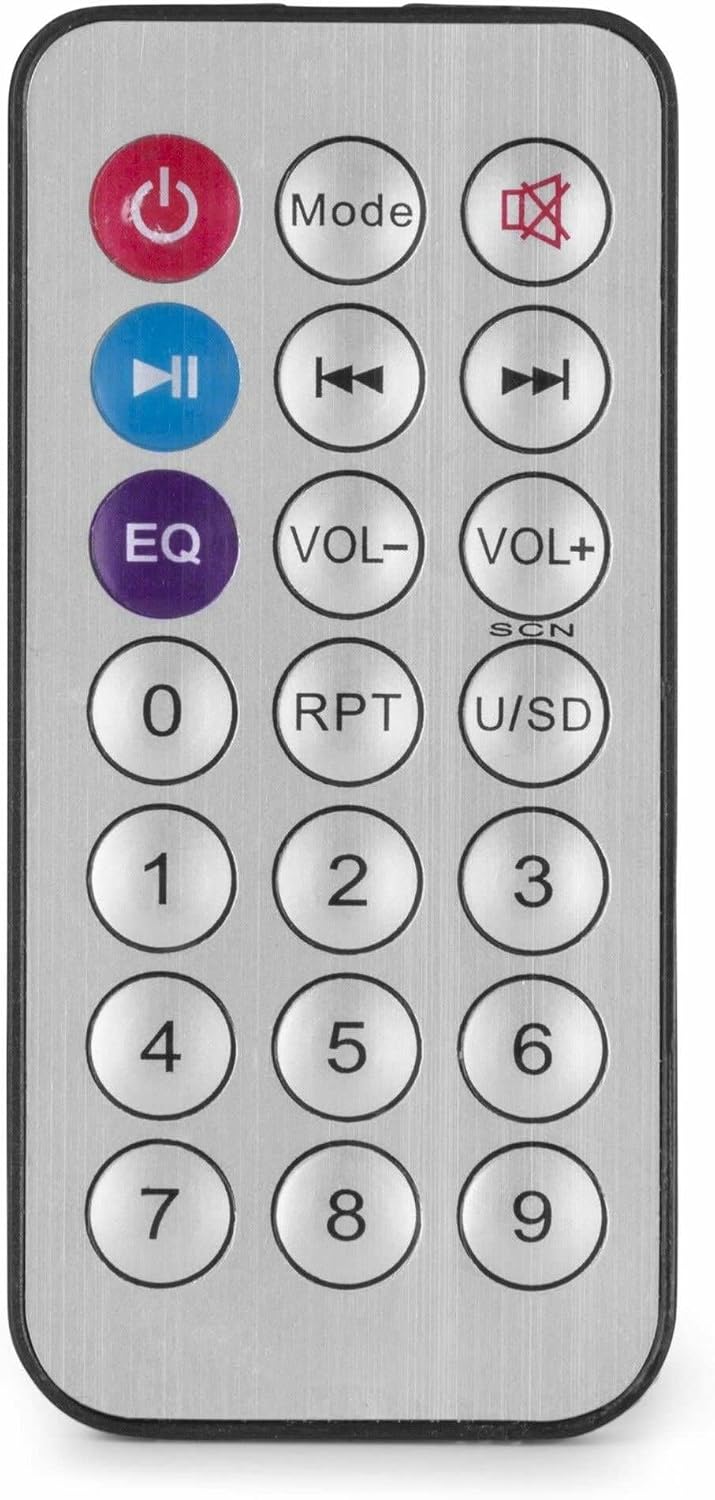
చిత్రం 4: వైర్లెస్ రిమోట్ కంట్రోల్.
నిర్వహణ
- శుభ్రపరచడం: Disconnect the power before cleaning. Use a soft, dry cloth to wipe the exterior of the ampలిఫైయర్. లిక్విడ్ క్లీనర్లు లేదా ఏరోసోల్లను ఉపయోగించవద్దు.
- వెంటిలేషన్: Ensure that the ventilation openings are clear of dust and debris to maintain proper airflow.
- నిల్వ: If storing the unit for an extended period, disconnect it from power and store it in a cool, dry place, preferably in its original packaging.
ట్రబుల్షూటింగ్
| సమస్య | సాధ్యమైన కారణం | పరిష్కారం |
|---|---|---|
| శక్తి లేదు | Power cable not connected; Power outlet faulty; Ampలైఫైయర్ స్విచ్ ఆఫ్. | Check power cable connection; Test power outlet; Ensure amplifier switch is ON. |
| సౌండ్ అవుట్పుట్ లేదు | Incorrect source selected; Volume too low; Speaker connections faulty; Mute activated. | Select correct input source; Increase master and source volume; Check speaker wiring; Deactivate mute function on remote. |
| బ్లూటూత్ కనెక్ట్ కావడం లేదు | Ampలైఫైయర్ బ్లూటూత్ మోడ్లో లేదు; పరికరం చాలా దూరంగా ఉంది; పరికరం ఇప్పటికే మరొక యూనిట్తో జత చేయబడింది. | నిర్ధారించండి amplifier is in Bluetooth mode ("BLUE" displayed); Move device closer; Disconnect from other devices and try again. |
| USB ప్లేబ్యాక్ సమస్యలు | USB డ్రైవ్ సరిగ్గా ఫార్మాట్ చేయబడలేదు; అనుకూలంగా లేదు. file ఫార్మాట్; USB డ్రైవ్ లోపభూయిష్టంగా ఉంది. | USB డ్రైవ్ FAT32 ఫార్మాట్ చేయబడిందని నిర్ధారించుకోండి; MP3 ఉపయోగించండి. files; వేరే USB డ్రైవ్ని ప్రయత్నించండి. |
| వక్రీకరించిన ధ్వని | Volume too high; Incorrect impedance matching for speakers; Faulty audio source. | Reduce volume; Verify speaker impedance matches amplifier output; Test with a different audio source. |
స్పెసిఫికేషన్లు
- అవుట్పుట్ పవర్: 25 W
- స్పీకర్ అవుట్పుట్: 100V and 4-16 Ohm
- ఫ్రీక్వెన్సీ పరిధి: 50 హెర్ట్జ్ - 18 కిలోహెర్ట్జ్
- సిగ్నల్-టు-శబ్ద నిష్పత్తి: >75 డిబి
- కనెక్షన్ వాల్యూమ్tage: 230 Vac/50 Hz
- కొలతలు (L x W x H): 205 x 285 x 65 మిమీ
- బరువు: 1.5 కిలోలు
- ఫీచర్లు: Bluetooth, USB MP3 Player, Radio, AUX Input, Microphone Input, Bass/Treble Control, Integrated Equalizer, Remote Control
- మోడల్ సంఖ్య: PDM25
- తయారీదారు: ట్రోనియోస్ BV
వారంటీ మరియు మద్దతు
For warranty information and technical support, please refer to the documentation provided with your purchase or visit the official Power Dynamics webసైట్. ఏవైనా వారంటీ క్లెయిమ్ల కోసం మీ కొనుగోలు రుజువును ఉంచుకోండి.
తయారీదారు: ట్రోనియోస్ BV
Webసైట్: www.power-dynamics.eu