
1. ముఖ్యమైన భద్రతా సమాచారం
Before operating the Propel FitnessOne HT55 Treadmill, please read and understand all safety instructions. Retain this manual for future reference.
- Always attach the safety key to your clothing before starting a workout. In case of an emergency, pulling the safety key will immediately stop the treadmill.
- ట్రెడ్మిల్ చుట్టూ తగినంత క్లియరెన్స్తో చదునైన, స్థిరమైన ఉపరితలంపై ఉంచబడిందని నిర్ధారించుకోండి.
- ఆపరేషన్ సమయంలో పిల్లలు మరియు పెంపుడు జంతువులను ట్రెడ్మిల్ నుండి దూరంగా ఉంచండి.
- ఏదైనా కొత్త వ్యాయామ కార్యక్రమాన్ని ప్రారంభించే ముందు వైద్యుడిని సంప్రదించండి.
- ట్రెడ్మిల్ పాడైపోయినా లేదా సరిగ్గా పనిచేయకపోయినా దాన్ని ఆపరేట్ చేయవద్దు.
- Maximum user weight capacity is 100 kg.
2. ప్యాకేజీ విషయాలు
అన్ని భాగాలు పెట్టెలో ఉన్నాయని నిర్ధారించుకోండి:
- 1 x Treadmill Set (Main Unit)
- 1 x Assembly Kit (Screws, bolts, washers, Allen key, wrench)
- 1 x భద్రతా కీ
- 1 x యూజర్ మాన్యువల్ (ఈ పత్రం)
- 1 x వారంటీ కార్డ్
3. సెటప్ మరియు ఇన్స్టాలేషన్
The Propel FitnessOne HT55 Treadmill is designed for easy setup. Follow these steps for assembly:
3.1 అన్బాక్సింగ్ మరియు ప్రారంభ సెటప్
Carefully open the package and remove the treadmill and all accessories. Place the treadmill on a flat surface.

Figure 3.1: Propel FitnessOne HT55 Treadmill in its operational state.
3.2 Assembling the Upright Posts and Console
The treadmill comes largely pre-assembled. You will need to lift the console and secure it.
- Lift the treadmill stem vertically until it locks into place.
- Unpack the provided screws, bolts, and nuts from the assembly kit.
- Fix the upright posts using the provided screws and bolt nuts. Tighten them securely with the Allen key.
- Attach the protective guard to the base of the treadmill and secure it with the appropriate screws.
Video 3.2: Installation guide for the Propel FitnessOne HT55 Treadmill, demonstrating the assembly process.
Video 3.3: Detailed installation steps for the Propel FitnessOne HT55 Treadmill, including securing components.
3.3 Connecting Power and Safety Key
- పవర్ కార్డ్ను తగిన ఎలక్ట్రికల్ అవుట్లెట్లోకి ప్లగ్ చేయండి.
- Insert the safety key into its designated slot on the console. The treadmill will not operate without the safety key in place.
4. ఆపరేటింగ్ సూచనలు
Familiarize yourself with the control console and features of your HT55 Treadmill.
4.1 Control Console Overview

Figure 4.1: The control console of the HT55 Treadmill.
The 5-inch blue backlit LCD display shows key workout metrics:
- సమయం: మీ వ్యాయామం వ్యవధి.
- వేగం: Current running speed (0.8 to 12 km/hr).
- దూరం: మొత్తం దూరం ప్రయాణించారు.
- కేలరీలు: అంచనా వేయబడిన కేలరీలు బర్న్ చేయబడ్డాయి.
- పల్స్: Heart rate detected by hand sensors.
- దశలు: Number of steps taken.
The console also features an MP3 interface with AUX input and built-in speakers for audio playback.

Figure 4.2: Close-up of the LCD display and console features.
4.2 వ్యాయామం ప్రారంభించడం
- సేఫ్టీ కీని కన్సోల్పై సరిగ్గా ఉంచి, మీ దుస్తులకు క్లిప్ చేశారని నిర్ధారించుకోండి.
- నొక్కండి START ప్రారంభించడానికి బటన్. ట్రెడ్మిల్ సాధారణంగా తక్కువ వేగంతో ప్రారంభమవుతుంది.
- వేగాన్ని సర్దుబాటు చేయడానికి వేగం +/- buttons on the console or the quick-speed keys (2, 4, 6, 8, 10, 12 km/hr). Speed controls are also available on the handrails.
- ఆపడానికి, నొక్కండి ఆపు button or pull the safety key.
4.3 వ్యాయామ కార్యక్రమాలు
The HT55 Treadmill includes 15 pre-set programs and 3 user-defined programs. Select a program using the మోడ్ button or dedicated program buttons on the console.
4.4 Manual Incline Adjustment
The treadmill features a 3-level manual incline. To adjust the incline, you must manually lift or lower the rear of the running deck and secure it at the desired level before starting your workout.
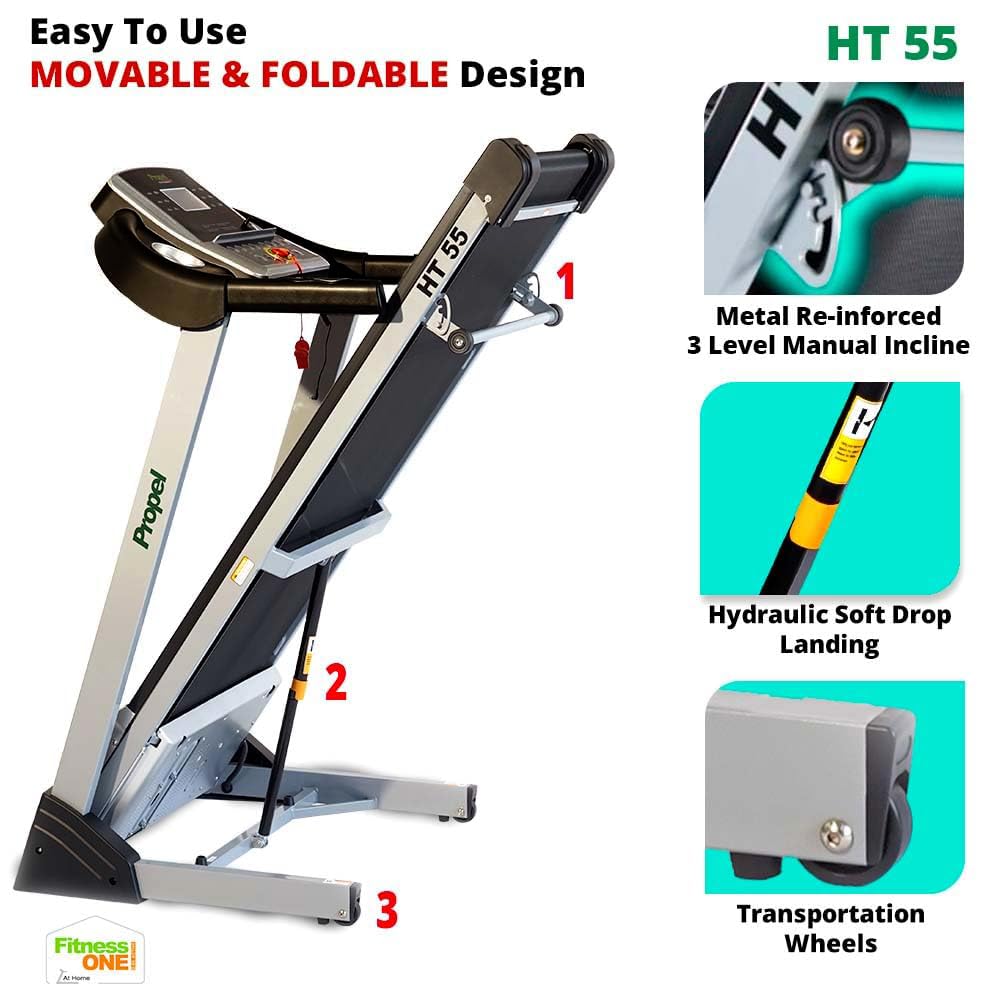
చిత్రం 4.3: మాన్యువల్ ఇంక్లైన్ సర్దుబాటు విధానం.
4.5 Hand Sensors and Audio
- Grip the hand sensors on the handlebars to monitor your pulse.
- Connect your MP3 device to the AUX input to play music through the built-in speakers.
5. నిర్వహణ
క్రమం తప్పకుండా నిర్వహణ మీ ట్రెడ్మిల్ యొక్క దీర్ఘాయువు మరియు సరైన పనితీరును నిర్ధారిస్తుంది.
- శుభ్రపరచడం: ప్రకటనతో ప్రతి ఉపయోగం తర్వాత ట్రెడ్మిల్ను తుడవండిamp చెమట మరియు దుమ్ము తొలగించడానికి వస్త్రం. రాపిడి క్లీనర్లను నివారించండి.
- సరళత: Periodically lubricate the running belt as per the instructions in the full user manual to reduce friction and wear.
- బెల్ట్ సర్దుబాటు: Check the running belt tension and alignment regularly. Adjust if necessary to prevent slipping or uneven wear.
- మోటారు ప్రాంతం: Keep the motor cover area clean and free from dust and debris to ensure proper ventilation.
6. ట్రబుల్షూటింగ్
మీ ట్రెడ్మిల్తో మీకు సమస్యలు ఎదురైతే, ఈ క్రింది సాధారణ పరిష్కారాలను చూడండి:
- ట్రెడ్మిల్ ప్రారంభం కావడం లేదు: Ensure the power cord is securely plugged in and the safety key is correctly placed. Check the power switch.
- బెల్ట్ జారడం: The running belt may need tensioning or lubrication. Refer to the detailed maintenance section in the full user manual.
- అసాధారణ శబ్దాలు: Stop the treadmill immediately. Check for loose parts or foreign objects under the belt. If the noise persists, contact customer support.
- సరికాని హృదయ స్పందన రేటు రీడింగ్లు: Ensure your hands are firmly placed on the pulse sensors. Dry hands or excessive movement can affect accuracy.
For more complex issues, contact Propel customer support.
7. స్పెసిఫికేషన్లు
Key technical specifications for the Propel FitnessOne HT55 Treadmill:
| ఫీచర్ | స్పెసిఫికేషన్ |
|---|---|
| బ్రాండ్ | ప్రొపెల్ |
| మోడల్ పేరు | HT55 |
| మోటార్ పవర్ | 3 HP Peak DC Motor |
| గరిష్ట వేగం | గంటకు 12 కి.మీ |
| ఇంక్లైన్ స్థాయిలు | 3-Level Manual Incline |
| రన్నింగ్ ఉపరితలం | 48 x 17 అంగుళాలు (1220 x 430 మిమీ) |
| గరిష్ట వినియోగదారు బరువు | 100 కిలోలు |
| ప్రదర్శన రకం | 5-inch Blue Backlit LCD |
| ముందుగా సెట్ చేసిన ప్రోగ్రామ్లు | 15 |
| కనెక్టివిటీ | MP3, AUX input |
| ఫోల్డబుల్ డిజైన్ | Yes, with Hydraulic Soft Drop Landing |
| వస్తువు బరువు | 44 కిలోలు |
| ఉత్పత్తి కొలతలు (కార్యాచరణ) | 152D x 75.2W x 118H సెంటీమీటర్లు |

Figure 7.1: Operational dimensions of the HT55 Treadmill.

చిత్రం 7.2: నడుస్తున్న ఉపరితల కొలతలు.

Figure 7.3: The 3HP Peak DC Motor.
8. వారంటీ మరియు మద్దతు
Propel FitnessOne provides comprehensive warranty coverage and support for your HT55 Treadmill:
- ఫ్రేమ్: 5 సంవత్సరాల వారంటీ.
- మోటార్: 1 సంవత్సరాల వారంటీ.
- భాగాలు: 1 సంవత్సరాల వారంటీ.
For installation assistance, video-guided support is available. In-person assembly support can be arranged for a nominal fee. Refer to your warranty card for detailed terms and conditions or contact Propel customer care at 96000 09010 or visit www.fitnessone.in.