
CHAOFAN 55813737
CHAOFAN Table Tennis Robot Backpack User Manual
మోడల్: 55813737
1. పరిచయం
This manual provides essential information for the proper use, setup, and maintenance of your CHAOFAN Table Tennis Robot Backpack. Please read this manual thoroughly before using the product to ensure optimal performance and longevity.
2. ఉత్పత్తి ముగిసిందిview
The CHAOFAN Table Tennis Robot Backpack is designed for convenient transport and storage of various table tennis robot models. Its robust construction and thoughtful design ensure your equipment is protected and easily portable.

Image 1: The CHAOFAN Table Tennis Robot Backpack in red and black, showcasing its upright design and main zipper.
ముఖ్య లక్షణాలు:
- అనుకూలత: Designed to be compatible with popular table tennis robot models such as Hui Pong JT-A, S6, S8, H600, Le Ji master 2040/2050, and similar models.
- కొలతలు: Backpack size is approximately 86 cm (height) x 34 cm (width) x 28 cm (depth).
- పోర్టబిలిటీ: Facilitates convenient movement of your table tennis machine.
- తేలికపాటి: Net weight of the backpack is 1.2 kg, with a gross weight of 1.5 kg.
- సర్దుబాటు పట్టీలు: Features adjustable shoulder straps for comfortable carrying.
- నిల్వ: Includes a stash pocket for additional items.
- మూసివేత: Secure zipper closure.
3. సెటప్ మరియు వినియోగం
Follow these steps to properly set up and use your table tennis robot backpack.
- Unpack the Backpack: బ్యాక్ప్యాక్ను దాని ప్యాకేజింగ్ నుండి జాగ్రత్తగా తొలగించండి.
- Prepare Your Robot: Ensure your table tennis robot is folded or configured to its most compact state, suitable for transport. Refer to your robot's specific manual for folding instructions.
- Insert the Robot: Open the main zipper of the backpack. Carefully slide your table tennis robot into the main compartment. Ensure it fits snugly and is centered to distribute weight evenly.
- Secure the Robot: If your robot has any loose parts or nets, ensure they are secured within the backpack or the robot itself to prevent damage during transport.
- Close the Backpack: Zip up the main compartment securely. Use the top buckles to further secure the opening.
- పట్టీలను సర్దుబాటు చేయండి: Put on the backpack. Adjust the shoulder straps and any waist straps (if present) to ensure a comfortable and secure fit. The weight should be distributed across your shoulders and hips.
- పాకెట్స్ ఉపయోగించండి: Use the stash pocket for smaller accessories like power cords, remote controls, or extra ping pong balls.

Image 2: A folded table tennis robot positioned next to the CHAOFAN backpack, demonstrating its compact size for transport.

Image 3: The table tennis robot and the CHAOFAN backpack displayed side-by-side, illustrating their relative sizes.

Image 4: A table tennis robot being partially inserted into the CHAOFAN backpack, showing the wide opening for easy loading.
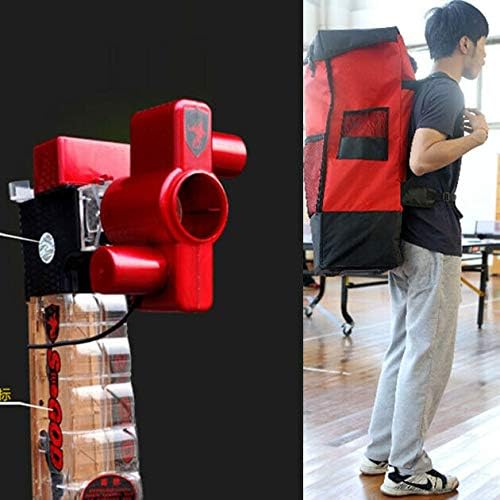
Image 5: A person wearing the CHAOFAN backpack, demonstrating how it looks when carried with a table tennis robot inside.
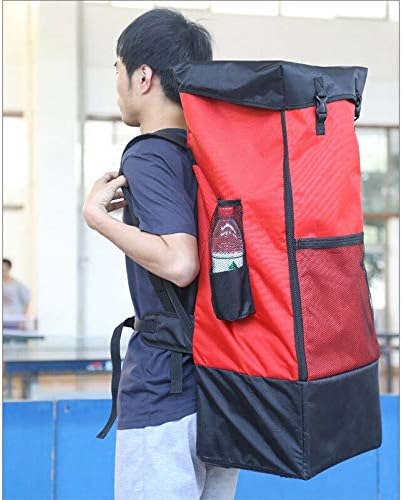
చిత్రం 6: ఒక వైపు view of a person wearing the CHAOFAN backpack, highlighting its profile మరియు సరిపోతాయి.
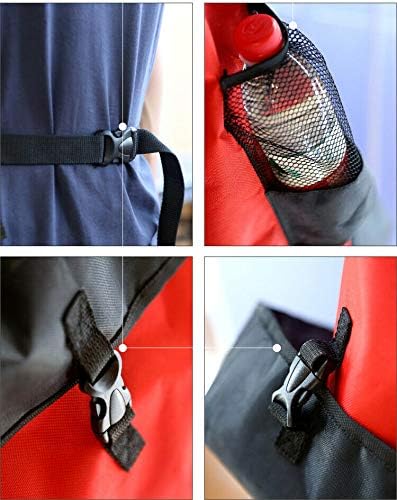
చిత్రం 7: వివరణాత్మకమైనది view of the backpack's features, including the waist buckle, mesh bottle pocket, and top securing buckle.
4. నిర్వహణ
Proper maintenance will extend the life of your CHAOFAN Table Tennis Robot Backpack.
- శుభ్రపరచడం: ప్రకటనతో బాహ్య భాగాన్ని తుడవండిamp అవసరమైతే గుడ్డ మరియు తేలికపాటి సబ్బు వాడండి. కఠినమైన రసాయనాలు లేదా రాపిడి క్లీనర్లను ఉపయోగించవద్దు.
- ఎండబెట్టడం: Allow the backpack to air dry completely before storing, especially if it has been exposed to moisture. Do not tumble dry.
- నిల్వ: బ్యాక్ప్యాక్ను ఉపయోగంలో లేనప్పుడు ప్రత్యక్ష సూర్యకాంతి పడకుండా చల్లని, పొడి ప్రదేశంలో నిల్వ చేయండి.
- జిప్పర్ సంరక్షణ: Periodically check zippers for smooth operation. If they become stiff, apply a small amount of zipper lubricant.
- పట్టీ తనిఖీ: Regularly inspect straps and buckles for any signs of wear or damage. Replace if necessary.
5. ట్రబుల్షూటింగ్
This section addresses common issues you might encounter with your backpack.
- సమస్య: Robot does not fit inside the backpack.
పరిష్కారం: Ensure your table tennis robot model is listed as compatible. Verify the robot is folded to its most compact dimensions. The backpack dimensions are 86x34x28 cm. - సమస్య: Backpack feels uncomfortable or heavy when carried.
పరిష్కారం: Adjust both shoulder straps evenly. If available, utilize the waist strap to distribute weight to your hips. Ensure the robot is centered within the backpack. - సమస్య: Zipper is stuck or difficult to move.
పరిష్కారం: Check for any fabric caught in the zipper teeth. Apply a small amount of zipper lubricant or wax to the teeth and try again.
6. స్పెసిఫికేషన్లు
| ఫీచర్ | వివరాలు |
|---|---|
| బ్రాండ్ | చావోఫాన్ |
| తయారీదారు | Hui Pang |
| మోడల్ నంబర్ (పార్ట్ నంబర్) | 55813737 |
| UPC | 782855813737 |
| కొలతలు (H x W x D) | 86 cm x 34 cm x 28 cm |
| నికర బరువు | 1.2 కిలోలు |
| స్థూల బరువు | 1.5 కిలోలు |
| రంగు | ఎరుపు |
| షెల్ రకం | మృదువైన |
| మూసివేత రకం | జిప్పర్ |
| పట్టీ రకం | సర్దుబాటు |
| Pocket Description | Stash Pocket |
| Compatible Robot Models | Hui Pong JT-A, S6, S8, H600, Le Ji master 2040/2050, and similar |
7. వారంటీ మరియు మద్దతు
For warranty information or technical support, please refer to the documentation provided with your original purchase or contact the retailer where the product was acquired. As this is an accessory, its warranty may be tied to the retailer's return policy or the manufacturer's general accessory warranty.
For further assistance, you may also attempt to contact the manufacturer, Hui Pang, or the brand, CHAOFAN, directly through their official channels if available.
Ask a question about this manual
Ask about setup, troubleshooting, compatibility, parts, safety, or missing instructions. Manuals+ will review the question and use this page’s manual context to help answer it.