
Andoer HDV-201LM
Andoer HDV-201LM 1080p Digital Video Camera User Manual
Model: HDV-201LM
1. పరిచయం
This manual provides detailed instructions for the safe and effective use of your Andoer HDV-201LM Digital Video Camera. Please read this manual thoroughly before operating the device and retain it for future reference.
The Andoer HDV-201LM is a 1080p Full HD digital video camera featuring a 5-megapixel CMOS sensor, capable of capturing video at 1920x1080p at 30 frames per second and still images up to 24 megapixels (interpolated). It includes a 16X digital zoom, a 3.0-inch TFT-LCD screen with 270-degree rotation, and supports external accessories via a hot shoe mount.
2. ప్యాకేజీ విషయాలు
క్రింద జాబితా చేయబడిన అన్ని వస్తువులు మీ ప్యాకేజీలో చేర్చబడ్డాయని నిర్ధారించుకోండి. ఏవైనా వస్తువులు తప్పిపోయినా లేదా దెబ్బతిన్నా, దయచేసి మీ రిటైలర్ను సంప్రదించండి.
- 1 x Andoer HDV-201LM Digital Video Camera
- 1 x కెమెరా బ్యాగ్
- 2 x Rechargeable 3.7V 800mAh Batteries (one pre-installed)
- 1 x USB కేబుల్
- 1 x AV కేబుల్
- 1 x రిమోట్ కంట్రోల్
- 1 x Camera User Manual (English)
- 1 x 0.39X Wide-Angle Lens
- 1 x బాహ్య మైక్రోఫోన్
- 1 x Microphone Connection Cable
- 1 x Microphone User Manual (Chinese)
Note: A memory card is not included. A Class 10 or higher SD card (up to 32GB) is strongly recommended for optimal performance.
3 భాగాల గుర్తింపు
Familiarize yourself with the various components of your digital video camera.

మూర్తి 3.1: ముందు view of the Andoer HDV-201LM camera with attached wide-angle lens and external microphone.

మూర్తి 3.2: వివరంగా views highlighting the hot shoe mount, control buttons, battery compartment, and 1/4-inch tripod thread.
- లెన్స్: Main optical component for capturing images and videos.
- LCD స్క్రీన్: 3.0-inch TFT-LCD display for viewing and menu navigation. Rotates 270 degrees.
- పవర్ బటన్: కెమెరాను ఆన్ లేదా ఆఫ్ చేస్తుంది.
- Record/Stop Button: Initiates or stops video recording.
- ఫోటో బటన్: స్టిల్ చిత్రాలను సంగ్రహిస్తుంది.
- జూమ్ లివర్ (ప/త): Adjusts digital zoom (Wide/Telephoto).
- మెనూ బటన్: కెమెరా సెట్టింగ్లను యాక్సెస్ చేస్తుంది.
- నావిగేషన్ బటన్లు: మెనూ నావిగేషన్ మరియు ఎంపిక కోసం ఉపయోగించబడుతుంది.
- హాట్ షూ మౌంట్: For attaching external accessories like microphones or LED lights.
- ట్రైపాడ్ థ్రెడ్: 1/4-inch thread for mounting the camera on a tripod.
- బ్యాటరీ కంపార్ట్మెంట్: రీఛార్జబుల్ బ్యాటరీని ఉంచుతుంది.
- SD కార్డ్ స్లాట్: మెమరీ కార్డ్ చొప్పించడానికి.
- USB పోర్ట్: For connecting to a computer or charging.
- AV అవుట్పుట్: For connecting to a television.
- LED ఫిల్ లైట్: Provides additional illumination in low-light conditions.
4. సెటప్
4.1 బ్యాటరీని ఛార్జ్ చేస్తోంది
- బ్యాటరీ కంపార్ట్మెంట్ కవర్ తెరవండి.
- Insert the provided 3.7V 800mAh battery, ensuring correct polarity. If an insulator tab is present, remove it before insertion.
- బ్యాటరీ కంపార్ట్మెంట్ కవర్ను మూసివేయండి.
- Connect the camera to a power source using the USB cable. The charging indicator will illuminate.
- పూర్తిగా ఛార్జ్ అయిన తర్వాత, సూచిక లైట్ మారుతుంది లేదా ఆపివేయబడుతుంది.
4.2. మెమరీ కార్డ్ని చొప్పించడం
- కెమెరా పవర్ ఆఫ్ చేయబడిందని నిర్ధారించుకోండి.
- SD కార్డ్ స్లాట్ను గుర్తించండి.
- Insert a Class 10 or higher SD card (up to 32GB) into the slot until it clicks into place.
- తీసివేయడానికి, కార్డు బయటకు వచ్చే వరకు సున్నితంగా నొక్కండి.
4.3. Attaching the Wide-Angle Lens
- Remove the protective cap from the camera lens.
- Carefully screw the 0.39X wide-angle lens onto the camera's main lens thread until secure.

Figure 4.1: The camera with the 0.39X super wide-angle lens attached, demonstrating its expanded field of view.
4.4. బాహ్య మైక్రోఫోన్ను అటాచ్ చేయడం
- Slide the external microphone into the hot shoe mount on top of the camera.
- Connect the microphone cable to the camera's external microphone input port.
5. కెమెరాను ఆపరేట్ చేయడం
5.1. పవర్ చేయడం ఆన్/ఆఫ్
- To power on, open the LCD screen or press the శక్తి బటన్.
- To power off, close the LCD screen or press and hold the శక్తి బటన్.
5.2. వీడియోలను రికార్డ్ చేయడం
- Ensure the camera is in video mode (indicated on the LCD screen). If not, press the మోడ్ మారడానికి బటన్.
- నొక్కండి రికార్డ్/ఆపు button to start recording. A red indicator will typically flash.
- నొక్కండి రికార్డ్/ఆపు రికార్డింగ్ ఆపివేయడానికి మళ్లీ బటన్.
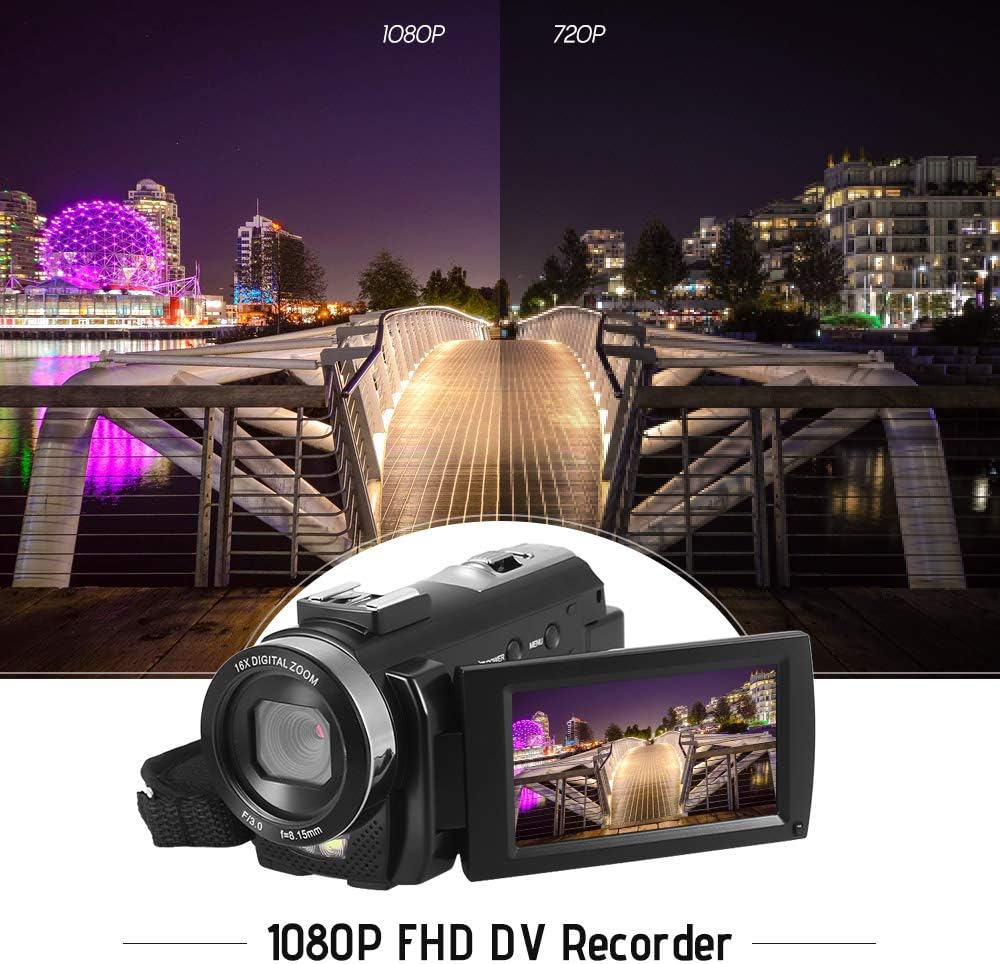
Figure 5.1: The camera is capable of recording in 1080p Full HD and 720p HD resolutions.
5.3. ఫోటోలు తీయడం
- కెమెరా ఫోటో మోడ్లో ఉందని నిర్ధారించుకోండి. లేకపోతే, నొక్కండి మోడ్ మారడానికి బటన్.
- LCD స్క్రీన్ ఉపయోగించి మీ షాట్ను ఫ్రేమ్ చేయండి.
- నొక్కండి ఫోటో button to capture an image.
5.4. డిజిటల్ జూమ్ ఉపయోగించడం
- ఉపయోగించండి W (వెడల్పు) మరియు టి (టెలిఫోటో) lever to adjust the 16X digital zoom.

Figure 5.2: The camera's 16X digital zoom allows for closer views of subjects.
5.5. మెనూ సెట్టింగులు
- నొక్కండి మెనూ button to access settings.
- Use the navigation buttons to scroll through options such as:
- వైట్ బ్యాలెన్స్: Auto, Daylight, Cloudy, Fluorescent, Tungsten.
- సీన్ మోడ్: Auto, Night, Portrait, Landscape, Backlight, Sport, Party, Beach, High Sensitivity.
- షూటింగ్ మోడ్: Single, Continuous.
- బహిరంగపరచడం: Adjust ±3.0EV.
- స్వీయ-టైమర్: Off, 2s, 5s, 10s.
- ఆటో పవర్ ఆఫ్: Off, 1min, 3min, 5min.
- భాష: English, German, French, Spanish, Italian, Turkish, Russian, Portuguese, Dutch, Simplified Chinese, Traditional Chinese, Japanese, Polish.
- ఇతర విధులు: Face Detection, Smile Capture, Beauty Face, Anti-Shake.
- నొక్కండి OK or రికార్డ్/ఆపు ఎంపికలను నిర్ధారించడానికి బటన్.
- నొక్కండి మెనూ నిష్క్రమించడానికి మళ్లీ బటన్.
5.6. టీవీకి కనెక్ట్ చేస్తోంది
- Use the provided AV cable to connect the camera's AV output to your television's AV input.
- Select the correct AV input channel on your TV to view camera content.
6. నిర్వహణ
6.1. కెమెరాను శుభ్రపరచడం
- కెమెరా బాడీని శుభ్రం చేయడానికి మృదువైన, పొడి వస్త్రాన్ని ఉపయోగించండి.
- లెన్స్ మరియు LCD స్క్రీన్ కోసం, ప్రత్యేకమైన లెన్స్ క్లీనింగ్ క్లాత్ మరియు ద్రావణాన్ని ఉపయోగించండి. కఠినమైన రసాయనాలను నివారించండి.
6.2. నిల్వ
- కెమెరాను ప్రత్యక్ష సూర్యకాంతి మరియు తీవ్రమైన ఉష్ణోగ్రతలకు దూరంగా చల్లని, పొడి ప్రదేశంలో నిల్వ చేయండి.
- కెమెరాను ఎక్కువ కాలం ఉపయోగించకపోతే బ్యాటరీని తీసివేయండి.
7. ట్రబుల్షూటింగ్
| సమస్య | సాధ్యమైన కారణం | పరిష్కారం |
|---|---|---|
| కెమెరా పవర్ ఆన్ అవ్వదు. | బ్యాటరీ ఖాళీ అయింది లేదా సరిగ్గా చొప్పించబడలేదు. | Charge the battery fully. Ensure the battery is inserted with correct polarity and the insulator tab is removed. |
| వీడియో రికార్డ్ చేయలేరు లేదా ఫోటోలు తీయలేరు. | మెమరీ కార్డ్ నిండిపోయింది, చొప్పించబడలేదు లేదా పాడైంది. | మెమరీ కార్డ్ చొప్పించండి. అనవసరమైన వాటిని తొలగించండి. files or format the card (this will erase all data). Replace the card if corrupted. |
| వీడియో/చిత్ర నాణ్యత బాగాలేదు. | Insufficient lighting, dirty lens, or incorrect settings. | Ensure adequate lighting. Use the LED fill light if necessary. Clean the lens. Adjust white balance and scene mode settings. |
| కెమెరా స్తంభించిపోతుంది లేదా స్పందించడం మానేస్తుంది. | సాఫ్ట్వేర్ లోపం లేదా తక్కువ బ్యాటరీ. | Remove and reinsert the battery to reset the camera. Ensure the battery is charged. |
8. స్పెసిఫికేషన్లు
| ఫీచర్ | స్పెసిఫికేషన్ |
|---|---|
| బ్రాండ్ | అండోయర్ |
| మోడల్ | HDV-201LM |
| చిత్రం సెన్సార్ | 5 మెగాపిక్సెల్ CMOS సెన్సార్ |
| వీడియో రిజల్యూషన్ | 1920x1080P (FHD 30fps), 1280x720 (HD 30fps), 640x480 (VGA 30fps), 320x240 (VGA 30fps) |
| వీడియో ఫార్మాట్ | AVI |
| చిత్రం రిజల్యూషన్ | 24MP (Interpolated), 20MP (Interpolated), 16MP (Interpolated), 12MP (Interpolated), 10MP (Interpolated), 7M Wide (Interpolated), 5MP, 3MP, 2M Wide, VGA |
| చిత్రం ఫార్మాట్ | JPG |
| డిజిటల్ జూమ్ | 16X |
| లెన్స్ | ff (F/3.0 f=8.15mm) |
| మాక్స్ ఎపర్చరు | 8.15 F |
| LCD స్క్రీన్ | 3.0-inch TFT-LCD (16:9), 270-degree rotation |
| నిల్వ | SD Card (up to 32GB, Class 10 recommended) |
| కనెక్టివిటీ | USB 2.0, AV Output (NTSC/PAL) |
| విద్యుత్ సరఫరా | 1 x 3.7V 800mAh రీఛార్జబుల్ బ్యాటరీ |
| రిమోట్ కంట్రోల్ బ్యాటరీ | 1 x 3V CR2025 Battery |
| ఆపరేటింగ్ సిస్టమ్ మద్దతు | Windows XP/Vista/7/8/10 |
| ప్రత్యేక లక్షణాలు | Anti-shake, Face Detection, Smile Capture, Beauty Face, Self-Timer, LED Fill Light, Hot Shoe Mount |
| కొలతలు | 13.5 x 5.5 x 6.5 సెం.మీ (5.3 x 2.2 x 2.6 in) |
| బరువు | 273g (9.6oz) with battery |
| రంగు | నలుపు |
9. వారంటీ మరియు మద్దతు
వారంటీ సమాచారం మరియు సాంకేతిక మద్దతు కోసం, దయచేసి మీ కొనుగోలుతో అందించిన డాక్యుమెంటేషన్ను చూడండి లేదా మీ రిటైలర్ను సంప్రదించండి. ఏవైనా వారంటీ క్లెయిమ్ల కోసం మీ కొనుగోలు రుజువును ఉంచండి.
Ask a question about this manual
Ask about setup, troubleshooting, compatibility, parts, safety, or missing instructions. Manuals+ will review the question and use this page’s manual context to help answer it.