
1. ఉత్పత్తి ముగిసిందిview
The Wendry I8 Plus is a compact 2.4GHz wireless mini QWERTY keyboard featuring an integrated touchpad and LED backlighting. Designed for convenience, it offers a versatile input solution for various devices, allowing for comfortable operation from a distance.
This device combines the functionality of a keyboard and a mouse, making it ideal for controlling smart TVs, PCs, Android TV boxes, and other compatible systems. Its plug-and-play design ensures easy setup without the need for additional software installation.

Image 1.1: The Wendry I8 Plus keyboard demonstrating compatibility with multiple devices.
2. ప్యాకేజీ విషయాలు
- Wendry I8 Plus Mini LED Backlit Keyboard
- USB రిసీవర్ (బ్యాటరీ కంపార్ట్మెంట్లో ఉంది)
- Rechargeable Lithium-ion Battery (if included, or compartment for AAA batteries)
- USB ఛార్జింగ్ కేబుల్ (వర్తిస్తే)
- వినియోగదారు మాన్యువల్ (ఈ పత్రం)
3. సెటప్ గైడ్
3.1 బ్యాటరీ ఇన్స్టాలేషన్
- కీబోర్డ్ వెనుక భాగంలో బ్యాటరీ కంపార్ట్మెంట్ను గుర్తించండి.
- బ్యాటరీ కవర్ను స్లైడ్తో తెరవండి.
- Insert the provided rechargeable battery or two AAA batteries, ensuring correct polarity (+/-).
- బ్యాటరీ కవర్ను సురక్షితంగా మూసివేయండి.
3.2 USB రిసీవర్ కనెక్షన్
- బ్యాటరీ కంపార్ట్మెంట్ కవర్ తెరవండి.
- Carefully remove the USB receiver, which is magnetically stored inside.
- Plug the USB receiver into an available USB port on your device (e.g., PC, Smart TV, Android TV Box).
- The device will automatically detect and install the necessary drivers. No additional software is required.
- కీబోర్డ్ ఇప్పుడు ఉపయోగం కోసం సిద్ధంగా ఉంది.

Image 3.1: Location of the USB receiver and battery compartment.
4. ఆపరేటింగ్ సూచనలు
4.1 Basic Keyboard and Touchpad Use
- టైపింగ్: Use the QWERTY layout for text input.
- టచ్ప్యాడ్: The central area functions as a high-sensitivity touchpad for mouse cursor control.
- సింగిల్ ఫింగర్ ట్యాప్: ఎడమ మౌస్ క్లిక్గా పనిచేస్తుంది.
- రెండు వేళ్ల ట్యాప్: Functions as a right mouse click.
- Two Finger Drag: For scrolling up and down.

Image 4.1: Using the high-sensitivity touchpad for navigation.
4.2 LED Backlighting Control
The keyboard features colorful LED backlighting for improved visibility in low-light conditions. To control the backlighting:
- నొక్కండి Fn కీతో పాటు F2 key to toggle the backlight on/off or change its color.

Image 4.2: The keyboard displaying its colorful LED backlighting.
4.3 DPI సర్దుబాటు
The touchpad's sensitivity (DPI) can be adjusted to suit your preference and screen size. There are 3 levels of DPI available:
- DPI ని సర్దుబాటు చేయడానికి, Fn కీతో పాటు స్పేస్ బార్. Repeat to cycle through the DPI levels.
4.4 మల్టీమీడియా కీలు
The keyboard includes dedicated multimedia control keys for easy access to functions like volume control, play/pause, and track navigation.
- వాల్యూమ్ అప్/డౌన్: ఉపయోగించండి V+ మరియు V- బటన్లు.
- ప్లే/పాజ్, తదుపరి/మునుపటి ట్రాక్: Use the dedicated media control buttons on the left side.
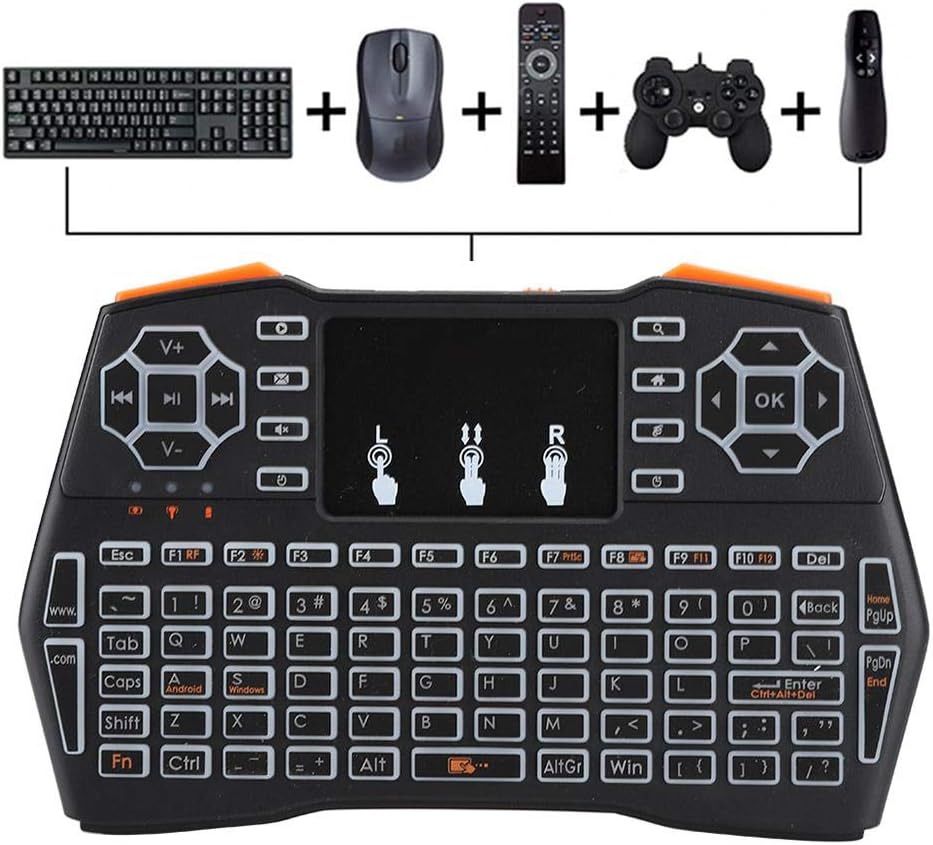
Image 4.3: Using the keyboard for multimedia control and gaming.
5. నిర్వహణ
- శుభ్రపరచడం: Use a soft, dry cloth to clean the keyboard surface. For stubborn dirt, a slightly damp వస్త్రాన్ని ఉపయోగించవచ్చు, కానీ పరికరంలోకి తేమ రాకుండా చూసుకోండి.
- నిల్వ: ఎక్కువసేపు ఉపయోగంలో లేనప్పుడు, కీబోర్డ్ను చల్లని, పొడి ప్రదేశంలో నిల్వ చేయండి.
- బ్యాటరీ సంరక్షణ: If using a rechargeable battery, ensure it is charged regularly. If using AAA batteries, remove them if the device will not be used for a long time to prevent leakage.
- USB రిసీవర్: Always store the USB receiver in its designated magnetic slot within the battery compartment to prevent loss.
6. ట్రబుల్షూటింగ్
- కీబోర్డ్ స్పందించడం లేదు:
- Ensure the battery is charged or replaced.
- Verify the USB receiver is securely plugged into the device.
- USB రిసీవర్ని వేరే USB పోర్ట్కి ప్లగ్ చేసి ప్రయత్నించండి.
- Ensure the keyboard is within the 20-meter operating range of the receiver.
- కనెక్ట్ చేయబడిన పరికరాన్ని పునఃప్రారంభించండి.
- Touchpad not working or erratic:
- Ensure your fingers are clean and dry when using the touchpad.
- Adjust the DPI settings (Fn + Space Bar) to see if sensitivity improves.
- టచ్ప్యాడ్ ఉపరితలాన్ని శుభ్రం చేయండి.
- బ్యాక్లైట్ పనిచేయడం లేదు:
- బ్యాటరీకి తగినంత ఛార్జ్ ఉందని నిర్ధారించుకోండి.
- Press Fn + F2 to toggle the backlight.
- చిన్న ఆపరేటింగ్ పరిధి:
- Ensure there are no significant obstructions between the keyboard and the USB receiver.
- Avoid using the keyboard near strong electromagnetic interference sources.
7. స్పెసిఫికేషన్లు
| ఫీచర్ | వివరాలు |
|---|---|
| మోడల్ సంఖ్య | I8 Plus (Wendryng7y53ptgu) |
| కనెక్టివిటీ టెక్నాలజీ | 2.4GHz Radio Frequency, USB |
| ప్రత్యేక ఫీచర్ | Touchpad, LED Backlighting |
| అనుకూల పరికరాలు | Gaming Console, Personal Computer, Television |
| కీబోర్డ్ వివరణ | QWERTY Mini Keyboard |
| ఆపరేటింగ్ దూరం | 20 మీటర్లు (సుమారు 65 అడుగులు) వరకు |
| శక్తి మూలం | 1 Nonstandard Battery (rechargeable) or AAA batteries |
| వస్తువు బరువు | 6.3 ఔన్సులు (సుమారు 178 గ్రాములు) |
| తయారీదారు | Wendry |
8. వారంటీ మరియు మద్దతు
For warranty information and technical support, please refer to the documentation provided at the time of purchase or contact your retailer. General support inquiries can often be directed to the manufacturer's official webసైట్ లేదా కస్టమర్ సర్వీస్ ఛానెల్లు.
ఏవైనా వారంటీ క్లెయిమ్ల కోసం దయచేసి మీ కొనుగోలు రుజువును ఉంచుకోండి.