
ఉత్పత్తి ముగిసిందిview
The DinoFire Wireless Presenter Remote with Air Mouse is a versatile tool designed to enhance your presentations. It combines the functionality of a traditional presentation clicker with a wireless air mouse, offering seamless control over your computer from a distance. This device is ideal for professionals, educators, and anyone who needs to deliver dynamic and engaging presentations.

Image: The DinoFire Wireless Presenter Remote, showcasing its sleek black design and ergonomic shape. An icon of a computer mouse is also visible, indicating its air mouse functionality.
ముఖ్య లక్షణాలు:
- Integrated Presenter and Air Mouse: Combines slide control with full mouse functionality, allowing for easy navigation of your computer without being tethered to it.
- పునర్వినియోగపరచదగిన బ్యాటరీ: Built-in 300mAh rechargeable battery provides weeks of use on a single 3-hour charge, with an automatic sleep mode to conserve power.
- Multi-Function Control: Supports black/full screen, page flip, volume control, video start/pause, hyperlink/website opening, and window switching.
- Bright Red Light Pointer: A highly visible red light pointer effectively highlights key points on your slides.
- దీర్ఘ శ్రేణి నియంత్రణ: Offers extended wireless range for freedom of movement during presentations.
- విస్తృత అనుకూలత: Compatible with Windows 2003/XP/Vista/7/8/10+, Mac OS, Linux, Android, and software like PowerPoint, Excel, Prezi, Keynote, Numbers, Pages, and web బ్రౌజర్లు.
- పోర్టబుల్ డిజైన్: Features magnetic storage for the USB dongle and a pen clip style for easy carrying.
సెటప్ గైడ్
Follow these steps to set up your DinoFire Wireless Presenter Remote:
- Charge the Presenter: Before first use, fully charge the presenter using the included micro USB cable. Connect the cable to the presenter's USB charging port and a power source (e.g., computer USB port, USB wall adapter). A full charge takes approximately 1.5 hours and provides up to 10 hours of use.
- USB రిసీవర్ని చొప్పించండి: Locate the USB receiver stored magnetically within the presenter. Gently pull it out.
- కంప్యూటర్కు కనెక్ట్ చేయండి: Plug the USB receiver into an available USB port on your computer. The system will automatically detect and install the necessary drivers (Plug & Play).
- పవర్ ఆన్: Slide the power switch on the side of the presenter to the 'On' position. The indicator light will illuminate, signifying it's ready for use.

Image: The DinoFire Wireless Presenter connected to a laptop via a USB cable for charging, illustrating its rechargeable feature. Text indicates "Use for 10 Hours" and "1.5H Charging".

Image: A diagram showing the DinoFire Wireless Presenter and its USB receiver, highlighting the plug-and-play setup process. Icons represent Left/Right Mouse Keys, Page Up/Down, Full/Black Screen, Play Videos, and Volume Control.
ఆపరేటింగ్ సూచనలు
The DinoFire Wireless Presenter offers various functions for effective presentation control:
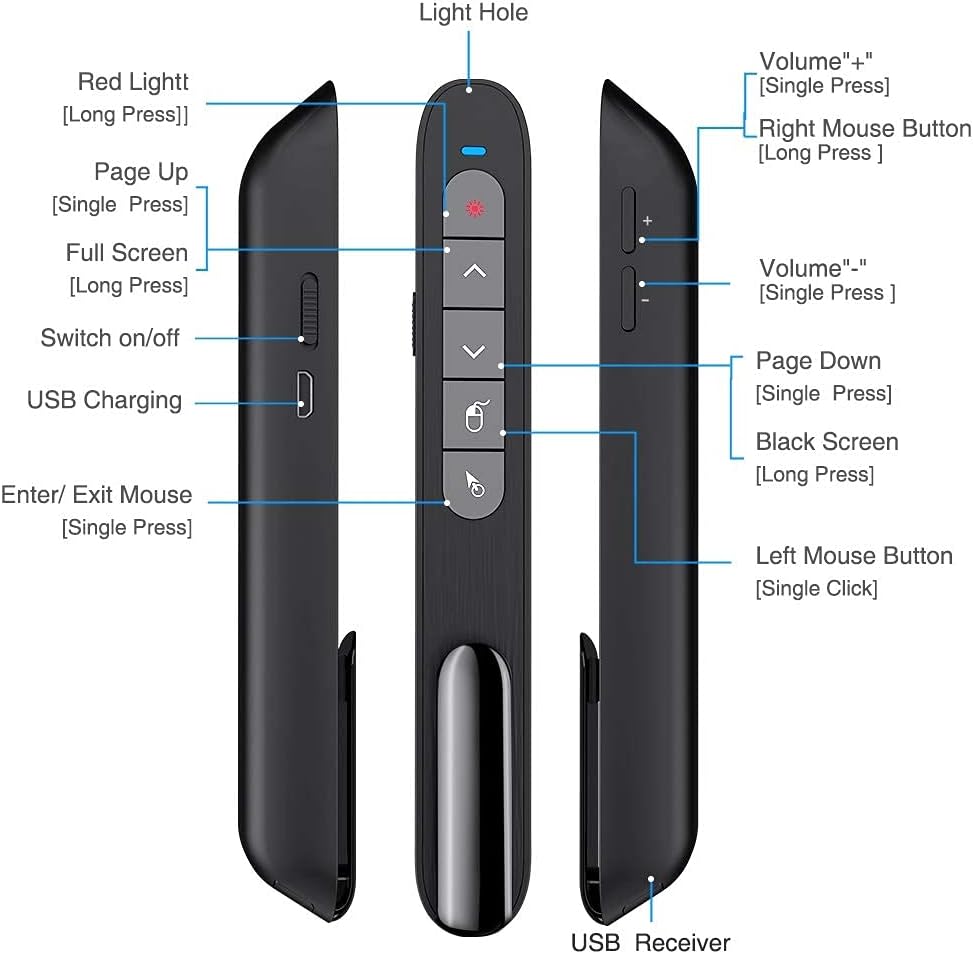
Image: A detailed diagram of the DinoFire Wireless Presenter, labeling each button and port, including Red Light, Page Up, Full Screen, Switch on/off, USB Charging, Enter/Exit Mouse, Volume buttons, Right Mouse Button, Page Down, Black Screen, Left Mouse Button, and USB Receiver.
- Red Light Pointer: Press the button with the red light icon (usually at the top) to activate the laser pointer. Release to turn off. The red light is bright and visible against various backgrounds.
- పేజీ పైకి/క్రిందికి: Use the dedicated Page Up (▲) and Page Down (▼) buttons to navigate through your presentation slides.
- పూర్తి స్క్రీన్/నలుపు స్క్రీన్: Long press the 'Full Screen' button to toggle between full screen mode and normal view. Long press the 'Black Screen' button to black out the screen, useful for focusing audience attention on the speaker.
- ఎయిర్ మౌస్ ఫంక్షన్:
- సక్రియం / నిష్క్రియం: Press the 'Enter/Exit Mouse' button (often depicted with a mouse icon) to enable or disable the air mouse function. When active, you can control the cursor by moving the presenter in the air.
- ఎడమ/కుడి క్లిక్: Use the 'Left Mouse Button' (single click) and 'Right Mouse Button' (long press) to perform corresponding mouse clicks.
- 6-Axis G-Sensor Control: The built-in 3-axis G-sensor and 3-axis gyroscope provide sensitive and reliable control for the wireless cursor function.

Image: A screenshot of a video player with a blue mouse cursor, illustrating the use of the DinoFire Wireless Presenter's air mouse function to control media playback. Text highlights "Left & Right Mouse Buttons Control".

Image: A person holding the DinoFire Wireless Presenter in front of a projected presentation, demonstrating the 6-Axis G-sensor control for the air mouse function.
- వాల్యూమ్ నియంత్రణ: Use the '+' and '-' buttons on the side of the presenter to adjust the system volume.
- Hyperlink/Website Control: The air mouse function allows you to click on hyperlinks and open websites directly from your presentation.
- Switch Windows: The presenter can also be used to switch between open application windows on your computer.

Image: The DinoFire Wireless Presenter emitting a red laser beam onto a projection screen, demonstrating its pointer function. Text indicates Air Mouse distance (80 ft), Wireless distance (30-50 ft), and Light distance (328 ft).
అనుకూలత:
The DinoFire Wireless Presenter is widely compatible with various operating systems and presentation software:
- ఆపరేటింగ్ సిస్టమ్స్: Windows 2003/XP/Vista/7/8/10 or above, Mac OS, Linux, Android.
- సాఫ్ట్వేర్: PowerPoint, Excel, Prezi, iWork (Keynote & Numbers & Pages), PDF viewers, and web బ్రౌజర్లు.
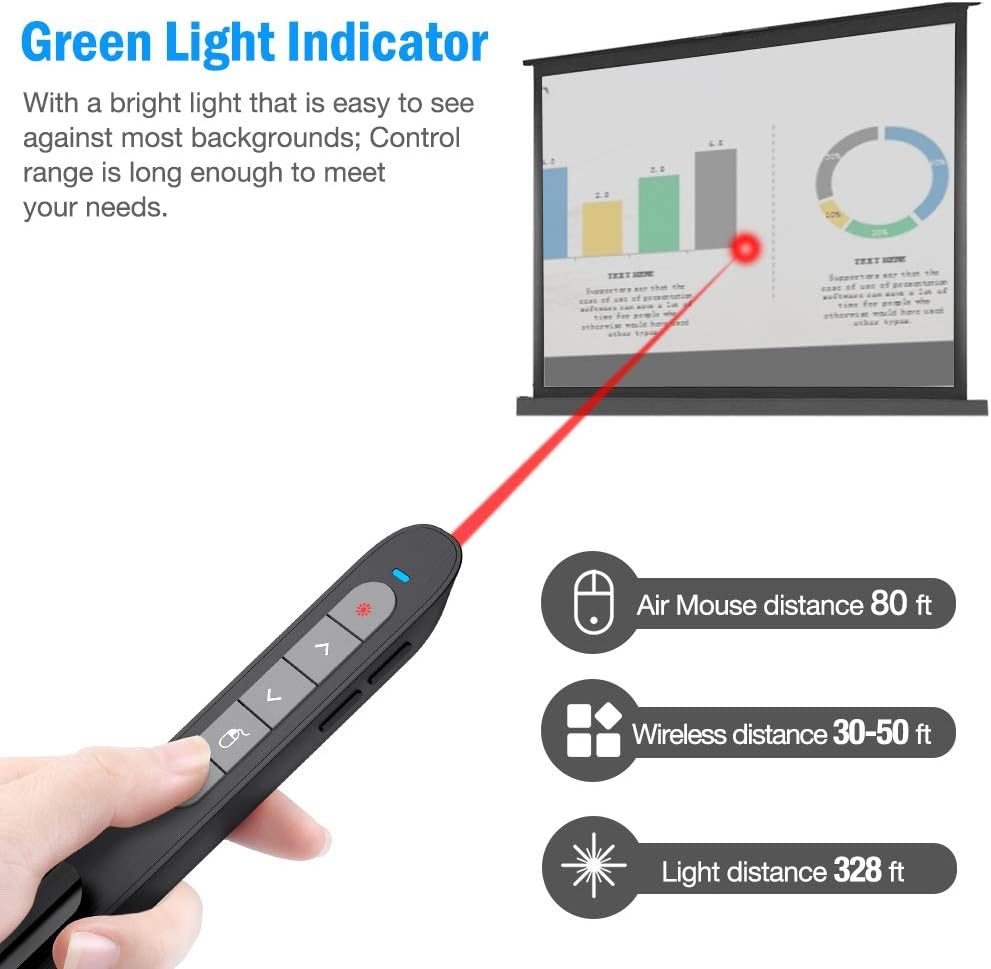
Image: A graphic illustrating the broad compatibility of the DinoFire Wireless Presenter with various operating systems (Windows, Mac, Android) and software applications (PowerPoint, Word, Excel, Keynote, Prezi, etc.).
నిర్వహణ
To ensure the longevity and optimal performance of your DinoFire Wireless Presenter, follow these maintenance guidelines:
- శుభ్రపరచడం: Use a soft, dry cloth to wipe the surface of the presenter. Avoid using harsh chemicals, solvents, or abrasive cleaners.
- బ్యాటరీ సంరక్షణ: బ్యాటరీ ఆరోగ్యాన్ని కాపాడుకోవడానికి, తరచుగా ఉపయోగించకపోయినా, పరికరాన్ని క్రమం తప్పకుండా రీఛార్జ్ చేయండి. ఎక్కువసేపు బ్యాటరీని పూర్తిగా డిశ్చార్జ్ చేయకుండా ఉండండి.
- నిల్వ: When not in use, store the USB receiver securely in its magnetic slot within the presenter to prevent loss. Store the presenter in a cool, dry place away from direct sunlight and extreme temperatures.
- చుక్కలను నివారించండి: Handle the presenter with care to prevent damage from accidental drops or impacts.
ట్రబుల్షూటింగ్
If you encounter issues with your DinoFire Wireless Presenter, refer to the following common problems and solutions:
| సమస్య | సాధ్యమైన కారణం / పరిష్కారం |
|---|---|
| Presenter is unresponsive or not detected. |
|
| Laser pointer is not working. |
|
| Air mouse cursor is erratic or not moving smoothly. |
|
| Presenter stops responding after an extended idle time. |
|
| Buttons are not performing expected functions. |
|
స్పెసిఫికేషన్లు
| ఫీచర్ | వివరాలు |
|---|---|
| మోడల్ సంఖ్య | TK701 |
| కనెక్టివిటీ | RF 2.4GZ Wireless |
| బ్యాటరీ రకం | 1 లిథియం పాలిమర్ బ్యాటరీ (చేర్చబడింది) |
| ఛార్జింగ్ సమయం | సుమారు 1.5 గంటలు |
| వస్తువు బరువు | 2.08 ఔన్సులు (59 గ్రాములు) |
| ప్యాకేజీ కొలతలు | 6.38 x 1.57 x 1.06 అంగుళాలు (16.2 x 4.0 x 2.7 సెం.మీ.) |
| లేజర్ రంగు | ఎరుపు |
| తయారీదారు | DinoFire LLC |
| మొదట అందుబాటులో ఉన్న తేదీ | జనవరి 24, 2020 |
వారంటీ మరియు మద్దతు
DinoFire products are designed for reliability and performance. For any issues or inquiries, please refer to the following information:
- వారంటీ: This product is typically covered by a 30-day refund/replacement policy from the date of purchase. Please retain your proof of purchase for warranty claims. Specific warranty terms may vary by region or retailer.
- కస్టమర్ మద్దతు: For technical assistance, troubleshooting beyond this manual, or warranty inquiries, please visit the official DinoFire webసైట్ లేదా మీరు ఉత్పత్తిని కొనుగోలు చేసిన విక్రేతను సంప్రదించండి.
- ఆన్లైన్ వనరులు: Check the DinoFire brand store on Amazon (DinoFire Store) for additional product information and updates.
గమనిక: ఈ మాన్యువల్లో పొందుపరచడానికి అందించిన డేటాలో 'విక్రేత' సృష్టికర్త రకంతో అధికారిక ఉత్పత్తి వీడియోలు ఏవీ కనుగొనబడలేదు.