
1. పరిచయం
This manual provides essential information for the safe and effective operation and maintenance of your Airthereal APH230C Floor Air Purifier. Please read all instructions carefully before use and retain this manual for future reference.
The Airthereal APH230C is designed to improve indoor air quality by filtering airborne particles such as allergens, pollen, dust, smoke, and pet dander, utilizing a True HEPA filtration system.
2. భద్రతా సూచనలు
అగ్ని ప్రమాదం, విద్యుత్ షాక్ లేదా గాయం ప్రమాదాన్ని తగ్గించడానికి, ఎల్లప్పుడూ ప్రాథమిక భద్రతా జాగ్రత్తలను అనుసరించండి:
- ఉపకరణాన్ని ఆపరేట్ చేయడానికి ముందు అన్ని సూచనలను చదవండి.
- దెబ్బతిన్న త్రాడు లేదా ప్లగ్తో ఎలాంటి ఫ్యాన్ను ఆపరేట్ చేయవద్దు. ఫ్యాన్ని విస్మరించండి లేదా పరీక్ష మరియు/లేదా మరమ్మత్తు కోసం అధీకృత సేవా సదుపాయానికి తిరిగి వెళ్లండి.
- కార్పెటింగ్ కింద త్రాడును నడపవద్దు. త్రో రగ్గులు, రన్నర్లు లేదా ఇలాంటి కవరింగ్లతో త్రాడును కవర్ చేయవద్దు. త్రాడును ట్రాఫిక్ ప్రాంతం నుండి దూరంగా అమర్చండి మరియు అది ఎక్కడికి జారిపోదు.
- Use this appliance only for its intended use as described in this manual. Any other use not recommended by the manufacturer may cause fire, electric shock, or injury to persons.
- Always unplug the appliance when not in use, when moving it from place to place, or before cleaning.
- పేలుడు మరియు/లేదా మండే పొగల సమక్షంలో ఉపకరణాన్ని ఆపరేట్ చేయవద్దు.
- Do not place any part of the appliance near an open flame, cooking or other heating appliance.
- డ్యామేజ్ అయిన త్రాడు లేదా ప్లగ్తో ఉపకరణాన్ని ఆపరేట్ చేయవద్దు, లేదా ఉపకరణం పనిచేయకపోవడం లేదా పడిపోయిన తర్వాత లేదా ఏ పద్ధతిలో పాడైపోయిన తర్వాత.
- కదిలే భాగాలతో సంబంధాన్ని నివారించండి.
- పరికరాన్ని నీటిలో లేదా ఇతర ద్రవాలలో ముంచవద్దు.
- ఈ ఉపకరణం వారి భద్రతకు బాధ్యత వహించే వ్యక్తి ద్వారా ఉపకరణాన్ని ఉపయోగించడం గురించి పర్యవేక్షణ లేదా సూచనలను అందిస్తే తప్ప, శారీరక, ఇంద్రియ లేదా మానసిక సామర్థ్యాలు తగ్గిన వ్యక్తులు (పిల్లలతో సహా) లేదా అనుభవం మరియు జ్ఞానం లేకపోవడం కోసం ఉద్దేశించబడలేదు.
- పిల్లలు ఉపకరణంతో ఆడకుండా ఉండేలా పర్యవేక్షించాలి.
3. ప్యాకేజీ విషయాలు
- 1 x Airthereal APH230C Air Purifier Unit
- 1 x True HEPA 3-in-1 Filtration Filter (pre-installed)
- 1 x వినియోగదారు మాన్యువల్

4. ఉత్పత్తి ముగిసిందిview
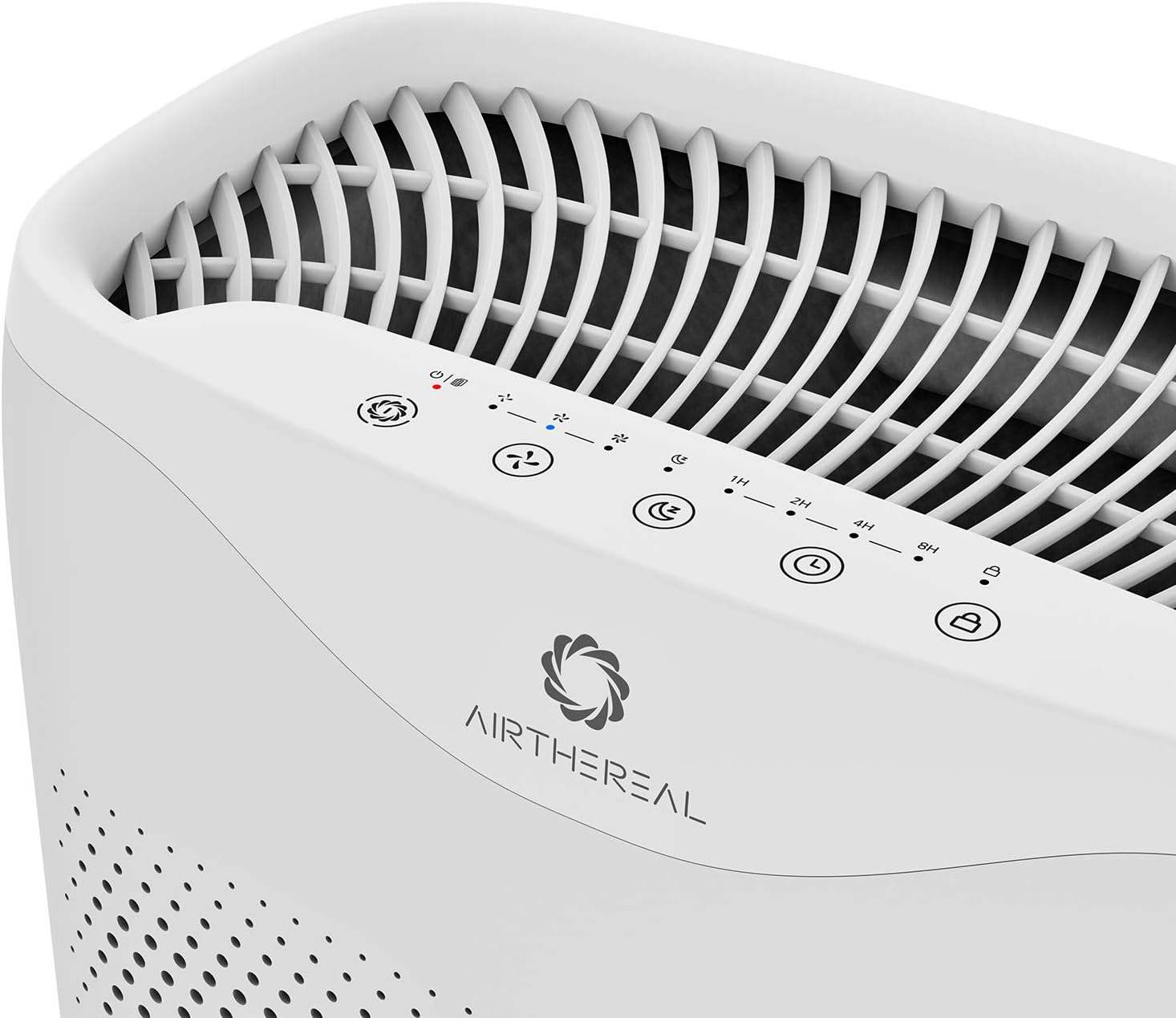
The Airthereal APH230C features a sleek design with intuitive controls and efficient air intake. Key components include the main unit, control panel, air intake vents, and the multi-layer filter.

5. సెటప్
- యూనిట్ను అన్ప్యాక్ చేయండి: దాని ప్యాకేజింగ్ నుండి ఎయిర్ ప్యూరిఫైయర్ను జాగ్రత్తగా తొలగించండి.
- ఫిల్టర్ ప్యాకేజింగ్ తొలగించండి: Open the front cover of the air purifier. The filter is pre-installed but wrapped in plastic for protection. Remove the plastic packaging from the filter before use.
- ఫిల్టర్ని ఇన్స్టాల్ చేయండి: Place the filter back into the unit, ensuring it is seated correctly. Close the front cover securely.
- ప్లేస్మెంట్: Place the air purifier on a firm, level surface. Ensure there is at least 6 inches (15 cm) of space around all sides of the unit for optimal airflow.
- పవర్ కనెక్షన్: పవర్ కార్డ్ను ప్రామాణిక ఎలక్ట్రికల్ అవుట్లెట్లోకి ప్లగ్ చేయండి.
6. ఆపరేటింగ్ సూచనలు
The control panel is located on the top of the unit.
- పవర్ బటన్ (⏻): యూనిట్ను ఆన్ లేదా ఆఫ్ చేయడానికి నొక్కండి.
- Fan Speed Button (🌪): Cycle through fan speeds: Low (1), Medium (2), High (3).
- Sleep Mode Button (🌛): Activates sleep mode, which dims display lights and sets the fan to its lowest, quietest setting (24 decibels).
- టైమర్ బటన్ (⏱): Set the operating time for 2, 4, or 8 hours. The unit will automatically turn off after the set time.
- Auto Mode Button (A): The purifier will automatically adjust the fan speed based on the detected air quality.
- UV Light Button (UV): Activates or deactivates the UV-C light for enhanced sterilization.
- Child Lock Button (🔒): Press and hold for 3 seconds to activate/deactivate the child lock, preventing accidental changes to settings.

7. నిర్వహణ
క్రమం తప్పకుండా నిర్వహణ సరైన పనితీరును నిర్ధారిస్తుంది మరియు మీ ఎయిర్ ప్యూరిఫైయర్ యొక్క జీవితకాలాన్ని పొడిగిస్తుంది.
ఫిల్టర్ భర్తీ
The "On/Off" button will light up and flash when it's time to replace the filter. It is recommended to replace the filter every six months for optimal performance, though this may vary based on usage and air quality.
- పవర్ ఆఫ్ మరియు అన్ప్లగ్: Turn off the air purifier and unplug it from the power outlet.
- ముందు కవర్ తొలగించండి: Gently pull the front cover to detach it from the unit.
- పాత ఫిల్టర్ తొలగించండి: Pull the tab on the old filter to remove it from the unit.
- కొత్త ఫిల్టర్ను ఇన్స్టాల్ చేయండి: Unwrap the new filter and insert it into the unit, ensuring the pull tab faces outwards.
- Replace Front Cover: Align the front cover and push it back into place until it clicks securely.
- ఫిల్టర్ సూచికను రీసెట్ చేయండి: Plug in the unit and turn it on. Press and hold the "On/Off" button for 5 seconds until the light stops flashing, indicating the filter timer has been reset.
యూనిట్ శుభ్రపరచడం
- యూనిట్ వెలుపలి భాగాన్ని మృదువైన, పొడి వస్త్రంతో తుడవండి.
- రాపిడి క్లీనర్లు లేదా ద్రావకాలు ఉపయోగించవద్దు.
- The pre-filter layer of the 3-in-1 filter can be gently vacuumed to remove large dust particles between replacements.
8. ట్రబుల్షూటింగ్
| సమస్య | సాధ్యమైన కారణం | పరిష్కారం |
|---|---|---|
| యూనిట్ ఆన్ చేయబడలేదు. | ప్లగిన్ చేయబడలేదు; పవర్ లేదాtage; front cover not closed properly. | Ensure power cord is securely plugged in; check power outlet; ensure front cover is fully closed. |
| గాలి ప్రసరణ బలహీనంగా ఉంది. | Filter is dirty or clogged; air intake/outlet blocked. | Replace filter; ensure no obstructions around air intake/outlet. |
| అసాధారణ శబ్దం. | Filter not installed correctly; foreign object inside unit. | Reinstall filter correctly; check for and remove any foreign objects (unplug first). |
| ఫిల్టర్ ఇండికేటర్ లైట్ మార్చిన తర్వాత కూడా వెలుగుతూనే ఉంటుంది. | Filter timer not reset. | Press and hold the "On/Off" button for 5 seconds to reset the filter timer. |
9. స్పెసిఫికేషన్లు
- మోడల్: APH230C
- బ్రాండ్: వాయుమార్గం
- ఉత్పత్తి కొలతలు: 7.5"డి x 13"వా x 20"హ
- వస్తువు బరువు: 10 పౌండ్లు
- శక్తి మూలం: కార్డెడ్ ఎలక్ట్రిక్
- రంగు: తెలుపు
- CADR: 135 CFM (230 m³/h)
- కవరేజ్ ప్రాంతం: Up to 600 ft² (55 m²) in 30 minutes, 315 ft² (30m²) in 14 minutes.
- శబ్ద స్థాయి (స్లీప్ మోడ్): < 24 dB
- ఫిల్టర్ రకం: నిజమైన HEPA 3-Stagఇ వడపోత

10. వారంటీ మరియు మద్దతు
Airthereal products come with a standard manufacturer's warranty. For detailed warranty information, product support, or to purchase replacement filters, please visit the official Airthereal webసైట్ లేదా కస్టమర్ సేవను సంప్రదించండి.
Webసైట్: www.airthereal.com
కస్టమర్ సేవ: మీ ఉత్పత్తి ప్యాకేజింగ్ లేదా అధికారిక webసంప్రదింపు వివరాల కోసం సైట్.