
1. పరిచయం మరియు ఓవర్view
Thank you for choosing the Comix S3508D Desktop Micro-Cut Paper Shredder. This manual provides essential information for the safe and efficient operation, maintenance, and troubleshooting of your new shredder. Please read it thoroughly before use and retain it for future reference.
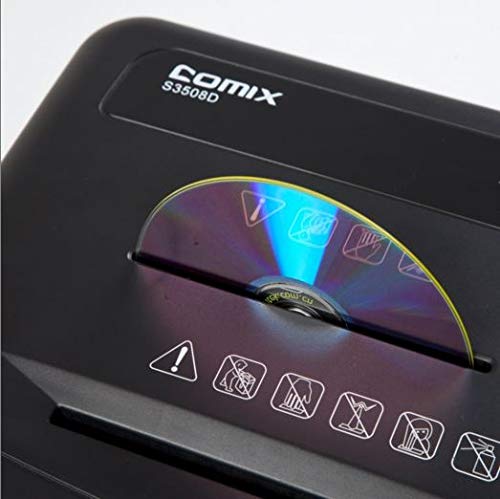
The Comix S3508D is designed for personal and home office use, offering secure destruction of sensitive documents, CDs/DVDs, and credit cards with its micro-cut technology. Key features include:
- Continuous shredding for up to 30 minutes.
- Separate waste bin design for CD/DVD fragments, allowing for easy waste separation.
- Energy-saving technology that automatically shuts off the device after 30 minutes of inactivity.
2. ముఖ్యమైన భద్రతా సూచనలు
గాయం లేదా నష్టం ప్రమాదాన్ని తగ్గించడానికి, దయచేసి ఈ క్రింది భద్రతా జాగ్రత్తలను గమనించండి:
- పిల్లలు మరియు పెంపుడు జంతువులకు దూరంగా ఉంచండి. The shredder has sharp blades and moving parts.
- Avoid loose clothing, jewelry, and long hair near the paper entry slot.
- Do not insert fingers or hands పేపర్ ఎంట్రీ స్లాట్లోకి.
- Do not spray any flammable products onto the shredder or use it near flammable materials.
- Unplug the shredder before moving, cleaning, or emptying the waste bin.
- Do not shred metal objects, wet paper, or adhesive labels as this can damage the blades.
- Operate the shredder on a flat, stable surface.
- Do not overload the shredder. Refer to the maximum sheet capacity in the specifications.
- Do not open the shredder housing. లోపల వినియోగదారు-సేవ చేయగల భాగాలు లేవు.
3. ఉత్పత్తి భాగాలు
Familiarize yourself with the main parts of your Comix S3508D shredder:
- ష్రెడర్ హెడ్: కట్టింగ్ మెకానిజం మరియు కంట్రోల్ ప్యానెల్ను కలిగి ఉంటుంది.
- పేపర్ ఎంట్రీ స్లాట్: For inserting documents.
- CD/DVD Entry Slot: A separate slot for optical media.
- నియంత్రణ స్విచ్: For selecting ON/OFF, Auto, Forward, and Reverse modes.
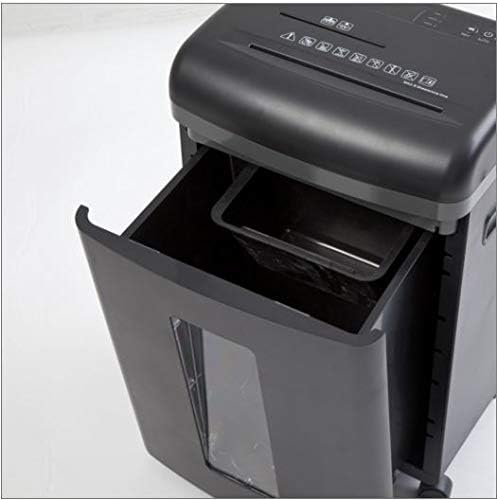
- చెత్త డబ్బా: Collects shredded paper and media.
- CD/DVD Waste Compartment: A smaller, separate compartment within the main bin for shredded optical media.
- కాస్టర్లు: సులభంగా కదలడానికి చక్రాలు.
4. సెటప్
- అన్ప్యాక్: ష్రెడర్ను దాని ప్యాకేజింగ్ నుండి జాగ్రత్తగా తొలగించండి. భవిష్యత్తులో రవాణా లేదా నిల్వ కోసం ప్యాకేజింగ్ను ఉంచండి.
- స్థానం: Place the shredder on a level and stable surface. Ensure there is enough space around the unit for proper ventilation and access to the power outlet.
- పవర్ కనెక్ట్ చేయండి: పవర్ కార్డ్ను ప్రామాణిక ఎలక్ట్రికల్ అవుట్లెట్లోకి ప్లగ్ చేయండి.
- Check Bin: Ensure the waste bin is correctly inserted into the shredder body. The shredder will not operate if the bin is not properly seated.
5. ఆపరేటింగ్ సూచనలు
నియంత్రణ స్విచ్ విధులు:
- ఆఫ్: ష్రెడర్ పవర్ ఆఫ్ చేయబడింది.
- దానంతట అదే: The shredder is in standby mode. It will automatically start when paper is inserted and stop when shredding is complete. This is the recommended setting for normal operation.
- ముందుకు: Manually runs the shredder forward. Use this for continuous shredding if needed, but be mindful of the duty cycle.
- రివర్స్: Manually runs the shredder in reverse. Use this to clear paper jams.
ముక్కలు చేసే పత్రాలు:
- నియంత్రణ స్విచ్ను దీనికి సెట్ చేయండి ఆటో.
- Insert up to 8 sheets of A4 (70gsm) paper straight into the paper entry slot. The shredder will automatically start and stop.
- Do not exceed the maximum sheet capacity to prevent jams and damage.
Shredding CDs/DVDs and Credit Cards:
- నియంత్రణ స్విచ్ను దీనికి సెట్ చేయండి ఆటో.
- Insert one CD/DVD or credit card at a time into the dedicated CD/DVD entry slot.
- The shredded media will fall into the separate CD/DVD waste compartment within the main bin.
డ్యూటీ సైకిల్:
The Comix S3508D is designed for a continuous run time of 30 minutes ON, followed by a 40 నిమిషాలు ఆఫ్ cool-down period. Exceeding the duty cycle may cause the shredder to overheat and activate its thermal protection, temporarily shutting down the unit. Allow it to cool down before resuming operation.
6. నిర్వహణ
చెత్త డబ్బాను ఖాళీ చేయడం:
- Always set the control switch to ఆఫ్ and unplug the shredder before emptying the bin.
- ష్రెడర్ ముందు భాగంలో ఉన్న వ్యర్థాల బిన్ను బయటకు తీయండి.
- Dispose of the shredded waste. Remember to empty the separate CD/DVD compartment as well.
- Slide the waste bin back into place until it clicks securely.
Shredder Oiling:
Regular oiling is recommended to maintain optimal performance and extend the life of your shredder, especially after emptying the waste bin 2-3 times or after heavy use. Use shredder oil (vegetable oil is not recommended).
- నియంత్రణ స్విచ్ను దీనికి సెట్ చేయండి ఆఫ్.
- పేపర్ ఎంట్రీ స్లాట్ అంతటా ష్రెడర్ ఆయిల్ యొక్క పలుచని గీతను వర్తించండి.
- నియంత్రణ స్విచ్ను దీనికి సెట్ చేయండి ముందుకు for 2-3 seconds to distribute the oil, then switch back to ఆఫ్.
శుభ్రపరచడం:
ష్రెడర్ యొక్క బాహ్య భాగాన్ని మృదువైన, పొడి గుడ్డతో తుడవండి. రాపిడి క్లీనర్లు లేదా ద్రావకాలను ఉపయోగించవద్దు.
7. ట్రబుల్షూటింగ్
| సమస్య | సాధ్యమైన కారణం | పరిష్కారం |
|---|---|---|
| ష్రెడర్ పనిచేయదు. | 1. పవర్ కార్డ్ ప్లగ్ చేయబడలేదు.
2. Waste bin not properly inserted. 3. వేడెక్కడం. |
1. Ensure power cord is securely plugged into an outlet.
2. Push the waste bin firmly into place. 3. Allow the shredder to cool down for 40 minutes. |
| పేపర్ జామ్. | 1. Too much paper inserted.
2. కాగితం తప్పుగా చొప్పించబడింది. |
1. Set switch to రివర్స్ to clear paper. Remove excess paper.
2. If jam persists, unplug, carefully remove paper, then plug in and try రివర్స్ మళ్ళీ. |
| Shredder runs continuously in AUTO mode. | Sensor is blocked or dirty. | Unplug the shredder and clean the paper entry sensor (usually a small clear window) with a soft cloth. |
8. స్పెసిఫికేషన్లు
| ఫీచర్ | వివరాలు |
|---|---|
| బ్రాండ్ | కామిక్స్ |
| మోడల్ | S3508D |
| ముక్కలు రకం | మైక్రో కట్ |
| ముక్కలు పరిమాణం | 2 x 12 మి.మీ |
| Standard Sheet Capacity (70gsm) | 8 షీట్లు |
| CD/DVD/Card Capacity | ఒక సమయంలో 1 |
| ఎంట్రీ వెడల్పు | 220 మి.మీ |
| ముక్కలు స్పీడ్ | 2.3 meters/minute |
| డ్యూటీ సైకిల్ | 30 నిమిషాలు ఆన్ / 40 నిమిషాలు ఆఫ్ |
| ప్రత్యేక ఫీచర్ | ఎనర్జీ సేవింగ్ మోడ్ |
| వస్తువు బరువు | 2.2 పౌండ్లు |
| ASIN | B083XFNHQH |
9. వారంటీ మరియు మద్దతు
Comix products are manufactured to high-quality standards. For warranty information, please refer to the warranty card included with your purchase or contact your retailer. For technical support or service inquiries, please contact Comix customer service through the contact information provided on the official Comix webసైట్ లేదా మీ కొనుగోలు డాక్యుమెంటేషన్.