
1. ఉత్పత్తి ముగిసిందిview
The PNY NVIDIA Quadro P620 is a professional graphics card designed for various demanding professional workflows. It features a 512 CUDA core Pascal GPU and 2GB of ultra-fast GDDR5 GPU memory, enabling the creation and manipulation of complex 2D and 3D models. Its flexible single-slot, low-profile form factor ensures compatibility with a wide range of computer chassis, including those with limited space and power. The card supports up to four 4K displays (4096 x 2160 at 60Hz) with HDR color, providing an expansive visual workspace for detailed creative and analytical tasks.
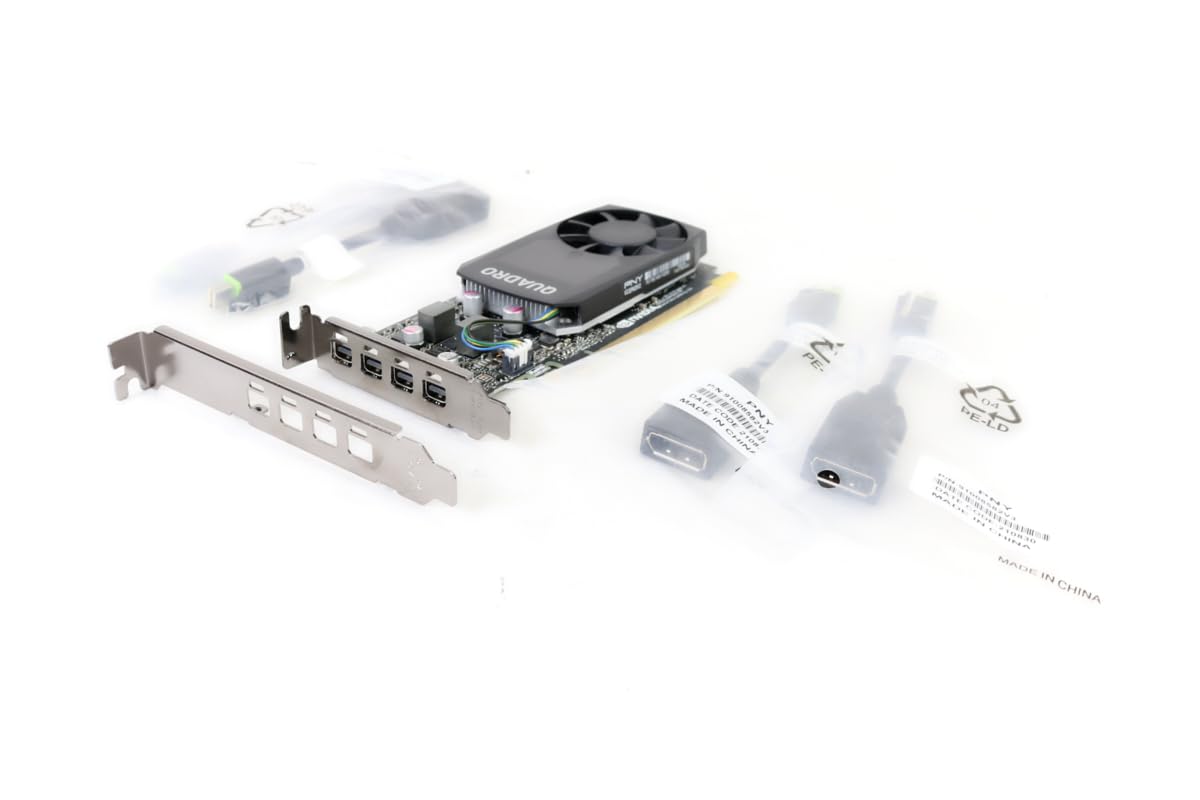
Figure 1.1: PNY Quadro P620 Graphics Card, front view.
2. సెటప్ మరియు ఇన్స్టాలేషన్
This section provides instructions for installing your PNY Quadro P620 graphics card into a compatible desktop computer system.
2.1 సిస్టమ్ అవసరాలు
- PCI Express x16 slot available.
- Compatible power supply (no external power connector required for P620).
- Minimum 2GB system memory recommended.
- Supported operating system (Windows, Linux).
2.2 హార్డ్వేర్ ఇన్స్టాలేషన్
- పవర్ ఆఫ్ మరియు డిస్కనెక్ట్: మీ కంప్యూటర్ను పూర్తిగా షట్ డౌన్ చేసి, వాల్ అవుట్లెట్ నుండి పవర్ కేబుల్ను డిస్కనెక్ట్ చేయండి.
- కంప్యూటర్ కేస్ తెరవండి: మదర్బోర్డును యాక్సెస్ చేయడానికి మీ కంప్యూటర్ కేసు యొక్క సైడ్ ప్యానెల్ను తీసివేయండి.
- PCIe స్లాట్ను గుర్తించండి: Identify an available PCI Express x16 slot on your motherboard. If replacing an existing graphics card, carefully remove it.
- Install Low-Profile Bracket (if needed): The PNY Quadro P620 is a low-profile card. If your system requires a full-height bracket, ensure the correct bracket is attached. The card typically ships with both options.
- గ్రాఫిక్స్ కార్డ్ చొప్పించు: Align the graphics card with the PCIe x16 slot and press down firmly until it is securely seated. A click may be heard.
- సెక్యూర్ కార్డ్: Use a screw or retention clip to secure the graphics card to the computer case.
- డిస్ప్లేలను కనెక్ట్ చేయండి: Connect your display cables (Mini DisplayPort) to the graphics card outputs. Adapters may be required for HDMI or DVI.
- కేస్ మూసివేసి పవర్ ఆన్ చేయండి: Replace the computer case side panel, reconnect the power cable, and power on your computer.

Figure 2.1: PNY Quadro P620 graphics card with a low-profile bracket detached, illustrating its compact design.

చిత్రం 2.2: పై నుండి క్రిందికి view of the PNY Quadro P620 graphics card, showing the fan and heatsink assembly.
2.3 డ్రైవర్ ఇన్స్టాలేషన్
After hardware installation, you must install the appropriate drivers for your operating system to ensure optimal performance and functionality.
- డ్రైవర్లను డౌన్లోడ్ చేయండి: Visit the official PNY or NVIDIA webసైట్ (www.nvidia.com/drivers) and download the latest Quadro drivers for your specific operating system and P620 model.
- డ్రైవర్లను ఇన్స్టాల్ చేయండి: Run the downloaded driver installer and follow the on-screen prompts. It is recommended to perform a clean installation.
- సిస్టమ్ పునఃప్రారంభించండి: డ్రైవర్ ఇన్స్టాలేషన్ పూర్తయిన తర్వాత మీ కంప్యూటర్ను పునఃప్రారంభించండి.
3. ఆపరేషన్
The PNY Quadro P620 is designed for professional applications requiring reliable graphics performance and multi-display support.
3.1 బహుళ-ప్రదర్శన ఆకృతీకరణ
The card supports up to four displays via its Mini DisplayPort outputs. To configure multiple displays:
- Ensure all displays are connected to the graphics card.
- Access your operating system's display settings (e.g., Windows Display Settings, NVIDIA Control Panel).
- Detect and arrange your displays as desired (extend, duplicate, or single display).
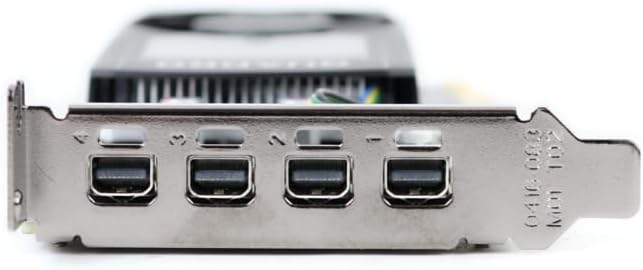
మూర్తి 3.1: క్లోజ్-అప్ view of the four Mini DisplayPort outputs on the PNY Quadro P620 graphics card.
3.2 Professional Software Compatibility
The Quadro P620 is optimized for professional applications such as CAD (e.g., SolidWorks), 3D modeling, video editing, and other design and engineering software. Ensure your software is updated to leverage the full capabilities of the GPU.
4. నిర్వహణ
Proper maintenance helps ensure the longevity and optimal performance of your graphics card.
- డ్రైవర్ నవీకరణలు: Regularly check for and install the latest graphics drivers from the NVIDIA webడ్రైవర్ నవీకరణలలో తరచుగా పనితీరు మెరుగుదలలు, బగ్ పరిష్కారాలు మరియు అనుకూలత మెరుగుదలలు ఉంటాయి.
- దుమ్ము శుభ్రపరచడం: Periodically clean dust from the graphics card's fan and heatsink using compressed air. Ensure the computer is powered off and unplugged before cleaning. Excessive dust can impede airflow and lead to overheating.
- వ్యవస్థ వాయు ప్రవాహం: Ensure your computer case has adequate airflow to prevent heat buildup, which can affect the graphics card's performance and lifespan.
5. ట్రబుల్షూటింగ్
If you encounter issues with your PNY Quadro P620, refer to the following common troubleshooting steps.
5.1 డిస్ప్లే అవుట్పుట్ లేదు
- కనెక్షన్లను తనిఖీ చేయండి: Ensure all display cables are securely connected to both the graphics card and the monitor.
- రీసీట్ కార్డ్: Power off your computer, unplug it, open the case, and carefully reseat the graphics card in its PCIe slot.
- శక్తిని ధృవీకరించండి: Although the P620 does not require external power, ensure your power supply is functioning correctly and providing sufficient power to the motherboard and PCIe slot.
- మరొక డిస్ప్లే/కేబుల్తో పరీక్షించండి: Try connecting the computer to a different monitor or using a different display cable to rule out external display issues.
5.2 డ్రైవర్ సంబంధిత సమస్యలు
- డ్రైవర్లను మళ్లీ ఇన్స్టాల్ చేయండి: If you experience crashes or graphical glitches, try uninstalling the current drivers and performing a clean installation of the latest drivers from the NVIDIA webసైట్.
- వైరుధ్యాల కోసం తనిఖీ చేయండి: Ensure no other graphics drivers (e.g., integrated graphics) are conflicting with the Quadro drivers. Disable integrated graphics in the BIOS if necessary.
5.3 పనితీరు సమస్యలు
- మానిటర్ ఉష్ణోగ్రతలు: Use monitoring software to check the GPU temperature. High temperatures can lead to throttling and reduced performance. Ensure proper cooling and clean any dust.
- సిస్టమ్ వనరులు: Verify that your system meets the recommended requirements for the applications you are running. Insufficient RAM or CPU can bottleneck GPU performance.
- అప్లికేషన్ సెట్టింగ్లు: Adjust graphics settings within your professional applications to balance performance and visual quality.
6. సాంకేతిక లక్షణాలు
Below are the key technical specifications for the PNY Quadro P620 graphics card (Model: VCQP620V2-PB).
| ఫీచర్ | స్పెసిఫికేషన్ |
|---|---|
| గ్రాఫిక్స్ కోప్రాసెసర్ | NVIDIA Quadro P620 |
| GPU ఆర్కిటెక్చర్ | పాస్కల్ |
| CUDA కోర్స్ | 512 |
| గ్రాఫిక్స్ RAM పరిమాణం | 2 GB |
| గ్రాఫిక్స్ RAM రకం | GDDR5 |
| మెమరీ ఇంటర్ఫేస్ | 128-బిట్ |
| మెమరీ బ్యాండ్విడ్త్ | 80 GB/s |
| GPU క్లాక్ స్పీడ్ | 2 GHz (Boost) |
| మెమరీ క్లాక్ స్పీడ్ | 1 GHz |
| వీడియో అవుట్పుట్ ఇంటర్ఫేస్ | 4x మినీ డిస్ప్లేపోర్ట్ 1.4 |
| గరిష్ట డిస్ప్లే రిజల్యూషన్ | 4x 4096x2160 @ 60Hz or 4x 5120x2880 @ 60Hz (with DisplayPort 1.4) |
| ఫారమ్ ఫ్యాక్టర్ | సింగిల్ స్లాట్, తక్కువ ప్రోfile |
| అనుకూల పరికరాలు | డెస్క్టాప్ పిసి |
| అభిమానుల సంఖ్య | 1 |
| వస్తువు బరువు | 4 గ్రాములు (సుమారుగా) |
| మోడల్ పేరు | VCQP620V2-PB |
| UPC | 751492633312 |
7. వారంటీ సమాచారం
PNY products typically come with a limited warranty. The specific terms and duration of the warranty may vary by region and product. Please retain your proof of purchase.
For detailed warranty information, including coverage, limitations, and how to make a claim, please refer to the official PNY website or the warranty documentation included with your product at the time of purchase.
8. కస్టమర్ మద్దతు
For technical assistance, driver downloads, product registration, and other support inquiries, please contact PNY customer service or visit their official webసైట్.
- PNY Official Webసైట్: www.pny.com
- సాంకేతిక మద్దతు ఫోన్: 1-800-230-0130 (ఉత్తర అమెరికా)
- డ్రైవర్ డౌన్లోడ్లు: సందర్శించండి www.nvidia.com/drivers for the latest NVIDIA Quadro drivers.

Figure 8.1: Retail packaging for the PNY Quadro P620, displaying technical support contact details.