
1. పరిచయం
This manual provides detailed instructions for the Walfront 37MP 1080P 60FPS USB HDMI Industrial Microscope Camera. This high-definition camera is designed for industrial applications, offering clear imaging and multiple connectivity options for enhanced work efficiency. Please read this manual thoroughly before operating the device to ensure proper usage and optimal performance.
2. ఉత్పత్తి ముగిసిందిview మరియు ఫీచర్లు
The Walfront 37MP Industrial Microscope Camera is a versatile imaging solution featuring dual HDMI and USB 2.0 outputs. It is specifically engineered for industrial use, providing high-resolution images and smooth video capture.
- అధిక రిజల్యూషన్: Offers 37MP image resolution and 1080P 60FPS video recording via HDMI. USB video resolution is 2MP when connected to a computer.
- ద్వంద్వ అవుట్పుట్: Equipped with standard HDMI (Type A) and USB 2.0 (Type B) interfaces for flexible connectivity.
- Conversion Adapter: Includes a conversion adapter for easy mounting on various industrial microscopes.
- బహుళ విధులు: Supports digital zoom, automatic/manual brightness control, freeze function, and adjustable R/G/B color balance.
- OSD మెను: On-Screen Display menu available in multiple languages including English, Chinese, French, Spanish, Japanese, and German.

Figure 2.1: Various industrial applications for the microscope camera, such as scientific research, material analysis, SMT industry, maintenance, jewelry inspection, and watch repair.
3. ప్యాకేజీ విషయాలు
క్రింద జాబితా చేయబడిన అన్ని వస్తువులు మీ ప్యాకేజీలో చేర్చబడ్డాయని దయచేసి ధృవీకరించండి:
- 1 x 37MP Industrial Microscope Camera
- 1 x 30mm అడాప్టర్
- 1 x 30.5mm అడాప్టర్
- 1 x 0.5X C-Mount
- 1 x Remote Control (Battery Not Included)
- 1 x High Definition Data Cable (HDMI Cable)
- 1 x పవర్ అడాప్టర్
- 1 x CD (Software)

Figure 3.1: All components included in the Walfront 37MP Microscope Camera package, laid out for inspection.
4. స్పెసిఫికేషన్లు
| ఫీచర్ | స్పెసిఫికేషన్ |
|---|---|
| మోడల్ | Camera with HD USB2.0 Two Output |
| చిత్రం ఫార్మాట్ | JPG |
| చిత్రం రిజల్యూషన్ | 37MP |
| Video Format (T-F Card) | MP4 |
| వీడియో రికార్డర్ | 2K at 30fps, 1080P at 60FPS |
| HD Multimedia Interface Video Resolution | 1920 x 1080 at 60FPS |
| USB Video Resolution | 1920 x 1080 at 30fps; 1280 x 720 at 30FPS; 640 x 480 at 30fps; 320 x 240 at 30fps |
| వైట్ బ్యాలెన్స్ | ఆటోమేటిక్ / మాన్యువల్ |
| కాంతి | ఆటోమేటిక్ / మాన్యువల్ |
| బహిరంగపరచడం | Automatic / Manual, Adjustable Value |
| రంగు | రంగురంగుల |
| అద్దం | Left / Right, Up / Down |
| ఫ్రీజ్ ఫంక్షన్ | మద్దతు |
| OSD భాషలు | English / Chinese / French / Spanish / Japanese / German |
| చిత్రం సెన్సార్ | 37MP CMOS Sensor 1/2.9 Inch |
| సెన్సార్ పరిమాణం | 1.335µm x 1.335µm |
| ఫ్రేమ్ రేట్ | 60fps |
| హౌసింగ్ మెటీరియల్ | మెటల్ |
| లెన్స్ అనుకూలత | C / CS Mount |
| T-F Card Interface | గరిష్టంగా 64G (చేర్చబడలేదు) |
| HD Multimedia Interface | Standard HD Multimedia Interface Output (Type A) |
| USB ఇంటర్ఫేస్ | Standard USB2.0 Interface (Type B) |
| ఇన్పుట్ వాల్యూమ్tage | DC 12V |
| బరువు | 0.59 కిలోలు |
5. సెటప్
Follow these steps to set up your Walfront 37MP Industrial Microscope Camera:
- పవర్ కనెక్ట్ చేయండి: Connect the provided power adapter to the camera's DC 12V input port and plug it into a power outlet.
- Connect to Display (HDMI): Use the included HDMI cable to connect the camera's HDMI output port to an external monitor or display.
- Mount on Microscope:
- Attach the appropriate adapter (30mm, 30.5mm, or 0.5X C-Mount) to the camera lens.
- Carefully insert the camera with the attached adapter into the eyepiece tube of your industrial microscope.
- Connect to Computer (USB - Optional): If you intend to use the camera with a computer for image processing or software control, connect the camera's USB 2.0 (Type B) port to your computer using a USB cable (not always included, check package).
- TF కార్డ్ని చొప్పించండి (ఐచ్ఛికం): For direct image and video storage without a computer, insert a TF (MicroSD) card (up to 64GB, not included) into the camera's TF card slot.
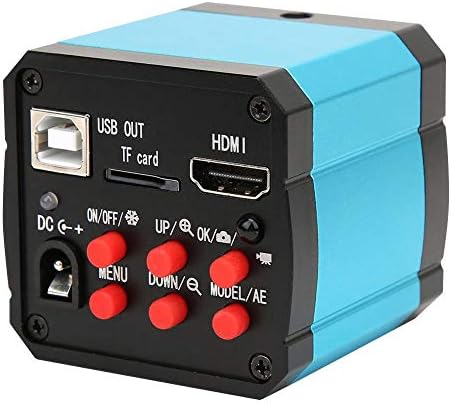
చిత్రం 5.1: వెనుక view of the camera, emphasizing the arrangement of its ports and control buttons.

Figure 5.2: A visual guide demonstrating the correct method for inserting the camera into a microscope's eyepiece.
Video 5.1: Demonstration of connecting the Walfront 37MP Microscope Camera to a monitor and a microscope, showing live feed and image adjustment.
6. ఆపరేటింగ్ సూచనలు
Once the camera is set up, you can begin operation using the camera's onboard buttons, remote control, or connected computer software.
6.1 ప్రాథమిక ఆపరేషన్
- పవర్ ఆన్/ఆఫ్: Press the 'ON/OFF' button on the camera or 'POWER' button on the remote control.
- మెను నావిగేషన్: Use the 'MENU' button to access the OSD menu. Use 'UP'/'DOWN' and 'LEFT'/'RIGHT' buttons (or remote arrows) to navigate, and 'OK' to select.
- చిత్రం క్యాప్చర్: Press the camera icon button on the remote control to take a still picture.
- వీడియో రికార్డింగ్: Press the video camera icon button on the remote control to start/stop video recording.
- డిజిటల్ జూమ్: Use the 'UP'/'DOWN' buttons to adjust digital zoom.
- మోడ్ ఎంపిక: Use the 'MODE' button on the remote to switch between different display modes.

Figure 6.1: The remote control unit for the camera, featuring buttons for power, mode, navigation, capture, and menu access.
6.2 Software Operation (via USB)
For advanced features and computer connectivity, install the
Ask a question about this manual
Ask about setup, troubleshooting, compatibility, parts, safety, or missing instructions. Manuals+ will review the question and use this page’s manual context to help answer it.