
1. పరిచయం
ధన్యవాదాలు, ధన్యవాదాలు.asing the Vonyx CVB215 Active Speaker. This powerful 1600W speaker features dual 15-inch woofers, Bluetooth connectivity, and MP3 playback capabilities, making it ideal for various audio applications including music playback, parties, and public announcements. This manual provides essential information for safe operation, setup, and maintenance of your speaker. Please read it thoroughly before use and retain it for future reference.
2. భద్రతా సూచనలు
- విద్యుత్ సరఫరా: Ensure the speaker is connected to a power outlet with the correct voltage (230V AC / 50Hz).
- తేమ: Do not expose the speaker to rain or moisture to prevent electric shock.
- వెంటిలేషన్: Ensure adequate ventilation around the speaker. Do not block ventilation openings.
- ఉష్ణ మూలాలు: రేడియేటర్లు, హీట్ రిజిస్టర్లు, స్టవ్లు లేదా వేడిని ఉత్పత్తి చేసే ఇతర ఉపకరణాలు వంటి ఉష్ణ వనరుల నుండి స్పీకర్ను దూరంగా ఉంచండి.
- శుభ్రపరచడం: Disconnect from power before cleaning. Use a dry cloth.
- సర్వీసింగ్: Do not attempt to service the speaker yourself. Refer all servicing to qualified service personnel.
- ప్లేస్మెంట్: స్పీకర్ పడిపోకుండా ఉండటానికి స్థిరమైన, చదునైన ఉపరితలంపై ఉంచండి.
3. ఉత్పత్తి ముగిసిందిview
The Vonyx CVB215 is a robust active speaker designed for high-quality audio output. It features a durable enclosure with a metal grille protecting the dual 15-inch woofers and tweeters. Integrated handles allow for easier transport.
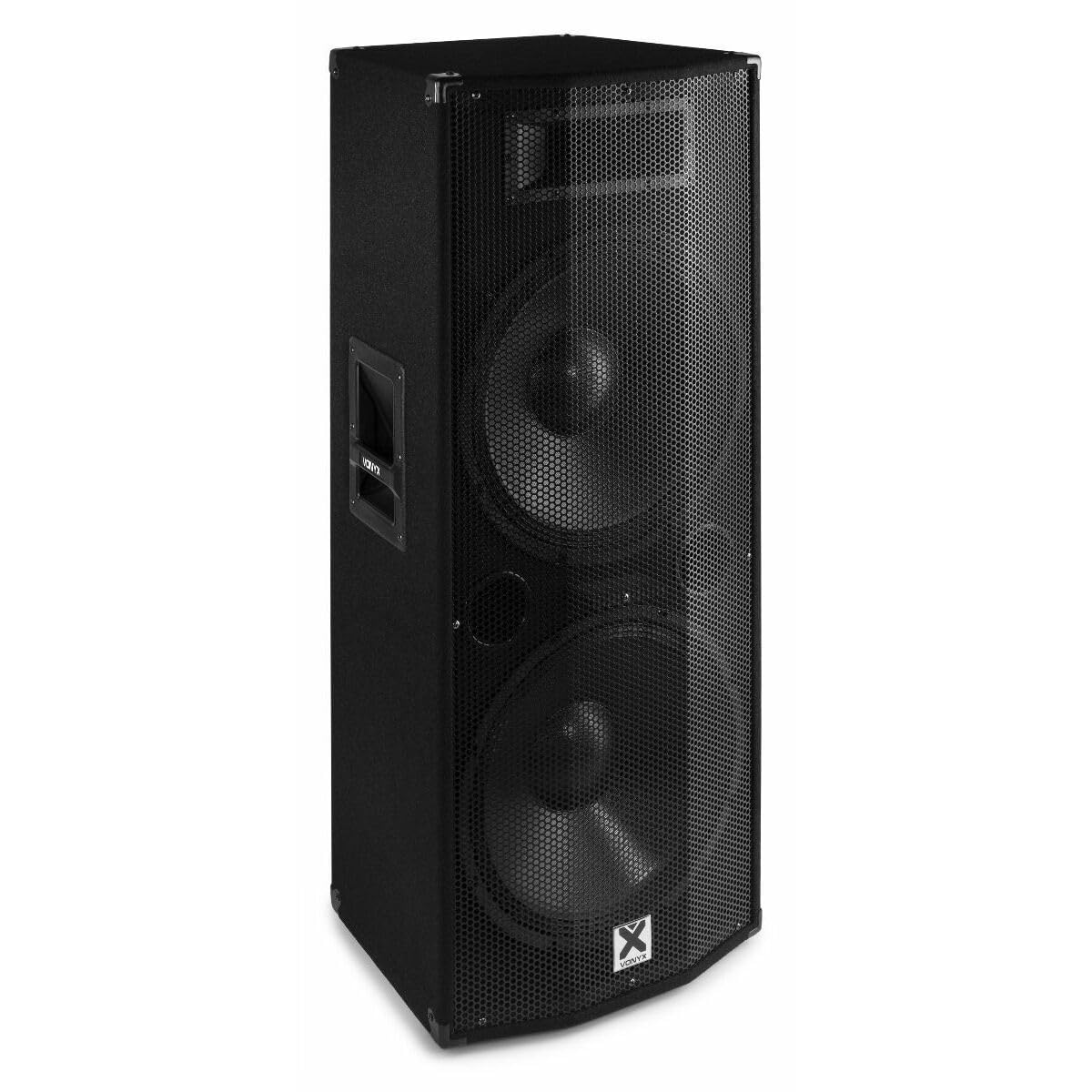
చిత్రం 3.1: ముందు view of the Vonyx CVB215 active speaker. This image displays the speaker's front, highlighting the protective metal grille and the Vonyx logo.
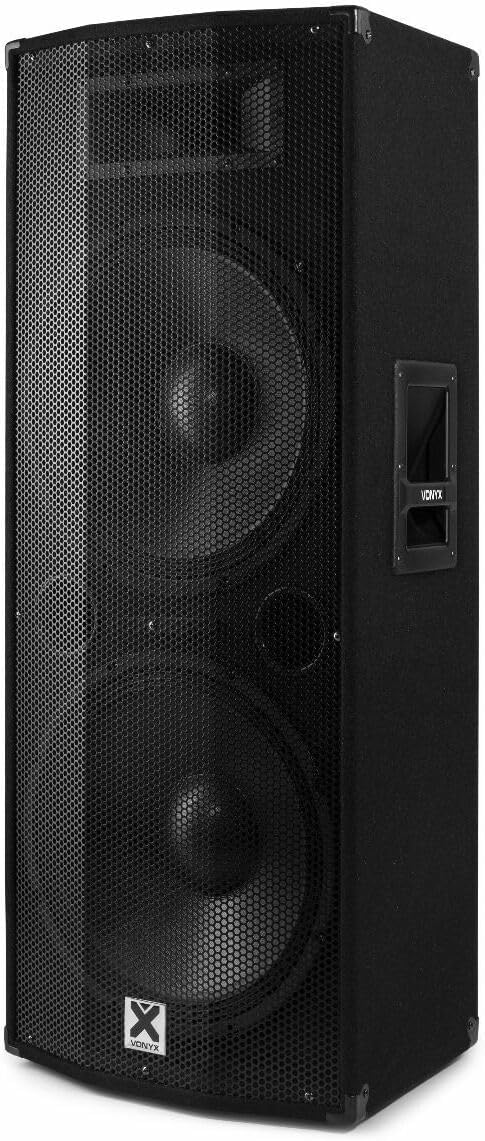
చిత్రం 3.2: కోణీయ view of the Vonyx CVB215 active speaker. This perspective shows the speaker's side with an integrated handle, designed for portability.
వెనుక ప్యానెల్ నియంత్రణలు మరియు కనెక్షన్లు
The rear panel houses all input/output connections and control knobs for audio adjustment.

చిత్రం 3.3: Rear panel of the Vonyx CVB215 active speaker. This image provides an overview of all connections and controls located on the back of the unit.
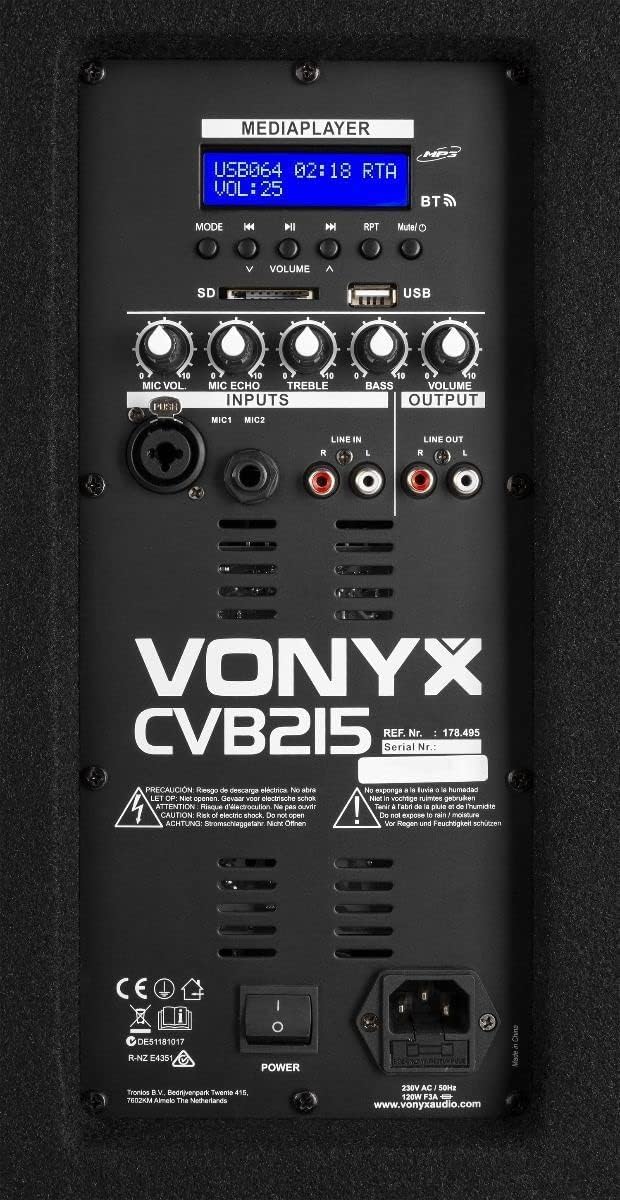
చిత్రం 3.4: వివరంగా view of the Vonyx CVB215 rear panel controls. This close-up highlights the media player interface, USB and SD card slots, microphone inputs (MIC1, MIC2), Line In (RCA), Line Out (RCA), and various adjustment knobs.
- MEDIAPLAYER Display: ప్రస్తుత మోడ్, ట్రాక్ సమాచారం మరియు వాల్యూమ్ స్థాయిని చూపుతుంది.
- USB/SD కార్డ్ స్లాట్లు: For MP3 playback from USB drives or SD cards.
- మోడ్ బటన్: Switches between Bluetooth, USB, SD, and Line-in modes.
- VOLUME Knobs: Adjusts overall volume, microphone volume (MIC VOL), microphone echo (MIC ECHO), treble, and bass.
- MIC1/MIC2 ఇన్పుట్లు: 6.3mm jack inputs for microphones.
- లైన్ ఇన్ (RCA): Stereo RCA inputs for connecting external audio sources (e.g., mixer, CD player).
- LINE OUT (RCA): Stereo RCA outputs for connecting to another active speaker or ampజీవితకాలం.
- పవర్ స్విచ్: స్పీకర్ను ఆన్/ఆఫ్ చేస్తుంది.
- AC IN: పవర్ కేబుల్ కనెక్షన్.
రిమోట్ కంట్రోల్
The speaker comes with a remote control for convenient operation of the media player functions.

చిత్రం 3.5: Remote control for the Vonyx CVB215 speaker. This image displays the layout of the remote control, including buttons for media playback, volume adjustment, and mode selection.
4. సెటప్
- అన్ప్యాకింగ్: Carefully remove the speaker from its packaging. Retain the packaging for future transport or storage.
- ప్లేస్మెంట్: Place the speaker on a stable, level floor. Ensure there is sufficient space around the speaker for proper ventilation. The speaker is designed for floorstanding use.
- పవర్ కనెక్షన్: Connect the supplied power cable to the AC IN socket on the rear panel of the speaker and then to a suitable power outlet.
- ప్రారంభ పవర్ ఆన్: Ensure all volume controls are set to minimum before turning on the speaker using the POWER switch.
5. ఆపరేటింగ్
5.1. బ్లూటూత్ కనెక్షన్
- స్పీకర్ను ఆన్ చేయండి.
- నొక్కండి మోడ్ button on the rear panel or remote control until "BT" (Bluetooth) appears on the MEDIAPLAYER display. The speaker will enter pairing mode.
- మీ బ్లూటూత్-ప్రారంభించబడిన పరికరంలో (స్మార్ట్ఫోన్, టాబ్లెట్, ల్యాప్టాప్), అందుబాటులో ఉన్న బ్లూటూత్ పరికరాల కోసం శోధించండి.
- Select "Vonyx" or a similar name from the list.
- Once paired, you will hear a confirmation sound, and the display will indicate a successful connection.
- ఇప్పుడు మీరు స్పీకర్ ద్వారా మీ పరికరం నుండి ఆడియోను ప్లే చేయవచ్చు. బ్లూటూత్ పరిధి దాదాపు 10 మీటర్లు (33 అడుగులు).
5.2. MP3 Playback (USB/SD)
- Insert a USB flash drive or SD card (containing MP3 files) into the corresponding slot on the rear panel.
- The speaker will automatically switch to USB or SD mode and begin playing the first track. If not, press the మోడ్ button to select USB or SD mode.
- Use the playback controls (Play/Pause, Previous, Next) on the rear panel or remote control to manage your music.
- సర్దుబాటు చేయండి వాల్యూమ్ ప్లేబ్యాక్ స్థాయిని నియంత్రించడానికి నాబ్.
5.3. Line-in Connection (RCA)
- Connect your external audio source (e.g., mixer, CD player, TV) to the లైన్ ఇన్ (RCA) inputs on the rear panel using appropriate RCA cables.
- నొక్కండి మోడ్ button until "LINE" or "AUX" appears on the display.
- Play audio from your connected device and adjust the main వాల్యూమ్ knob on the speaker.
5.4. మైక్రోఫోన్ వినియోగం
- Connect your microphone(s) to the MIC1 or MIC2 6.3mm jack inputs.
- సర్దుబాటు చేయండి MIC VOL knob to control the microphone volume.
- ఉపయోగించండి MIC ఎకో knob to add an echo effect to the microphone signal, if desired.
5.5. టోన్ కంట్రోల్
- ఉపయోగించండి ట్రబుల్ knob to adjust the high frequencies of the audio.
- ఉపయోగించండి BASS knob to adjust the low frequencies of the audio.
6. నిర్వహణ
- శుభ్రపరచడం: Disconnect the speaker from the power supply before cleaning. Use a soft, dry cloth to wipe the exterior surfaces. Do not use abrasive cleaners or solvents.
- నిల్వ: If not in use for an extended period, store the speaker in a dry, dust-free environment. It is recommended to use the original packaging for protection.
- తనిఖీ: Periodically check the power cable for any signs of damage. If damaged, replace it immediately with an approved cable.
7. ట్రబుల్షూటింగ్
| సమస్య | సాధ్యమైన కారణం | పరిష్కారం |
|---|---|---|
| శక్తి లేదు | Power cable not connected; Power switch off; Outlet fault | Check power cable connection; Turn power switch on; Test outlet with another device |
| సౌండ్ అవుట్పుట్ లేదు | Volume too low; Incorrect input mode selected; Audio source issue; Cables not connected properly | Increase master volume; Select correct input mode (Bluetooth, USB, Line); Check audio source; Ensure all cables are securely connected |
| బ్లూటూత్ కనెక్ట్ కావడం లేదు | Speaker not in pairing mode; Device too far; Bluetooth off on source device | Ensure speaker is in BT mode; Move device closer (within 10m); Enable Bluetooth on your device and re-scan |
| వక్రీకృత ఆడియో | Volume too high (clipping); Poor audio source quality; Damaged cables | Reduce volume on speaker and source; Use high-quality audio files; Replace damaged cables |
| MP3 ప్లేబ్యాక్ సమస్యలు | మద్దతు లేదు file format; Corrupt USB/SD card; Incorrect mode | నిర్ధారించండి files are MP3 format; Try a different USB/SD card; Select USB/SD mode |
8. స్పెసిఫికేషన్లు

చిత్రం 8.1: Dimensions of the Vonyx CVB215 active speaker. This diagram illustrates the height, width, and depth of the speaker for placement planning.
- బ్రాండ్: వోనిక్స్
- మోడల్ సంఖ్య: 178.495
- గరిష్ట అవుట్పుట్ పవర్: 1600 వాట్
- స్పీకర్ రకం: Multimedia, Active, Floorstanding
- వూఫర్ వ్యాసం: 2 x 15 అంగుళాలు
- ఆడియో అవుట్పుట్ మోడ్: స్టీరియో
- కనెక్టివిటీ టెక్నాలజీ: బ్లూటూత్, RCA, USB
- బ్లూటూత్ పరిధి: 10 మీటర్లు
- Total USB 2.0 Ports: 1
- అనుకూల పరికరాలు: Laptop, MP3-player, Smartphone, Tablet, Television
- నియంత్రణ పద్ధతి: రిమోట్ కంట్రోల్
- శక్తి మూలం: Corded Electric (230V AC / 50Hz)
- ఉత్పత్తి కొలతలు (L x W x H): 46.5 x 40 x 112.5 సెం.మీ
- చేర్చబడిన భాగాలు: Handles, metal grille, remote control
9. వారంటీ మరియు మద్దతు
వారంటీ సమాచారం మరియు సాంకేతిక మద్దతు కోసం, దయచేసి మీ కొనుగోలుతో అందించిన డాక్యుమెంటేషన్ను చూడండి లేదా మీ రిటైలర్ను సంప్రదించండి. ఏవైనా వారంటీ క్లెయిమ్ల కోసం మీ కొనుగోలు రుజువును ఉంచండి.