
1. పరిచయం
Thank you for choosing the Xiaomi Mi 55-inch 4K UHD Smart Android TV. This manual provides essential information for the safe and efficient use of your television. Please read it thoroughly before operating the device and retain it for future reference.

చిత్రం 1.1: ముందు view of the Xiaomi Mi 55-inch 4K UHD Smart Android TV.
2. భద్రతా సమాచారం
సురక్షితమైన ఆపరేషన్ను నిర్ధారించడానికి మరియు నష్టాన్ని నివారించడానికి, ఈ క్రింది జాగ్రత్తలను గమనించండి:
- వర్షం లేదా తేమకు టీవీని బహిర్గతం చేయవద్దు.
- వెంటిలేషన్ ఓపెనింగ్స్ను నిరోధించవద్దు.
- పవర్ ప్లగ్ కు సరైన గ్రౌండింగ్ ఉండేలా చూసుకోండి.
- టీవీని అస్థిర ఉపరితలాలపై ఉంచడం మానుకోండి.
- టీవీని ప్రత్యక్ష సూర్యకాంతి, వేడి వనరులు మరియు తెరిచిన మంటల నుండి దూరంగా ఉంచండి.
- మెరుపు తుఫానుల సమయంలో లేదా ఎక్కువసేపు ఉపయోగించనప్పుడు టీవీని అన్ప్లగ్ చేయండి.
- అన్ని సేవలను అర్హత కలిగిన సేవా సిబ్బందికి సూచించండి.
3. ప్యాకేజీ విషయాలు
ప్యాకేజీలో అన్ని అంశాలు ఉన్నాయని నిర్ధారించుకోండి:
- 1 × Xiaomi Mi 55-inch TV
- 1 × Remote control with voice control
- 1 × Remote control batteries
- 1 × పవర్ కేబుల్
- 1 × User manual (this document)
- 1 × Support legs
- 4 × Screws for support legs
4. సెటప్
4.1. భౌతిక సంస్థాపన
Your TV can be installed on a stand or wall-mounted. The TV is VESA mounting standard compatible.
4.1.1. స్టాండ్ ఇన్స్టాలేషన్
- స్క్రీన్ దెబ్బతినకుండా ఉండటానికి టీవీని ముఖం కిందకి మెత్తగా, చదునైన ఉపరితలంపై జాగ్రత్తగా ఉంచండి.
- Attach the support legs to the designated slots at the bottom of the TV using the provided screws. Ensure they are securely fastened.
- టీవీని స్థిరమైన, స్థాయి ఉపరితలంపై ఉంచండి.
4.1.2. వాల్ మౌంటింగ్ (ఐచ్ఛికం)
If you choose to wall-mount your TV, use a VESA-compatible wall mount kit (sold separately) and follow the instructions provided with the wall mount. Ensure the wall can support the weight of the TV.
4.2. పెరిఫెరల్స్ కనెక్ట్ చేయడం
మీ బాహ్య పరికరాలను టీవీ పోర్ట్లకు కనెక్ట్ చేయండి:
- HDMI: Connect Blu-ray players, game consoles, or set-top boxes to the HDMI ports (3 available). HDMI ARC is supported for audio return channel functionality.
- USB: Connect USB storage devices for media playback (2 available).
- LAN: వైర్డు ఇంటర్నెట్ కనెక్షన్ కోసం, LAN పోర్ట్కి ఈథర్నెట్ కేబుల్ను కనెక్ట్ చేయండి.
- డిజిటల్ ఆడియో అవుట్ (ఆప్టికల్): అధిక-నాణ్యత డిజిటల్ సౌండ్ కోసం బాహ్య ఆడియో సిస్టమ్కి కనెక్ట్ చేయండి.
4.3. ప్రారంభ పవర్ ఆన్
- పవర్ కేబుల్ను టీవీకి, ఆపై పవర్ అవుట్లెట్కు కనెక్ట్ చేయండి.
- రిమోట్ కంట్రోల్ లేదా టీవీలో పవర్ బటన్ను నొక్కండి.
- భాష ఎంపిక, నెట్వర్క్ కనెక్షన్ (Wi-Fi లేదా ఈథర్నెట్) మరియు Google ఖాతా సైన్-ఇన్తో సహా ప్రారంభ సెటప్ను పూర్తి చేయడానికి స్క్రీన్పై సూచనలను అనుసరించండి.
5. ఆపరేటింగ్ సూచనలు
5.1. రిమోట్ కంట్రోల్
The included remote control allows you to navigate the TV's features. It supports voice control for convenient interaction with Google Assistant.
- పవర్ బటన్: టీవీని ఆన్ లేదా ఆఫ్ చేస్తుంది.
- నావిగేషన్ ప్యాడ్ (పైకి/క్రిందికి/ఎడమ/కుడి/సరే): మెనూలను నావిగేట్ చేసి, ఎంపికలను ఎంచుకుంటుంది.
- వాల్యూమ్ బటన్లు: ధ్వని స్థాయిని సర్దుబాటు చేస్తుంది.
- ఛానెల్ బటన్లు: టీవీ ఛానళ్లు మారుస్తాడు.
- గూగుల్ అసిస్టెంట్ బటన్: వాయిస్ నియంత్రణను సక్రియం చేస్తుంది.
- హోమ్ బటన్: ఆండ్రాయిడ్ టీవీ హోమ్ స్క్రీన్కు తిరిగి వస్తుంది.
- వెనుక బటన్: మునుపటి స్క్రీన్కి తిరిగి వస్తుంది.
- యాప్ బటన్లు: Dedicated buttons for popular apps like Netflix and YouTube.
5.2. స్మార్ట్ టీవీ ఫీచర్లు (ఆండ్రాయిడ్ టీవీ)
Your TV runs on Android TV (version 9), providing access to a wide range of smart features:
- Google అసిస్టెంట్: కంటెంట్ కోసం శోధించడానికి, స్మార్ట్ హోమ్ పరికరాలను నియంత్రించడానికి మరియు సమాచారాన్ని పొందడానికి వాయిస్ ఆదేశాలను ఉపయోగించండి.
- Google Play Store: Download and install various apps, games, and streaming services.
- అంతర్నిర్మిత Chromecast: మీ స్మార్ట్ఫోన్, టాబ్లెట్ లేదా కంప్యూటర్ నుండి కంటెంట్ను నేరుగా టీవీకి ప్రసారం చేయండి.
- ముందే ఇన్స్టాల్ చేసిన యాప్లు: Access Netflix, YouTube, and a web నేరుగా బ్రౌజర్.
- స్మార్ట్ థింగ్స్ యాప్ సపోర్ట్: Integrate with other compatible smart home devices.
5.3. చిత్రం మరియు ధ్వని సెట్టింగ్లు
మీ ఆప్టిమైజ్ చేయడానికి చిత్రం మరియు ధ్వని సెట్టింగ్లను సర్దుబాటు చేయండి viewఅనుభవం:
- చిత్ర రీతులు: వివిధ ప్రీసెట్ల నుండి ఎంచుకోండి (ఉదా., స్టాండర్డ్, వివిడ్, మూవీ, గేమ్) లేదా బ్రైట్నెస్, కాంట్రాస్ట్, కలర్ మరియు షార్ప్నెస్ను అనుకూలీకరించండి.
- HDR: The TV supports HDR for enhanced contrast and color with compatible content.
- సౌండ్ మోడ్లు: స్టాండర్డ్, మ్యూజిక్, మూవీ వంటి ప్రీసెట్ల నుండి ఎంచుకోండి లేదా ఈక్వలైజర్ సెట్టింగ్లను అనుకూలీకరించండి.
- DTS/Dolby Audio: The TV supports DTS and Dolby audio technologies for immersive sound.
6. నిర్వహణ
6.1. శుభ్రపరచడం
To clean your TV:
- శుభ్రం చేసే ముందు టీవీని ఎల్లప్పుడూ అన్ప్లగ్ చేయండి.
- స్క్రీన్ మరియు క్యాబినెట్ను తుడవడానికి మృదువైన, పొడి వస్త్రాన్ని ఉపయోగించండి.
- మొండి గుర్తులకు, తేలికగా dampనీటితో లేదా ప్రత్యేక స్క్రీన్ క్లీనర్తో వస్త్రాన్ని తుడవండి. క్లీనర్ను ఎప్పుడూ స్క్రీన్పై నేరుగా పిచికారీ చేయవద్దు.
- రాపిడి క్లీనర్లు లేదా ద్రావణాలను ఉపయోగించడం మానుకోండి.
6.2. సాఫ్ట్వేర్ నవీకరణలు
Periodically check for software updates to ensure your TV has the latest features and performance improvements. Updates can usually be found in the TV's settings menu under 'About' or 'System Update'.
7. ట్రబుల్షూటింగ్
మీరు సమస్యలను ఎదుర్కొంటే, ఈ క్రింది సాధారణ సమస్యలు మరియు పరిష్కారాలను చూడండి:
| సమస్య | సాధ్యమైన పరిష్కారం |
|---|---|
| శక్తి లేదు | Check if the power cable is securely connected and the power outlet is working. Try a different outlet. |
| చిత్రం లేదు, కానీ ధ్వని ఉంది | సరైన ఇన్పుట్ సోర్స్ ఎంచుకోబడిందని నిర్ధారించుకోండి. బాహ్య పరికరాలకు కేబుల్ కనెక్షన్లను తనిఖీ చేయండి. |
| శబ్దం లేదు, కానీ చిత్రం ఉంది | Check volume level and mute settings. Verify audio cable connections. If using external audio, ensure it's powered on and correctly configured. |
| రిమోట్ కంట్రోల్ పనిచేయడం లేదు | బ్యాటరీలను మార్చండి. రిమోట్ మరియు టీవీ మధ్య ఎటువంటి అడ్డంకులు లేవని నిర్ధారించుకోండి. అది బ్లూటూత్ రిమోట్ అయితే రిమోట్ను తిరిగి జత చేయండి. |
| Wi-Fiకి కనెక్ట్ చేయడం సాధ్యపడదు | Check if the Wi-Fi router is on and working. Re-enter the Wi-Fi password. Try restarting the TV and router. |
| యాప్లు నెమ్మదిగా లేదా క్రాష్ అవుతున్నాయి | Close unused apps. Clear app cache. Restart the TV. Ensure sufficient internet speed. |
సమస్య కొనసాగితే, కస్టమర్ సపోర్ట్ని సంప్రదించండి.
8. స్పెసిఫికేషన్లు
| ఫీచర్ | వివరాలు |
|---|---|
| మోడల్ సంఖ్య | L55M5-5ASP పరిచయం |
| స్క్రీన్ పరిమాణం | 55 అంగుళాలు |
| ప్రదర్శన సాంకేతికత | LED |
| రిజల్యూషన్ | 3840 x 2160 (4K UHD) |
| రిఫ్రెష్ రేట్ | 60Hz |
| Viewing యాంగిల్ | 178 డిగ్రీలు |
| వీడియో ఫీచర్లు | HDR మద్దతు |
| ఆపరేటింగ్ సిస్టమ్ | ఆండ్రాయిడ్ టీవీ (ఆండ్రాయిడ్ 9) |
| RAM | 2GB |
| నిల్వ సామర్థ్యం | 8GB |
| ఆడియో అవుట్పుట్ | 2 x 10W స్పీకర్లు |
| ఆడియో టెక్నాలజీస్ | DTS/Dolby Audio |
| స్మార్ట్ ఫీచర్లు | Google Assistant, Google Play, Web Browser, SmartThings app support, YouTube, Netflix (subscription not included), Chromecast built-in, DVB-T2 + DVB-C tuner |
| కనెక్టివిటీ | 3 x HDMI (with ARC), 2 x USB, 1 x LAN (Ethernet 100Mbps), 1 x Digital Optical Audio Out, Built-in Wi-Fi (2.4G/5G), Bluetooth 4.2 |
| కారక నిష్పత్తి | 16:9 |
| మౌంటు ప్రమాణం | VESA అనుకూలమైనది |
| ఉత్పత్తి కొలతలు (W x D x H) | 124.2 x 24.5 x 78 సెం.మీ (స్టాండ్తో) |
| ఉత్పత్తి బరువు | 13 కిలోలు |
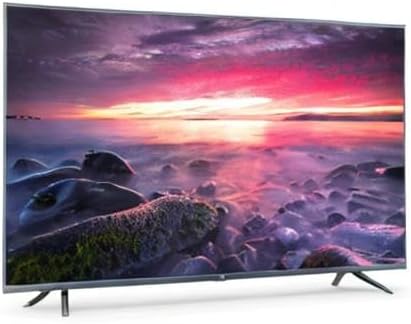
Image 8.1: Energy efficiency label for the Xiaomi Mi 55-inch TV.
9. వారంటీ మరియు మద్దతు
వారంటీ సమాచారం కోసం, దయచేసి మీ ఉత్పత్తితో చేర్చబడిన వారంటీ కార్డును చూడండి లేదా అధికారిక Xiaomi వెబ్సైట్ను సందర్శించండి. webమీ ప్రాంతం కోసం సైట్. కొనుగోలు రుజువుగా మీ కొనుగోలు రసీదును ఉంచండి.
For technical support, troubleshooting assistance beyond this manual, or service inquiries, please contact Xiaomi customer service through their official channels.