
1. పరిచయం
This manual provides instructions for the operation and maintenance of your Crosley CR612B-AB Corsair Tabletop AM/FM Bluetooth Radio with CD Player and Dual Alarm Clock. Please read this manual thoroughly before using the product to ensure proper function and to prevent damage.

Figure 1: Crosley CR612B-AB Corsair Tabletop AM/FM Bluetooth Radio with CD Player and Dual Alarm Clock.
2. పెట్టెలో ఏముంది
క్రింద జాబితా చేయబడిన అన్ని వస్తువులు మీ ప్యాకేజీలో చేర్చబడ్డాయని ధృవీకరించండి:
- Crosley CR612B Corsair Radio Unit
- ఎసి పవర్ అడాప్టర్
- ఇన్స్ట్రక్షన్ మాన్యువల్
3. ఉత్పత్తి ముగిసిందిview
Familiarize yourself with the various components and controls of your Corsair radio.

Figure 2: Front Panel Controls and Features. This image highlights the headphone jack, alarm clock buttons (Alarm 1, Alarm 2), and the analog tuning dial.
- వాల్యూమ్ నాబ్: ఆడియో అవుట్పుట్ స్థాయిని సర్దుబాటు చేస్తుంది.
- ట్యూనింగ్ నాబ్: Selects AM/FM radio frequencies.
- మోడ్ బటన్: Switches between AM/FM radio, CD player, and Bluetooth modes.
- స్లీప్ బటన్: స్లీప్ టైమర్ ఫంక్షన్ను యాక్టివేట్ చేస్తుంది.
- Alarm 1 / Alarm 2 Buttons: Set and activate dual alarms.
- సమయ బటన్: Used for setting the clock.
- AM/FM బటన్: Toggles between AM and FM radio bands.
- CD ప్లేయర్ నియంత్రణలు: Play/Pause, Stop, Display, CD Mode, Skip/Search (Forward/Backward), Program.
- హెడ్ఫోన్ జాక్: ప్రైవేట్ వినడం కోసం.
- పవర్ బటన్: యూనిట్ని ఆన్ లేదా ఆఫ్ చేస్తుంది.
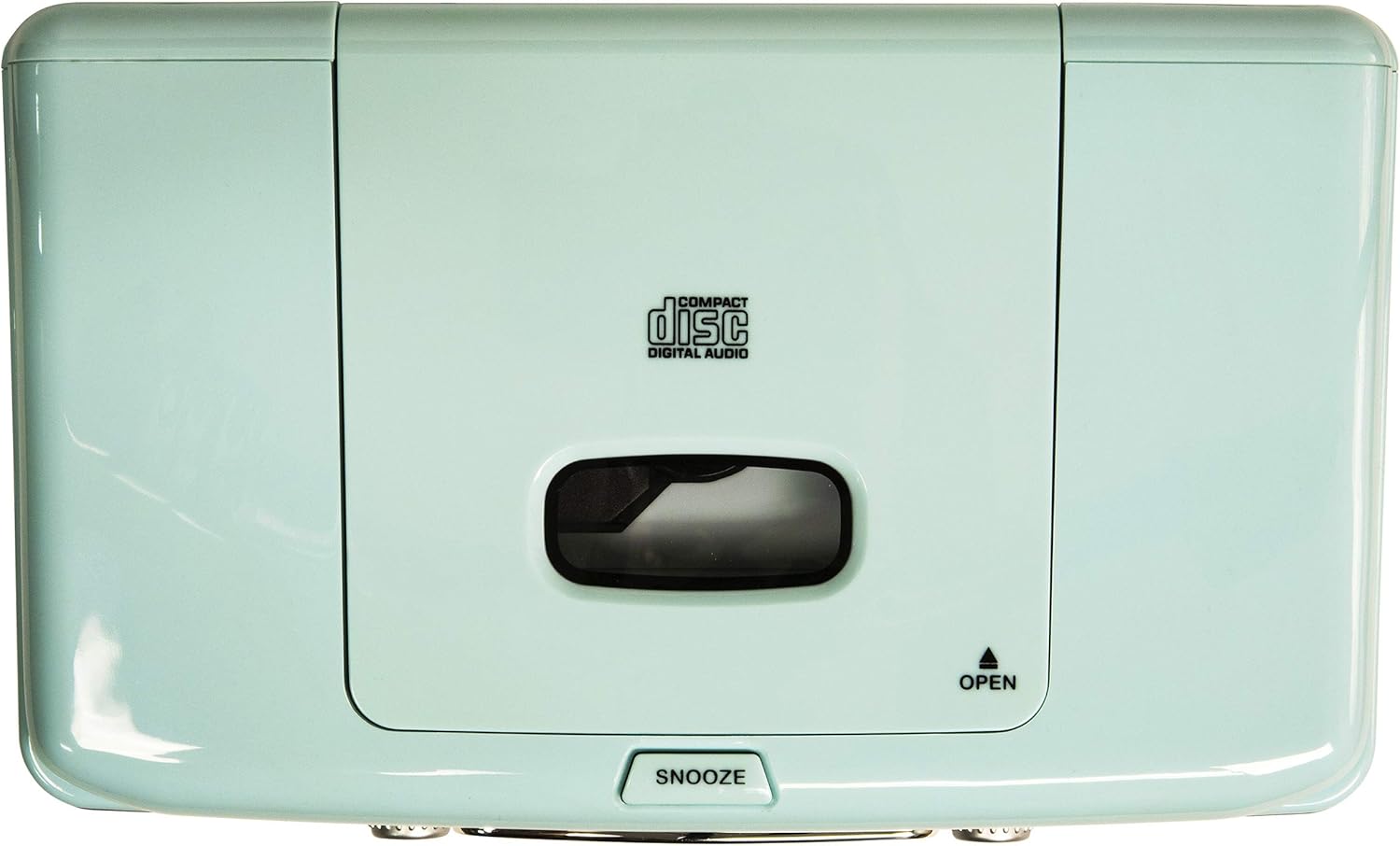
Figure 3: Top Panel. This image shows the top-loading CD player compartment and the Snooze button.

Figure 4: Rear Panel. This image displays the AC power input and the battery compartment for backup power.
4. సెటప్
4.1 పవర్ కనెక్షన్
- యూనిట్ స్థిరమైన, చదునైన ఉపరితలంపై ఉంచబడిందని నిర్ధారించుకోండి.
- Connect the AC power adapter to the DC IN jack on the rear of the unit.
- AC పవర్ అడాప్టర్ను ప్రామాణిక వాల్ అవుట్లెట్లోకి ప్లగ్ చేయండి.
4.2 బ్యాటరీ బ్యాకప్ (ఐచ్ఛికం)
For alarm clock backup during power outages, install one 9V battery (not included) into the battery compartment on the rear of the unit. This will maintain time and alarm settings in case of a power interruption.
4.3 యాంటెన్నా సెటప్
The unit has a built-in AM antenna. For FM reception, extend the wire FM antenna located on the rear of the unit for optimal signal reception.
5. ఆపరేటింగ్ సూచనలు
5.1 పవర్ ఆన్/ఆఫ్
నొక్కండి శక్తి యూనిట్ను ఆన్ లేదా ఆఫ్ చేయడానికి ముందు ప్యానెల్పై ఉన్న బటన్.
5.2 AM/FM రేడియో ఆపరేషన్
- నొక్కండి మోడ్ button until 'RADIO' is displayed.
- నొక్కండి AM/FM AM లేదా FM బ్యాండ్ని ఎంచుకోవడానికి బటన్.
- తిప్పండి ట్యూనింగ్ మీకు కావలసిన రేడియో స్టేషన్ను ఎంచుకోవడానికి నాబ్.
- సర్దుబాటు చేయండి వాల్యూమ్ మీకు ఇష్టమైన శ్రవణ స్థాయికి నాబ్ చేయండి.
Video 1: Crosley CR612B-AB Corsair AM/FM Bluetooth Radio. This video demonstrates the radio's AM/FM tuning functionality.
5.3 CD ప్లేయర్ ఆపరేషన్
- నొక్కండి మోడ్ button until 'CD' is displayed.
- నొక్కండి తెరవండి CD కంపార్ట్మెంట్ తెరవడానికి యూనిట్ పైభాగంలో బటన్ను నొక్కండి.
- Place a CD with the label side facing up into the compartment.
- CD కంపార్ట్మెంట్ మూతను మూసివేయండి.
- నొక్కండి ప్లే/పాజ్ చేయండి ప్లేబ్యాక్ ప్రారంభించడానికి బటన్.
- ఉపయోగించండి స్కిప్ / సెర్చ్ ట్రాక్ల మధ్య నావిగేట్ చేయడానికి బటన్లు.
- నొక్కండి ఆపు ప్లేబ్యాక్ ముగించడానికి బటన్.
- ది కార్యక్రమం button allows you to create a custom playback order for tracks.

Figure 5: CD Player Open. This image shows the top-loading CD player ready for disc insertion.
5.4 బ్లూటూత్ ఆపరేషన్
- నొక్కండి మోడ్ button until 'BT' (Bluetooth) is displayed. The unit will enter pairing mode, indicated by a flashing 'BT'.
- మీ బాహ్య పరికరంలో బ్లూటూత్ని ప్రారంభించండి (ఉదా, స్మార్ట్ఫోన్, టాబ్లెట్).
- కోసం వెతకండి 'Crosley Corsair' in your device's Bluetooth settings and select it to pair.
- Once paired, the 'BT' indicator will stop flashing, and you can stream audio from your device to the radio.
- Adjust the volume on both your external device and the radio for optimal sound.

Figure 6: Bluetooth Streaming. This image illustrates connecting an external device via Bluetooth to the radio.
Video 2: CR612B Corsair Tabletop AM/FM Bluetooth Radio with CD Player. This video provides an overview of the radio's features, including Bluetooth connectivity.
5.5 అలారం గడియారం విధులు
- సెట్టింగు సమయం: నొక్కండి మరియు పట్టుకోండి TIME బటన్. ఉపయోగించండి స్కిప్ / సెర్చ్ గంటలు మరియు నిమిషాలను సర్దుబాటు చేయడానికి బటన్లను నొక్కి, ఆపై నొక్కండి TIME మళ్ళీ నిర్ధారించడానికి.
- అలారం 1/2 సెట్ చేస్తోంది: ఏదో ఒకటి నొక్కి పట్టుకోండి అలారం 1 or అలారం 2 బటన్. ఉపయోగించండి స్కిప్ / సెర్చ్ buttons to set the alarm time. Press the respective అలారం button again to select the alarm source (Buzzer, Radio, or CD) and confirm.
- యాక్టివేట్ చేయడం/డియాక్టివేట్ చేయడం అలారం: క్లుప్తంగా నొక్కండి అలారం 1 or అలారం 2 to toggle the alarm on or off. An alarm icon will appear on the display when active.
- ఆగే: అలారం మోగినప్పుడు, నొక్కండి స్నూజ్ button on top of the unit to temporarily silence it. The alarm will sound again after a few minutes.
- స్లీప్ టైమర్: నొక్కండి నిద్రించు స్లీప్ టైమర్ సెట్ చేయడానికి బటన్ను పదే పదే నొక్కండి (ఉదా. 15, 30, 60, 90 నిమిషాలు). సెట్ చేసిన సమయం తర్వాత యూనిట్ స్వయంచాలకంగా ఆపివేయబడుతుంది.
5.6 హెడ్ఫోన్ వాడకం
Plug 3.5mm headphones into the హెడ్ఫోన్ జాక్ on the front panel for private listening. The main speakers will be muted automatically.
6. నిర్వహణ
6.1 శుభ్రపరచడం
- యూనిట్ వెలుపలి భాగాన్ని మృదువైన, పొడి వస్త్రంతో తుడవండి.
- రాపిడి క్లీనర్లు, మైనపులు లేదా ద్రావకాలను ఉపయోగించవద్దు ఎందుకంటే అవి ముగింపును దెబ్బతీస్తాయి.
- CD కంపార్ట్మెంట్ను శుభ్రంగా మరియు దుమ్ము లేకుండా ఉంచండి.
6.2 నిల్వ
When not in use for extended periods, unplug the unit from the power outlet and store it in a cool, dry place.
7. ట్రబుల్షూటింగ్
| సమస్య | సాధ్యమైన కారణం | పరిష్కారం |
|---|---|---|
| పవర్ లేదు | పవర్ కార్డ్ సురక్షితంగా కనెక్ట్ కాలేదు. | Ensure the AC power adapter is firmly plugged into the unit and a working wall outlet. |
| పేలవమైన రేడియో రిసెప్షన్ | బలహీనమైన సిగ్నల్. | Adjust the position of the FM wire antenna. For AM, try repositioning the unit. |
| CD Not Playing | CD inserted incorrectly or dirty/scratched. | Ensure the CD is inserted label-side up. Clean the CD with a soft cloth. Try a different CD. |
| బ్లూటూత్ కనెక్ట్ కావడం లేదు | Device not in pairing mode or too far away. | Ensure the radio is in Bluetooth mode and 'BT' is flashing. Move your device closer to the radio. Check your device's Bluetooth settings. |
| అలారం వినిపించడం లేదు | అలారం సెట్ చేయబడలేదు లేదా నిష్క్రియం చేయబడలేదు. | Verify alarm time and source are set correctly and the alarm is activated (icon visible). |
8. స్పెసిఫికేషన్లు
| బ్రాండ్ | క్రాస్లీ |
| మోడల్ సంఖ్య | CR612B-AB |
| రంగు | ఆక్వా బ్లూ |
| ఉత్పత్తి కొలతలు (L x W x H) | 6.75"లీ x 11.5"వా x 7.25"హ |
| కనెక్టివిటీ టెక్నాలజీ | బ్లూటూత్ |
| రేడియో బ్యాండ్లకు మద్దతు ఉంది | AM/FM |
| ఆడియో అవుట్పుట్ మోడ్ | స్టీరియో |
| శక్తి మూలం | AC అడాప్టర్ |
| బ్యాటరీ అవసరం | 1 x 9V battery (for backup, not included) |
| ప్రదర్శన రకం | LED |
| మెటీరియల్ | Chrome (accents) |

Figure 7: Product Dimensions. This diagram provides the overall measurements of the unit.
9. వారంటీ & సపోర్ట్
9.1 వారంటీ సమాచారం
ఈ ఉత్పత్తి a ద్వారా కవర్ చేయబడింది One Year Limited Manufacturer's Warranty. Please refer to the warranty card included in your packaging for full details on coverage and terms.
9.2 కస్టమర్ మద్దతు
For technical assistance, troubleshooting, or warranty claims, please contact Crosley customer support. Contact information can typically be found on the manufacturer's official webసైట్ లేదా ఉత్పత్తి ప్యాకేజింగ్లో.
