
GENELEC 8320APM GLM Studio
GENELEC 8320APM GLM Studio Monitor Speaker System User Manual
Model: 8320APM GLM Studio
1. పరిచయం
Thank you for choosing the GENELEC 8320APM GLM Studio Monitor Speaker System. This system is designed to provide accurate and neutral sound reproduction for professional audio production environments. This bundle includes a pair of 8320APM stereo monitors, the GLM Kit for automatic acoustic calibration, and the 9310AM volume controller, offering a comprehensive solution for optimizing your listening space.

Figure 1: GENELEC 8320APM GLM Studio Monitor Speaker System with included accessories.
2. భద్రతా సమాచారం
Please read these safety instructions carefully before using the product. Failure to follow these instructions may result in electric shock, fire, or other hazards.
- వర్షం లేదా తేమకు యూనిట్ను బహిర్గతం చేయవద్దు.
- Do not open the speaker enclosure. Refer all servicing to qualified service personnel.
- స్పీకర్ల చుట్టూ సరైన వెంటిలేషన్ ఉండేలా చూసుకోండి.
- Use only the power cable supplied with the unit.
- Avoid placing the speakers near heat sources or in direct sunlight.
- పిల్లలకు దూరంగా ఉంచండి.
3. ప్యాకేజీ విషయాలు
క్రింద జాబితా చేయబడిన అన్ని వస్తువులు మీ ప్యాకేజీలో చేర్చబడ్డాయని ధృవీకరించండి:
- GENELEC 8320APM Studio Monitors (2 units)
- 9310B Wired Volume Controller
- Measurement Microphone (individually calibrated at the Genelec factory in Iisalmi, Finland)
- Power Cables (1.8m)
- RJ45 Cables (5m)
- ఆపరేటింగ్ మాన్యువల్
- GLM Network Adapter
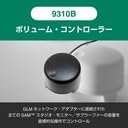
Figure 2: All components included in the GENELEC 8320APM GLM Studio bundle.
4. సెటప్
4.1 భౌతిక స్థానం మరియు కనెక్షన్లు
Proper placement of your monitors is crucial for optimal sound reproduction. Position the speakers symmetrically in your listening space, forming an equilateral triangle with your listening position.
- Connect the power cables to the speakers and a suitable power outlet.
- Connect your audio source (e.g., audio interface, mixer) to the XLR analog input on the back of each speaker.
- Connect the GLM Network Adapter to your computer via USB.
- Connect the GLM Network Adapter to the RJ45 control ports on both speakers using the supplied RJ45 cables. This allows the GLM software to control and calibrate the speakers.
- Connect the 9310B Wired Volume Controller to the GLM Network Adapter.

Figure 3: Rear panel of the 8320APM monitor, highlighting XLR analog input and RJ45 control ports.
Figure 4: Connection diagram for the GLM Network Adapter, speakers, and computer.
4.2 GLM Software Installation and Calibration
The Genelec Loudspeaker Manager (GLM) software is essential for optimizing the performance of your 8320APM monitors in your specific acoustic environment.
- Download the latest GLM software from the official Genelec webసైట్.
- Install the GLM software on your computer.
- Launch the GLM software. It will detect the connected speakers via the GLM Network Adapter.
- Place the measurement microphone at your primary listening position.
- Follow the on-screen instructions in the GLM software to perform the automatic calibration. This process measures your room's acoustics and applies corrections to ensure a flat and accurate frequency response.

Figure 5: The GLM software interface displaying room correction measurements and adjustments.

Figure 6: Proper placement and connection of the GLM measurement microphone for calibration.
5. ఆపరేషన్
5.1 ప్రాథమిక ప్లేబ్యాక్
Once the physical connections are made and GLM calibration is complete, your system is ready for use.
- Ensure both speakers are powered on (indicated by the green LED on the front).
- Control the overall volume using the 9310B Wired Volume Controller.
- మీ కనెక్ట్ చేయబడిన సోర్స్ నుండి ఆడియోను ప్లే చేయండి.
5.2 Using GLM Software
The GLM software provides advanced control over your monitor system:
- గది దిద్దుబాటు: After initial calibration, GLM continuously monitors and adjusts the sound to compensate for room acoustics.
- సమూహ నిర్వహణ: Create and manage speaker groups for different listening scenarios (e.g., stereo, surround).
- వినియోగదారు ప్రీసెట్లు: Save and recall different calibration settings or custom EQ curves.
- సిస్టమ్ సమాచారం: View detailed information about each speaker, including firmware version and operational status.
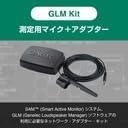
Figure 7: The 9310B Wired Volume Controller for convenient system volume adjustment.
6. నిర్వహణ
To ensure the longevity and optimal performance of your GENELEC 8320APM system, follow these maintenance guidelines:
- శుభ్రపరచడం: Wipe the speaker surfaces with a soft, dry cloth. Do not use abrasive cleaners or solvents.
- దుమ్ము: Regularly remove dust from the speaker grilles and vents to prevent overheating.
- నిల్వ: స్పీకర్లను ఎక్కువసేపు నిల్వ ఉంచినట్లయితే, వాటిని పవర్ నుండి డిస్కనెక్ట్ చేసి, చల్లని, పొడి ప్రదేశంలో నిల్వ చేయండి.
- తనిఖీ: Periodically check cables for any signs of wear or damage.
7. ట్రబుల్షూటింగ్
If you encounter issues with your GENELEC 8320APM system, refer to the following common problems and solutions:
| సమస్య | సాధ్యమైన కారణం | పరిష్కారం |
|---|---|---|
| స్పీకర్ల నుండి శబ్దం లేదు. | Power not connected, audio cables loose, volume too low. | Check power connections, ensure audio cables are securely plugged in, increase volume using the 9310B controller or source. |
| అస్పష్టమైన లేదా వక్రీకరించిన ధ్వని. | Improper GLM calibration, incorrect input level, damaged speaker/cable. | Rerun GLM calibration. Ensure input levels are not clipping. Inspect cables and speakers for damage. |
| Speakers not detected by GLM software. | RJ45 cables loose, GLM Network Adapter not connected, software issue. | Check RJ45 connections between speakers and adapter. Ensure USB connection to computer. Restart GLM software and computer. |
| Sound quality is not "flat" or "accurate" (as mentioned in reviewలు). | GLM calibration not performed or performed incorrectly. | Perform GLM calibration. As noted by users, the true "flat, clear, accurate" sound is achieved after proper GLM calibration. Ensure the microphone is correctly positioned and the process is completed. |
8. స్పెసిఫికేషన్లు
| ఫీచర్ | వివరాలు |
|---|---|
| మోడల్ పేరు | 8320APM GLM Studio |
| స్పీకర్ రకం | మానిటర్ |
| ప్రత్యేక లక్షణాలు | వాల్యూమ్ నియంత్రణ |
| సిఫార్సు ఉపయోగం | కంప్యూటర్ కోసం |
| అనుకూల పరికరాలు | PC |
| వూఫర్ వ్యాసం | 4 అంగుళాలు |
| యూనిట్ల సంఖ్య | 2 |
| కంట్రోలర్ రకం | బటన్ |
| రంగు | బూడిద రంగు |
| ఉత్పత్తి కొలతలు (D x W x H) | 14.2 x 15.1 x 24.2 సెం.మీ |
| ఉత్పత్తి బరువు | 3.2 కిలోలు |
| జలనిరోధిత | తప్పు |
| బ్యాటరీలు అవసరం | నం |
| తయారీదారు | GENELEC |
| తయారీదారు మోడల్ సంఖ్య | 8320APM GLM Studio |
| మెటీరియల్ | Recycled Aluminum |
| కనెక్టివిటీ టెక్నాలజీ | XLR |
| ఆడియో అవుట్పుట్ మోడ్ | స్టీరియో |
| మౌంటు రకం | ఫ్లోర్ స్టాండింగ్ |
9. వారంటీ & సపోర్ట్
వారంటీ రకం: 2-year warranty period. An extended 3-year warranty period is available upon product user registration (proof of purchase required).
For technical support, service, or warranty claims, please contact your local GENELEC distributor or visit the official GENELEC webసంప్రదింపు సమాచారం కోసం సైట్.
అధికారిక Webసైట్: www.genelec.com
Ask a question about this manual
Ask about setup, troubleshooting, compatibility, parts, safety, or missing instructions. Manuals+ will review the question and use this page’s manual context to help answer it.