
1. పరిచయం
This manual provides essential information for the proper use and care of your Amazon Renewed Samsung Galaxy Note 10+ Plus N975 smartphone. This device features a 6.8-inch Quad HD+ Dynamic AMOLED screen, a versatile camera system including 12MP Telephoto, 12MP Wide-angle, and 16MP Ultra Wide rear cameras, a 10MP selfie camera, 12GB RAM, 256GB internal storage, and runs on Android 9 (Pie). It also includes stereo speakers tuned by AKG with Dolby Atmos technology and the S Pen for remote, intuitive gestures. As a renewed product, it has been professionally inspected and tested to work and look like new.

Figure 1.1: Samsung Galaxy Note 10+ Plus N975 Smartphone Overview
2. పెట్టెలో ఏముంది
Please verify that all the following items are included with your renewed device:
- Samsung Galaxy Note 10+ Plus N975 Smartphone
- USB ఛార్జర్ బ్లాక్
- USB ఛార్జింగ్ కేబుల్
గమనిక: As an Amazon Renewed product, accessories may be generic but are fully compatible and functional.
3. సెటప్ గైడ్
3.1 ప్రారంభ ఛార్జింగ్
Before first use, fully charge your device. Connect the USB charging cable to the USB charger block, then plug it into a power outlet. Insert the USB-C end of the cable into the charging port at the bottom of your phone.
3.2 SIM కార్డ్ ఇన్స్టాలేషన్
- ఫోన్ పై అంచున సిమ్ కార్డ్ ట్రేని గుర్తించండి.
- Insert the SIM ejection tool (not always included with renewed products; a paperclip can be used) into the small hole next to the tray to eject it.
- Place your Nano-SIM card onto the tray with the gold contacts facing down.
- ట్రేని ఫోన్లోకి క్లిక్ అయ్యే వరకు జాగ్రత్తగా మళ్లీ చొప్పించండి.
3.3 పవర్ చేయడం ఆన్/ఆఫ్
- పవర్ ఆన్ చేయడానికి: Press and hold the Power/Side key (located on the right side) until the Samsung logo appears.
- పవర్ ఆఫ్ చేయడానికి: Press and hold the Power/Side key, then tap 'Power off' on the screen. Alternatively, swipe down from the top of the screen to open the Quick Settings panel, tap the Power icon, and select 'Power off'.
3.4 ప్రారంభ సెటప్ విజార్డ్
మొదటిసారి పవర్-ఆన్ చేసిన తర్వాత, స్క్రీన్పై ఉన్న సూచనలను అనుసరించండి:
- మీ భాషను ఎంచుకోండి.
- Wi-Fi నెట్వర్క్కి కనెక్ట్ చేయండి.
- మీ Google ఖాతాతో సైన్ ఇన్ చేయండి లేదా కొత్తదాన్ని సృష్టించండి.
- Set up security features (fingerprint, face recognition, PIN, pattern).
- Transfer data from an old device (optional).
4. ఆపరేటింగ్ సూచనలు
4.1 ప్రాథమిక నావిగేషన్
The Galaxy Note 10+ Plus uses a touchscreen interface. Swipe up, down, left, or right to navigate menus and content. Tap icons to open applications. Use pinch-to-zoom gestures for images and web పేజీలు.
4.2 కెమెరా వినియోగం
Your device features a versatile camera system:
- వెనుక కెమెరాలు: 12MP Telephoto, 12MP Wide-angle, 16MP Ultra Wide. Open the Camera app and tap the lens icons to switch between modes.
- ముందు కెమెరా: 10MP Selfie Camera. Tap the camera switch icon to activate.
Tap the shutter button to take photos or the record button to capture videos. Explore various modes like Pro, Panorama, and Live Focus for enhanced photography.
4.3 ఆడియో ఫీచర్లు
Experience rich audio with stereo speakers tuned by AKG and surround sound with Dolby Atmos technology. Connect compatible earphones (sound by AKG) for a personalized audio experience.
4.4 S పెన్ ఫంక్షనాలిటీ
The S Pen is integrated into your Galaxy Note 10+ Plus. Eject it from its slot at the bottom of the phone. Use it for:
- స్క్రీన్ ఆఫ్ మెమో: Jot down notes instantly when the screen is off.
- వాయు చర్యలు: Perform remote gestures to control camera, media playback, and more.
- స్మార్ట్ ఎంపిక: స్క్రీన్ యొక్క నిర్దిష్ట ప్రాంతాలను సంగ్రహించండి.
- Live Message: Create animated handwritten messages.
4.5 Android 9 (Pie) Basics
Familiarize yourself with the Android 9 operating system. Key features include adaptive battery, gesture navigation (optional), digital wellbeing tools, and enhanced privacy controls. Access settings by swiping down from the top of the screen and tapping the gear icon.
5. నిర్వహణ
5.1 మీ పరికరాన్ని శుభ్రపరచడం
మీ ఫోన్ స్క్రీన్ మరియు బాడీని శుభ్రం చేయడానికి మృదువైన, మెత్తటి బట్టను ఉపయోగించండి. రాపిడి పదార్థాలు లేదా కఠినమైన రసాయనాలను నివారించండి. మొండి మరకల కోసం, కొద్దిగా dampఎలక్ట్రానిక్స్ కోసం రూపొందించిన నీటితో వస్త్రం లేదా స్క్రీన్ క్లీనర్.
5.2 బ్యాటరీ సంరక్షణ
Your device has an intelligent 3500 mAh battery. To prolong battery life:
- తీవ్రమైన ఉష్ణోగ్రతలను నివారించండి.
- ఫోన్ 100% ఛార్జ్ అయిన తర్వాత ఎక్కువసేపు ఛార్జింగ్లో ఉంచవద్దు.
- అవసరమైనప్పుడు పవర్-సేవింగ్ మోడ్లను ఉపయోగించండి.
- Keep software updated for optimal battery management.
5.3 సాఫ్ట్వేర్ నవీకరణలు
Regularly check for and install software updates. These updates often include performance improvements, security patches, and new features. Go to సెట్టింగ్లు > సాఫ్ట్వేర్ అప్డేట్ > డౌన్లోడ్ చేసి ఇన్స్టాల్ చేయండి.
5.4 నిల్వ నిర్వహణ
256GB అంతర్గత నిల్వతో, మీకు ample space. To manage storage:
- అనవసరమైన వాటిని క్రమం తప్పకుండా తొలగించండి fileలు, ఫోటోలు మరియు వీడియోలు.
- ఉపయోగించని అప్లికేషన్లను అన్ఇన్స్టాల్ చేయండి.
- బ్యాకప్ల కోసం క్లౌడ్ నిల్వ సేవలను ఉపయోగించండి.
5.5 General Care for Renewed Devices
While renewed devices are tested for functionality, they may show minor cosmetic imperfections. Handle your device with care, use a protective case and screen protector to prevent further damage.
6. ట్రబుల్షూటింగ్
మీ పరికరంతో మీకు సమస్యలు ఎదురైతే, ఈ క్రింది దశలను ప్రయత్నించండి:
6.1 పరికరం ఆన్ కావడం లేదు
- బ్యాటరీ ఛార్జ్ అయ్యిందని నిర్ధారించుకోండి. ఛార్జర్ను కనెక్ట్ చేసి, పవర్ ఆన్ చేయడానికి ప్రయత్నించే ముందు కొన్ని నిమిషాలు వేచి ఉండండి.
- Perform a forced restart: Press and hold the Volume Down button and the Power/Side key simultaneously for about 7-10 seconds.
6.2 ఛార్జింగ్ సమస్యలు
- Check the charging cable and adapter for damage. Try a different cable and adapter if available.
- ఛార్జింగ్ పోర్ట్ శుభ్రంగా మరియు చెత్త లేకుండా ఉందని నిర్ధారించుకోండి.
6.3 స్క్రీన్ స్పందించడం లేదు
- Restart the device using the forced restart method (Volume Down + Power/Side key).
- If the issue persists, consider a factory reset (గమనిక: ఇది మొత్తం డేటాను తొలగిస్తుంది).
6.4 నెట్వర్క్ కనెక్టివిటీ సమస్యలు
- ఎయిర్ప్లేన్ మోడ్ను ఆన్ మరియు ఆఫ్ టోగుల్ చేయండి.
- Check SIM card installation.
- నెట్వర్క్ సెట్టింగ్లను రీసెట్ చేయండి: సెట్టింగ్లు > జనరల్ మేనేజ్మెంట్ > రీసెట్ > నెట్వర్క్ సెట్టింగ్లను రీసెట్ చేయండి.
6.5 ఫ్యాక్టరీ రీసెట్ (చివరి ప్రయత్నం)
If all other troubleshooting fails, you may need to perform a factory reset. This will erase all data on your device. Back up important data before proceeding. Go to సెట్టింగ్లు > జనరల్ మేనేజ్మెంట్ > రీసెట్ > ఫ్యాక్టరీ డేటా రీసెట్.
7. స్పెసిఫికేషన్లు
| మోడల్ పేరు | Galaxy Note 10 Plus |
| అంశం మోడల్ సంఖ్య | SM-N975U |
| ఆపరేటింగ్ సిస్టమ్ | ఆండ్రాయిడ్ 9.0 (పై) |
| స్క్రీన్ పరిమాణం | 6.8 Inches Quad HD+ Dynamic AMOLED |
| రిజల్యూషన్ | 1440 x 2960 |
| RAM మెమరీ ఇన్స్టాల్ చేయబడిన పరిమాణం | 12 GB |
| మెమరీ స్టోరేజ్ కెపాసిటీ | 256 GB |
| వెనుక కెమెరా | 12MP Telephoto, 12MP Wide-angle, 16MP Ultra Wide |
| ఫ్రంట్ కెమెరా | 10MP సెల్ఫీ కెమెరా |
| బ్యాటరీ కెపాసిటీ | 3500 మిల్లీamp గంటలు (లిథియం అయాన్) |
| ఉత్పత్తి కొలతలు | 6.39 x 3.04 x 0.31 అంగుళాలు |
| వస్తువు బరువు | 12 ఔన్సులు |
| వైర్లెస్ క్యారియర్ | AT&T (for this specific variant) |
8. Amazon Renewed Product Conditions
As an Amazon Renewed product, your device has undergone a thorough inspection and testing process. It is guaranteed to be fully functional. The cosmetic condition is categorized as follows:
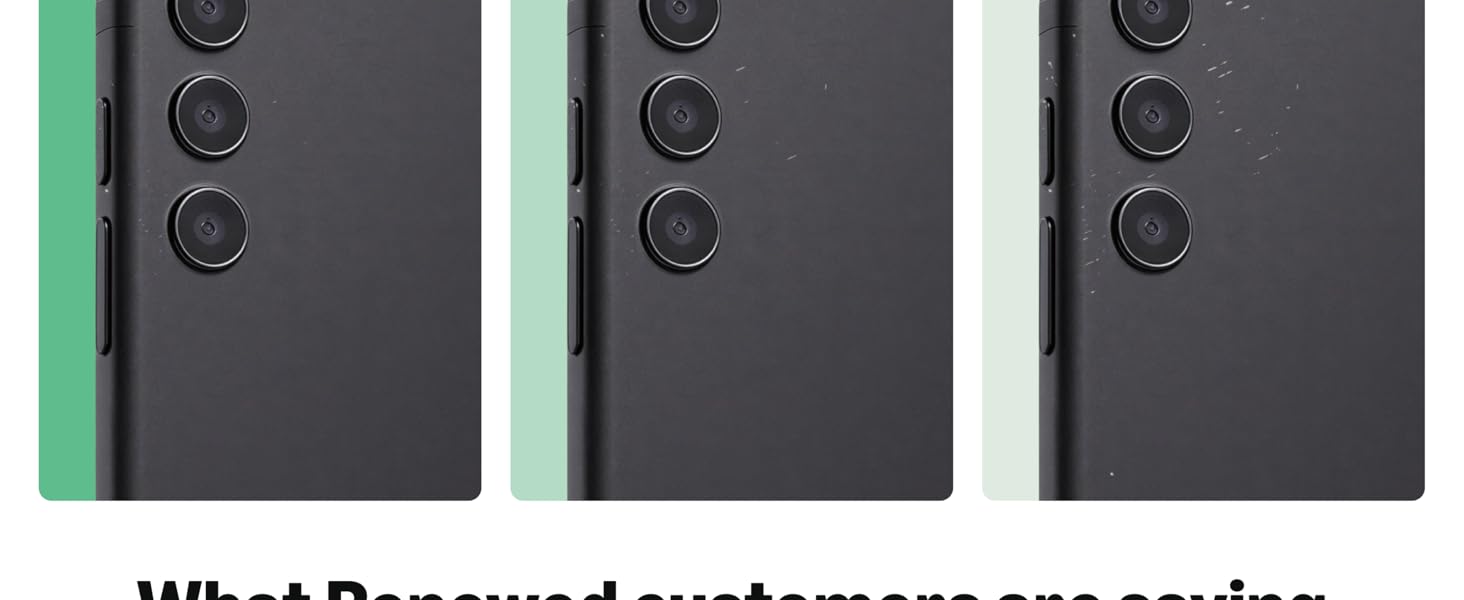
Figure 8.1: Amazon Renewed Condition Guidelines
9. వారంటీ మరియు మద్దతు
9.1 అమెజాన్ పునరుద్ధరించబడిన హామీ
Your Amazon Renewed purchase is backed by the Amazon Renewed Guarantee. This provides a 90-day refund or replacement policy if the product does not work as expected. Please refer to the Amazon Renewed program terms for full details.
9.2 కస్టమర్ మద్దతు
For any issues, questions, or support requests regarding your Amazon Renewed Samsung Galaxy Note 10+ Plus, please contact Amazon Customer Service or the seller directly through your Amazon order history. Provide your order number and a detailed description of the issue for efficient assistance.