
AM alphamount APPSLTK2
Tilting TV Wall Mount Bracket Instruction Manual
Model: APPSLTK2 - Brand: AM alphamount
ఉత్పత్తి ముగిసిందిview
This AM alphamount Tilting TV Wall Mount Bracket (Model: APPSLTK2) is designed to securely hold LCD, OLED, flat screen, and curved TVs ranging from 37 to 82 inches. It features a low-profile design, keeping your TV close to the wall while offering a convenient tilt adjustment for optimal viewing. The mount is compatible with 16-24 inch wood studs and supports VESA patterns up to 600x400mm. All necessary hardware for installation is included.

Figure 1: The AM alphamount Tilting TV Wall Mount Bracket, showing its main components and low-profile డిజైన్.
భద్రతా సమాచారం
Please read all instructions carefully before installation. If you have any doubts about the installation process, consult a qualified professional. Improper installation may result in serious injury or damage to your TV and property.
- బరువు సామర్థ్యం: Do not exceed the maximum weight capacity of 132 lbs (60 kg). This mount is constructed from durable alloy steel.
- టీవీ పరిమాణం అనుకూలత: Designed for TVs between 37 and 82 inches.
- VESA అనుకూలత: Ensure your TV's VESA mounting pattern is between 200x100mm and 600x400mm.
- గోడ రకం: This mount is primarily designed for installation on 16-24 inch wood studs, concrete walls, or brick walls. Do not install on drywall alone.
- సాధనాలు: ఇన్స్టాలేషన్ కోసం తగిన సాధనాలను ఉపయోగించండి. ఎల్లప్పుడూ భద్రతా గ్లాసెస్ ధరించండి.
- పిల్లలు మరియు పెంపుడు జంతువులు: Ensure the TV is securely mounted and out of reach of children and pets to prevent accidental tipping.
ప్యాకేజీ విషయాలు
Verify that all components are present before beginning installation. If any parts are missing or damaged, contact AM alphamount customer service.
- వాల్ ప్లేట్ అసెంబ్లీ
- TV Brackets (2x)
- Assorted TV Screws (M4, M6, M8)
- Spacers and Washers
- Concrete Anchors (for concrete/brick installation)
- Lag Bolts (for wood stud installation)
- బబుల్ స్థాయి
- వెల్క్రో కేబుల్ టైస్
- సూచనల మాన్యువల్ (ఈ పత్రం)
స్పెసిఫికేషన్లు
| ఫీచర్ | వివరాలు |
|---|---|
| మోడల్ సంఖ్య | APPSLTK2 |
| బ్రాండ్ | AM alphamount |
| టీవీ సైజు అనుకూలత | 37 - 82 అంగుళాలు |
| గరిష్ట బరువు సామర్థ్యం | 132 పౌండ్లు (60 కిలోలు) |
| VESA అనుకూలత | 200x100mm నుండి 600x400mm |
| టిల్ట్ యాంగిల్ | 0 - 10 Degrees |
| ప్రోfile వాల్ నుండి | 1.5 అంగుళాలు (3.8 సెం.మీ.) |
| మెటీరియల్ | మిశ్రమం ఉక్కు |
| Stud Spacing Compatibility | 16-24 inches (wood studs) |
సెటప్ మరియు ఇన్స్టాలేషన్
This mount is designed for quick and easy installation, often completed in under 15 minutes. For detailed, step-by-step instructions, please refer to the official ఇన్స్టాలేషన్ మాన్యువల్ (PDF) provided by AM alphamount.
కీలక సంస్థాపన పరిగణనలు:
- Wall Type Verification:
Identify your wall type (wood stud, concrete, or brick) to ensure you use the correct hardware and installation method. The mount is suitable for 16", 18", and 24" wood studs, as well as concrete and brick walls.

Figure 2: Illustration of compatible wall types for mounting, including wood studs, concrete, and brick.
- Wall Plate Placement:
The open-shaped wall plate design provides ample space for electrical outlets or other obstacles behind the TV. This design also allows for easy horizontal adjustment of the TV after mounting to achieve perfect centering.
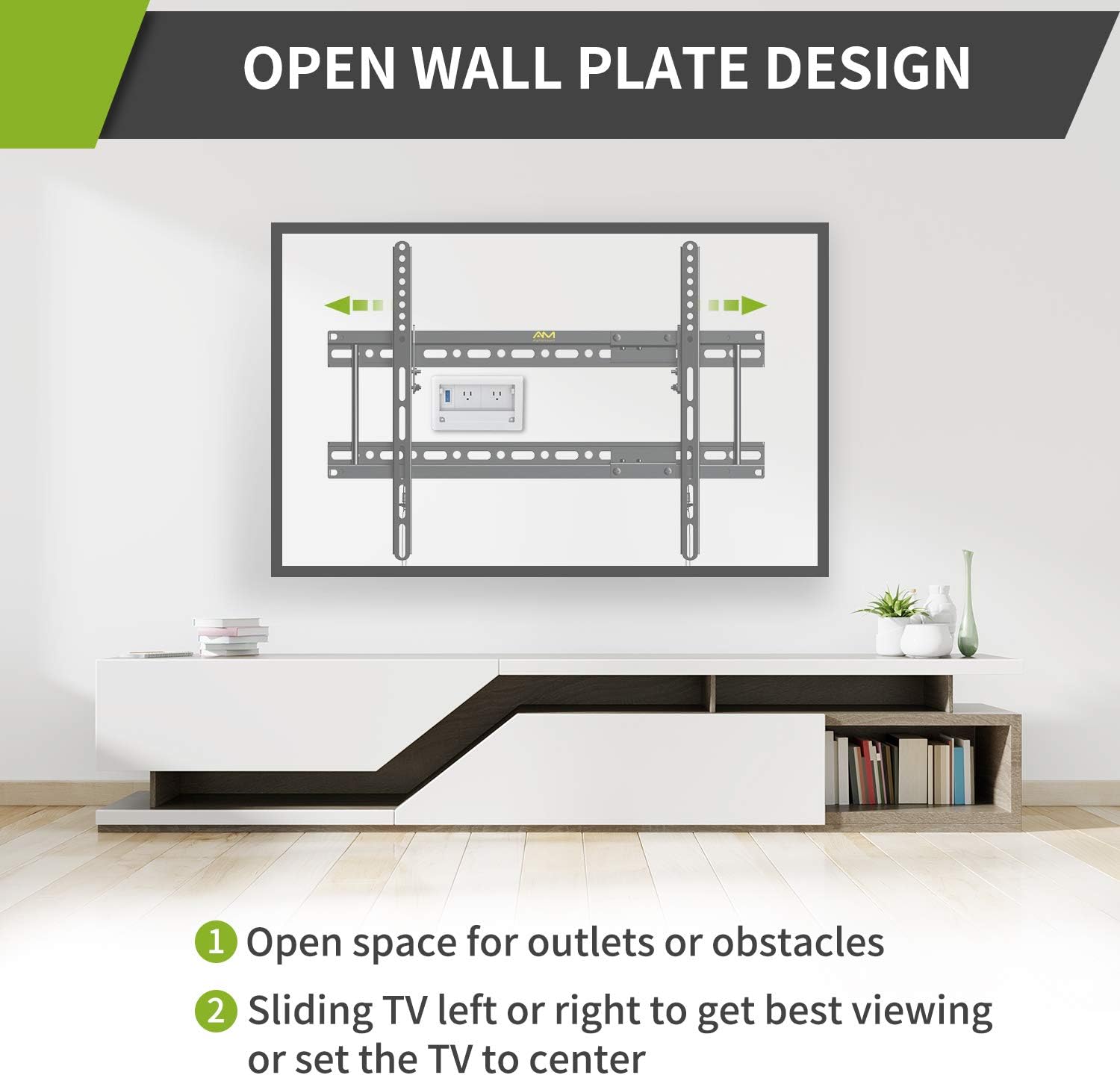
Figure 3: The open wall plate design facilitates access to outlets and allows for sliding the TV left or right for optimal positioning.
- Attaching TV Brackets:
Attach the two TV brackets to the back of your television using the appropriate screws and spacers from the included hardware kit. Ensure the brackets are securely fastened and aligned with your TV's VESA pattern.

మూర్తి 4: వివరంగా view of the detachable wall plate and VESA dimensions, including extension for wider stud spacing.
- టీవీని మౌంట్ చేయడం:
Carefully lift the TV with the attached brackets and hook them onto the wall plate. The quick-release pull-down straps allow for easy removal of the TV from the mount if needed.

Figure 5: The quick release and lock mechanism ensures secure attachment and easy detachment of the TV.
ఇన్స్టాలేషన్ వీడియో గైడ్:
Video 1: An official AM alphamount video demonstrating the features and installation process of the tilting TV wall mount. This video highlights the low-profile design, tilt adjustment, and quick release mechanism, showcasing its use in various settings like living rooms, bedrooms, and exhibition spaces.
ఆపరేటింగ్ సూచనలు
Once installed, the AM alphamount Tilting TV Wall Mount allows for easy adjustment to enhance your viewing అనుభవం.
- వంపు సర్దుబాటు: This mount offers a 0-10° tilt adjustment. To adjust the tilt, loosen the tilt adjusting bolts on the side of the TV brackets, set your desired angle, and then securely tighten the bolts. This feature helps in reducing glare and relieving neck pain by allowing you to choose the most comfortable viewing స్థానం.
- తక్కువ-ప్రోfile డిజైన్: The mount holds your TV only 1.5 inches from the wall, providing a sleek and space-saving appearance.
- Quick Release Pull-Downs: The integrated quick release pull-down straps allow for easy and safe removal of the TV from the wall mount when access to cables or the back of the TV is required.

Figure 6: Demonstrates the low-profile design and the 0-10 degree tilt adjustment for flexible viewing కోణాలు.
నిర్వహణ
క్రమం తప్పకుండా నిర్వహణ మీ టీవీ వాల్ మౌంట్ యొక్క దీర్ఘాయువు మరియు సురక్షితమైన ఆపరేషన్ను నిర్ధారిస్తుంది.
- శుభ్రపరచడం: Wipe the mount with a soft, dry cloth to remove dust. Avoid using abrasive cleaners or solvents.
- కాలానుగుణ తనిఖీలు: Periodically check all screws and bolts to ensure they remain tight and secure. Over time, vibrations or adjustments can cause fasteners to loosen.
- కేబుల్ నిర్వహణ: Use the provided Velcro cable ties to keep cables tidy and prevent them from being pinched or damaged.
ట్రబుల్షూటింగ్
If you encounter issues with your TV mount, refer to the following common problems and solutions:
| సమస్య | సాధ్యమైన కారణం | పరిష్కారం |
|---|---|---|
| టీవీ స్థాయిలో లేదు. | Wall plate or TV brackets are not level. | Adjust the wall plate using the integrated leveling feature or re-level the TV brackets before tightening. |
| Difficulty tilting the TV. | Tilt adjusting bolts are too tight. | Slightly loosen the tilt adjusting bolts, adjust the angle, then re-tighten firmly. |
| మౌంట్ అస్థిరంగా అనిపిస్తుంది. | Improper installation or loose fasteners. | Immediately remove the TV. Re-check all mounting points and fasteners on both the wall and the TV. Ensure you are mounting into appropriate wall structures (studs, concrete, brick) and not just drywall. |
| తప్పిపోయిన భాగాలు. | ప్యాకేజింగ్ లోపం. | Contact AM alphamount customer service for replacement parts. |
వారంటీ మరియు మద్దతు
AM alphamount stands behind the quality of its products. This TV wall mount comes with a 10-year manufacturer's service warranty, ensuring long-term reliability and support.
మరిన్ని సహాయం, సాంకేతిక మద్దతు లేదా వారంటీ క్లెయిమ్ల కోసం, దయచేసి అధికారిని సందర్శించండి AM alphamount Store on Amazon లేదా మీ ఉత్పత్తి ప్యాకేజింగ్లో అందించిన సంప్రదింపు సమాచారాన్ని చూడండి.
Ask a question about this manual
Ask about setup, troubleshooting, compatibility, parts, safety, or missing instructions. Manuals+ will review the question and use this page’s manual context to help answer it.